
Product Overview
The BEBANG Magnifying Lamp with Light and Stand (Model BE-1) is a versatile tool designed for close-up work, hobbies, and reading. It features a 10x magnification lens, integrated LED lighting with adjustable brightness and color modes, and a stable weighted base, making it ideal for tasks requiring precision and enhanced visibility.
Key Features
- 10x Magnification: High-resolution optics provide clear, undistorted, and magnified views for intricate details.
- Adjustable LED Lighting: Equipped with 72 LEDs, offering 3 color modes (Cool, Warm & White, Warm) and 10 stepless dimmable brightness levels (10% to 100%).
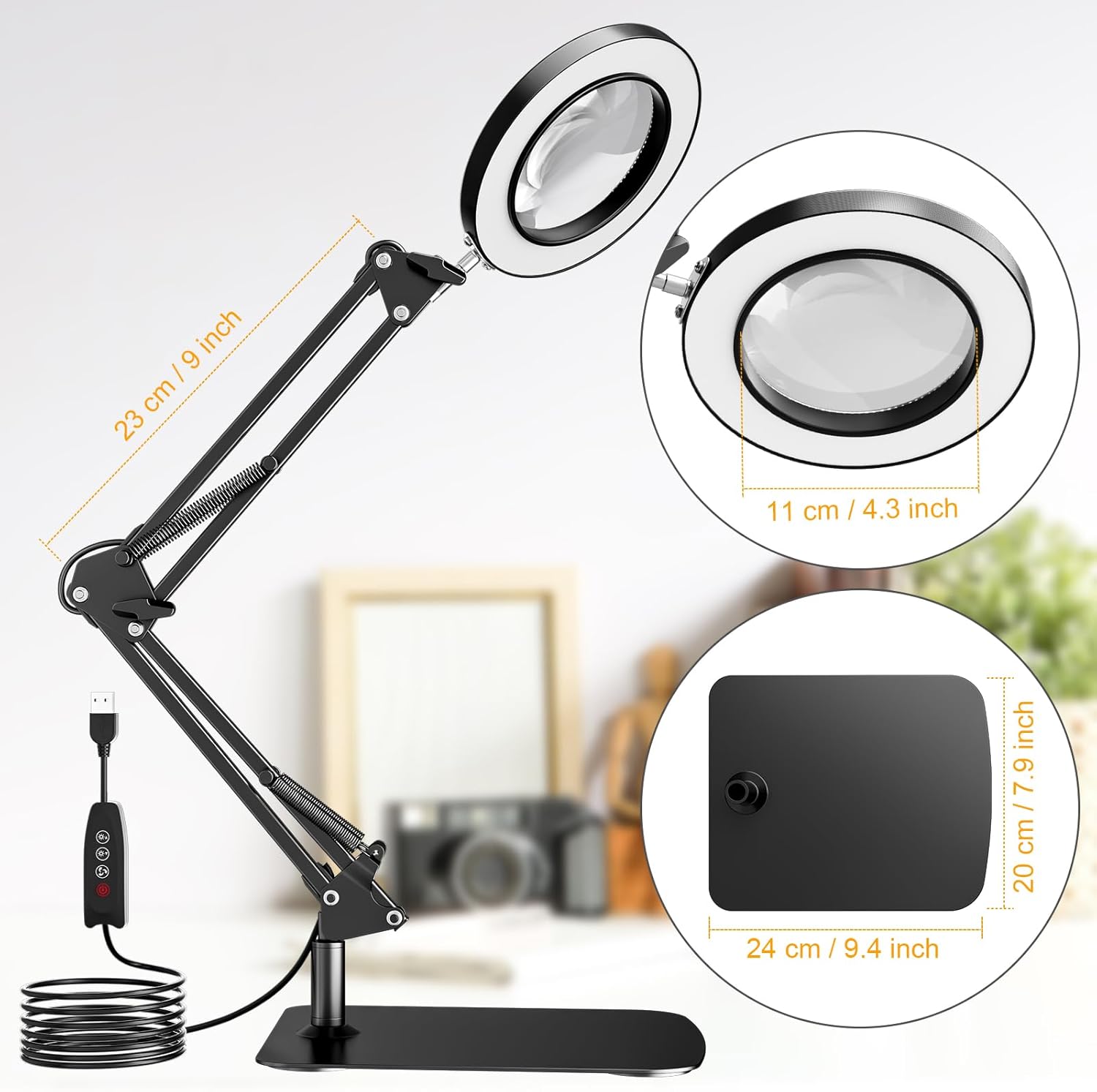
- Stable Weighted Base: Features an upgraded, thick square base (20 cm x 24 cm) to ensure stability and prevent tipping, even when the arm is fully extended.
- Multi-Angle Adjustable Arm: Both the lens and the swing arm support multi-angle pivot adjustment, allowing for optimal positioning for various tasks.
- Eye-Friendly Illumination: Designed to provide flicker-free, distortion-free, and chromatic aberration-free lighting for comfortable extended use.
Package Contents
Please check the package carefully to ensure all items are present and in good condition.
- BEBANG Magnifying Lamp (BE-1)
- Weighted Square Base
- USB Power Cable
- User Manual (this document)
Setup Instructions
Assembly
- Carefully unpack all components from the box.
- Place the weighted square base on a stable, flat surface.
- Insert the main arm of the magnifying lamp into the designated slot on the weighted base. Ensure it is securely seated.
- Adjust any screws or locking mechanisms if present to firmly attach the arm to the base.

Power Connection
Connect the USB power cable to the lamp's power input port. Plug the other end of the USB cable into a compatible USB power adapter (not included) or a USB port on a computer or power bank. Ensure the power source provides sufficient voltage (e.g., 5V/2A).
Operating Instructions
Control Panel Overview

Power On/Off
Press the ON/OFF button on the inline control panel to turn the lamp on or off.
Adjusting Brightness
Once the lamp is on, use the "+" and "-" buttons to increase or decrease the brightness level. The lamp offers 10 stepless dimmable levels, from 10% to 100% intensity.
Changing Color Modes
Press the Color Temperature Change button to cycle through the 3 available color modes: Cool Light, Warm & White Light, and Warm Light. Select the mode that best suits your task or environment.
Adjusting Magnifier Angle and Position
The magnifying lamp is designed with a highly flexible arm and lens head. You can adjust both the lens and the swing arm to achieve the optimal angle and height for your work. The arm allows for various movements including 360° rotation, 225°, 180°, and 135° angle adjustments. Ensure the base remains stable during adjustments.


Maintenance
Cleaning
To clean the lens, use a soft, lint-free cloth specifically designed for optics. Do not use abrasive cleaners or solvents, as they may damage the lens coating. For the lamp body and base, wipe with a dry or slightly damp cloth. Ensure the lamp is unplugged before cleaning.
Storage
When not in use, store the magnifying lamp in a clean, dry place away from direct sunlight and extreme temperatures. Avoid placing heavy objects on the lamp or its cable.
Troubleshooting
| Problem | Possible Cause | Solution |
|---|---|---|
| Lamp does not turn on. | No power supply; loose USB connection; faulty power adapter/USB port. | Ensure the USB cable is securely connected to both the lamp and the power source. Try a different USB power adapter or port. |
| Light flickers or is unstable. | Insufficient power supply; loose connection; internal wiring issue. | Use a stable power source with adequate output (e.g., 5V/2A). Check all connections. If the problem persists, contact customer support. |
| Lamp is unstable or tips over. | Base not on a flat surface; arm extended too far; base not properly attached. | Place the lamp on a firm, flat, and level surface. Adjust the arm to a more balanced position. Ensure the arm is securely attached to the base. |
| Magnification is blurry or distorted. | Lens is dirty; object is out of focal range. | Clean the lens with a soft, lint-free cloth. Adjust the distance between the lens and the object until the image is clear. |
Specifications
| Feature | Detail |
|---|---|
| Model Number | BE-1 |
| Magnification | 10x |
| Light Source | 72 LEDs |
| Color Modes | 3 (Cool, Warm & White, Warm) |
| Brightness Levels | 10 (Stepless Dimmable, 10%-100%) |
| Base Dimensions | 24 cm x 20 cm (9.4 in x 7.9 in) |
| Lens Diameter | 11 cm (4.3 in) |
| Max Arm Length | 23 cm (9 in) |
| Material | Glass (Lens), Plastic (Handle) |
| Product Weight | 2 Kilograms |
| Power Input | USB |
| Package Dimensions | 29.11 x 28.6 x 8.51 cm |
Warranty and Support
BEBANG products are manufactured to high-quality standards. For information regarding warranty coverage, please refer to the warranty card included with your purchase or visit the official BEBANG website.
If you encounter any issues or have questions about your BEBANG Magnifying Lamp, please contact our customer support team. Provide your model number (BE-1) and a detailed description of the issue for faster assistance.
Contact information (e.g., email, phone, website) can typically be found on the product packaging or the brand's official website.