
NBBUFF NB-rgb004-1
NBBUFF RGB LED Strip Lights User Manual
Model: NB-rgb004-1
1. Introduction
Thank you for choosing NBBUFF RGB LED Strip Lights. This product is designed to enhance your living space with vibrant, customizable lighting. Featuring smart app and remote control, music synchronization, and adjustable brightness, these LED strips are ideal for various indoor applications, including bedrooms, living rooms, and for special occasions.
This manual provides essential information for safe and effective use, including installation instructions, operation guidelines, maintenance tips, and troubleshooting. Please read it thoroughly before installation and retain it for future reference.

Image 1.1: Overview of the NBBUFF 200FT RGB LED Strip Lights package, showing two rolls of LED strips, a remote control, a power adapter, and a controller.
2. What's in the Box
Please verify that all components are present and in good condition upon opening the package:
- Led Strip Lights (2 rolls)
- Controller (1)
- Remote Control (1)
- Power Adapter (1)
- Instruction Manual (1)

Image 2.1: The main components included in the NBBUFF LED Strip Lights package.
3. Setup and Installation
Follow these steps for proper installation of your LED strip lights:
- Preparation: Ensure the installation surface is clean, dry, and smooth. Dust, dirt, or moisture can affect the adhesive's effectiveness.
- Test Before Installation: Before peeling off the adhesive backing, connect the LED strips to the controller and power adapter. Plug it in and test all functions (colors, modes, brightness) to ensure the lights are working correctly.
- Adhesion: Carefully peel off the protective film from the adhesive backing on the LED strip. Press the strip firmly onto the desired surface. For enhanced adhesion, use the included tape at intervals, especially in corners or areas with less contact.
- Connecting Components: Connect the LED strip to the controller, ensuring the arrows on both connectors align. Then, connect the controller to the power adapter.
- Power On: Plug the power adapter into a standard electrical outlet.
Important Note: The LED strips are designed for indoor use only and are not water resistant. Avoid installing them in damp or wet environments.

Image 3.1: An example of LED strip lights installed behind a television, demonstrating a common application.
4. Operating Instructions
Your NBBUFF LED Strip Lights can be controlled via a dedicated mobile application or the included remote control.
4.1 App Control
Download the compatible app (refer to the QR code on the controller or the instruction manual for the app name). Once installed, pair your LED lights with the app via Bluetooth or Wi-Fi (depending on the model's capabilities).
- Color Selection: Choose from 16 million colors using the color wheel or preset options.
- Mode Selection: Select various dynamic modes such as Flash, Jump, Fade, and more.
- Brightness Adjustment: Adjust brightness from 1% to 100% for optimal ambiance.
- Music Sync: Activate the music mode to make the lights dance to the rhythm of your music, utilizing the built-in high-sensitivity music sensor.
- Timing Function: Set schedules for the lights to automatically turn on or off at specific times.
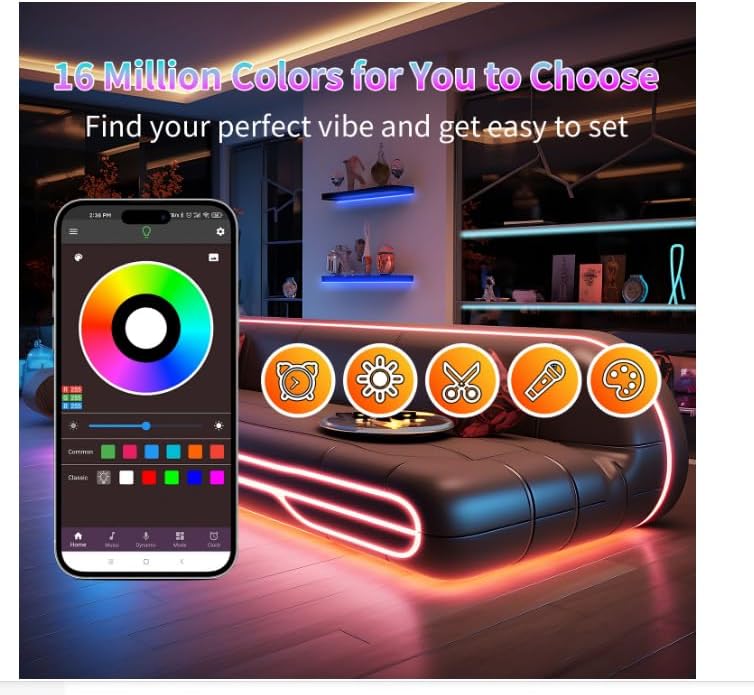
Image 4.1: The mobile application interface for controlling the LED strip lights, demonstrating color selection and various functions.
4.2 Remote Control
The included IR remote control provides quick access to essential functions:
- Power On/Off: Turn the lights on or off.
- Color Presets: Select from a range of static colors.
- Brightness Levels: Adjust brightness to preset levels (e.g., 20%, 40%, 60%, 80%, 100%).
- Dynamic Modes: Cycle through various lighting effects.
- Music Mode: Activate music synchronization.

Image 4.2: Example of LED lights in music mode, creating a dynamic atmosphere.
5. Maintenance
To ensure the longevity and optimal performance of your LED strip lights, follow these maintenance guidelines:
- Cleaning: Gently wipe the LED strips with a soft, dry cloth to remove dust. Do not use liquid cleaners or abrasive materials.
- Avoid Water: These lights are not water resistant. Keep them away from water, high humidity, and damp environments to prevent damage.
- Handle with Care: Avoid bending the strips sharply or applying excessive force, which can damage the internal circuitry.
- Power Off When Not in Use: For extended periods of non-use, unplug the power adapter from the wall outlet.
6. Troubleshooting
If you encounter issues with your LED strip lights, refer to the following common problems and solutions:
| Problem | Possible Cause | Solution |
|---|---|---|
| Lights do not turn on. | No power, loose connection, faulty adapter/controller. |
|
| Remote control not working. | Battery depleted, remote not pointed at receiver, obstruction. |
|
| App cannot connect to lights. | Bluetooth/Wi-Fi off, app not updated, incorrect pairing. |
|
| Sections of the strip show different colors or no light. | Damaged LED segment, poor connection, excessive bending. |
|
If the problem persists after trying these solutions, please contact NBBUFF customer support for further assistance.
7. Specifications
| Feature | Detail |
|---|---|
| Brand | NBBUFF |
| Model Number | NB-rgb004-1 |
| Light Color | RGB |
| Length | 200FT (2 Rolls of 100FT) |
| Control Method | App Control, Remote Control |
| Power Source | AC |
| Voltage | 24 Volts |
| Indoor/Outdoor Usage | Indoor |
| Water Resistance Level | Not Water Resistant |
| Material | Copper, Plastic |
| Item Weight | 12.6 ounces |
| Number of Light Sources | 720 |
8. Warranty and Support
For warranty information and customer support, please refer to the documentation included with your purchase or contact NBBUFF directly through their official channels. Ensure you have your product model number (NB-rgb004-1) and purchase details ready when seeking support.
Manufacturer: NBBUFF
Ask a question about this manual
Ask about setup, troubleshooting, compatibility, parts, safety, or missing instructions. Manuals+ will review the question and use this page’s manual context to help answer it.