
1. Introduction
This manual provides detailed instructions for the assembly, operation, and maintenance of your FORGING MOUNT Mobile TV Cart, Model FM6618. This versatile TV stand is designed for televisions ranging from 23 to 60 inches and supports up to 88 lbs. Its mobile design with locking wheels and adjustable height features make it suitable for various environments, including home offices, schools, and conference rooms.

Image: The FORGING MOUNT Mobile TV Cart with a television mounted, positioned in a modern living room, showcasing its adjustable height for perfect viewing.
2. Safety Information
- Ensure all parts are present and undamaged before assembly. Do not use if any parts are missing or defective.
- Do not exceed the maximum weight capacity of 88 lbs (40 kg) for the TV or 22 lbs (10 kg) for the media shelf.
- This product is designed for indoor use. While portable, avoid prolonged exposure to outdoor elements.
- Always ensure the wheels are locked when the TV cart is stationary to prevent accidental movement.
- When adjusting height or moving the TV cart with a large television, it is recommended to have two people for safety.
- Keep children and pets away from the TV cart during assembly and operation.
- Regularly check all screws and connections to ensure they remain tight and secure.
3. Package Contents
Verify that all components listed below are included in your package:
- Base Frame (H-shaped)
- Vertical Support Columns (2 sections)
- TV Mounting Brackets (2 pieces)
- Media Shelf
- Locking Wheels (4 pieces)
- Hardware Kit (screws, washers, nuts, Allen wrench, screwdriver)
- Instruction Manual
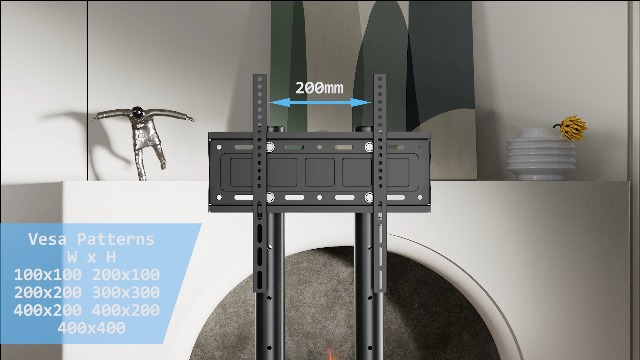
Image: All components of the FORGING MOUNT Mobile TV Cart laid out on a carpet, including the base, columns, mounting brackets, media shelf, wheels, and hardware kit.
4. Setup and Installation
Follow these steps carefully to assemble your mobile TV cart.
4.1. Assemble the Base
- Attach the two long square tubes to the central H-shaped base using the provided screws and Allen wrench. Ensure the long square tubes face forward for optimal stability.
- Screw the four locking wheels into the designated holes at the ends of the base frame. Tighten them securely.
Video: A person demonstrates the unboxing and assembly process of the mobile TV cart, including attaching the base, vertical columns, and TV mounting plate.

Image: Close-up of the stable H-shaped base design with four locking wheels, ideal for corner placement and ensuring stability.
4.2. Install the Vertical Columns
- Insert the lower sections of the vertical support columns into the central base. Secure them with the pre-installed screws.
- Attach the upper sections of the vertical support columns to the lower sections. Ensure they are aligned and secured.
4.3. Attach TV Mounting Brackets to TV
- Carefully place your TV face down on a soft, clean surface.
- Align the TV mounting brackets with the VESA mounting holes on the back of your TV.
- Use the appropriate screws from the hardware kit to secure the brackets to your TV. Ensure they are tightened firmly.

Image: The back of a television showing the VESA mounting holes and how the TV mounting brackets attach to them.
4.4. Mount TV to Stand
- With assistance, carefully lift the TV and hook the attached mounting brackets onto the vertical support columns of the TV cart.
- Ensure the TV is securely seated on the hooks.
- Insert the safety lock bolts at the bottom of the TV mounting brackets to prevent the TV from accidentally lifting off the stand.

Image: A close-up view of the safety lock bolts mechanism on the TV mounting brackets, designed to prevent the TV from sliding or falling.
4.5. Install Media Shelf
- Attach the media shelf to the desired height on the vertical support columns using the provided clamps and screws.
- Ensure the shelf is level and securely fastened.
5. Operating Instructions
5.1. Adjusting Height
The TV cart offers 4 height adjustment levels for optimal viewing. To adjust the height:
- Loosen the locking knobs on the vertical support columns.
- Remove the safety pins from the adjustment holes.
- With assistance (especially for larger TVs), carefully raise or lower the TV to the desired height.
- Re-insert the safety pins into the corresponding holes to secure the height.
- Tighten the locking knobs firmly to prevent any movement.
Video: A person demonstrates the height adjustment mechanism of the TV stand, showing how to loosen knobs, remove pins, adjust height, and re-secure for a portable TV stand for home or office use.

Image: The mobile TV stand illustrating its four height adjustment levels, allowing users to position the TV screen at a comfortable viewing height.
5.2. Moving the TV Cart
The TV cart is equipped with 360° smooth-rolling and locking wheels for easy mobility.
- To move: Unlock all four wheels by pressing down on the locking levers.
- Carefully push the TV cart to its new location.
- To secure: Lock all four wheels by pressing down on the locking levers until they click into place.

Image: A close-up view of one of the TV cart's heavy-duty wheels, showing the lock/unlock mechanism and its 360° rotation capability.
5.3. Tilting and Rotating the TV
The TV mount allows for tilting to reduce glare and optimizing viewing angles, as well as rotation for portrait or landscape orientation.
- To tilt: Loosen the tilt adjustment knobs on the TV mounting brackets. Adjust the TV to the desired tilt angle. Tighten the tilt adjustment knobs firmly to secure the TV in place.
- To rotate: Loosen the rotation screws on the mounting plate. Carefully rotate the TV 90 degrees for portrait or landscape view. Re-tighten the screws to secure.
Video: This video demonstrates the assembly and features of a universal touch screen floor stand/cart, including how to adjust the tilt and rotate the screen between portrait and landscape orientations.
6. Maintenance
- Clean the stand with a soft, damp cloth. Avoid abrasive cleaners or solvents.
- Periodically check all screws, bolts, and connections to ensure they are tight. Re-tighten if necessary.
- Inspect the wheels for any debris or damage that might hinder smooth movement. Clean or replace as needed.
7. Troubleshooting
| Problem | Possible Cause | Solution |
|---|---|---|
| TV cart is unstable. | Screws are loose; uneven surface; weight imbalance. | Tighten all assembly screws. Ensure the cart is on a flat surface. Distribute TV weight evenly. |
| Wheels do not roll smoothly. | Wheels are locked; debris in wheels. | Unlock all wheels. Clean any debris from the wheel casters. |
| Difficulty adjusting TV height. | Locking knobs or safety pins are not fully disengaged. | Ensure locking knobs are loosened and safety pins are fully removed before attempting to adjust height. Use two people for heavy TVs. |
8. Specifications
- Model: FM6618
- Brand: FORGING MOUNT
- Compatible TV Sizes: 23-60 inches
- VESA Compatibility: 100x100mm to 400x400mm
- Maximum TV Weight Capacity: 88 lbs (40 kg)
- Media Shelf Weight Capacity: 22 lbs (10 kg)
- Height Adjustment: 4 levels
- Movement Type: Rotate, Tilt, Rolling
- Material: Alloy Steel
- Color: Black

Image: A detailed diagram illustrating the overall dimensions and measurements of the FORGING MOUNT Mobile TV Cart.

Image: A visual guide detailing the VESA range (Max 400x400mm, Min 100x100mm), compatible TV sizes (23-60 inches), and maximum load capacity (88 lbs) for the TV cart.
9. Warranty and Support
For warranty information or technical support, please refer to the contact details provided by FORGING MOUNT at the point of purchase or visit their official website. Keep your purchase receipt for warranty claims.

