
NBBUFF NB-rgb001-5
NBBUFF 200FT RGB LED Strip Lights User Manual
Model: NB-rgb001-5
Introduction
Thank you for choosing the NBBUFF 200FT RGB LED Strip Lights. This manual provides essential information for the safe and efficient use of your new LED strip lights. These versatile lights offer vibrant color-changing options, music synchronization, and convenient control via a remote or smartphone app, perfect for enhancing the ambiance of bedrooms, kitchens, parties, and home decor.
What's in the Box
- LED Strip Lights (2 rolls)
- Controller (1)
- Remote Control (1)
- Power Adapter (1)
- Instruction Manual (1)
Setup
1. Surface Preparation
Ensure the installation surface is clean, dry, and smooth. Dust or uneven textures can affect adhesion.
2. Attaching the LED Strip Lights
- Unroll the LED strip lights carefully.
- Peel off the protective backing from the adhesive tape on the back of the strip.
- Press the strip firmly onto the desired surface. For enhanced adhesion, especially around corners or obstacles, use the included adhesive tape accessories.
- The strip lights are cuttable at designated marks to fit specific lengths. Ensure to cut only at these marks to avoid damaging the circuit.

Image: Diagram illustrating the application of double-sided tape for secure installation of LED strip lights, particularly when changing direction or encountering obstacles.
3. Connecting Power
- Connect the LED strip to the controller.
- Connect the power adapter to the controller.
- Plug the power adapter into a standard electrical outlet.
Important: Please test the LED light strips before final installation. Do not immerse in fire. Children under the age of 16 should use this product under adult supervision. Cut off power supply before installing or replacing the lamp.
Operating Instructions
Your NBBUFF LED Strip Lights can be controlled via the included IR remote control or a dedicated smartphone application.

Image: Illustration of the two primary control methods: a smartphone app for comprehensive control and a traditional IR remote for quick adjustments.
1. Remote Control Functions
The 60-key IR remote allows for direct control over various light settings:
- Power On/Off: Turn the lights on or off.
- Color Selection: Choose from a wide range of static colors.
- Brightness Adjustment: Dim or brighten the lights (20%, 40%, 60%, 80%, 100%).
- Dynamic Modes: Select modes like Flash, Jump, or Fade for animated lighting effects.
- DIY Colors: Create and save custom color settings.
- Timing: Set timers for automatic on/off functionality.
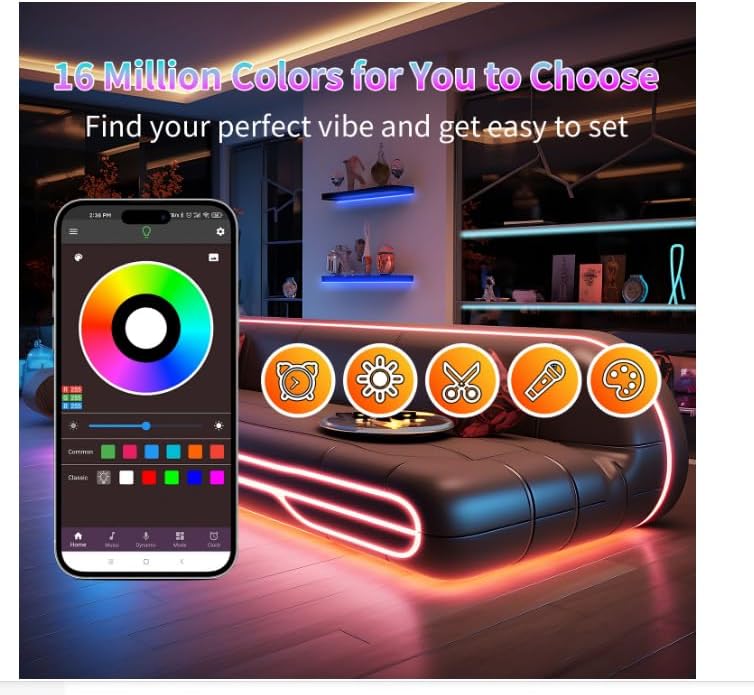
Image: A visual representation of the smartphone application's color selection interface, highlighting the vast array of 16 million colors and various control options.
2. Smartphone App Control
Download the dedicated app to unlock advanced features and greater control:
- Bluetooth Connectivity: Connect your lights via Bluetooth for seamless control.
- 16 Million Colors: Access a full spectrum of colors to customize your ambiance.
- Music Sync Mode: The built-in sensitive microphone allows the lights to change colors and speed in rhythm with surrounding sound and music. This feature is also controllable via the app.
- Custom Brightness: Adjust brightness from 1% to 100% for precise lighting.
- Timing Function: Set schedules for automatic power on/off, enhancing daily routines.

Image: A scene depicting the music sync mode, where LED lights dynamically respond to sound, creating an engaging atmosphere for activities like singing or playing instruments.
Maintenance
- Keep the LED strip lights clean and free from dust to maintain optimal brightness and lifespan.
- Avoid exposing the lights to excessive moisture or direct water, as they are not water resistant.
- Do not bend the strip lights sharply or apply excessive force, which could damage the internal wiring.
- Regularly check connections to ensure they are secure.
Troubleshooting
- Lights not turning on:
- Check if the power adapter is securely plugged into both the controller and the wall outlet.
- Ensure the LED strip is correctly connected to the controller.
- Verify the power outlet is functional.
- Remote control not working:
- Ensure there are no obstructions between the remote and the controller's IR receiver.
- Check and replace the remote control battery if necessary.
- Lights not sticking to the surface:
- Clean the surface thoroughly before application.
- Use additional adhesive tape accessories for extra support, especially on textured or frequently touched areas.
- App connection issues:
- Ensure Bluetooth is enabled on your smartphone.
- Restart the app and try reconnecting.
- Ensure the lights are powered on.
If you encounter any issues not covered here, please contact NBBUFF customer service for assistance.
Specifications
| Feature | Detail |
|---|---|
| Brand | NBBUFF |
| Model Number | NB-rgb001-5 |
| Color | Multicolor (RGB) |
| Item Length | 200 Feet (2 Rolls of 100ft) |
| Number of Light Sources | 720 |
| Indoor/Outdoor Usage | Indoor |
| Power Source | AC |
| Voltage | 24 Volts |
| Controller Type | App Control, Remote Control |
| Connectivity Technology | Bluetooth |
| Water Resistance Level | Not Water Resistant |
| Material Type | Copper, Paper |
Support
If you have any questions after receiving the product, please contact our customer email service. We will reply to you within 24 hours.
For further assistance, please refer to the contact information provided on the product packaging or the official NBBUFF website.
Ask a question about this manual
Ask about setup, troubleshooting, compatibility, parts, safety, or missing instructions. Manuals+ will review the question and use this page’s manual context to help answer it.