
1. Introduction
This manual provides detailed instructions for the installation, operation, and maintenance of your NBBUFF RGB LED Strip Lights. Please read this manual thoroughly before use to ensure proper functionality and safety.
What's in the Box:
- LED light strips (3 rolls, total 300ft)
- Remote control
- Power adapter
- Controller box
- Adhesive tape for enhanced adhesion

2. Safety Information
- This product is designed for indoor use only. Do not expose to water or high humidity.
- Ensure the power supply voltage matches the product specifications (24 Volts).
- Do not cut the LED strips while connected to power.
- Keep out of reach of children.
- Avoid bending the LED strips sharply, as this may damage the internal circuitry.
- Always unplug the power adapter before cleaning or performing any maintenance.
3. Setup and Installation
- Prepare the Surface: Ensure the installation surface is clean, dry, and smooth. Dust, oil, or uneven surfaces can reduce the adhesive's effectiveness.
- Test the Lights: Before peeling off the adhesive backing, connect the LED strips to the controller and power adapter. Plug into an outlet to ensure all lights function correctly.
- Peel and Stick: Carefully peel off the protective film from the adhesive backing on the LED strip. Press the strip firmly onto the desired surface.
- Secure with Clips (Optional): For enhanced adhesion, especially on textured surfaces or corners, use the included adhesive clips or additional tape.
- Connect Components: Connect the LED strips to the controller box, and then connect the controller box to the power adapter. Ensure all connections are secure.
- Power On: Plug the power adapter into a standard electrical outlet.

4. Operating Instructions
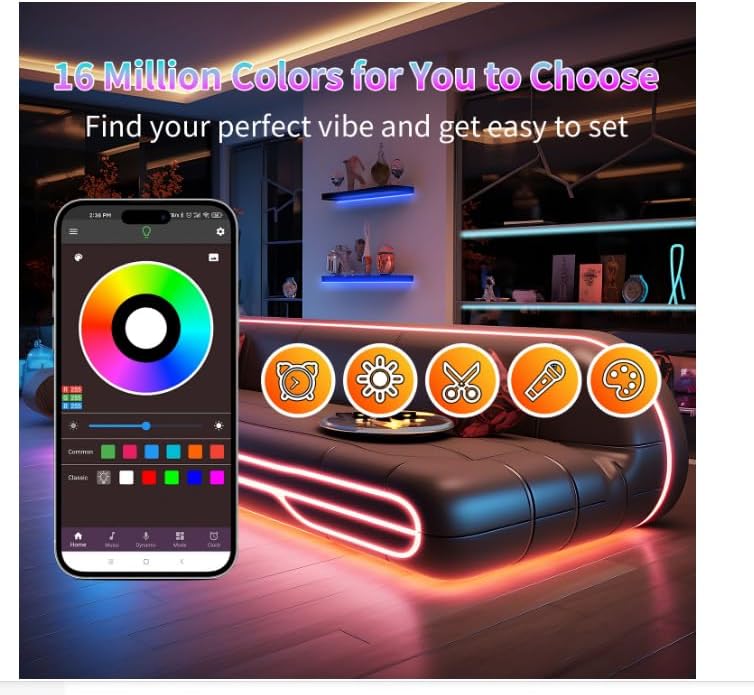
Your NBBUFF LED Strip Lights can be controlled via a smart app or the included remote control.
4.1. App Control
- Download the App: Scan the QR code on the controller box or in the packaging to download the designated smart app.
- Pair the Device: Open the app and follow the on-screen instructions to pair your LED strip lights. Ensure your phone's Bluetooth is enabled.
- Control Functions:
- Color Selection: Choose from millions of colors using the color wheel or preset options.
- Brightness Adjustment: Adjust brightness from 1% to 100%.
- Modes: Select various dynamic modes such as Flash, Jump, or Fade.
- Music Sync: Activate the music mode to synchronize the lights with ambient sound or music.
- Timing Setting: Set schedules for automatic turn on/off times.
4.2. Remote Control
The included IR remote control provides quick access to essential functions.
- Power Button: Turn lights on or off.
- Color Buttons: Select static colors.
- Brightness Buttons: Adjust brightness in preset increments (20%, 40%, 60%, 80%, 100%).
- Mode Buttons: Cycle through various dynamic lighting effects (Flash, Jump, Fade, etc.).
- Music Mode: Activate music synchronization.


5. Maintenance
- Cleaning: Gently wipe the LED strips with a dry, soft cloth. Do not use liquid cleaners or abrasive materials. Ensure the power is disconnected before cleaning.
- Storage: If storing the lights, ensure they are clean and dry. Roll them loosely to prevent damage to the strips or adhesive. Store in a cool, dry place.
- Adhesive Longevity: The adhesive backing is designed for a single application. If re-installation is necessary, additional adhesive tape may be required.
6. Troubleshooting
| Problem | Possible Cause | Solution |
|---|---|---|
| Lights do not turn on. | Power connection loose; power adapter faulty; remote battery dead. | Check all connections. Ensure power adapter is plugged in. Replace remote battery. |
| Lights are not sticking to the surface. | Surface is dirty, uneven, or not dry; adhesive has lost its stickiness. | Clean and dry the surface thoroughly. Use additional adhesive tape or mounting clips for reinforcement. |
| Remote control not working. | Remote battery dead; IR sensor blocked; remote too far from controller. | Replace remote battery. Ensure clear line of sight to the controller's IR sensor. Move closer to the controller. |
| App cannot connect to lights. | Bluetooth off; app not updated; lights not in pairing mode. | Ensure Bluetooth is enabled on your device. Update the app. Follow app instructions to re-pair the device. |
| A section of lights only shows one color or is off. | Damage to the LED strip or connection point. | Inspect the strip for visible damage or kinks. If damage is present, contact customer support. |
If you encounter issues not listed here or require further assistance, please contact NBBUFF customer support.
7. Specifications
| Feature | Detail |
|---|---|
| Brand | NBBUFF |
| Model Number | NB-rgb004-2 |
| Indoor/Outdoor Usage | Indoor |
| Special Features | Automatic On-Off, Color Changing, Dimmable, Remote Controlled, Timer |
| Power Source | Corded Electric |
| Light Color | RGB |
| Material | Plastic |
| Controller Type | App Control, Remote Control |
| Number of Light Sources | 300 |
| Voltage | 24 Volts |
| Water Resistance Level | Not Water Resistant |
| Item Weight | 1.39 pounds |
| Package Dimensions | 7.91 x 6.46 x 2.24 inches |
8. Warranty and Support
NBBUFF products are designed for quality and reliability. For specific warranty details, please refer to the warranty card included with your product or visit the official NBBUFF website. If you have any questions, concerns, or require technical support, please contact our customer service team through the contact information provided on the product packaging or our website.
We are committed to providing excellent customer service and ensuring your satisfaction with our products.