
1. Introduction
Thank you for choosing NBBUFF RGB LED Strip Lights. This manual provides essential information for the safe and efficient use of your new LED strip lights. Please read it thoroughly before installation and operation.
These 132ft (2 rolls of 65.6ft) RGB LED strip lights offer vibrant, color-changing illumination with music synchronization, remote control, and app control capabilities. They are designed for indoor use to enhance the ambiance of various spaces.
2. What's in the Box
- LED Strip Lights (2 rolls)
- Controller (1)
- Remote Control (1)
- Power Adapter (1)
- Instruction Manual (1)
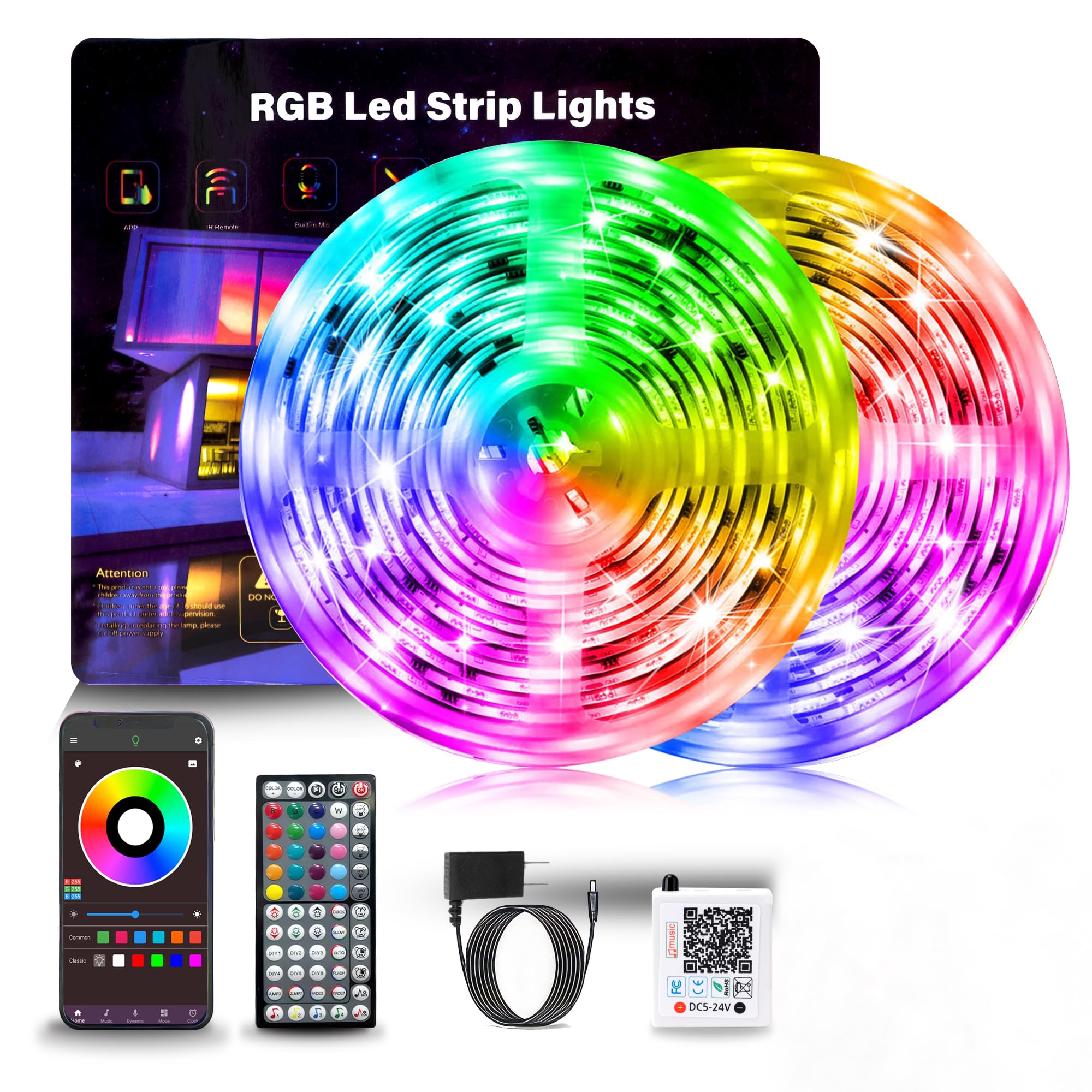
Image: The package contents, showing the LED strip rolls, controller, remote, and power adapter.
3. Setup Instructions
- Prepare the Surface: Ensure the installation surface is clean, dry, and smooth. Dust, oil, or moisture can affect the adhesive's effectiveness.
- Test the Lights: Before peeling off the adhesive, connect the LED strips to the controller and power adapter. Plug in the power adapter to ensure all lights function correctly. This allows you to identify any issues before permanent installation.
- Attach the LED Strips: Carefully peel off the protective backing from the adhesive tape on the back of the LED strips. Press the strips firmly onto the desired surface. For enhanced adhesion, use the included tape accessories if needed.
- Connect Components: Connect the LED strips to the controller, ensuring the arrows on the connectors align. Then, connect the power adapter to the controller and plug it into a standard electrical outlet.
- Download the App (Optional): For advanced control features, download the recommended app (usually indicated by a QR code in the packaging or manual) on your smartphone. Follow the in-app instructions to pair your device with the LED lights via Bluetooth.

Image: Example of LED strip light installation behind a television for ambient lighting.
4. Operating Instructions
4.1 Control Methods
Your NBBUFF LED Strip Lights can be controlled via the included IR remote control or a smartphone app.

Image: Illustration of app control via smartphone and IR remote control.
4.1.1 Remote Control
The 60-key remote allows for basic functions:
- Power On/Off: Turn the lights on or off.
- Color Selection: Choose from various preset static colors.
- Mode Selection: Cycle through dynamic modes like Flash, Jump, or Fade.
- Brightness Adjustment: Adjust brightness to 20%, 40%, 60%, 80%, or 100%.
- Music Mode: Activate music synchronization.
4.1.2 App Control
The smartphone app provides enhanced control and customization:
- Color Wheel: Select from 16 million colors for precise customization.
- Dynamic Modes: Access a wider range of preset and customizable dynamic lighting effects.
- Brightness Adjustment: Adjust brightness from 1% to 100%.
- Music Sync: Utilize the phone's microphone for music synchronization.
- Timing Setting: Schedule automatic on/off times for the lights.
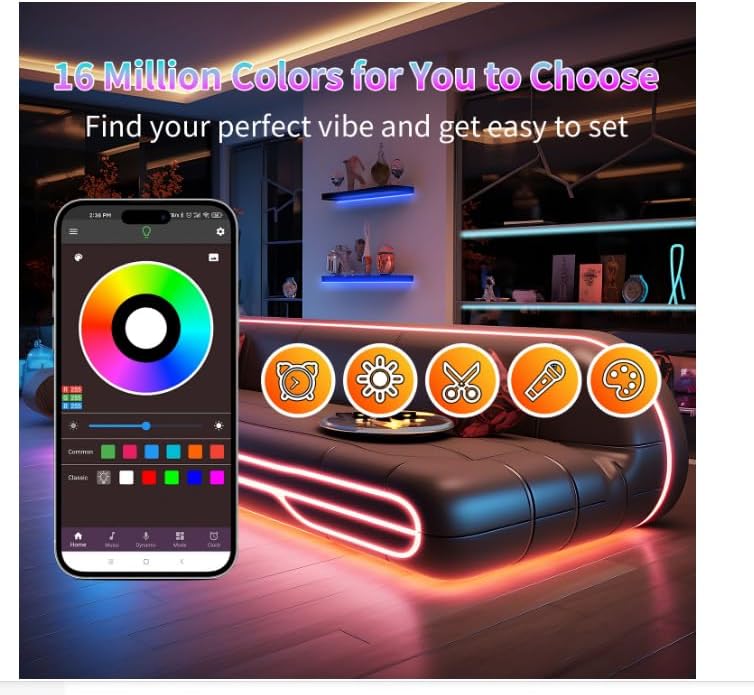
Image: App interface showing color selection and various control options.
4.2 Special Features
- Music Synchronization: The built-in sensitive microphone in the controller allows the LED lights to change colors and speed in real-time with ambient sound and music. When using the app, the lights can sync to music played on your smartphone.
- Timing Function: Set a schedule for the lights to automatically turn on or off at specific times, enhancing convenience and energy efficiency.

Image: Lights reacting to music, creating a dynamic atmosphere.
5. Maintenance
- Cleaning: Gently wipe the LED strips with a dry, soft cloth to remove dust. Do not use liquid cleaners or immerse the strips in water.
- Connections: Periodically check all connections (strip to controller, controller to power adapter) to ensure they are secure.
- Storage: If storing the lights for an extended period, ensure they are clean, dry, and coiled loosely to prevent damage to the strips or wiring.
6. Troubleshooting
| Problem | Possible Cause | Solution |
|---|---|---|
| Lights do not turn on. | No power, loose connection, remote battery dead. | Check power adapter connection to outlet and controller. Ensure strip connectors are aligned (arrow to arrow). Replace remote battery. |
| Remote control not working. | Remote battery dead, IR sensor blocked, remote too far. | Replace remote battery. Ensure no obstructions between remote and IR receiver on controller. Operate remote within range. |
| App cannot connect to lights. | Bluetooth off, app not paired, lights not powered. | Ensure Bluetooth is enabled on your phone. Restart the app. Power cycle the LED lights. Follow in-app pairing instructions. |
| Lights are dim or incorrect color. | Brightness setting too low, incorrect mode selected. | Increase brightness via remote or app. Select desired color or mode. |
| Adhesive not holding. | Surface not clean/dry, improper application. | Ensure surface is thoroughly cleaned and dry before application. Use additional adhesive clips or tape if necessary. |
7. Specifications
- Model Number: NB-rgb002-3
- Brand: NBBUFF
- Length: 132 Feet (2 rolls of 65.6ft)
- Light Source Type: LED
- Light Color: RGB (Color Changing)
- Number of Light Sources: 480
- Power Source: AC
- Voltage: 24 Volts
- Control Method: App, Remote Control
- Connectivity Technology: Bluetooth
- Special Features: Corded, Color Changing, Dimmable, Timer, Music Sync, Automatic On-Off
- Indoor/Outdoor Usage: Indoor
- Material Type: Copper, Plastic
8. Warranty and Support
For any questions, concerns, or technical assistance, please contact NBBUFF customer support. While specific warranty details are not provided in this manual, please refer to your purchase documentation or contact the seller for warranty information.
Customer Support: Please refer to the contact information provided with your purchase or visit the official NBBUFF website for support resources.