
1. Introduction
Thank you for choosing the NBBUFF RGB LED Strip Light. This 20-meter LED strip offers vibrant color-changing capabilities, music synchronization, and convenient control via both a 60-key remote and a smartphone application. Designed for indoor use, it is ideal for enhancing the ambiance of bedrooms, living rooms, kitchens, and for various festive occasions.

Figure 1: Room ambiance before and after installing NBBUFF RGB LED Strip Lights.
2. Safety Information
- Ensure the power adapter is compatible with your local voltage (24 Volts AC).
- Do not connect the LED strip to power while it is still rolled up, as this may cause overheating.
- This product is designed for indoor use only and is not waterproof. Avoid exposure to water or high humidity.
- Do not cut the LED strip unless specifically instructed and only at designated cutting marks. Improper cutting can damage the strip.
- Keep out of reach of children.
- Always unplug the power adapter before cleaning or performing any maintenance.
3. Package Contents
Please check the package for the following items:
- 1 x NBBUFF RGB LED Strip Light (20 meters)
- 1 x Remote Control (60-key)
- 1 x Power Adapter (AC)
- 1 x Control Box (integrated with the strip)
- Adhesive Tape Accessory (for enhanced adhesion)
4. Setup and Installation
Follow these steps for easy installation:
- Prepare the Surface: Ensure the surface where you plan to install the LED strip is clean, dry, and smooth. Dust, dirt, or moisture can affect the adhesive's performance.
- Unroll the Strip: Carefully unroll the entire LED strip before connecting it to power.
- Connect Components: Connect the LED strip to the control box, and then connect the control box to the power adapter. Ensure all connections are secure.
- Test the Lights: Before peeling off the adhesive backing, plug in the power adapter to a wall outlet and test the LED strip to ensure it functions correctly.
- Apply the Strip: Peel off the protective backing from the adhesive tape on the back of the LED strip. Carefully press the strip onto your desired surface, applying firm and even pressure.
- Secure Corners and Turns: For corners, sharp turns, or areas where the strip might experience stress, use the included adhesive tape accessory to reinforce the adhesion and prevent the strip from falling off over time.

Figure 2: Connection diagram for the LED strip, control box, and power adapter.
5. Operating Instructions
The NBBUFF RGB LED Strip Light can be controlled using either the included 60-key remote control or a dedicated smartphone application.
5.1. App Control
To use the smartphone application for control:
- Download the App: Scan the QR code on the control box or search for the specified app name (usually found in the product packaging or a small leaflet) in your smartphone's app store (iOS or Android).
- Enable Bluetooth: Ensure Bluetooth is enabled on your smartphone.
- Connect to Device: Open the app. It should automatically detect the LED strip light via Bluetooth. Follow the in-app instructions to pair your device.
- Control Functions: Once connected, you can access a wide range of functions including:
- Selecting from 16 million colors.
- Choosing various dynamic modes (Flash, Jump, Fade, etc.).
- Adjusting brightness and speed.
- Activating music synchronization.
- Setting timers.

Figure 3: Two control methods: App Control and IR Remote Control.
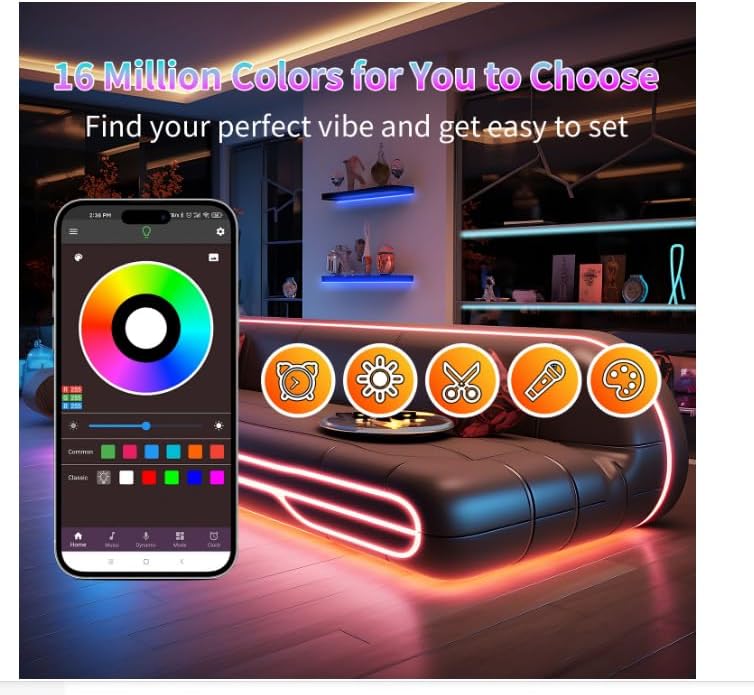
Figure 4: App interface for color selection and mode customization.
5.2. Remote Control
The included 60-key remote control provides direct access to common functions:
- Activate Remote: Before first use, pull out the plastic insulation tab from the battery compartment of the remote control.
- Point and Control: Point the remote control directly at the IR receiver on the control box.
- Functions: Use the buttons to:
- Turn ON/OFF.
- Select static colors.
- Adjust brightness.
- Choose preset dynamic modes.
- Control music sync mode (if applicable via remote).
Note: The remote control uses infrared (IR) technology, requiring a direct line of sight to the control box.
5.3. Music Synchronization Mode
The LED strip features a built-in sensitive microphone that allows the lights to change colors and speed in real-time, reacting to ambient sound and music. You can also synchronize the lights with music played through your smartphone via the app.
To activate music sync mode:
- Via App: Open the app, navigate to the music mode section, and select your desired settings.
- Via Remote: Press the designated music sync button on the remote control (refer to the remote's button layout).

Figure 5: LED strip lights reacting to music in a dynamic display.
5.4. Timer Function
The timer function allows you to schedule the LED strip to automatically turn on and off at specific times. This feature is accessible through the smartphone application.
- Open the app and navigate to the timer settings.
- Set your desired activation time and deactivation time.
- Save the settings. The lights will now operate according to your schedule.
6. Maintenance
- Cleaning: Ensure the LED strip is unplugged before cleaning. Gently wipe the strip with a dry, soft cloth. Do not use liquid cleaners or abrasive materials.
- Adhesion: If the strip begins to peel, reinforce it with additional adhesive tape or clips (not included). Ensure the surface is clean before re-applying.
- Storage: If storing the LED strip, gently roll it back into its original spool or a loose coil. Avoid sharp bends or creases. Store in a cool, dry place.
7. Troubleshooting
| Problem | Possible Cause | Solution |
|---|---|---|
| Lights do not turn on. |
|
|
| Remote control not working. |
|
|
| App cannot connect to the strip. |
|
|
| LED strip is falling off the wall. |
|
|
8. Specifications
| Brand | NBBUFF |
| Model Number | NB-rgb002-1 |
| Light Type | LED |
| Light Color | RGB (Color Changing) |
| Length | 20 Meters |
| Number of Bulbs | 240 |
| Power Source | AC (Adapter Included) |
| Voltage | 24 Volts |
| Control Method | Remote Control, App Control (Bluetooth) |
| Connectivity Technology | Bluetooth |
| Special Features | Music Synchronization, Timer Function |
| Water Resistance Level | Not Waterproof (Indoor Use Only) |
| Material | Plastic, Copper |
9. Warranty and Support
For any questions or assistance during the use of your NBBUFF RGB LED Strip Light, please contact our customer support. While specific warranty details are not provided in this manual, we are committed to ensuring your satisfaction with our product.
Please refer to your purchase documentation or the retailer's website for specific warranty terms and contact information.