
1. Introduction
Thank you for choosing the Banshee 3A Smart Charger. This charger is specifically designed for 12V (4S 12.6V) Lithium Iron Phosphate (LiFePO4) batteries. It provides efficient and safe charging to optimize the performance and lifespan of your LiFePO4 battery. Please read this manual thoroughly before use to ensure proper operation and safety.

Image 1.1: Top view of the Banshee 3A Smart Charger.
2. Safety Information
Always observe the following safety precautions to prevent injury or damage to the charger or battery:
- This charger is for indoor use only. Do not expose to rain, moisture, or extreme temperatures.
- HAZARDOUS AREA: Do not remove the charger cover. There are no user-serviceable parts inside. Refer servicing to qualified personnel only.
- Ensure the charger is compatible with your battery type. This charger is designed exclusively for 12V (14.6V) LiFePO4 batteries with a Battery Management System (BMS). Using it with other battery types may cause damage or hazards.
- Avoid short-circuiting the output terminals.
- Keep out of reach of children.
- Disconnect the charger from the power outlet before making or breaking connections to the battery.

Image 2.1: Important compatibility notice for LiFePO4 batteries with BMS.
3. Product Features
The Banshee 3A Smart Charger offers the following key features:
- Dedicated LiFePO4 Charging: Optimized for 12V (4S 12.6V) Lithium Iron Phosphate batteries, ensuring proper charging voltage and current.
- Efficient Charging: Input 100-240 volts, 50/60Hz. Output: 14.6 volts, 3.0 amps. Utilizes constant current (CC) and constant voltage (CV) charging modes.
- Fast Charging: Delivers 3 amps per hour, suitable for batteries smaller than 25Ah, commonly found in motorcycles, lawnmowers, ATVs, and UTVs.
- Safety Protections: Features automatic shutdown upon full charge and multilevel protections against overcharge, over-voltage, overheat, over-time charging, and short circuits.
- Wide Operating Temperature: Functions effectively in cold environments down to 5°F (-15°C) and hot environments up to 104°F (40°C), preventing over-charging.

12V Compatible

Fully Automatic

LED Indicators

Includes Clamps
4. Setup
Follow these steps to set up your Banshee 3A Smart Charger:
- Connect to Battery: Ensure the charger is unplugged from the AC power outlet. Connect the red (+) alligator clip to the positive (+) terminal of your LiFePO4 battery and the black (-) alligator clip to the negative (-) terminal. Ensure a secure connection.
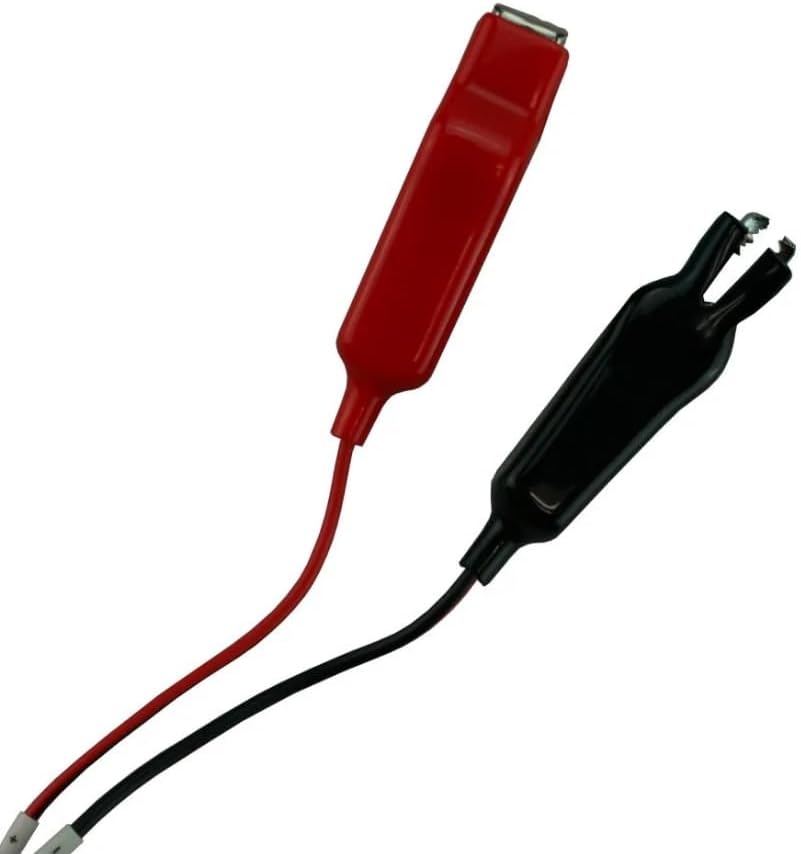
Image 4.1: Red and black alligator clips for connecting to battery terminals.
- Connect to AC Power: Plug the charger's AC power cord into a standard 100-240V AC wall outlet.

Image 4.2: AC input port on the charger for connecting to a power source.
5. Operating Instructions
Once connected, the charger will automatically begin the charging process. The LED indicator on the charger provides status information:
- Red LED: Indicates the battery is currently charging.
- Green LED: Indicates the battery is fully charged. The charger will automatically stop charging to prevent overcharge.
When the battery is fully charged (Green LED), disconnect the charger from the AC power outlet first, then disconnect the alligator clips from the battery terminals.
6. Maintenance
To ensure the longevity and proper function of your charger:
- Keep the charger clean and dry. Wipe with a soft, dry cloth. Do not use harsh chemicals or abrasives.
- Store the charger in a cool, dry place when not in use.
- Regularly inspect the cables and connectors for any signs of damage. Do not use if cables are frayed or connectors are damaged.
7. Troubleshooting
If you encounter issues with your charger, refer to the following common problems and solutions:
| Problem | Possible Cause | Solution |
|---|---|---|
| Charger not turning on / No LED indicator | No AC power; Faulty connection | Check AC outlet and power cord connection. Ensure battery connections are secure. |
| Red LED stays on indefinitely | Battery deeply discharged; Battery fault | Allow more time for charging. If it persists, the battery may be faulty or incompatible. |
| Charger gets excessively hot | Poor ventilation; Internal fault | Ensure adequate ventilation around the charger. Discontinue use if overheating persists and contact support. |
| Green LED immediately after connecting | Battery already fully charged; Poor connection | Verify battery charge level. Recheck battery connections. |
8. Specifications
Detailed specifications for the Banshee 3A Smart Charger:
- Model Number: LifePO4 14.6V (Mfr Part Number: 12V Lithium Charger)
- Input Voltage: 100-240V AC, 50/60Hz
- Output Voltage: 14.6V DC
- Output Current: 3.0 Amps
- Charging Mode: Constant Current (CC) / Constant Voltage (CV)
- Compatible Battery Type: 12V (4S 12.6V) Lithium Iron Phosphate (LiFePO4) with BMS
- Product Dimensions: 5"D x 3"W x 2"H
- Manufacturer: BatteryJack inc.
- UPC: 840417434711

Image 8.1: Product label displaying charger specifications and warnings.
9. Warranty and Support
This Banshee 3A Smart Charger comes with a 2 Year Warranty from the date of purchase. For warranty claims or technical support, please contact your retailer or visit the official Banshee website for customer service information.
For additional information and products, you can visit the Banshee Store on Amazon.
