
Nord Stage 4
Nord Stage 4 88 Digital Piano User Manual
Model: Stage 4 | Brand: Nord
1. Introduction
The Nord Stage 4 88 is a powerful and versatile digital piano designed for professional musicians. It integrates an upgraded array of Grand, Upright, and Electric Pianos from the exclusive Nord Piano Library, alongside advanced Organ and Synth sections. This manual provides essential information for setting up, operating, maintaining, and troubleshooting your instrument to ensure optimal performance and longevity.

Image: Top-down view of the Nord Stage 4 88 Digital Piano, highlighting its distinctive red finish and comprehensive control panel.
2. What's in the Box
Upon unboxing your Nord Stage 4 88 bundle, please verify that all the following components are present:
- Nord Stage 4 88 Digital Piano
- Adjustable Stand
- Keyboard Bench
- Sustain Pedal
- Headphones
- Instrument Cable
- Polishing Cloth
- Power Cable (not explicitly listed in 'whats_in_the_box' but implied for a digital piano)
- User Manual (this document)

Image: The complete Nord Stage 4 88 bundle, showing the digital piano along with the included stand, bench, sustain pedal, headphones, instrument cable, and polishing cloth.
3. Key Features
- Powerful Synth Section: Features three independent Layers based on the Nord Wave 2 Synth Engine, including Virtual Analog synthesis, Samples, FM, and Wavetable. An extensive new collection of samples from the Nord Sample Library offers a broad sonic palette. The advanced Arpeggiator includes new Polyphonic, Gate, and Pattern modes.
- Award-Winning Organ Simulations: Includes simulations of B3 Tonewheel, B3 Bass, classic Vox and Farfisa, as well as two Pipe Organ models. All Stage 4 models are equipped with new Physical drawbars with LED indicators for optimal hands-on experience.
- Powerful New Effects: The extensive range of Effects includes a new Pump effect for side chain simulation, a new Spin effect, and brand new variations of Reverb, Delay, Amps, and Modulation effects.
- Intuitive Panel Design: Features a brand new panel design with dedicated LED faders for each Layer, providing exceptional overview and flexibility. The new Preset Library is packed with inspiring ready-to-use Piano, Synth, and Organ sounds.
- Enhanced Piano Section: Introduces an upgraded array of Grands, Uprights, and Electric Pianos sourced from the exclusive Nord Piano Library, complemented by new functionalities like Dynamic Compression and Unison.
4. Setup
4.1 Unpacking and Placement
Carefully remove the Nord Stage 4 88 and all accessories from their packaging. Place the instrument on a stable, flat surface, such as the included adjustable stand. Ensure adequate ventilation around the unit and avoid placing it near heat sources or in direct sunlight.
4.2 Power Connection
Connect the provided power cable to the AC IN socket on the rear panel of the Nord Stage 4 88. Plug the other end into a grounded electrical outlet. Ensure the power switch is in the OFF position before connecting to power.
4.3 Connecting Peripherals
The Nord Stage 4 88 offers various connectivity options for external devices:
- Audio Outputs: Connect the main audio outputs (L/R) to your amplifier, mixer, or audio interface using standard 1/4-inch instrument cables.
- Headphones: Plug your headphones into the 3.5mm headphone jack for private practice.
- Sustain Pedal: Connect the included sustain pedal to the dedicated sustain pedal input.
- Control Pedal: An optional control pedal can be connected for expressive control over various parameters.
- MIDI: Use the MIDI IN/OUT ports to connect to other MIDI devices.
- USB: Connect the USB port to your computer for MIDI over USB functionality, allowing integration with DAWs and VST plugins.

Image: The rear panel of the Nord Stage 4 88, illustrating the various connection ports including power, audio outputs, MIDI, and USB.
5. Operating Instructions
5.1 Overview of the Control Panel
The Nord Stage 4 88 features a logically organized control panel divided into distinct sections: Organ, Piano, Synth, and Effects. Each section has dedicated controls for intuitive sound shaping and performance.
5.2 Piano Section
The Piano section offers a wide selection of acoustic and electric pianos. Use the dedicated controls to select piano types, adjust dynamics, and enable features like Advanced String Resonance and Dynamic Pedal Noise for enhanced realism.
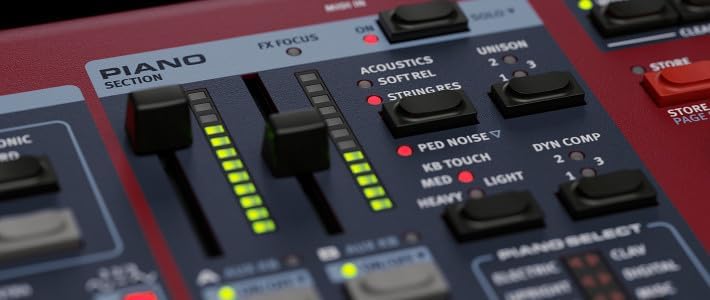
Image: Detailed view of the Piano section controls, showing faders for acoustics, soft release, string resonance, and dynamic compression.
5.3 Organ Section
The Organ section provides authentic simulations of classic B3 tonewheel, Vox, Farfisa, and Pipe Organs. Utilize the physical drawbars to shape the organ tone in real-time, and explore various vibrato/chorus and rotary speaker simulations.
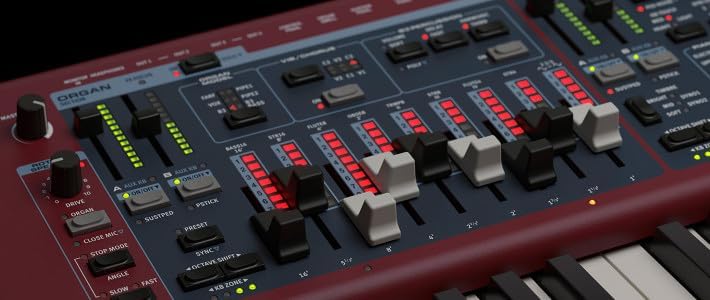
Image: Close-up of the Organ section, highlighting the physical drawbars with LED indicators and controls for vibrato/chorus and percussion.
5.4 Synth Section
The Synth section is based on the Nord Wave 2 Synth Engine, offering Virtual Analog, Samples, FM, and Wavetable synthesis. Explore a vast library of sounds and use the dedicated controls for oscillators, filters, envelopes, and the advanced arpeggiator.

Image: Detailed view of the Synth section, showing the display, oscillator controls, filter section, and envelope parameters.
5.5 Effects Section
The Effects section provides a comprehensive suite of high-quality effects that can be applied to any of the instrument sections. This includes modulation effects, delay, reverb, and amp simulations. Each effect offers various parameters for fine-tuning.

Image: Close-up of the Layer Effects section, displaying controls for modulation, delay, reverb, and amplifier simulations.
5.6 Program Management
The Nord Stage 4 88 features 512 Programs organized into 8 banks with 8 pages each, with 8 program locations per page. The new Preset Library offers quick access to inspiring sounds. You can save your custom sounds and settings as Programs for instant recall during live performances or studio sessions.
6. Maintenance
To ensure the longevity and optimal performance of your Nord Stage 4 88, follow these maintenance guidelines:
- Cleaning: Use the included polishing cloth or a soft, dry, lint-free cloth to clean the surface of the instrument. For stubborn marks, a slightly damp cloth can be used, but avoid excessive moisture. Do not use abrasive cleaners or solvents.
- Storage: When not in use, store the instrument in a dry, dust-free environment. If transporting, use a dedicated soft case or hard case to protect it from physical damage.
- Environmental Conditions: Avoid exposing the instrument to extreme temperatures, high humidity, or direct sunlight, as these can damage internal components and the finish.
7. Troubleshooting
This section addresses common issues you might encounter with your Nord Stage 4 88. If you experience a problem not listed here, or if the suggested solutions do not resolve the issue, please contact Nord customer support or an authorized service center.
| Problem | Possible Cause | Solution |
|---|---|---|
| No sound output | Volume too low; cables disconnected; wrong output selected; headphones plugged in. | Check Master Volume knob; ensure audio cables are securely connected; verify correct output settings; unplug headphones if using main outputs. |
| Keys not responding | Local control off; MIDI settings issue; faulty key contact. | Check Local Control setting in System menu; review MIDI settings; if persistent, contact service. |
| Unusual noises or hum | Ground loop; faulty cable; interference from other electronics. | Try a different power outlet; use shielded cables; move away from other electronic devices. |
| Sustain pedal not working | Pedal connected to wrong input; pedal polarity issue; faulty pedal. | Ensure pedal is in the correct input; check pedal polarity setting in System menu; test with another pedal if available. |
8. Specifications
| Feature | Detail |
|---|---|
| Model Name | Nord Stage 4 88-Key Piano Bundle |
| Number of Keys | 88 |
| Key Action | Hammer Action (implied by 88-key digital piano) |
| Dimensions (L x W x H) | 59.84 x 19.69 x 10.24 inches |
| Item Weight | 30 pounds |
| Connectivity Technology | Auxiliary, MIDI, USB |
| Headphones Jack | 3.5mm Jack |
| Power Source | Corded Electric |
| Material Type | Plastic |
| UPC | 840262239097 |
| Manufacturer | Nord |
| Supported Software | DAWs, VST plugins |
9. Warranty and Support
The Nord Stage 4 88 Digital Piano comes with a manufacturer's warranty. Please refer to the warranty card included with your product or visit the official Nord website for detailed information regarding warranty terms, registration, and service procedures. For technical support, troubleshooting assistance, or to locate an authorized service center, please contact Nord customer support directly.
Related documentsStage 4


Ask a question about this manual
Ask about setup, troubleshooting, compatibility, parts, safety, or missing instructions. Manuals+ will review the question and use this page’s manual context to help answer it.