
Introduction
This manual provides essential information for the safe and effective use of your UpBright USB-C Car 15V DC Adapter. Please read this manual thoroughly before operating the device to ensure proper functionality and to prevent damage.
The UpBright USB-C Car 15V DC Adapter is designed to provide a stable 15V DC power supply from a vehicle's 12V DC cigarette lighter outlet, specifically compatible with devices such as the Sagemcom Fast 5688W and T-Mobile 5G Wi-Fi Home Mobile Internet Gateway Router.
Product Overview
The package includes one (1) UpBright USB-C Car 15V DC Adapter. This adapter converts your vehicle's 12V DC power into a stable 15V DC output via a USB-C connector, suitable for compatible electronic devices.
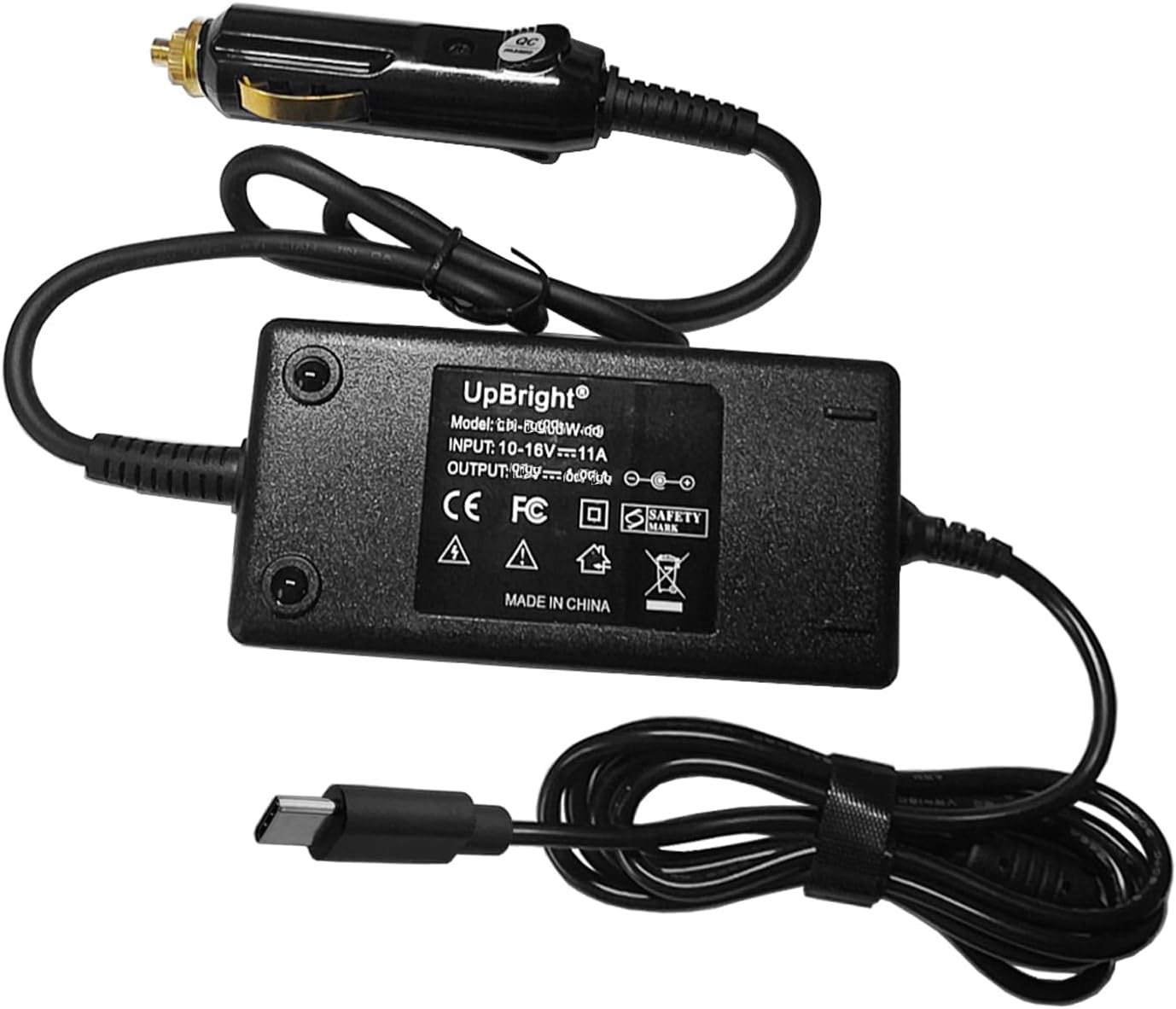
Image showing the UpBright USB-C Car 15V DC Adapter, which includes a cigarette lighter plug, the main adapter unit with specifications, and a USB-C output cable.
The adapter features a standard cigarette lighter plug for vehicle power input, a compact main unit housing the power conversion circuitry, and an integrated USB-C cable for connecting to your device.
Setup Instructions
- Verify Compatibility: Ensure your device requires a 15V DC input and uses a USB-C port for power. This adapter is specifically designed for Sagemcom Fast 5688W, P/N 253944686, 253945323, and T-Mobile FAST5688W 5G Wi-Fi Home Mobile Internet Gateway Router models.
- Vehicle Power Source: Locate the 12V DC cigarette lighter or auxiliary power outlet in your vehicle. Ensure the vehicle's ignition is in the ACC (Accessory) or ON position, or the engine is running, to provide power to the outlet.
- Connect Adapter: Insert the cigarette lighter plug of the UpBright adapter firmly into your vehicle's 12V DC power outlet.
- Connect Device: Plug the USB-C connector of the adapter into the USB-C power input port of your compatible device (e.g., Sagemcom router).
- Power On: Your device should now receive power or begin charging. Observe your device's power indicator to confirm successful connection.
Note: For optimal performance and to prevent draining your vehicle's battery, it is recommended to use the adapter while the vehicle's engine is running.
Operating Guidelines
Once connected, the UpBright USB-C Car 15V DC Adapter will continuously supply power to your connected device as long as the vehicle's 12V DC outlet is active. No additional controls or settings are required on the adapter itself.
- Ensure the adapter and connected device are placed in a stable location, away from excessive heat, moisture, or direct sunlight.
- Avoid bending or crimping the cables excessively, as this can damage the internal wiring.
- Do not attempt to disassemble or modify the adapter. This will void the warranty and may cause damage or injury.
- Disconnect the adapter from the vehicle's power outlet when not in use for extended periods to prevent potential battery drain.
Maintenance
The UpBright USB-C Car 15V DC Adapter requires minimal maintenance to ensure its longevity and performance.
- Cleaning: Use a soft, dry cloth to wipe the exterior of the adapter. Do not use liquid cleaners, solvents, or abrasive materials.
- Storage: When not in use, store the adapter in a cool, dry place, away from direct sunlight and extreme temperatures. Coil the cable loosely to prevent kinks or damage.
- Inspection: Periodically inspect the adapter and cables for any signs of wear, cuts, or damage. If any damage is observed, discontinue use immediately and contact support.
Troubleshooting
If you encounter issues with your UpBright USB-C Car 15V DC Adapter, refer to the following common problems and solutions:
| Problem | Possible Cause | Solution |
|---|---|---|
| Device not powering on/charging. |
|
|
| Adapter feels warm during use. | Normal operation. | A slight warmth is normal during operation. Ensure adequate ventilation around the adapter. If it becomes excessively hot or emits smoke/odor, disconnect immediately and contact support. |
If the problem persists after attempting these solutions, please contact UpBright customer support for further assistance.
Specifications
| Feature | Detail |
|---|---|
| Model Number | Model Fast 5688W Car DC Charger |
| Brand | UPBRIGHT |
| Input Voltage | 12 Volts (DC) from vehicle cigarette lighter |
| Output Voltage/Current | 15V DC, 2.5A (37.5W) |
| Connector Type | USB Type C |
| Compatible Devices | Sagemcom Fast 5688W, P/N 253944686, 253945323, T-Mobile FAST5688W 5G Wi-Fi Home Mobile Internet Gateway Router |
| Product Dimensions | 7 x 5 x 2 inches |
| Item Weight | 0.176 ounces |
| Included Components | 1 x Adapter |
Warranty and Support
UpBright offers a comprehensive warranty and support for this product:
- Refund Policy: 30 days refund period from the date of purchase.
- Exchange Policy: 24 months exchange for defective units.
For technical support, warranty claims, or any other inquiries, please contact UpBright customer service through their official channels or the retailer where the product was purchased. Please have your product model number and purchase details ready when contacting support.
Visit the UPBRIGHT Store for more information.