
1. Introduction
This manual provides essential instructions for setting up, operating, maintaining, and troubleshooting your TRIGKEY Mini PC S6 Pro. The S6 Pro is a compact desktop computer featuring an AMD Ryzen 7 7735HS processor, designed for various tasks from daily computing to demanding applications and gaming.
The device supports high-performance computing with its 8-core, 16-thread processor, advanced integrated graphics, and high-speed DDR5 RAM. It offers extensive connectivity options including Wi-Fi 6, Bluetooth 5.2, 2.5G LAN, and multiple display outputs for a versatile user experience.
2. Package Contents
Verify that all items listed below are included in your package:
- TRIGKEY Mini PC S6 Pro
- User Manual
- VESA Mount Bracket
- HDMI Cables
- Power Adapter (Output: 19V/5.26A)

Image: Included accessories for the TRIGKEY Mini PC S6 Pro, including the user manual, VESA mount, HDMI cables, and power adapter.
3. Product Overview
The TRIGKEY Mini PC S6 Pro features a compact design with essential ports for connectivity and expansion.

Image: Diagram illustrating the front and rear interfaces of the TRIGKEY Mini PC S6 Pro, including power button, USB ports, HDMI, DP, Type-C, and LAN.
Front Panel Interfaces:
- Power Button: To turn the device on or off.
- 3.5mm Audio Jack: For headphones or microphones.
- Type-C (10Gbps): For data transfer and display output.
- USB 3.2 (10Gbps) x 2: High-speed data transfer ports.
- CLR CMOS: Button to clear CMOS settings (use with caution).
Rear Panel Interfaces:
- DC Power Input: Connect the power adapter here.
- HDMI 2.0: For display output.
- DP 1.4: For display output.
- USB 2.0 (480Mbps): Standard USB port.
- USB 4.0 (40Gbps): High-speed data transfer and display output.
- LAN 2.5G: For wired network connection.
4. Setup Instructions
4.1 Initial Connection
- Connect Display: Use an HDMI or DisplayPort cable to connect your monitor(s) to the corresponding ports on the Mini PC. The device supports triple display output via HDMI, DP, and Type-C/USB 4.0.
- Connect Peripherals: Plug in your keyboard, mouse, and any other USB devices into the available USB ports.
- Connect Network: For a wired connection, plug an Ethernet cable into the 2.5G LAN port. For wireless, ensure your Wi-Fi network is available.
- Connect Power: Insert the power adapter cable into the DC power input port on the Mini PC, then plug the adapter into a power outlet.
4.2 Power On
Press the Power Button located on the front panel of the Mini PC. The power indicator light will illuminate, and the system will begin to boot up.
5. Operating System and Storage
5.1 Pre-installed Operating System
The TRIGKEY Mini PC S6 Pro comes with a pre-activated OS (Operating System) installed. Upon first boot, follow the on-screen instructions to complete the initial setup of the operating system.
5.2 Installing Other Operating Systems
The Mini PC supports various operating systems, including WOS and Ubuntu. To install a different OS, you will typically need to:
- Create a bootable USB drive with your desired OS installation media.
- Access the BIOS/UEFI settings during startup (usually by pressing Del or F2).
- Configure the boot order to prioritize the USB drive.
- Follow the on-screen instructions of the OS installer.
5.3 Storage Expansion
The Mini PC supports expansion of its internal storage. You can add a 2.5-inch SSD or HDD (up to 2TB) to increase your storage capacity. Refer to the detailed instructions in the included user manual for physical installation steps.
6. Connectivity
6.1 Wireless Connectivity
The S6 Pro is equipped with Wi-Fi 6 for high-speed wireless internet access, offering speeds up to 2400 Mbps, which is significantly faster than Wi-Fi 5. It also features Bluetooth 5.2 for seamless connection to wireless peripherals such as keyboards, mice, and audio devices.
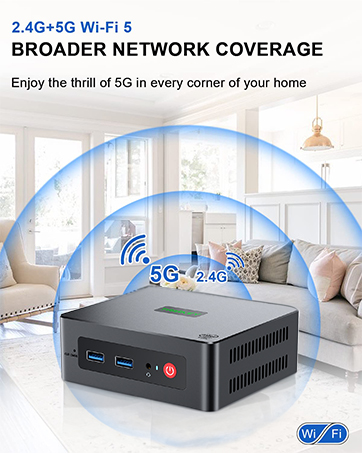
Image: Representation of wireless network coverage, illustrating the device's Wi-Fi capabilities.
6.2 Wired Network
A 2.5G LAN port is provided for a stable and high-speed wired network connection, suitable for applications requiring consistent bandwidth.
6.3 Multi-Display Support
The Mini PC supports triple display output at 4K resolution with refresh rates up to 120Hz/160Hz via its HDMI, DisplayPort (DP), and Type-C/USB 4.0 interfaces. This allows for enhanced productivity by extending your desktop across multiple screens.
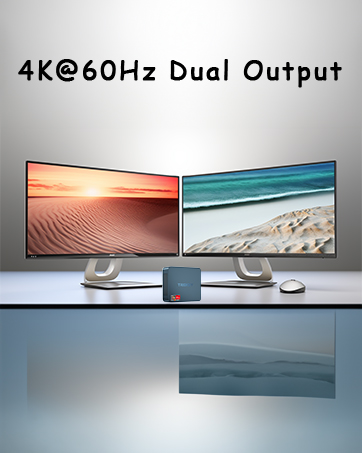
Image: Illustration of a multi-monitor setup, demonstrating the Mini PC's capability to connect to multiple displays.
7. Performance Features
7.1 AMD Ryzen 7 7735HS Processor
The S6 Pro is powered by the AMD Ryzen 7 7735HS processor, featuring 8 cores and 16 threads with a base clock frequency of 3.20 GHz and a maximum turbo frequency of 4.75 GHz. This processor utilizes the 'Zen 3+' architecture for improved single-core performance and power efficiency.

Image: Detailed specifications of the AMD Ryzen 7 7735HS processor, highlighting its core count, clock speeds, and architecture.
7.2 DDR5 RAM
The system is equipped with 32GB of DDR5 5600MHz RAM, supporting up to 64GB in dual-channel configuration. DDR5 memory provides higher bandwidth and improved performance compared to previous generations.
7.3 Integrated Graphics
The Mini PC features integrated AMD Radeon Graphics with 12 cores and a clock speed of 2200 MHz, capable of handling daily design tasks and most low-power games, while delivering high-definition visuals.
7.4 Heat Dissipation
An optimized heat dissipation system with a dedicated system fan accelerates airflow, providing efficient cooling for the RAM and SSD. This design helps maintain stable performance during extended use.

Image: Diagram illustrating the internal heat dissipation system, showing the system fan and airflow for cooling the RAM and SSD.
8. Maintenance
8.1 General Cleaning
To ensure optimal performance and longevity, regularly clean the exterior of the Mini PC with a soft, dry cloth. Use compressed air to gently clear dust from ventilation openings to prevent overheating. Ensure the device is powered off and unplugged before cleaning.
8.2 Ventilation
Always place the Mini PC in a well-ventilated area. Avoid blocking the air vents on the sides and back of the device. Do not place the PC on soft surfaces that could obstruct airflow.
9. Troubleshooting
This section addresses common issues you might encounter with your Mini PC.
9.1 No Power
- Ensure the power adapter is securely connected to both the Mini PC and a working power outlet.
- Verify that the power outlet is functional by testing it with another device.
- Check the power adapter for any visible damage.
9.2 No Display Output
- Confirm that the monitor is powered on and set to the correct input source (HDMI, DP, or Type-C).
- Ensure display cables are securely connected to both the Mini PC and the monitor.
- Try using a different display cable or monitor to rule out faulty equipment.
9.3 Network Connectivity Issues
- Wired: Check if the Ethernet cable is properly connected to the LAN port and your router/modem. Verify router status.
- Wireless: Ensure Wi-Fi is enabled in the operating system. Check if the correct Wi-Fi network is selected and the password is entered correctly. Restart your router/modem.
9.4 Audio Output Issues
- Check volume settings in the operating system and on your connected audio device.
- Ensure the correct audio output device is selected in your sound settings.
- If experiencing issues with sound configuration when switching between programs or headphones, this may indicate a hardware-related sound card behavior. Ensure drivers are up to date.
10. Specifications
| Feature | Specification |
|---|---|
| Brand | TRIGKEY |
| Item Model Number | S6 6600H (Series: S6 Pro 7735HS) |
| Operating System | OS (Supports WOS, Ubuntu) |
| Processor Brand | AMD |
| Processor Type | AMD Ryzen 7 |
| Processor Model | AMD Ryzen 7 7735HS |
| Processor Speed | 4.75 GHz (Max Turbo) |
| Number of Cores | 8 |
| RAM | 32 GB DDR5 |
| Maximum Memory | 64 GB |
| Hard Drive Size | 500 GB |
| Hard Drive Technology | SSD |
| Hard Drive Interface | SSD |
| Resolution | 4K Ultra HD (3840 x 2160) |
| Graphics Chipset Brand | AMD |
| Graphics Card Description | Integrated |
| GPU / Graphics Coprocessor | Integrated Graphics |
| Graphics RAM Type | SO-DIMM |
| Processor Socket | FP7 |
| Connectivity Type | Wi-Fi |
| Wireless Technology Type | Bluetooth (BT5.2), Wi-Fi (Wi-Fi 6) |
| Hardware Interface | Ethernet (2.5G), HDMI, DisplayPort, USB (USB 3.2, USB 2.0, USB 4.0), Type-C |
| Number of HDMI Ports | 1 |
| Connector Type | HDMI, DP, USB, Ethernet, Type-C |
| Device Compatibility | Monitor, Printer, Headset, Speaker, Television, Smartphone |
| Package Dimensions | 16 x 13.7 x 10.6 cm |
| Item Weight | 1.13 kilograms |
| Specific Uses for Product | Multimedia, Daily Use, Education |
| PC Type | Mini PC |
11. Warranty and Support
TRIGKEY provides comprehensive support for your Mini PC S6 Pro:
- One-Year Warranty: Your purchase is covered by a one-year warranty from the date of purchase.
- 24/7 Customer Service: Personalized customer service is available 7 days a week, 24 hours a day.
- Lifetime Technical Support: Enjoy lifetime technical assistance for your product.
For further assistance or inquiries, please refer to the contact options provided by TRIGKEY.
Image: Icons representing various TRIGKEY customer support channels, including email, consultation, website, and technical support.


