
Introduction
The JBL Clip 5 is an ultra-portable Bluetooth speaker designed for on-the-go audio. It features a robust design, powerful sound, and convenient portability with its integrated carabiner. This manual provides essential information for setting up, operating, maintaining, and troubleshooting your JBL Clip 5 speaker.
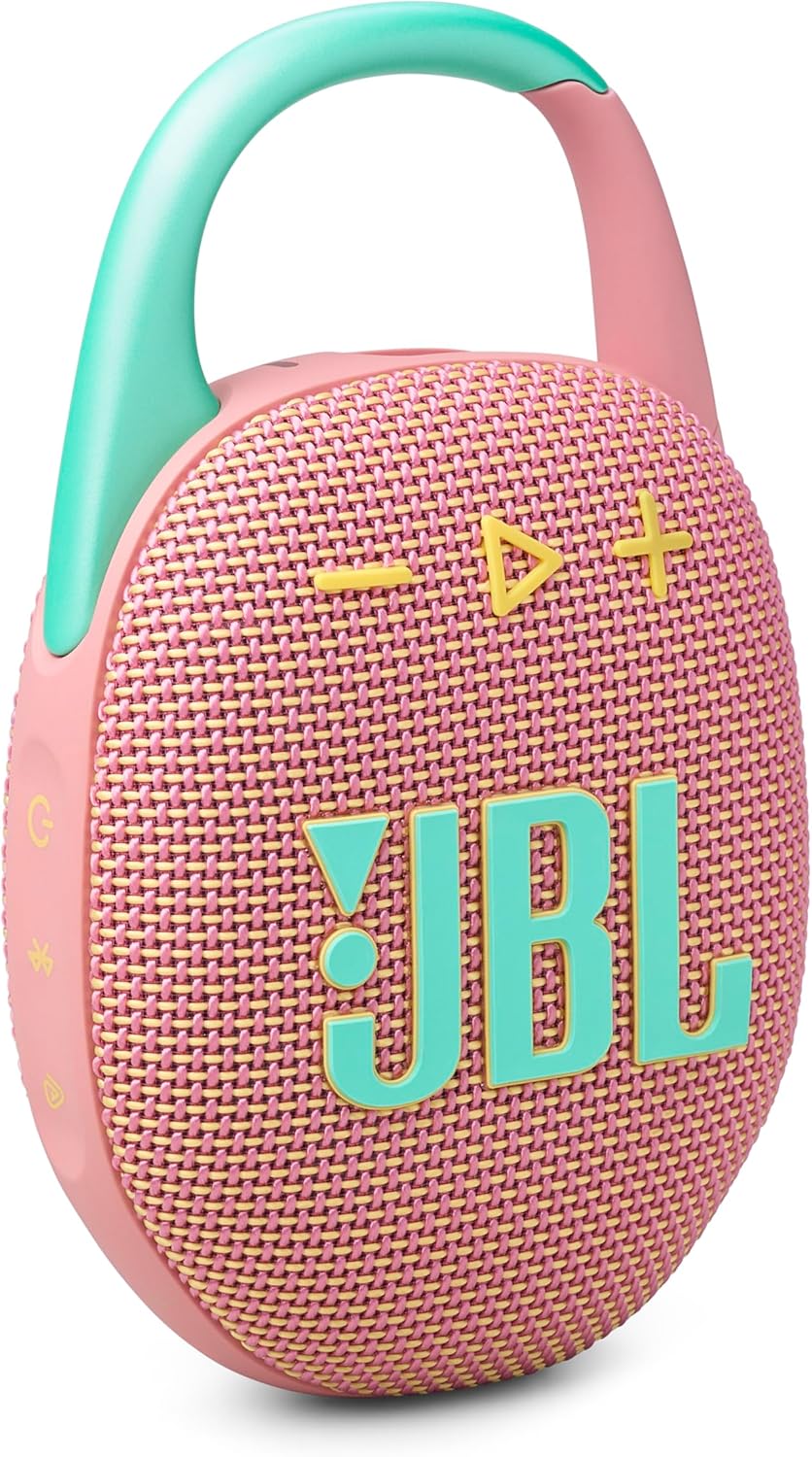
Image: The JBL Clip 5 speaker, showcasing its compact design and integrated carabiner.
What's in the Box
Ensure all the following items are included in your package:
- 1 x JBL Clip 5 Speaker
- 1 x Type-C to Type-A Charging Cable
- Quick Start Guide
- Safety Sheet
- Warranty Card
Setup
1. Charging the Speaker
Before first use, fully charge your JBL Clip 5. Connect the included Type-C to Type-A charging cable to the speaker's charging port and a compatible USB power source. The charging indicator will show the charging status.
2. Powering On/Off
- To power on: Press and hold the power button until the indicator light illuminates.
- To power off: Press and hold the power button again until the indicator light turns off.
3. Bluetooth Pairing
- Power on your JBL Clip 5 speaker.
- Press the Bluetooth button on the speaker. The indicator light will flash, indicating it is in pairing mode.
- On your smartphone or other Bluetooth-enabled device, go to the Bluetooth settings.
- Select "JBL Clip 5" from the list of available devices.
- Once connected, the Bluetooth indicator light will remain solid.
Operating the Speaker
Basic Controls
- Volume Up/Down: Use the '+' and '-' buttons on the speaker.
- Play/Pause: Press the play button (triangle icon) once.
- Skip Track: Double-press the play button to skip to the next track.
Playtime Boost
To extend battery life, activate Playtime Boost. This feature can add up to 3 additional hours of playtime, bringing the total to 15 hours. Refer to the Quick Start Guide for specific instructions on activating this feature.

Image: The JBL Clip 5 speaker clipped to a backpack, highlighting its portability and up to 12 hours of playtime, extendable with Playtime Boost.
Multi-Speaker Connection (Auracast)
The JBL Clip 5 supports Auracast technology, allowing you to connect multiple JBL Auracast-enabled speakers for a larger, synchronized audio experience. You can pair two Clip 5s for stereo sound or connect several for party mode.
JBL Portable App
Download the JBL Portable App for additional features and control over your speaker. The app allows you to manage JBL speakers, access more audio options, and receive software updates.

Image: A graphic encouraging users to download the JBL Portable App for managing speakers, accessing audio options, and software updates.
Maintenance
Waterproof and Dustproof (IP67)
The JBL Clip 5 is IP67 rated, meaning it is fully waterproof and dustproof. This allows for use in various environments, including near water or dusty conditions. After exposure to water, ensure the charging port cover is securely closed and allow the speaker to dry completely before charging.

Image: The JBL Clip 5 speaker positioned on a beach, demonstrating its IP67 waterproof and dustproof capabilities in an outdoor setting.

Image: The JBL Clip 5 speaker hanging from a shower head, highlighting its waterproof functionality for use in wet environments.
General Care
- Clean the speaker with a soft, damp cloth. Do not use harsh chemicals or abrasive materials.
- Avoid exposing the speaker to extreme temperatures.
- Store the speaker in a cool, dry place when not in use.
Troubleshooting
- No Power: Ensure the speaker is charged. Connect it to a power source using the provided cable.
- Cannot Pair Bluetooth:
- Ensure the speaker is in pairing mode (flashing Bluetooth indicator).
- Turn off and on your device's Bluetooth.
- Move the speaker closer to your device.
- If previously paired, try forgetting the device on your phone and re-pairing.
- No Sound:
- Check the volume levels on both the speaker and your connected device.
- Ensure the speaker is properly connected via Bluetooth.
- Poor Sound Quality:
- Move the speaker closer to your device to avoid interference.
- Ensure there are no obstructions between the speaker and your device.
For further assistance, refer to the JBL Portable App or the official JBL support website.
Specifications

Image: The JBL Clip 5 speaker with its physical dimensions indicated, highlighting its ultra-portable size.
| Feature | Detail |
|---|---|
| Model Name | Clip 5 |
| Item Model Number | JBLCLIP5PINKAM |
| Speaker Type | Multimedia |
| Special Features | Bass Boost, Dustproof, Multi Room Audio, Portable, Waterproof |
| Connectivity Technology | Bluetooth |
| Wireless Communication Technology | Bluetooth |
| Compatible Devices | Smartphone |
| Power Source | Battery Powered (1 Lithium Ion battery required) |
| Battery Life | Up to 12 hours (Up to 15 hours with Playtime Boost) |
| Waterproof Rating | IP67 |
| Speaker Maximum Output Power | 7 Watts |
| Signal-to-Noise Ratio | 85 dB |
| Audio Output Mode | Stereo |
| Control Method | Voice |
| Mounting Type | Built-in Carabiner |
| Product Dimensions (D x W x H) | 3.4" x 1.8" x 5.3" |
| Item Weight | 0.29 Kilograms (approximately 10 ounces) |
| UPC | 050036400138 |
Warranty Information
The JBL Clip 5 comes with a Limited Warranty. Please refer to the Warranty Card included in your product packaging for detailed terms and conditions, including coverage period and how to make a claim. Retain your proof of purchase for warranty service.
Support
For additional support, frequently asked questions, or to download the full user manual, please visit the official JBL website or utilize the JBL Portable App. The app provides a convenient way to manage your speaker settings and access troubleshooting tips.
You can also visit the JBL Store on Amazon for more product information and accessories.


