
ELIKIDSTO Y15
ELIKIDSTO Motorcycle Helmet Headset User Manual
Model: Y15
Introduction
This user manual provides detailed instructions for the ELIKIDSTO Motorcycle Helmet Headset, Model Y15. This headset is designed to enhance your riding experience with HiFi sound, noise cancellation, and convenient features like voice assistant and FM radio. Please read this manual thoroughly before use to ensure proper installation and operation.
Product Overview and Package Contents
The ELIKIDSTO Motorcycle Helmet Headset (Model Y15) is a wireless earphone system for helmets, featuring integrated controls and RGB lighting. It is designed for clear audio and communication while riding.

Image: Contents of the ELIKIDSTO Helmet Headset package, including the Y12 device, user manual, Type-C charging cable, clip-on base, device velcro, mic stick velcro, and horn velcro. It also shows a Type-C interface hard tube mic headset.
Package Contents:
- 1 x ELIKIDSTO Motorcycle Helmet Headset (Model Y15)
- 1 x User Manual
- 1 x Type-C Charging Cable
- 1 x Clip-on Base
- 1 x Device Velcro
- 1 x Mic Stick Velcro
- 1 x Horn Velcro
- Boom Microphones (for open-face/flip-face helmets)
- Button Microphone (for full-face helmets)
Setup and Installation
Proper installation is crucial for optimal performance and sound quality. Please follow these steps carefully.

Image: A visual guide illustrating the six steps for installing the headset into a motorcycle helmet, from placing speakers to securing the main unit.
- Check Helmet Compatibility: Before purchasing or installing, verify if your helmet has reserved space for speakers. If not, a small modification to the helmet lining might be necessary.
- Speaker Placement: Attach the helmet speakers to the reserved spaces inside your helmet using the provided Velcro. Ensure they are positioned close to your ears for the best sound experience. Run the speaker wires neatly behind the helmet padding.
- Microphone Selection:
- For open-face or flip-face (convertible) helmets, use the boom microphone.
- For full-face helmets, use the button microphone.
- Mounting the Main Unit: Secure the main headset unit to the side of your helmet using the clip-on base or adhesive stickers.
- Connecting the Headphone Port: This is a critical step for sound output.
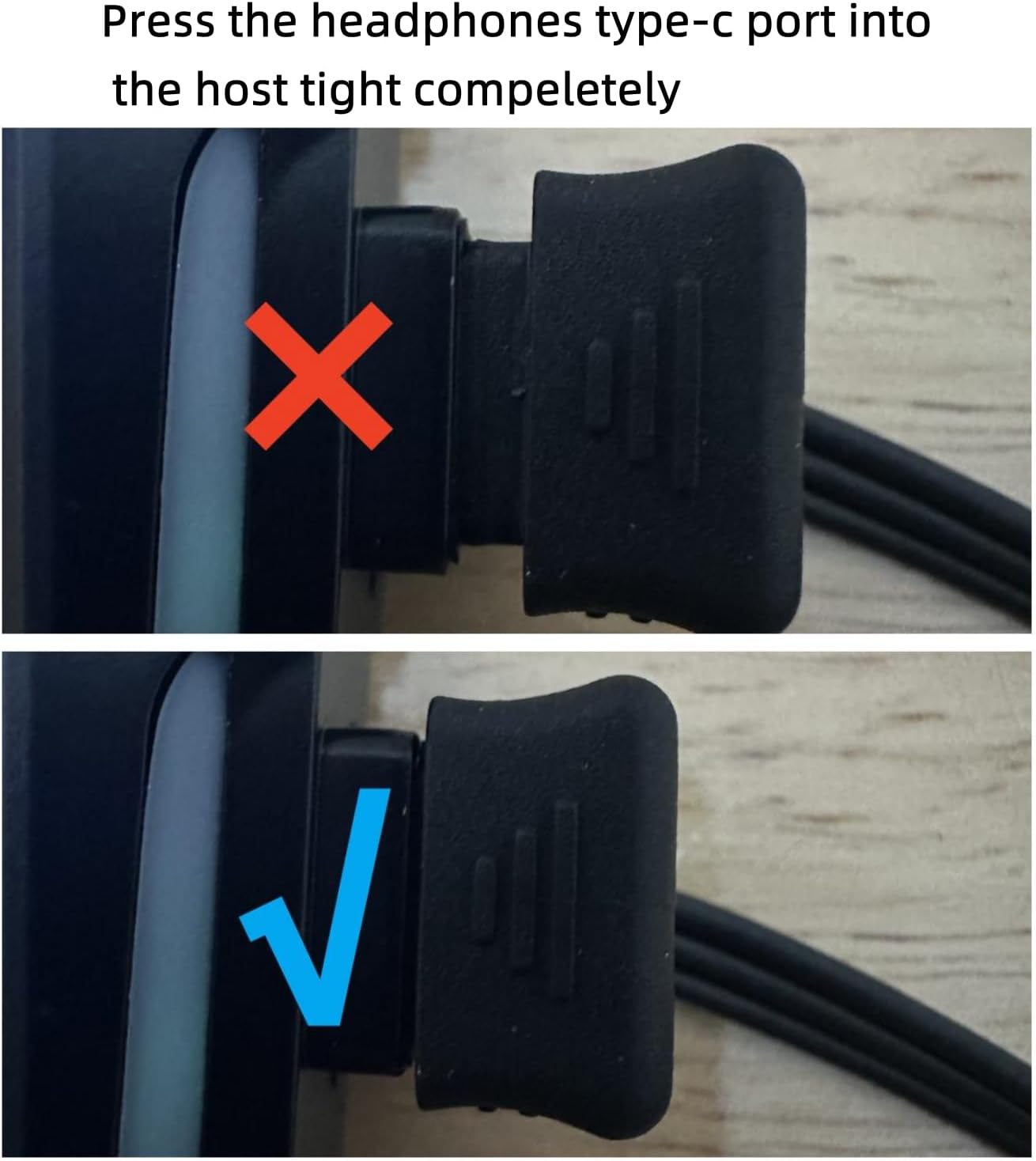
Image: A comparison showing the incorrect (top, partially inserted) and correct (bottom, fully inserted) way to plug the Type-C headphone cable into the main unit. A "PA" sound indicates a secure connection.
Press the headphones' Type-C port into the host unit completely until you hear a "PA" sound, indicating a tight and secure fit. If the port is not fully plugged in, you may experience no sound or low volume.

Image: An illustration demonstrating that the ELIKIDSTO headset is suitable for various helmet types, including full helmets, off-road helmets, half helmets, unmask helmets, and retro helmets.
Operating Instructions
Power On/Off and Pairing:
- Power On: Press and hold the power button until the indicator light turns on.
- Pairing Mode: To enter pairing mode, long press the function key. The red and blue lights on the device will flash alternately.
- Connect to Device: On your mobile phone or other Bluetooth device, search for "ELIKIDSTO Y15" (or similar model name) and select it to pair. The headset will automatically reconnect to previously paired devices.
Connecting Two Phones:
The headset supports simultaneous connection to two mobile phones.

Image: The ELIKIDSTO headset shown with two mobile phones, illustrating its capability to connect to and manage calls/audio from two devices concurrently.
Music Playback:
Enjoy high-fidelity stereo music from your connected device.

Image: A motorcycle helmet equipped with the ELIKIDSTO headset, depicted with musical notes flowing around it, symbolizing the enhanced music listening experience during rides.
- Play/Pause: Press the multi-function button once.
- Next Track: Press the "+" button.
- Previous Track: Press the "-" button.
Call Handling:
- Auto Answer: The headset can automatically answer incoming calls within 10 seconds, promoting safer riding.
- Answer/End Call: Press the multi-function button once.
- Reject Call: Press and hold the multi-function button.
Voice Assistant (Siri/Google Assistant):
Easily activate your device's voice assistant without diverting your attention from the road.

Image: A rider wearing a helmet with the ELIKIDSTO headset, featuring icons for a microphone and Siri, demonstrating the integrated voice assistant control for hands-free operation.
- Activate Voice Assistant: Press the dedicated voice control button (microphone icon).
Volume Adjustment:
- Increase Volume: Press and hold the "+" button.
- Decrease Volume: Press and hold the "-" button.
- Optimal Volume: Adjust the volume using your mobile phone before riding. Ensure speakers are positioned close to your ears within the helmet, avoiding obstruction from the lining.
FM Radio:
The headset includes an FM radio function for listening to broadcasts.

Image: The ELIKIDSTO headset highlighting its Stereo FM radio capability, with text indicating "Multiple stable signal receivers" and categories of content like Music, Sport, Traffic, News, Emotion, Cross talk, and Entertainment.
- Activate FM Mode: Refer to the user manual for specific button presses to enter FM mode.
- Automatic Channel Search: In FM mode, long press the voice assistant button for automatic one-click channel search and storage.
Maintenance
- Water Resistance: The headset features IPX6 waterproof technology, allowing it to withstand various weather conditions like wind and rain. However, avoid submerging the device in water.
- Cleaning: Use a soft, dry cloth to clean the headset. Do not use abrasive cleaners or solvents.
- Storage: Store the headset in a cool, dry place when not in use.
- Charging: Charge the device using the provided Type-C charging cable. Avoid using damaged cables or chargers.

Image: The ELIKIDSTO headset shown partially submerged in water, illustrating its IP56 dustproof and waterproof rating, indicating resilience against splashes and rain.
Troubleshooting
| Problem | Possible Cause | Solution |
|---|---|---|
| No sound or low volume | Headphone Type-C port not fully inserted. Speakers not positioned correctly. | Ensure the Type-C headphone port is fully plugged into the host unit until you hear a "PA" sound. Adjust speaker position closer to ears. Check mobile phone volume. |
| Cannot pair with phone | Headset not in pairing mode. Bluetooth off on phone. | Long press function key to enter pairing mode (red and blue lights flash). Ensure Bluetooth is enabled on your phone. Restart both devices. |
| Short battery life | Battery not fully charged. Aging battery. | Ensure the device is fully charged (approx. 1 hour). If battery life significantly degrades, contact support. |
| Poor sound quality at high speeds | Wind noise. Speakers not optimally placed. | Ensure speakers are as close to your ears as possible. Consider helmet wind noise reduction accessories. Adjust volume. |
Specifications
| Feature | Detail |
|---|---|
| Model Name | Y15 |
| Connectivity Technology | Wireless (Bluetooth 5.2) |
| Noise Control | Active Noise Cancellation (Dual CVC, DSP) |
| Headphones Jack | 2.5 mm Jack (for speaker connection) |
| Water Resistance Level | IPX6 Waterproof |
| Battery Life | Up to 25 Hours (music/talk time) |
| Charging Time | Approx. 1 Hour |
| Speaker Diameter | 40MM |
| Speaker Wattage | 0.3 Watt |
| Control Type | Voice Control, Physical Buttons |
| Material | Plastic |
| Product Dimensions | 3.43 x 0.91 x 1.65 inches |
| Item Weight | 3.84 ounces |
| Manufacturer | ELIKIDSTO |
Warranty and Support
For warranty information, technical support, or any inquiries regarding your ELIKIDSTO Motorcycle Helmet Headset, please refer to the contact information provided with your purchase or visit the official ELIKIDSTO website. Keep your purchase receipt for warranty claims.
Ask a question about this manual
Ask about setup, troubleshooting, compatibility, parts, safety, or missing instructions. Manuals+ will review the question and use this page’s manual context to help answer it.