
CIGMAN CNV00
CIGMAN 4K Night Vision Goggles CNV00 User Manual
Model: CNV00 | Brand: CIGMAN
Introduction
Thank you for choosing the CIGMAN 4K Night Vision Goggles. This device is engineered to provide superior clarity and extended visibility in low-light and complete darkness conditions, making it ideal for various outdoor activities such as hunting, wildlife observation, and security monitoring. This manual will guide you through the setup, operation, and maintenance of your new night vision goggles to ensure optimal performance and longevity.
Package Contents
Please verify that all items listed below are included in your package:
- 1 x Night Vision Binoculars
- 1 x Neck Strap
- 1 x Type-C Cable
- 1 x 32GB TF Card
- 1 x Lens Cleaning Cloth
- 1 x Cloth Bag
- 1 x Portable Bag
- 1 x Compass
- 1 x User Manual

Key Features
- Superior Clarity: Capture sharp, detailed images with a 58MP photo sensor that delivers Full HD resolution, day or night. The versatile video resolutions (4K, 1080P, 720P) cater to a range of practical needs, while the 5x digital zoom allows for enhanced detail in both photos and videos.

Image: The 3.99-inch large display screen highlighting 4K Ultra HD video and 58MP image capture capabilities. 
Image: Visual comparison demonstrating increased image clarity and detail from 10MP to 58MP resolution. 
Image: Graphic illustrating the effect of 5X digital zoom, bringing distant objects into clearer view. - Extended Range: Powered by a starlight-level sensor and a high-intensity infrared spotlight, the CNV00 night vision goggles offer crisp, clear visibility up to 1968ft/600m, even in low-light environments. With the largest 3.99" high-definition display available on the market and an impressive f/1.0 aperture, it guarantees exceptional light capture for unparalleled clarity.

Image: Night vision goggles mounted on a tripod, demonstrating clear visibility of sheep in total darkness up to 1968ft/600m. 
Image: Exploded view diagram of the night vision lens system, highlighting components for Ultra HD 4K clarity and light capture. - Versatile Multi-functionality: This night vision scope is designed for a wide range of applications, featuring a built-in tactical light for illumination and outdoor rescue operations. It also includes an integrated microphone and speaker for smooth recording and playback, along with a dedicated backlight button for easy use during nighttime activities. With 3 adjustable IR levels, you can tailor the infrared light intensity for optimal visibility, even in complete darkness.

Image: The night vision goggles with their built-in flashlight illuminated, placed next to a compass on a map, demonstrating utility for navigation and illumination. 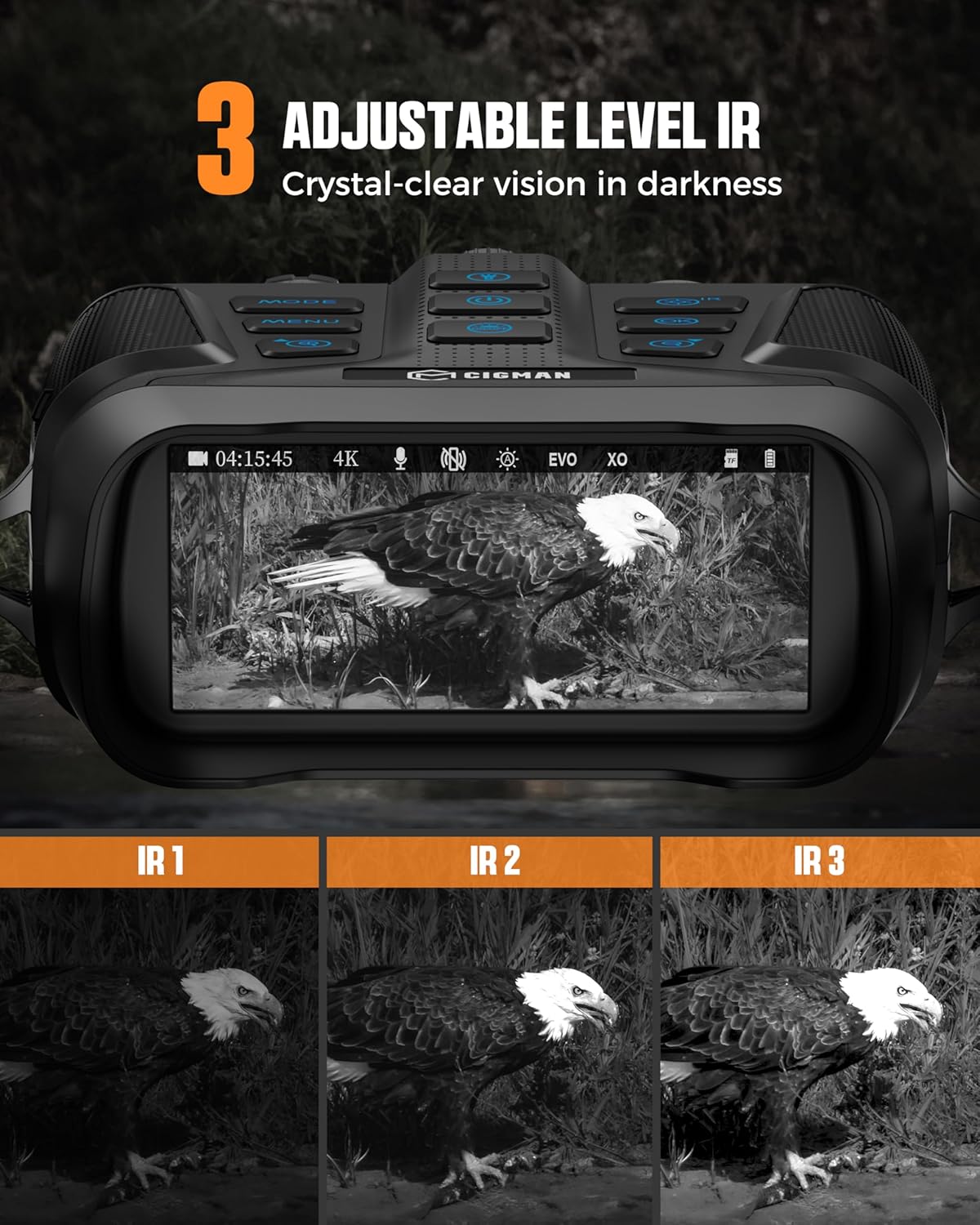
Image: Display showing the effect of three adjustable infrared (IR) levels on night vision clarity, from IR 1 to IR 3. - Environmental Adaptability: With an IP65 rating, these night vision goggles are durable and reliable in wet conditions, perfect for outdoor adventures and tactical operations. Tripod compatibility provides extra stability for extended use, while their portability makes them ideal for camping, hiking, and wildlife observation.

Image: The night vision goggles covered in water droplets, illustrating their IP65 protection level for use in rainy environments.
Setup Guide
1. Charging the Battery
The CIGMAN Night Vision Goggles are equipped with a powerful 5000mAh built-in lithium battery. Before first use, ensure the device is fully charged using the provided Type-C cable. Connect the cable to the device's Type-C port and a suitable power source. The charging indicator will show the charging status.

2. Inserting the TF Card
A 32GB TF (MicroSD) card is included for storing photos and videos. Locate the TF card slot on the device, insert the card gently until it clicks into place. Ensure the card is inserted correctly to avoid damage.
3. Attaching the Neck Strap
Attach the provided neck strap to the designated attachment points on the goggles. This will help prevent accidental drops and provide comfort during extended use.
4. Initial Power On and Focus Adjustment
Press and hold the Power On/Off button to turn on the device. Once powered on, adjust the Focus Ring on the lenses to achieve a clear image. Turn the ring towards 'FAR' for distant objects and 'NEAR' for closer objects.

Operating Instructions
Controls Overview

Familiarize yourself with the buttons and their functions:
- Power On/Off: Long press to turn the device on or off.
- Menu (M): Access the main menu for settings and options.
- OK Button: Confirm selections within the menu.
- Zoom In/Up: Increase digital zoom or navigate up in menus.
- Zoom Out/Down: Decrease digital zoom or navigate down in menus.
- Tactical Light Switch (TL): Activate the built-in tactical flashlight.
- Infrared Light Switch (IR): Adjust the infrared illumination levels.
- Backlight Switch: Turn on/off the backlight for buttons for use in dark conditions.
Photo and Video Capture
To capture media:
- Press the Mode button to switch between Photo, Video, and Playback modes.
- In Photo or Video mode, press the OK button to capture an image or start/stop video recording.
- Utilize the Zoom In/Up and Zoom Out/Down buttons to adjust the 5x digital zoom for closer views.
Adjusting Infrared (IR) Levels
The device features 3 adjustable IR levels to optimize visibility in varying degrees of darkness:
- Press the IR button to cycle through the 3 infrared intensity levels.
- Select the level that provides the clearest image without overexposure.
Special Features
- Time-Lapse Photography: Set intervals (2s, 5s, 10s) for automatic photo capture. Access this setting via the Menu.
- Continuous Shooting: Capture multiple images in quick succession.
- Anti-Shake: This feature helps stabilize images and videos, reducing blur from hand movements.

File Transfer and Playback
To review or transfer your media:
- In Playback mode, use the navigation buttons to browse through your captured photos and videos.
- Connect the device to a computer using the Type-C cable to transfer files. The device will appear as a removable storage device.

Maintenance
Cleaning
Regular cleaning ensures optimal performance:
- Use the provided lens cleaning cloth to gently wipe the lenses. Avoid using abrasive materials or harsh chemicals.
- Wipe the body of the goggles with a soft, damp cloth.
Storage
When not in use, store the goggles in the portable bag in a cool, dry place, away from direct sunlight and extreme temperatures.
Water Resistance
The device has an IP65 rating, meaning it is protected against dust and low-pressure water jets. While it can withstand wet conditions, avoid submerging it in water.
Troubleshooting
If you encounter any issues with your CIGMAN Night Vision Goggles, please refer to the following common problems and solutions:
- Device not powering on: Ensure the battery is fully charged. If the issue persists, try connecting to a power source and attempting to power on.
- Blurred image: Adjust the focus ring on the lenses. Ensure the lenses are clean and free from smudges or debris.
- Poor night vision performance: Check the IR level settings and increase if necessary. Ensure there are no obstructions blocking the IR illuminator.
- Cannot record or save files: Verify that the TF card is correctly inserted and has sufficient free space. The card may need to be formatted (refer to menu settings for formatting option).
For further assistance, please contact CIGMAN customer support.
Specifications
| Feature | Specification |
|---|---|
| Brand | CIGMAN |
| Model | CNV00 |
| Package Dimensions | 10.28 x 8.23 x 4.02 inches |
| Item Weight | 3.8 pounds |
| Special Feature | High Magnification, Night Vision, Built-In Flash, Image Stabilization |
| Mounting Type | Tripod Mount |
| Binocular Prism Description | Porro Prism |
| Water Resistance Level | Waterproof (IP65) |
| Battery | 5000mAh built-in lithium battery |
| Night Viewing Range | Up to 1968ft/600m |
| Lens Aperture | f/1.0 |
| Screen Size | 3.99 inches |
| Memory Card Support | Max 512GB (32GB included) |
Safety Information
Please read and adhere to the following safety guidelines:
- Do not look directly at strong light sources (e.g., sun, laser) through the device, as this can cause permanent eye damage.
- Keep the device away from extreme temperatures, humidity, and dust.
- Do not attempt to disassemble or repair the device yourself. Refer to qualified service personnel.
- Keep out of reach of children.
Warranty and Support
CIGMAN products come with a standard manufacturer's warranty. For detailed warranty information, product support, or service inquiries, please visit the official CIGMAN website or contact their customer service department. Please retain your proof of purchase for warranty claims.
Ask a question about this manual
Ask about setup, troubleshooting, compatibility, parts, safety, or missing instructions. Manuals+ will review the question and use this page’s manual context to help answer it.