
Introduction
Thank you for choosing the MDCMDCM Solar Motion Sensor Outdoor Lights. This manual provides essential information for the proper installation, operation, and maintenance of your new solar lights. Designed for outdoor use, these lights offer bright, motion-activated illumination for enhanced security and visibility in areas such as gardens, yards, patios, and pathways. Please read this manual thoroughly before use to ensure optimal performance and longevity of your product.
What's in the Box
Upon unpacking, please ensure all items listed below are present and in good condition:
- 2 x MDCMDCM Solar Motion Sensor Outdoor Lights
- 2 x Wall Brackets
- Mounting Screws and Wall Plugs (typically 8 screws and 8 plugs)
- User Manual
- Remote Controls (quantity may vary based on pack size, typically one per light or one for the set)

Key Features
- High Brightness: 3000 Lumens output with 236 super bright LEDs for extensive illumination.
- Adjustable Design: Three adjustable heads allow for flexible lighting direction and a 270° wide-angle lighting area.
- Dual Motion Sensors: Upgraded 2 smart PIR motion sensors provide a 180° detection angle within a range of 0-32 feet, offering wider and more sensitive coverage.
- Three Lighting Modes: Customizable lighting modes to suit various needs (details in Operating Instructions).
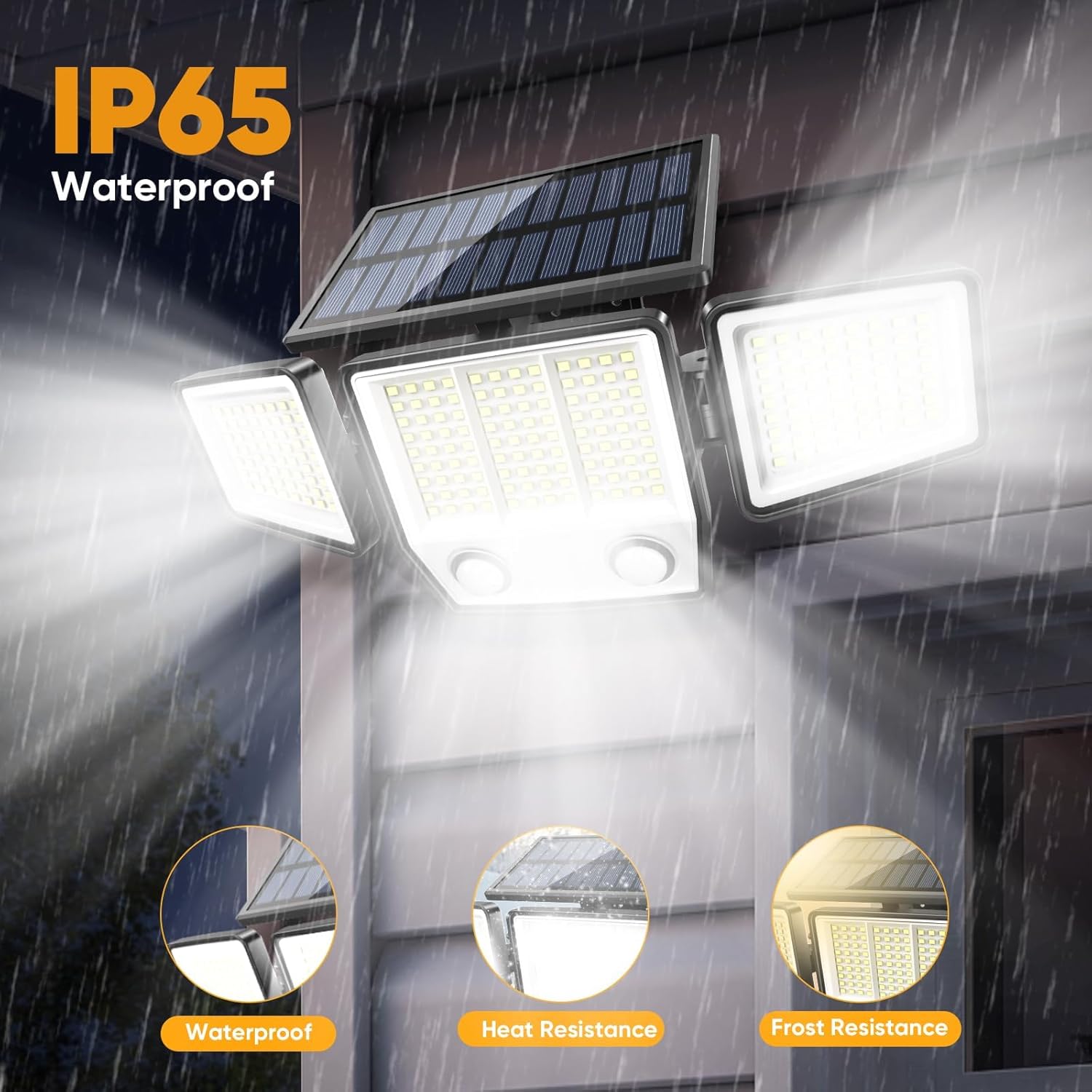
- Durable and Weatherproof: IP65 waterproof rating and high-strength ABS material ensure durability against various weather conditions (waterproof, heat-resistant, frost-resistant).
- Efficient Solar Charging: Monocrystalline silicon glass panels with up to 50% conversion rate for efficient daytime charging.
- Long-lasting Battery: Built-in 2000mAh large capacity battery for extended operation.
- Long Lifespan: Designed for a lifespan of over 50,000 hours.


Setup and Installation
Installation is designed to be quick and easy, requiring no wiring. Follow these steps for optimal performance:
- Choose a Location: Select an outdoor location that receives direct sunlight for at least 6-8 hours daily to ensure the solar panel charges effectively. The recommended installation height is approximately 6.5 feet.
- Mount the Bracket: Use the provided screws and wall plugs to securely attach the wall bracket to your desired surface. Ensure the bracket is level.
- Attach the Light: Slide the solar light unit onto the mounted wall bracket until it clicks securely into place.
- Adjust Light Heads and Solar Panel: Adjust the three light heads to cover the desired illumination area. Position the solar panel to face the sun for maximum exposure throughout the day.
Installation Video
Video 1: This video demonstrates the unboxing and installation process for the MDCMDCM Solar Motion Lights Outdoor Waterproof.
Operating Instructions
The solar light features three distinct lighting modes, which can be selected using the included remote control or the button on the unit. Ensure the light is turned on before selecting a mode.
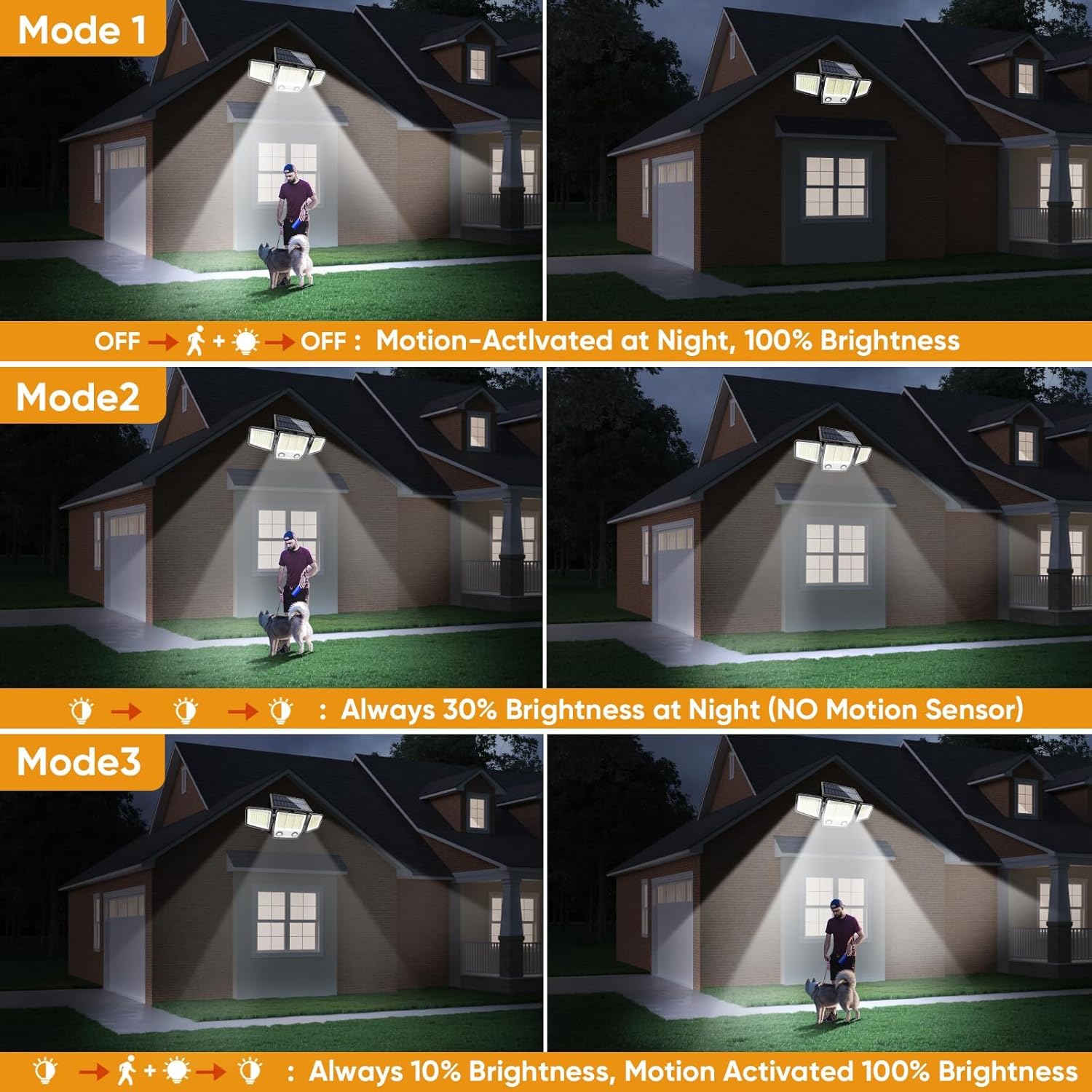
- Mode 1 (Motion Activated 100% Brightness): The light remains OFF at night until motion is detected. Upon detection, it illuminates at 100% brightness for approximately 20 seconds, then turns OFF again.
- Mode 2 (Always 30% Brightness): The light stays ON at 30% brightness throughout the night, without motion sensor activation.
- Mode 3 (10% Brightness + Motion Activated 100% Brightness): The light stays ON at a dim 10% brightness at night. When motion is detected, it brightens to 100% for approximately 20 seconds, then returns to 10% brightness.


Maintenance
To ensure your MDCMDCM Solar Motion Sensor Outdoor Lights continue to function effectively, follow these simple maintenance guidelines:
- Clean the Solar Panel: Regularly wipe the solar panel with a soft, damp cloth to remove dust, dirt, leaves, or snow. A clean panel ensures maximum sunlight absorption and efficient battery charging.
- Check Mounting: Periodically inspect the mounting screws and bracket to ensure the light remains securely attached to the surface. Tighten any loose screws as needed.
- Clear Obstructions: Ensure no new obstructions (e.g., growing branches, new structures) are blocking direct sunlight from reaching the solar panel or interfering with the motion sensor's detection range.
Troubleshooting
If your solar light is not performing as expected, consider the following common issues and solutions:
- Light Not Turning On at Night:
- Ensure the light is switched ON.
- Verify the solar panel is receiving sufficient direct sunlight (6-8 hours) during the day. Relocate if necessary.
- Check if the battery is fully charged. Allow for a full day of charging before first use or after prolonged storage.
- Confirm the selected operating mode is appropriate for your needs.
- Motion Sensor Not Detecting:
- Ensure the motion sensors are clean and free from obstructions.
- Check the detection range and angle. The dual sensors offer 180° detection up to 32 feet.
- Verify the light is in Mode 1 or Mode 3 for motion activation.
- Light is Dim or Flickering:
- The battery may not be fully charged. Ensure adequate sunlight exposure.
- Clean the solar panel to improve charging efficiency.
- Extreme temperatures can affect battery performance.
Specifications
| Feature | Specification |
|---|---|
| Brand | MDCMDCM |
| Model Name | MDCMDCM Solar Motion Lights Outdoor (2 Pack) |
| Brightness | 3000 Lumens |
| Number of LEDs | 236 |
| Color Temperature | 7000 Kelvin (Cool White) |
| Battery Capacity | 2000mAh |
| Water Resistance Level | IP65 Waterproof |
| Material | Acrylonitrile Butadiene Styrene (ABS) |
| Motion Sensor Detection Angle | 180° |
| Motion Sensor Detection Distance | 0-32 feet |
| Lighting Angle | 270° Wide Angle |
| Product Dimensions | 6"L x 5"W x 13"H |
| Item Weight | 8 ounces |
| Power Source | Solar Powered |
| Installation Type | Wall-mounted |
Warranty and Support
MDCMDCM provides a Limited Warranty for this product. Additionally, your purchase is backed by a 365-day guarantee, ensuring that your light will not break or stop working under normal use conditions. For any questions, technical support, or warranty claims, please refer to the contact information provided in the user manual included in your package or visit the official MDCMDCM store on Amazon.