
1. Introduction
This manual provides detailed instructions for the assembly, operation, and maintenance of your TVON TV Floor Stand. Please read this manual thoroughly before installation and retain it for future reference. This stand is designed for most 32-60 inch flat or curved LCD, LED, or OLED televisions, supporting VESA patterns from 100x100mm up to 400x400mm, with a maximum load capacity of 40 kg.
The TVON TV Floor Stand offers a stable and adaptable solution for your television, featuring height adjustment and swivel capabilities for optimal viewing comfort.
2. Safety Information
WARNING: Failure to read and follow these instructions may result in serious personal injury, property damage, or voiding your warranty.
- Weight Capacity: Do not exceed the maximum load capacity of 40 kg (88 lbs). This stand is intended for use only with the maximum weights indicated. Use with products heavier than the maximum weight indicated may result in instability causing possible injury.
- Screen Size: This stand is compatible with TVs between 32 and 60 inches. Ensure your TV's VESA pattern is within the supported range (100x100mm to 400x400mm).
- Assembly: Assemble the product strictly according to the instructions. Improper assembly can lead to damage or serious injury.
- Children: Keep children away from the assembly area. Small parts may be a choking hazard.
- Stability: Ensure the stand is placed on a stable, level surface. Do not place the stand near edges where it could be easily knocked over.
- Cable Management: Route all cables properly to prevent tripping hazards and to avoid damage to the cables or TV.
- Inspection: Periodically check all screws and connections to ensure they remain tight and secure.
3. Package Contents
Please verify that all parts are present and undamaged before beginning assembly. If any parts are missing or damaged, contact customer support.
| Part | Description | Quantity |
|---|---|---|
| A | Base Plate | 1 |
| B | Support Column | 1 |
| C | TV Mounting Bracket (Vertical) | 2 |
| D | TV Mounting Plate (Horizontal) | 1 |
| E | Additional Support Feet (Optional) | 2 |
| F | Cable Management Clips | 2 |
| G | Hardware Kit (Screws, Washers, Spacers) | 1 set |
| H | Allen Key | 1 |
4. Assembly Instructions
Follow these steps carefully for proper assembly. Two people are recommended for certain steps, especially when mounting the TV.
4.1. Attach Support Column to Base Plate
- Place the Base Plate (A) on a soft, clean surface to prevent scratches.
- Align the bottom of the Support Column (B) with the mounting holes on the Base Plate (A).
- Secure the Support Column to the Base Plate using the appropriate screws from the Hardware Kit (G) and the Allen Key (H). Ensure it is tightly fastened.

Description: This image shows the sturdy rectangular base plate connected to the vertical support column, illustrating the initial assembly of the stand's foundation.
4.2. Install Optional Support Feet
If you plan to place the stand away from a wall, attach the Additional Support Feet (E) to the rear of the Base Plate (A) for enhanced stability. If placing against a wall, these can be omitted to save space.
- Locate the designated slots on the underside of the rear edge of the Base Plate (A).
- Slide the Additional Support Feet (E) into these slots until they click securely into place.

Description: This image displays two views of the TV stand base. The left side shows the stand positioned against a wall without the additional feet, while the right side shows the stand away from the wall with the additional support feet extended, highlighting their function for increased stability. A close-up inset shows how the feet attach.
4.3. Attach TV Mounting Plate to Support Column
- Slide the TV Mounting Plate (D) onto the Support Column (B) at your desired initial height.
- Secure the TV Mounting Plate using the provided screws and Allen Key (H). Do not overtighten yet, as you may need to adjust the height later.
4.4. Attach TV Mounting Brackets to TV
- Carefully place your TV face down on a soft, clean surface.
- Identify the VESA mounting holes on the back of your TV.
- Select the correct size screws, washers, and spacers from the Hardware Kit (G) that fit your TV's VESA holes. Refer to your TV's manual for VESA screw specifications.
- Attach the Vertical TV Mounting Brackets (C) to the back of your TV. Ensure the hooks on the brackets face upwards and are positioned correctly to engage with the TV Mounting Plate (D).
- Tighten all screws securely, but do not overtighten.

Description: This diagram illustrates the compatibility of the TV stand, showing it supports TVs from 32 to 55 inches, with a maximum load of 40 kg, and VESA patterns ranging from 100x100mm to 400x400mm. It also indicates suitability for both flat and curved TV screens.
4.5. Mount TV to Stand
- With assistance, carefully lift the TV and hook the Vertical TV Mounting Brackets (C) onto the TV Mounting Plate (D) on the Support Column (B).
- Ensure the TV is securely seated and level.
- Tighten any safety screws or locking mechanisms on the mounting brackets to prevent the TV from accidentally disengaging.
4.6. Cable Management
Use the Cable Management Clips (F) to neatly route TV cables along the Support Column (B) for a clean appearance and to prevent tangling.

Description: This image shows a close-up of a black cylindrical pole with a blue cable secured to it by a black cable management clip, demonstrating how to organize cables neatly.
4.7. Assembly Video Guide
For a visual guide on the assembly process, please watch the following video:
Description: This video demonstrates the assembly process of the TVON TV Floor Stand, showcasing its compatibility with various TV sizes, swivel functionality, and cable management features. It also highlights the optional support feet for enhanced stability.
5. Operating Instructions
5.1. Height Adjustment
The TVON TV Floor Stand features 3 height settings, allowing you to adjust your TV's position for optimal viewing. The height can be adjusted from 1293mm to 1392mm.
- Loosen the screws securing the TV Mounting Plate (D) to the Support Column (B).
- Carefully slide the TV (with the mounting plate) up or down to the desired height.
- Once the desired height is achieved, securely tighten the screws to lock the TV in place.
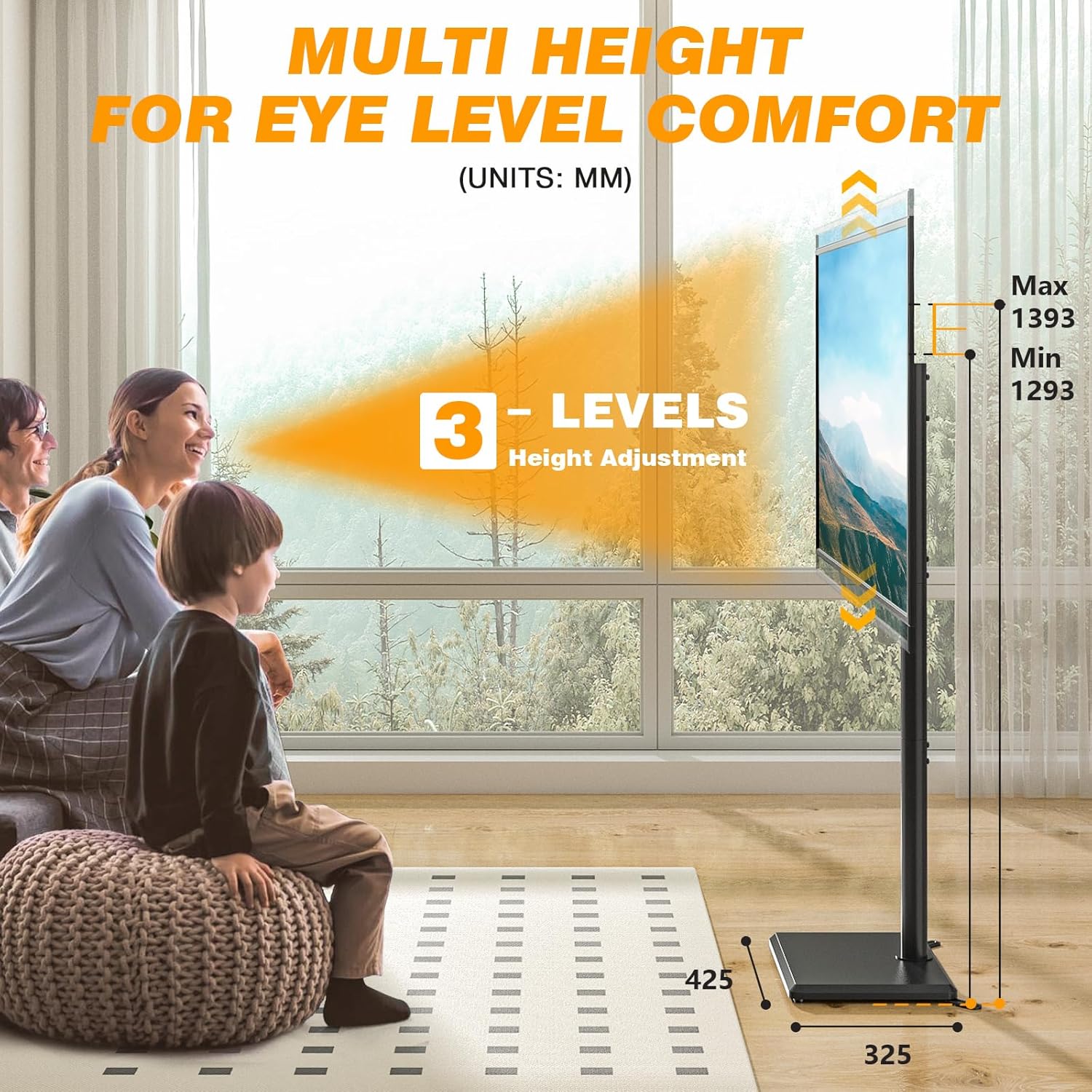
Description: This image illustrates the multi-level height adjustment feature of the TV stand, showing three distinct height settings (1293mm, 1343mm, 1393mm) for eye-level comfort. A family is shown watching TV, emphasizing the ergonomic benefit.
5.2. Swivel Function
The TV stand allows for a 35° left-right swivel, providing a flexible viewing angle from various positions in your room.
- Gently grasp the sides of your TV.
- Rotate the TV to the left or right to achieve your preferred viewing angle. The stand supports a total swivel range of 70° (35° to each side).

Description: This image demonstrates the 70-degree swivel capability of the TV stand, showing a TV rotating left and right to achieve an optimal viewing angle. A couple is shown relaxing on a sofa, enjoying the flexible positioning.
6. Maintenance
- Cleaning: Use a soft, dry cloth to clean the stand. Avoid abrasive cleaners or solvents that could damage the finish.
- Periodic Checks: Regularly inspect all connections and fasteners to ensure they are tight and secure. Loose connections can lead to instability.
- Damage: If any part of the stand becomes damaged, discontinue use immediately and contact customer support for replacement parts or advice.
7. Troubleshooting
| Problem | Possible Cause | Solution |
|---|---|---|
| TV is not stable / wobbles | Loose connections; uneven surface; TV too heavy; incorrect VESA mounting. | Ensure all screws are tightened. Place stand on a level surface. Verify TV weight is within 40 kg limit. Recheck VESA mounting. Consider using optional support feet. |
| TV cannot be mounted | Incorrect VESA pattern; TV size outside range; wrong screws/spacers. | Confirm TV VESA pattern (100x100mm to 400x400mm) and size (32-60 inches). Use correct screws and spacers from the hardware kit. |
| Height adjustment is difficult | Screws are too tight. | Loosen the height adjustment screws slightly before attempting to slide the TV. Ensure they are re-tightened after adjustment. |
8. Specifications
| Feature | Detail |
|---|---|
| Model Number | TF1401 |
| Compatible TV Sizes | 32 - 60 inches |
| Max Load Capacity | 40 kg (88 lbs) |
| VESA Compatibility | 100x100mm to 400x400mm |
| Height Adjustment | 3 levels (1293mm - 1392mm) |
| Swivel Angle | ±35° (70° total) |
| Mounting Type | Floor Mount |
| Material | Metal and Wood |
| Color | Black |
9. Warranty and Support
TVON products are manufactured with quality and care. This product comes with a standard manufacturer's warranty against defects in materials and workmanship. Please refer to the warranty card included in your package or visit our official website for detailed warranty terms and conditions.
For technical assistance, missing parts, or any questions regarding your TVON TV Floor Stand, please contact our customer support team:
- Email: support@tvon.com
- Website: www.tvon.com
- Please have your model number (TF1401) and purchase date ready when contacting support.