1. Introduction
This manual provides instructions for the ALLIMITY AH59-02146M and AH59-02146L replacement remote controls. These remotes are designed to be compatible with various Samsung Micro Component Multimedia Systems, offering a direct replacement without the need for complex setup or programming.
2. Safety Information
- Keep batteries out of reach of children.
- Do not mix old and new batteries, or different types of batteries.
- Remove batteries if the remote control will not be used for an extended period.
- Avoid exposing the remote to extreme temperatures or direct sunlight.
3. Package Contents
Your package should contain the following item:
- 1 x ALLIMITY Replacement Remote Control (Model AH59-02146M or AH59-02146L)
Note: AAA batteries are not included and must be purchased separately.
4. Setup
4.1 Battery Installation
- Locate the battery compartment on the back of the remote control.
- Slide the battery compartment cover downwards and remove it.
- Insert two (2) AAA batteries, ensuring the positive (+) and negative (-) terminals align correctly with the markings inside the compartment.
- Replace the battery compartment cover by sliding it back into place until it clicks securely.

Image: Back view of the remote control with the battery cover removed, illustrating the battery insertion points for two AAA batteries.

Image: Back view of the remote control with the battery cover securely closed.
The remote control is now ready for use. No programming or pairing is required.
5. Operation
5.1 Basic Functionality
This replacement remote control functions identically to the original Samsung remote for compatible multimedia systems. Simply point the remote at your Samsung Micro Component Multimedia System and press the desired button.

Image: Front view of the ALLIMITY replacement remote control, displaying its full button layout.
5.2 Compatible Samsung Systems
The ALLIMITY AH59-02146M / AH59-02146L remote control is compatible with the following Samsung Micro Component Multimedia System models:
- MM-C530D
- MM-D530D
- MM-DG35-EUR
- MMC550D
- MMC430D
- MMC530D
- MM-D430D
- MM-DG351
- MM-DG35IRS
- MM-DG36
- MM-C330D
- MM-DG25
- MMC330D
- MMDG25
- MM-C550D
- MM-C430D
- MM-DG35
- MM-DG36l
- REMOCON-ASSY
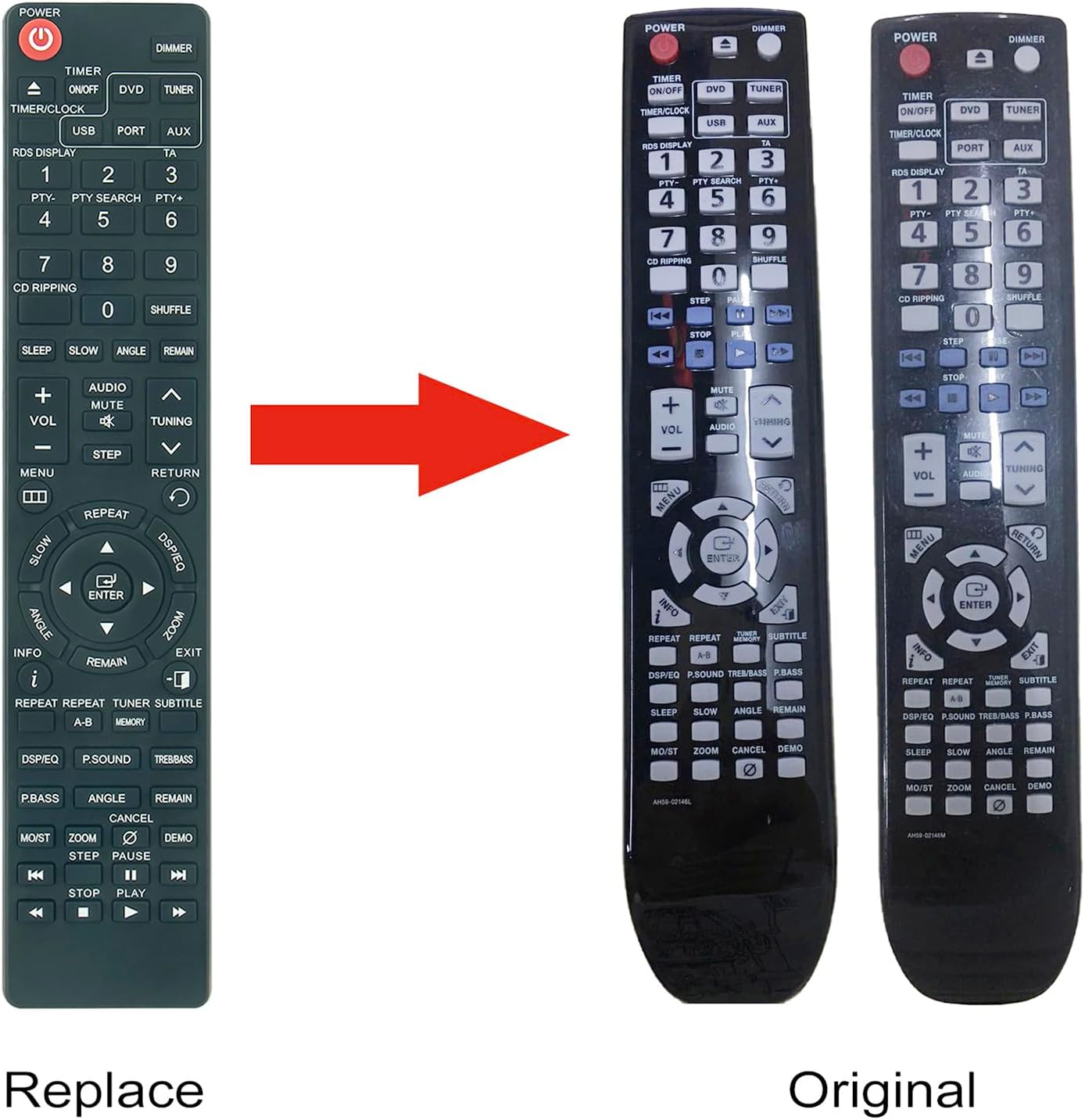
Image: A visual comparison between the ALLIMITY replacement remote and an original Samsung remote, demonstrating their similar design and button layout.
6. Maintenance
6.1 Cleaning
To clean the remote control, gently wipe it with a soft, dry cloth. Do not use liquid cleaners or abrasive materials, as these may damage the surface or internal components.
6.2 Battery Replacement
If the remote control's performance degrades or it stops responding, replace the batteries. Follow the battery installation steps outlined in Section 4.1. Always replace both batteries at the same time with new AAA alkaline batteries.
7. Troubleshooting
| Problem | Possible Cause | Solution |
|---|---|---|
| Remote not responding | Dead or incorrectly inserted batteries. | Replace batteries with new AAA batteries, ensuring correct polarity. |
| Remote has limited range | Weak batteries or obstruction between remote and system. | Replace batteries. Ensure a clear line of sight to the multimedia system's IR receiver. |
| Specific buttons not working | Button malfunction or system incompatibility. | Verify your Samsung system model is listed in the compatible models. If issues persist, contact customer support. |
8. Specifications
- Model Numbers: AH59-02146M, AH59-02146L
- Brand: ALLIMITY
- Power Source: 2 x AAA Batteries (not included)
- Dimensions: Approximately 6 x 2 x 0.6 inches (15.24 x 5.08 x 1.52 cm)
- Item Weight: Approximately 2 ounces (56.7 grams)
- Color: Black
- Special Feature: No Programming Required
- Compatible Devices: Samsung Micro Component Multimedia Systems (refer to Section 5.2 for specific models)
9. Warranty and Support
For warranty information or technical support, please refer to the seller's policy or contact the retailer from whom the product was purchased. Keep your purchase receipt as proof of purchase.


