
DeerRun BA05
DeerRun 2025 Upgrade Smart Under Desk Walking Pad (Model BA05)
Instruction Manual
1. Introduction
Welcome to the DeerRun 2025 Upgrade Smart Under Desk Walking Pad, Model BA05. This manual provides essential information for the safe and efficient operation, maintenance, and troubleshooting of your new walking pad. Designed for versatility, this unit supports walking, jogging, and light running, making it suitable for both home and office environments. Please read this manual thoroughly before first use and retain it for future reference.
2. Important Safety Information
To ensure safe operation and prevent injury, please observe the following precautions:
- Always place the walking pad on a flat, stable surface.
- Ensure adequate clearance around the unit (at least 2 feet on all sides).
- Keep children and pets away from the walking pad during operation.
- Do not use the walking pad if you weigh more than 265 lbs (120 kg).
- Wear appropriate athletic footwear.
- If you experience dizziness, nausea, chest pain, or any other abnormal symptoms, stop your workout immediately and consult a physician.
- Unplug the walking pad from the power outlet when not in use or before cleaning/maintenance.
- Do not attempt to service the unit yourself. Contact customer support for assistance.
3. Product Features
The DeerRun Smart Under Desk Walking Pad is equipped with several features designed for a convenient and effective workout:
- 3-in-1 Adjustable Speed: Seamlessly switch between walking, jogging, and light running modes with adjustable speed settings from 0.6 to 3.8 MPH.
- Quiet and Durable Motor: Features a 2.5HP motor that operates quietly (below 45dB), supporting users up to 265 lbs.
- Multi-Layer Running Belt: Designed with a 5-layer non-slip belt and 6 buffer pivot points for enhanced shock absorption, protecting your ankles and knees.
- Smart App Integration (PitPat): Connect via Bluetooth to the PitPat app for virtual competitions, personalized AI coaching, training videos, and comprehensive data tracking.
- Remote Control: Easily adjust speed and control the unit with the included remote.
- LED Display: Clear display shows essential metrics including speed, time, distance, and calories burned.
- Portable Design: No assembly required and features built-in transport wheels for easy movement and storage under furniture or in tight spaces.

Figure 1: Multi-layer running belt with shock absorption for ankle and knee protection.

Figure 2: Illustration of the 3-in-1 functionality, demonstrating working, walking, and jogging modes.
Video 1: This video provides a general overview of the DeerRun Walking Pad's features and usage scenarios.
Video 2: This video highlights the smart features and compact design of the DeerRun Walking Pad.
4. Setup Instructions
Your DeerRun Walking Pad arrives fully assembled and ready for immediate use.
- Unpacking: Carefully remove the walking pad from its packaging. Retain packaging for potential future transport or returns.
- Placement: Place the walking pad on a firm, level surface. Ensure there is sufficient space around the unit for safe operation.
- Power Connection: Locate the power input port on the front of the walking pad. Connect the provided power cord to the unit and then to a standard electrical outlet.
- Power On: Flip the main power switch located near the power cord input to the 'ON' position. The LED display should illuminate.
Video 3: This video demonstrates the unboxing and initial setup process of the DeerRun Walking Pad, showing how to prepare it for first use.
5. Operating Instructions
Your walking pad can be controlled using the included remote control or the PitPat smartphone application.
5.1. Using the Remote Control
- Start/Stop: Press the central play/pause button to start or stop the walking pad.
- Speed Adjustment: Use the '+' button to increase speed and the '-' button to decrease speed. The speed range is 0.6 to 3.8 MPH.
- Display: The LED display on the walking pad will show current speed, time, distance, and calories burned.

Figure 3: Remote control and LED display showing workout metrics.
5.2. Using the PitPat App
- Download: Download the "PitPat" app from your smartphone's app store (available on iOS and Android).
- Connect: Enable Bluetooth on your smartphone and open the PitPat app. Follow the in-app instructions to pair with your DeerRun Walking Pad.
- Features: The app allows you to control the walking pad, track your workout data, participate in virtual races, access training videos, and receive AI coaching.
Figure 4: PitPat app interface for enhanced workout tracking and interactive features.
6. Maintenance
Regular maintenance ensures the longevity and optimal performance of your walking pad.
- Cleaning: Wipe down the walking pad with a damp cloth after each use to remove sweat and dust. Do not use abrasive cleaners.
- Lubrication: The running belt requires periodic lubrication to reduce friction and extend its lifespan. Use the provided lubricant and follow the instructions in the user manual for application frequency (typically every 3-6 months depending on usage).
- Belt Adjustment: If the running belt feels loose or off-center, use the included 5# wrench to adjust the tension bolts at the rear of the unit. Refer to the detailed instructions in the full user manual for proper adjustment procedures.
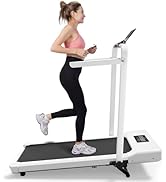
Figure 5: Included accessories for maintenance, including lubricating oil and wrench.
7. Troubleshooting
If you encounter issues with your DeerRun Walking Pad, refer to the following common solutions.
- Unit Not Powering On: Ensure the power cord is securely plugged into both the unit and a working electrical outlet. Check the main power switch is in the 'ON' position.
- Remote Control Unresponsive:
- Check for poor contact between the battery and terminals. Gently open the back cover of the remote and adjust the metal contacts.
- If the problem persists, turn on the machine and press the '+' button on the remote for 5 seconds after the device displays "0:00". You should hear a beep indicating successful pairing.
- Unusual Noises: Check for any foreign objects under the running belt. Ensure the belt is properly lubricated and centered.
- Error Codes: If an error code appears on the LED display, consult the full user manual for specific meanings and solutions. For persistent issues, contact customer support.
Video 4: This video provides instructions on how to troubleshoot issues with the remote control not functioning correctly.
8. Specifications
| Feature | Detail |
|---|---|
| Brand | DeerRun |
| Model Name | BA05 |
| Color | White |
| Product Dimensions (LxWxH) | 45.12"D x 19.57"W x 4.53"H |
| Item Weight | 41 Pounds |
| Material | Alloy Steel |
| Maximum Speed | 3.8 Miles per Hour |
| Minimum Speed | 0.6 Miles per Hour |
| Maximum Weight Recommendation | 265 Pounds |
| Maximum Horsepower | 2.5 Horsepower |
| Deck Length | 39.5 Inches |
| Deck Width | 15.7 Inches |
| Display Type | LED |
| Connectivity Technology | Bluetooth & PitPat |
| Assembly Required | No |
| Included Components | Lubricant, Power Cord, Remote Control, Tool Kit, User Manual |
9. Portability and Storage
The DeerRun Walking Pad is designed for convenience, featuring a compact profile and built-in wheels for easy transport and storage.
- Easy Movement: Simply tilt the walking pad and roll it to your desired location using the integrated transport wheels.
- Compact Storage: Its slim design allows it to be stored under most furniture, such as sofas or beds, or vertically against a wall, minimizing space requirements.

Figure 6: Demonstrating the ease of moving and storing the walking pad under furniture.
Video 5: This video provides a sizing guide for DeerRun treadmills, illustrating how different models fit various user needs and spaces.
10. Warranty and Support
Your DeerRun Walking Pad comes with a comprehensive 12-month warranty, guaranteeing long-term satisfaction.
For any questions, concerns, or technical assistance, our dedicated 24/7 customer support team is available to help. Please refer to the contact information provided in your user manual or on the product packaging.
Related documentsBA05


Ask a question about this manual
Ask about setup, troubleshooting, compatibility, parts, safety, or missing instructions. Manuals+ will review the question and use this page’s manual context to help answer it.