1. Introduction
This manual provides detailed instructions for the installation, operation, and maintenance of your Ctronics 4MP Dual Lens Security Camera System. Please read this manual thoroughly before using the product to ensure proper setup and functionality. Keep this manual for future reference.

Image: Four Ctronics 4MP Dual Lens Security Cameras, showcasing the product package.
2. Safety Information
To prevent injury to yourself or others, and to avoid damage to your device, read all safety information before using the product.
- Ensure the power supply voltage is stable and matches the camera's requirements.
- Do not expose the camera to extreme temperatures, humidity, or direct sunlight.
- Avoid placing the camera near strong electromagnetic fields.
- Do not attempt to disassemble or modify the camera. Refer all servicing to qualified personnel.
- Clean the camera with a soft, dry cloth. Do not use harsh chemicals or abrasive cleaners.
3. Package Contents
Verify that all items are present in your package:
- Ctronics 4MP Dual Lens Security Camera(s)
- Power Adapter(s)
- Mounting Screws and Wall Plugs
- Waterproof Kit for Network Cable (if applicable)
- User Manual (this document)
4. Product Overview
The Ctronics 4MP Dual Lens Security Camera features a robust design with advanced functionalities for comprehensive surveillance.
Key Components:
- Dual Lenses: Equipped with both a telephoto (8.0mm) and a wide-angle (3.6mm) lens for versatile viewing.
- Infrared LEDs: For night vision capabilities.
- White Light LEDs: For color night vision and deterrence.
- Microphone: For audio input.
- Speaker: For two-way audio communication and sound alarms.
- Antennas: For 2.4/5GHz WiFi connectivity.
- PTZ Mechanism: Allows for 360° pan and 90° tilt rotation.
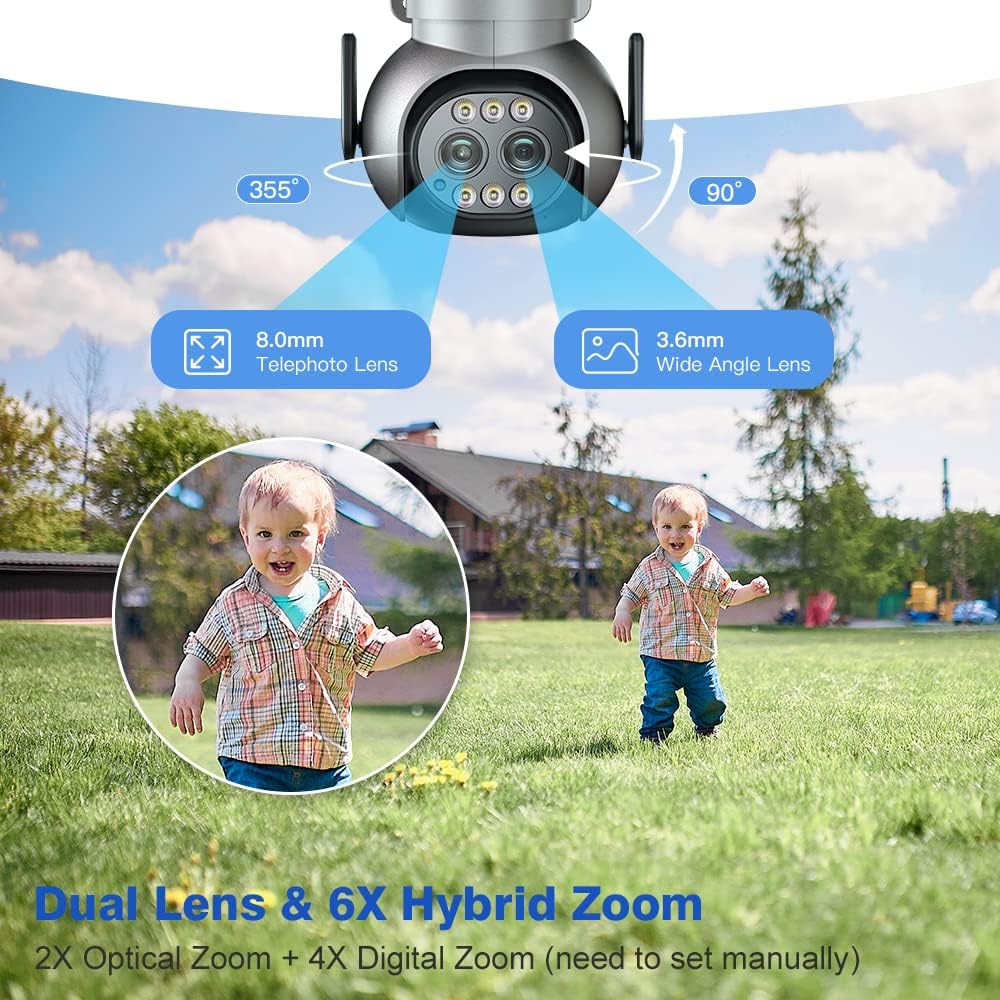
Image: Diagram illustrating the dual lenses (8.0mm telephoto and 3.6mm wide-angle) and the 355° pan and 90° tilt rotation capabilities of the camera.
5. Setup
5.1 Physical Installation
The camera supports both ceiling and wall installation. Choose a location that provides optimal coverage and a stable mounting surface.

Image: Illustrations demonstrating two installation methods: ceiling installation (camera mounted underneath an overhang) and wall installation (camera mounted on a vertical wall surface).
- Mark the drilling positions using the mounting template (if provided).
- Drill holes and insert wall plugs.
- Secure the camera base to the wall/ceiling using the provided screws.
- Adjust the camera angle as needed after power-up.
5.2 Network Connection
The camera supports dual-band 2.4GHz and 5GHz WiFi connections. Ensure your router is within range.

Image: A visual representation of a house with a Ctronics camera, showing the wider range of 2.4 GHz WiFi and the faster data speed of 5 GHz WiFi, indicating optimal transmission distance up to 20 meters.
- Download the Ctronics app from your mobile app store (iOS/Android).
- Register an account and log in.
- Power on the camera. Wait for the camera to enter pairing mode (indicated by a specific LED status or voice prompt).
- In the app, follow the on-screen instructions to add your camera. This typically involves scanning a QR code on the camera or connecting to its temporary WiFi hotspot.
- Select your home WiFi network (2.4GHz or 5GHz) and enter the password.
- Once connected, the camera will indicate successful pairing.
6. Operating Instructions
6.1 Live View and PTZ Control
Access the live video feed through the Ctronics app. Use the on-screen controls to pan (horizontal rotation) and tilt (vertical rotation) the camera for a 360° view.
6.2 Zoom Function
The camera features 6X Hybrid Zoom, combining 2X optical zoom and 4X digital zoom. Optical zoom provides clearer magnification without loss of detail. Digital zoom can be manually set within the app.
6.3 Human Detection and Auto Tracking
The camera can detect human shapes and automatically track their movement within the surveillance area. This feature helps reduce false alarms from pets or inanimate objects.
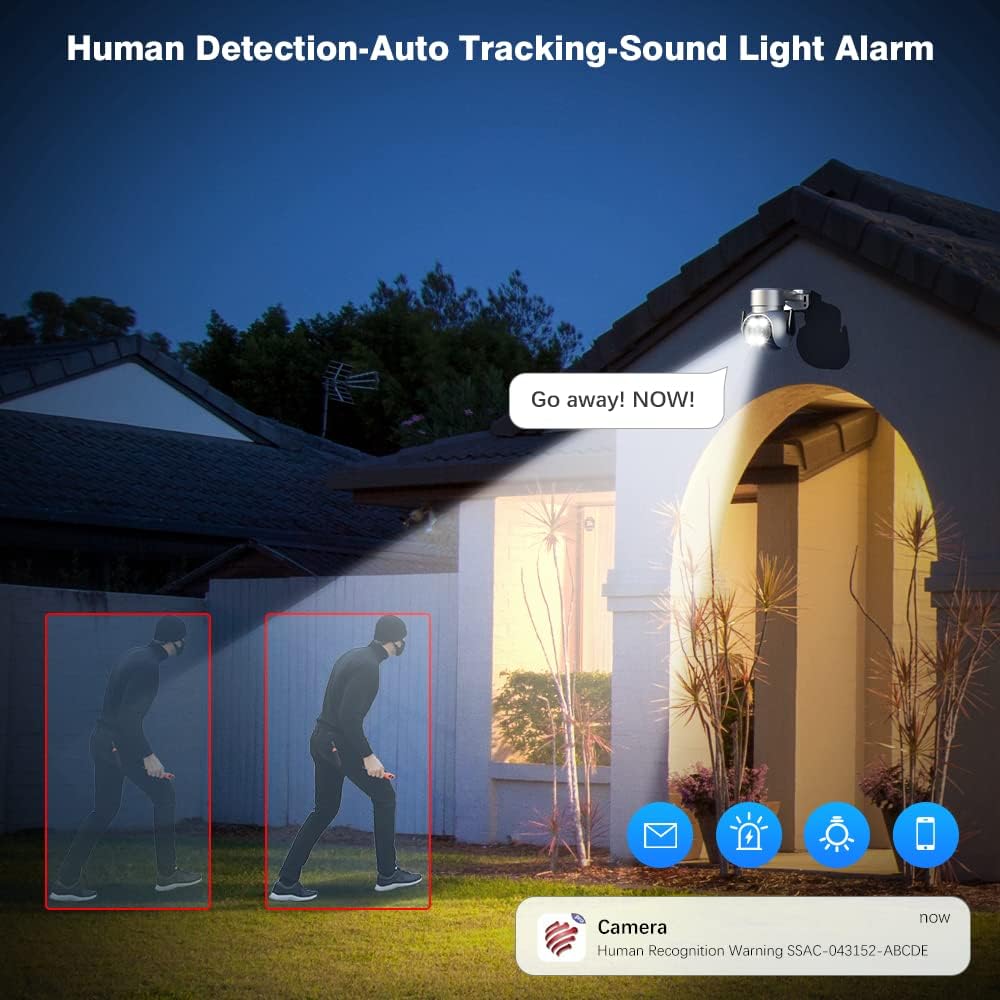
Image: A night scene showing the Ctronics camera detecting a human figure (highlighted in red boxes) and triggering a 'Go away! NOW!' sound and light alarm. App notifications for human recognition are also shown.
6.4 Color Night Vision
The camera provides clear color images even in low-light conditions, extending visibility beyond traditional infrared night vision. It also supports standard IR night vision up to 30 meters.

Image: A split image demonstrating the difference between 30M IR Night Vision (monochrome) and 20M Color Night Vision (full color) captured by the Ctronics 2.5K 4MP camera, with app toggles for each mode.
6.5 Two-way Audio and Multi-user Sharing
Communicate with individuals near the camera using the built-in microphone and speaker. The system also allows multiple users to access the camera feed simultaneously, enabling family members to monitor the property.

Image: A collage showing a child speaking into the camera ('Mommy, I'm coming.'), a person viewing the camera feed on a smartphone ('Baby, it's time for lunch.'), and two adults sharing a device to view the camera, illustrating two-way audio and multi-user sharing capabilities.
6.6 Recording and Playback
The camera supports continuous recording, event-triggered recording (e.g., motion detection), and scheduled recording. Recordings can be stored on a microSD card (not included) or a compatible NVR/cloud service. Use the app's playback function to review recorded footage.
7. Maintenance
- Cleaning: Regularly wipe the camera lens and body with a soft, lint-free cloth to ensure clear image quality. Do not use liquid cleaners.
- Firmware Updates: Check the Ctronics app periodically for firmware updates. Keeping your camera's firmware up-to-date ensures optimal performance and access to new features.
- Network Stability: Ensure your WiFi network is stable and strong at the camera's location for uninterrupted operation.
8. Troubleshooting
8.1 Camera Offline
- Check if the camera is powered on.
- Verify your WiFi network is working correctly.
- Ensure the camera is within WiFi range. Try moving the camera closer to the router or using a WiFi extender.
- Restart the camera and your router.
8.2 Poor Image Quality
- Clean the camera lens.
- Check your network speed. A slow connection can affect streaming quality.
- Ensure there are no obstructions blocking the camera's view.
8.3 Motion Detection Not Working
- Ensure motion detection is enabled in the app settings.
- Adjust the motion detection sensitivity.
- Check the detection zone settings to ensure the area of interest is covered.
8.4 Cannot Connect to 5GHz WiFi
- While the camera supports 5GHz, ensure your router's 5GHz band is active and broadcasting.
- 5GHz signals have a shorter range and are more susceptible to obstacles. Try connecting to the 2.4GHz band if issues persist.
9. Specifications
| Feature | Specification |
|---|---|
| Brand | Ctronics |
| Connectivity Technology | USB, Ethernet, HDMI (Note: USB/HDMI for specific models/accessories, primary is WiFi) |
| Video Capture Resolution | 4 MP (2.5K) |
| Special Feature | Night Vision (Color & IR) |
| Number of Channels | 4 (for the 4-pack system) |
| Memory Storage Capacity | 4 GB (Internal/Included, typically refers to system memory, not user storage) |
| Compatible Devices | Laptops (via software/NVR), Smartphones (via app) |
| Signal Format | Digital |
| Other Camera Features | Rear, Front (referring to lens orientation/view) |
| Low Light Technology | Night Vision |
| Recording Mode | HD video |
| Optical Sensor Technology | Night Vision |
| Lens Type | Varifocal (Dual Lens: 8.0mm Telephoto, 3.6mm Wide-Angle) |
| Item Weight | 5.81 pounds (for the 4-pack) |
| IP Rating | IP66 (Weatherproof) |
| Zoom | 6X Hybrid Zoom (2X Optical + 4X Digital) |
| PTZ | 360° Pan, 90° Tilt |
10. Warranty and Support
Ctronics products typically come with a limited warranty. Please refer to the warranty card included with your product or visit the official Ctronics website for detailed warranty terms and conditions.
Customer Support:
For technical assistance, troubleshooting, or warranty claims, please contact Ctronics customer support through their official website or the contact information provided in your product packaging. When contacting support, please have your product model number (CT-4MP-DL-PTZ) and purchase information ready.


