
1. Introduction
Thank you for choosing the Dysaim Gesture RC Car, Model 8868E. This 4WD remote control stunt car offers an exciting and interactive experience with its unique gesture control, multi-directional movement, and dynamic features. This manual provides essential information for setting up, operating, and maintaining your RC car to ensure long-lasting enjoyment.
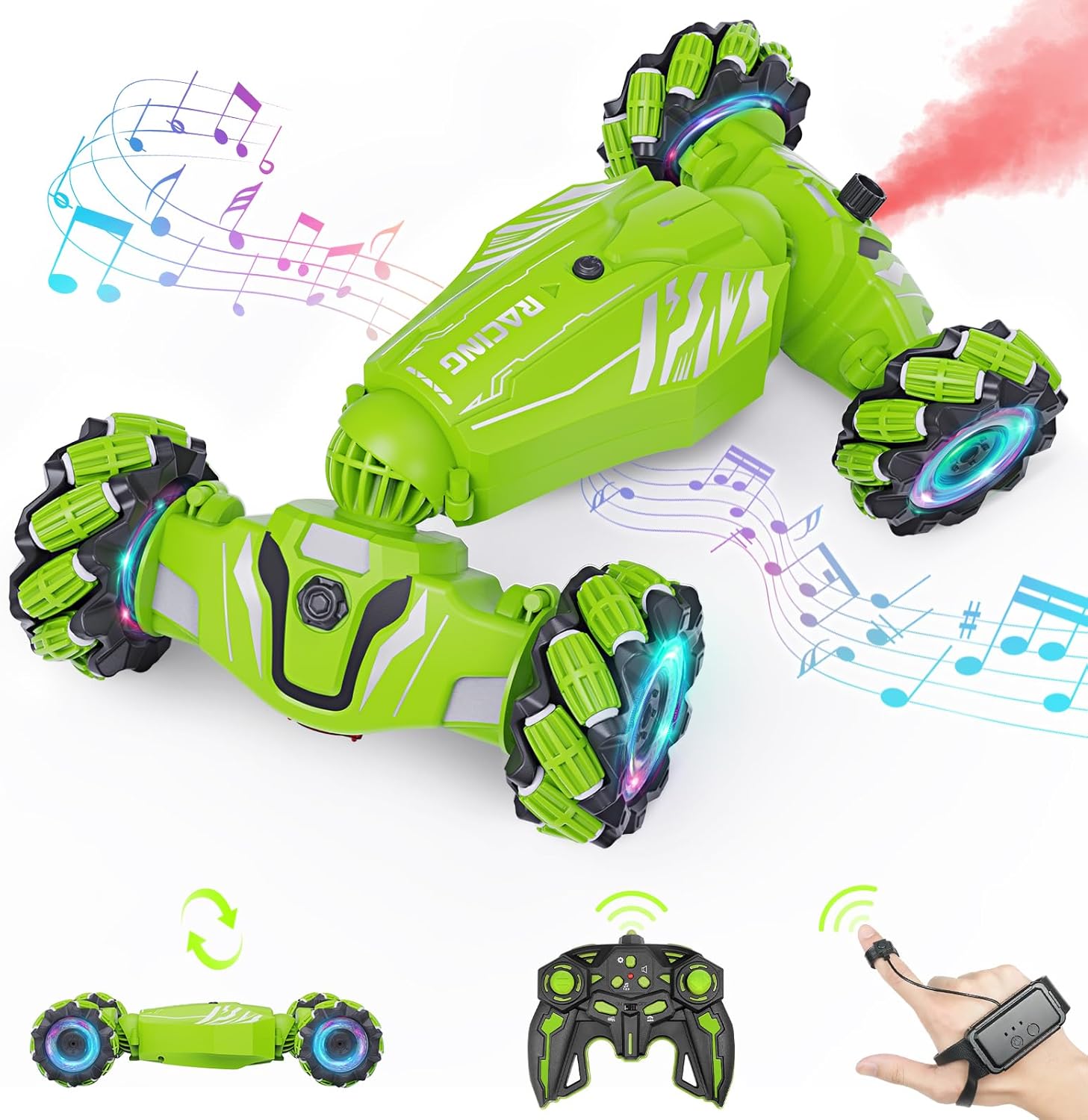
Image 1.1: The Dysaim Gesture RC Car, Model 8868E.
2. What's in the Box
Please check the contents of your package against the list below:
- 1 x Gesture RC Car
- 1 x Gravity Sensor Watch Controller
- 1 x 2.4GHz Remote Controller
- 2 x Rechargeable Lithium Ion Batteries
- 1 x USB Charging Cable
- 1 x Water-filled Dropper
- 1 x Screwdriver

Image 2.1: Package contents of the Dysaim Gesture RC Car.
3. Setup
3.1. Battery Installation
- Locate the battery compartment on the underside of the RC car.
- Use the provided screwdriver to open the battery compartment cover.
- Connect the rechargeable Lithium Ion battery to the car's battery connector. Ensure the polarity is correct.
- Carefully place the battery inside the compartment and close the cover, securing it with the screw.

Image 3.1: Battery installation steps.
3.2. Charging the Batteries
The Dysaim Gesture RC Car comes with two rechargeable Lithium Ion batteries for extended playtime. Use the provided USB charging cable.
- Connect the battery to the USB charging cable.
- Plug the USB end of the cable into a standard USB power adapter (not included) or a computer USB port.
- The indicator light on the USB cable will show the charging status. Refer to the charging cable's instructions for specific light indications (e.g., red for charging, off for fully charged).
- A full charge typically takes approximately 2-3 hours and provides 25-30 minutes of playtime per battery.

Image 3.2: Battery charging process.
4. Operating Instructions
4.1. Control Modes
The Dysaim Gesture RC Car can be controlled using two methods:
- 2.4GHz Remote Controller: Provides precise control over the car's movements.
- Gravity Sensor Watch Controller: Allows for intuitive hand gesture control, enabling the car to mimic your hand movements.

Image 4.1: The RC car and its two control methods.

Image 4.2: Detailed view of controller functions.
4.2. Stunt Features and Movement
The RC car is designed for dynamic performance:
- 360° Rotation: Perform full rotations for impressive maneuvers.
- Double-Sided Flip: The car can flip and continue driving on either side.
- All-Round Drifts: Execute precise drifts in any direction.
- 45° Climbing: Capable of climbing inclines up to 45 degrees.
- Transformation Modes: Switch between 'On-Road' mode for speed and 'Off-Road' mode for rougher terrains.

Image 4.3: Stunt capabilities of the RC car.

Image 4.4: Transformation between On-Road and Off-Road modes.
4.3. Multi-Terrain Performance
Equipped with 4WD and durable tires, the Dysaim Gesture RC Car can conquer various terrains:
- Road
- Sand
- Rock
- Grass

Image 4.5: Multi-terrain capabilities.
4.4. Lights, Music, and Fog Sprayer
Enhance your driving experience with these interactive features:
- Colorful Lights: Dazzling color-changing lights on the wheels and body.
- Dynamic Music: Play exciting music during operation.
- Fog Sprayer: Add water using the provided dropper to activate a cool fog effect from the rear of the car.

Image 4.6: Lights, music, and fog sprayer in action.

Image 4.7: Activating the fog sprayer.
4.5. Official Product Video
Video 4.8: An official product video from Dysaim showcasing the Gesture Sensing RC Stunt Car's features and capabilities, including its various movements and interactive elements.
5. Maintenance
- Cleaning: Wipe the car with a soft, dry cloth after each use to remove dust and debris. Avoid using water or harsh chemicals.
- Battery Care: Always fully charge batteries before storage. If not used for an extended period, charge the batteries every 3 months to prolong their lifespan. Remove batteries from the car and controllers when not in use.
- Storage: Store the RC car and its accessories in a cool, dry place away from direct sunlight and extreme temperatures.
6. Troubleshooting
- Car not responding: Ensure both the car and controller batteries are fully charged and correctly installed. Check that both devices are powered on and paired.
- Poor range or interference: Operate the car in an open area away from other 2.4GHz devices or large metal objects that may cause interference.
- Reduced performance: This may indicate low battery power. Recharge the batteries.
- Fog sprayer not working: Ensure the water tank is filled with clean water using the provided dropper. Check for any blockages in the nozzle.
7. Specifications
| Feature | Specification |
|---|---|
| Product Dimensions | 10.63 x 6.3 x 2.56 inches |
| Item Weight | 1.61 pounds |
| Item Model Number | 8868E |
| Manufacturer Recommended Age | 6 - 12 years |
| Batteries | 2 Lithium Ion batteries required (included) |
| Manufacturer | Dysaim |
8. Safety Information
Please read and follow these safety guidelines to prevent injury or damage:
- Always operate the RC car in a safe, open area away from people, pets, and obstacles.
- Do not operate near roads, water, or electrical wires.
- Adult supervision is recommended for children operating the RC car.
- Do not touch the moving parts of the car during operation.
- Use only the specified batteries and charging cable.
- Do not attempt to modify or disassemble the car or its components.
- Keep small parts out of reach of young children to prevent choking hazards.
9. Warranty and Support
For warranty information, technical support, or any questions regarding your Dysaim Gesture RC Car, please contact Dysaim customer service through the retailer where the product was purchased or visit the official Dysaim website for support resources.

