
Product Overview
The MOKKOM Coffee Grinder is designed to provide precise and consistent coffee grounds for various brewing methods. It features a removable professional-grade coffee scale with Bluetooth connectivity, anti-static technology, and 31 adjustable grind settings. This manual provides instructions for safe and efficient operation, maintenance, and troubleshooting.

Image: MOKKOM Coffee Grinder with its removable scale and accessories.
What's in the Box
- MOKKOM Coffee Grinder Unit
- Removable Coffee Scale with Timer and Tare
- Coffee Ground Cup
- Coffee Bean Hopper with Lid
- Portafilter Cradles (Small for 50-53mm, Large for 58mm)
- Cleaning Brush
- USB-A to USB-C Charging Cable (for scale)
- User Manual
Setup
- Unpacking: Carefully remove all components from the packaging. Retain packaging for future transport or storage.
- Placement: Place the grinder on a stable, flat, and dry surface. Ensure adequate clearance around the unit for ventilation.
- Assemble Hopper: Place the coffee bean hopper onto the top of the grinder unit. Ensure it is securely seated.
- Insert Ground Cup/Scale: Place the coffee ground cup onto the scale platform. The removable scale should be placed on the base of the grinder.
- Power Connection: Plug the grinder's power cord into a suitable electrical outlet.
- Charge Scale: Use the provided USB-C cable to charge the removable coffee scale before first use.
Operating Instructions
1. Powering On/Off
- Press the ON/OFF button on the grinder's control panel to turn the unit on or off.
- The removable scale has its own POWER button. When the scale is turned on and placed on the grinder's base, it will automatically pair via Bluetooth.
2. Adjusting Grind Settings
The MOKKOM grinder offers 31 precise grind settings, from fine (for espresso) to coarse (for French Press). Use the grind adjustment knob on the side of the grinder to select your desired setting.
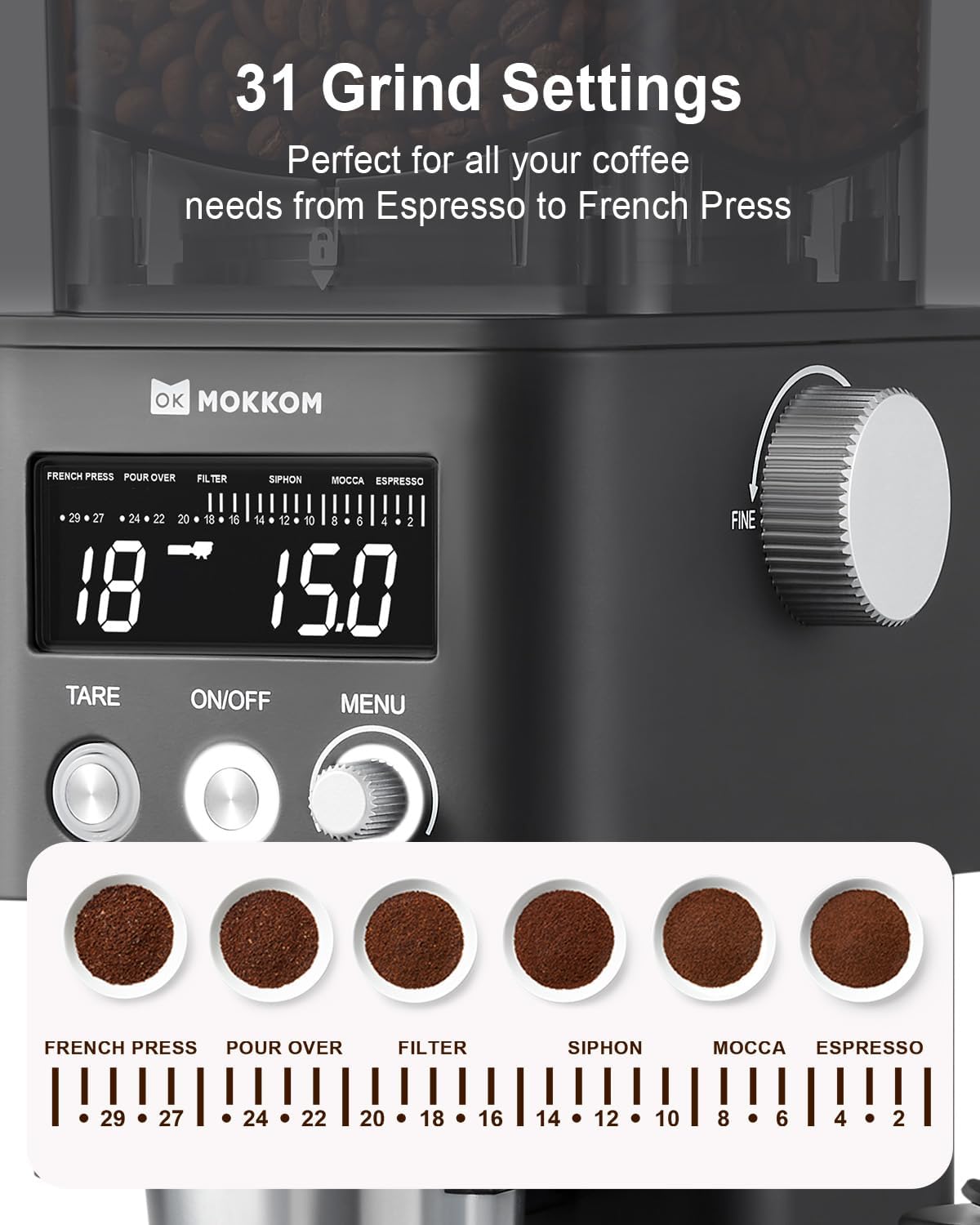
Image: Control panel showing 31 grind settings from French Press to Espresso.
3. Using the Removable Coffee Scale
The integrated scale provides real-time weight measurements and allows for precise control over your coffee grounds.
- Bluetooth Connectivity: The removable scale automatically pairs with the grinder when both are powered on.
- Units of Measurement: The scale supports measurements in grams (g), ounces (oz), and milliliters (ml). Adjust units using the scale's control buttons.
- Tare Function: Press the TARE button on the grinder or the scale to zero out the weight of the container.

Image: Removable coffee scale with a pour-over setup, demonstrating its use.
4. Grinding Modes (4-in-1 Selection)
The grinder allows you to select grinding parameters by time, cups, ounces, or grams.
- Time Selection: Adjust grind time up to 60 seconds in 0.1-second increments.
- Cup Selection: Select the number of cups from 1 to 12.
- OZ Selection: Adjust the weight from 0.2 to 5.3 oz.
- G Selection: Adjust the weight from 5 to 150 g.

Image: Control panel displaying options for Time, Cups, OZ, and G selection.
5. Using Portafilter Cradles (Design for Espresso)
The grinder comes with two sizes of portafilter cradles to allow direct grinding into your espresso portafilter.
- Small Cradle: For 50-53mm portafilters.
- Large Cradle: For 58mm portafilters.
- Insert the appropriate cradle into the grinding chute. Place your portafilter into the cradle before grinding.

Image: MOKKOM Coffee Grinder with a portafilter inserted into one of the cradles, ready for grinding.
6. Anti-static Technology
The innovative anti-static technology neutralizes static electricity during grinding, preventing coffee grounds from flying around and reducing mess.

Image: Diagram illustrating the anti-static mechanism within the grinder, showing coffee beans being ground without static cling.
Maintenance
1. Cleaning the Grinder
Regular cleaning ensures optimal performance and extends the life of your grinder.
- Disassembly: Unplug the grinder. Remove the bean hopper by twisting it counter-clockwise. The upper burr can then be removed by twisting and lifting.
- Cleaning Burrs: Use the provided cleaning brush to remove any residual coffee grounds from the conical burrs.
- Cleaning Hopper & Ground Cup: Wash the bean hopper and coffee ground cup with warm, soapy water. Rinse thoroughly and allow to air dry completely before reassembling.
- Wipe Exterior: Wipe the exterior of the grinder unit with a damp cloth. Do not immerse the main unit in water.
- Reassembly: Once all parts are dry, reassemble the burrs and hopper in reverse order of disassembly.

Image: Close-up view of the detachable stainless steel conical burr, highlighting its easy removal for cleaning.
Troubleshooting
1. Turning On/Off the Beeping Sound
- In standby mode, press and hold the TARE button for 3 seconds. The screen will display "OFF" to indicate the button tone is deactivated.
- To restore the button tone, press and hold the TARE button for 3 seconds again. The screen will display "ON".
2. Grinder Not Operating
- Ensure the power cord is securely plugged into an active outlet.
- Check if the bean hopper is correctly seated and locked into place. The grinder has a safety mechanism that prevents operation if the hopper is not properly installed.
- Verify that the ON/OFF button has been pressed.
3. Inconsistent Grind
- Ensure the burrs are clean and free of old coffee grounds or oils. Refer to the Maintenance section for cleaning instructions.
- Check that the grind setting knob is securely in position and has not shifted during operation.
Specifications
| Feature | Detail |
|---|---|
| Brand | MOKKOM |
| Model | CG020 |
| Color | Matte Black |
| Material | Stainless Steel (Burrs), Plastic (Housing) |
| Wattage | 200 watts |
| Grind Settings | 31 Precise Settings |
| Bean Hopper Capacity | 150 Grams |
| Ground Cup Capacity | 120 Grams |
| Power Source | AC adapter |
| Scale Connectivity | Bluetooth |
| Scale Measurement Units | g, oz, ml |

Image: MOKKOM Coffee Grinder with key dimensions and capacities labeled.
Additional Information
Official Product Video
Video: Official MOKKOM Coffee Grinder with Removable Coffee Scale. This video demonstrates the grinder's features, including the removable scale, grind adjustment, and anti-static technology.
Warranty and Support
For warranty information, technical support, or any inquiries regarding your MOKKOM Coffee Grinder, please refer to the contact details provided in the product packaging or visit the official MOKKOM website.
MOKKOM Store: Visit the MOKKOM Store on Amazon