
Viribus AAE-M1AB-AP
Contents
Viribus Electric Tricycle User Manual
Model: AAE-M1AB-AP | Brand: Viribus
1. Introduction
This manual provides essential information for the safe and efficient operation, maintenance, and troubleshooting of your Viribus Electric Tricycle. Please read this manual thoroughly before first use and retain it for future reference.

Figure 1: Viribus Electric Tricycle (Rosy 24 in) with accessories.
2. Safety Guidelines
Always wear a helmet and appropriate safety gear when riding. Ensure all components are securely fastened before each ride. Do not operate the tricycle under the influence of alcohol or drugs. Adhere to local traffic laws and regulations.
- Regularly check tire pressure and brake functionality.
- Do not exceed the maximum weight recommendation of 330 lbs.
- Keep hands and feet clear of moving parts.
- Charge the battery in a well-ventilated area away from flammable materials.
3. Setup and Assembly
Your Viribus Electric Tricycle requires some assembly. Please follow the steps below carefully. A tool kit is included for your convenience.
3.1 Included Components
- 1x Adult Electric Tricycle
- 1x Front Light
- 2x Zip Ties
- 2x Long Bolts & Nuts
- 6x Short Bolts & Nuts
- 2x Rear Reflectors
- 1x Charger
- 1x Power Cord
- 1x Screwdriver
- 3x Wrenches
- 3x Hex Wrenches
- 1x Instructions (this manual)
- Tool Kit
- Password Lock
3.2 Initial Setup Steps
- Unpacking: Carefully remove all components from the packaging.
- Handlebar Installation: Attach the handlebars securely.
- Front Wheel Assembly: Install the front wheel, ensuring the brake caliper is correctly aligned.
- Rear Basket Assembly: Assemble and attach the spacious rear basket.
- Saddle Adjustment: Adjust the cushioned saddle to a comfortable height. The step-through frame makes it easy for riders of any age to hop on and off.
- Battery Installation & Charging: The 468Wh removable battery is located under the seat. Insert the battery and lock it into place with the provided key. Fully charge the battery before first use.
- Brake Check: Verify that both front and rear brakes are functioning correctly. The tricycle features a handy parking brake to keep it stationary when parked.
- Tire Inflation: Ensure tires are inflated to the recommended pressure. The 1.95-inch wide tires with double-layer aluminum alloy hubs provide enhanced durability and stability.
- Password Lock: Utilize the included password lock for securing your tricycle.

Figure 2: Adjustable Cushioned Saddle for enhanced comfort.

Figure 3: UL2271 Certified Removable Battery. Provides up to 31 miles on full throttle.
4. Operating Your Electric Tricycle
Your Viribus Electric Tricycle offers versatile riding options to suit your preference.
4.1 Riding Modes
The tricycle supports three distinct riding modes:
- Throttle Mode: Engage the throttle for fully motorized assistance, reaching a maximum speed of 15.5 mph.
- Pedal Assist Mode (PAS): Provides electric assistance as you pedal. Choose from five assistance levels (7.5/9.5/11/13/15.5 mph) to extend your range up to 55-60 miles.
- Manual Control: Ride as a traditional tricycle without electric assistance.
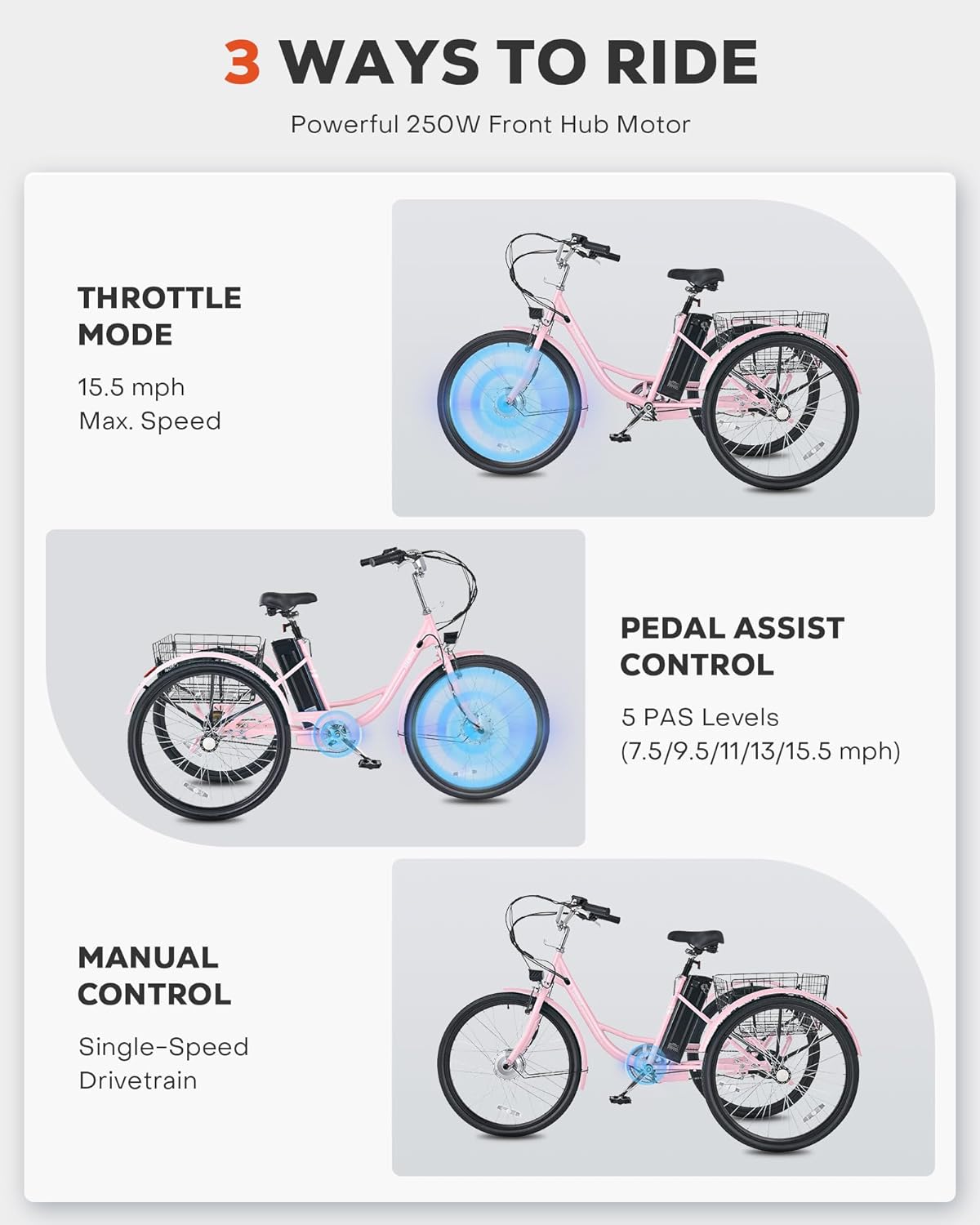
Figure 4: Three Ways to Ride your Viribus Electric Tricycle.
4.2 LCD Display Panel
The intuitive LCD display panel provides real-time information about your ride:
- Battery Meter: Always know your current charge level.
- Speedometer: Track your current speed in MPH.
- PAS Level: Select levels 1-5 to run at a percentage of top speed.
- Odometer: View your trip's distance and total distance traveled.

Figure 5: Intuitive Controls and LCD Display Panel.
4.3 Features for Convenience and Safety
- Front LED Headlight: Ensures visibility and safety during night rides.
- Convenient Horn Button: Provides loud, clear alerts at your fingertips.
- Large Rear Basket: Capable of accommodating up to 110 pounds, ideal for groceries or carrying pets.
- High-Tensile Steel Frame: Designed for durability and supports up to 330 lbs.

Figure 6: Large Rear Basket for storage.
4.4 Official Product Video
Watch the official product video for a visual guide on the Viribus Electric Tricycle's features and operation.
Video 1: Viribus Electric Tricycle for Adults - Overview of features and usage.
5. Maintenance
Regular maintenance ensures the longevity and optimal performance of your electric tricycle.
- Battery Care:
- Charge the battery regularly, even if not in use, to maintain its health.
- Avoid fully discharging the battery.
- Store the battery in a cool, dry place.
- Tire Maintenance:
- Check tire pressure before each ride.
- Inspect tires for wear and tear. The 1.95" wide tires are designed for a 3-year lifespan.
- Brake System:
- Regularly inspect brake pads and cables for wear.
- Ensure brakes respond smoothly and effectively.
- Cleaning:
- Clean the tricycle with a damp cloth. Avoid high-pressure water jets directly on electrical components.
- Lubricate the chain periodically.
- General Inspection:
- Check all nuts and bolts for tightness.
- Inspect the frame for any signs of damage.
6. Troubleshooting
This section addresses common issues you might encounter. For problems not listed here, please contact customer support.
| Problem | Possible Cause | Solution |
|---|---|---|
| Tricycle does not power on. | Battery not charged or not properly seated. | Ensure battery is fully charged and securely inserted. Check battery connection. |
| Motor not assisting. | PAS level too low or throttle not engaged. | Increase PAS level on LCD display or engage throttle. Check motor connections. |
| Brakes feel loose. | Brake cables need adjustment. | Adjust brake cable tension. If unsure, consult a professional. |
7. Specifications
| Feature | Detail |
|---|---|
| Brand | Viribus |
| Model Name | AAE-M1AB-AP |
| Bike Type | Electric Bike |
| Age Range (Description) | Adult |
| Color | Pink |
| Wheel Size | 24 Inches |
| Frame Material | Carbon Steel (High-Tensile Steel) |
| Suspension Type | Rigid |
| Motor Wattage | 250 watts (Peak 500W) |
| Battery Capacity | 468Wh (36V 13Ah) |
| Max Speed | 15.5 mph |
| Max Travel Range | 31 miles (full throttle), 55-60 miles (pedal assist) |
| Maximum Weight Recommendation | 330 Pounds |
| Minimum User Height | 5.1 Feet (Recommended: 5'3"-5'9") |
| Brake Style | Linear Pull |
| UPC | 850062264144 |
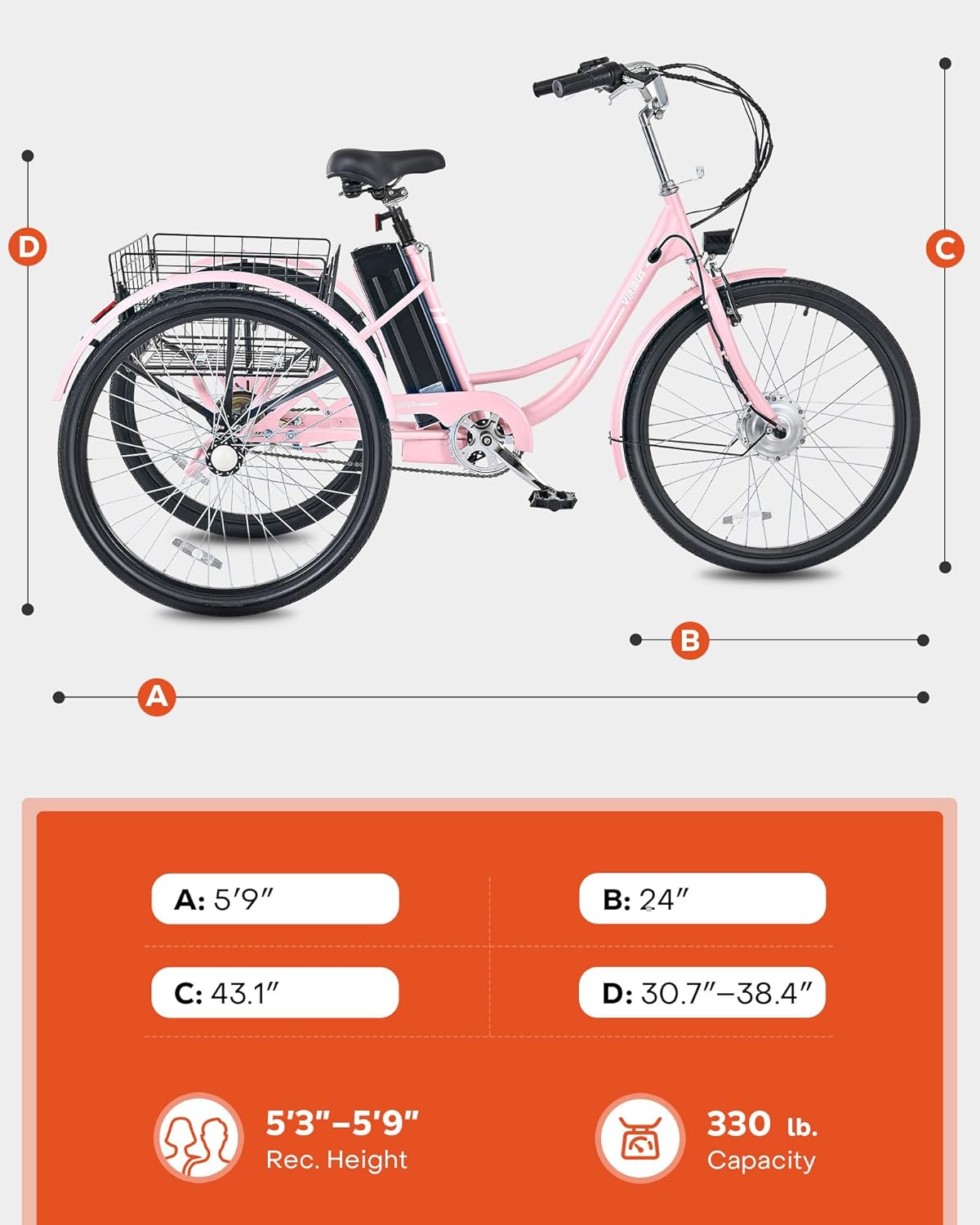
Figure 7: Tricycle Dimensions and Capacity.
8. Warranty and Support
Your Viribus Electric Tricycle comes with a 1 Year Limited Warranty. For warranty claims or technical assistance, please contact Viribus customer support.
You can find more information and contact customer support via the Viribus Store on Amazon.
Ask a question about this manual
Ask about setup, troubleshooting, compatibility, parts, safety, or missing instructions. Manuals+ will review the question and use this page’s manual context to help answer it.