
1. Introduction
Thank you for choosing the ODK L-Shaped Gaming Desk. This manual provides essential information for the safe assembly, operation, and maintenance of your new desk. Please read these instructions carefully before beginning assembly and retain them for future reference.
This versatile L-shaped desk is designed for both gaming and office use, offering ample workspace and integrated storage solutions. Key features include a reversible rack design, a 3-stage adjustable monitor stand, and a dedicated PC stand.
2. Safety Information
- Assembly: Always assemble the desk on a soft, clean surface to prevent scratches. It is recommended that two adults assemble this product due to its size and weight.
- Stability: Ensure all screws and fasteners are tightened securely before use. Periodically check and re-tighten all connections. Use the adjustable feet to level the desk on uneven floors.
- Weight Capacity: Do not exceed the tabletop's maximum load capacity of 50 kg (110 lbs). Distribute weight evenly.
- Children: Keep small parts and packaging materials away from children during assembly. Do not allow children to climb or play on the desk.
- Placement: Place the desk on a stable, level surface. Avoid placing it near heat sources or in direct sunlight for prolonged periods.
3. Package Contents
Before assembly, verify that all components listed below are present and undamaged. If any parts are missing or damaged, please contact ODK customer support.
- Desk panels (main tabletop, side tabletop, monitor stand, shelves)
- Metal frame components
- Assembly hardware (screws, bolts, nuts, adjustable feet)
- Assembly tools (Allen wrench)
- Instruction manual
4. Setup and Assembly Instructions
Follow the step-by-step instructions provided in the included assembly guide. All necessary tools for assembly are provided.
4.1. Unpacking and Preparation
- Clear a spacious area for assembly.
- Lay out all components and hardware, checking against the package contents list.
4.2. Frame Assembly
Assemble the metal frame components according to the diagrams. Ensure all connections are finger-tightened initially.
4.3. Attaching Desk Panels and Shelves
Secure the main tabletop, side tabletop, and storage shelves to the assembled frame. The integrated rack can be installed on either the left or right side to suit your space and preference.
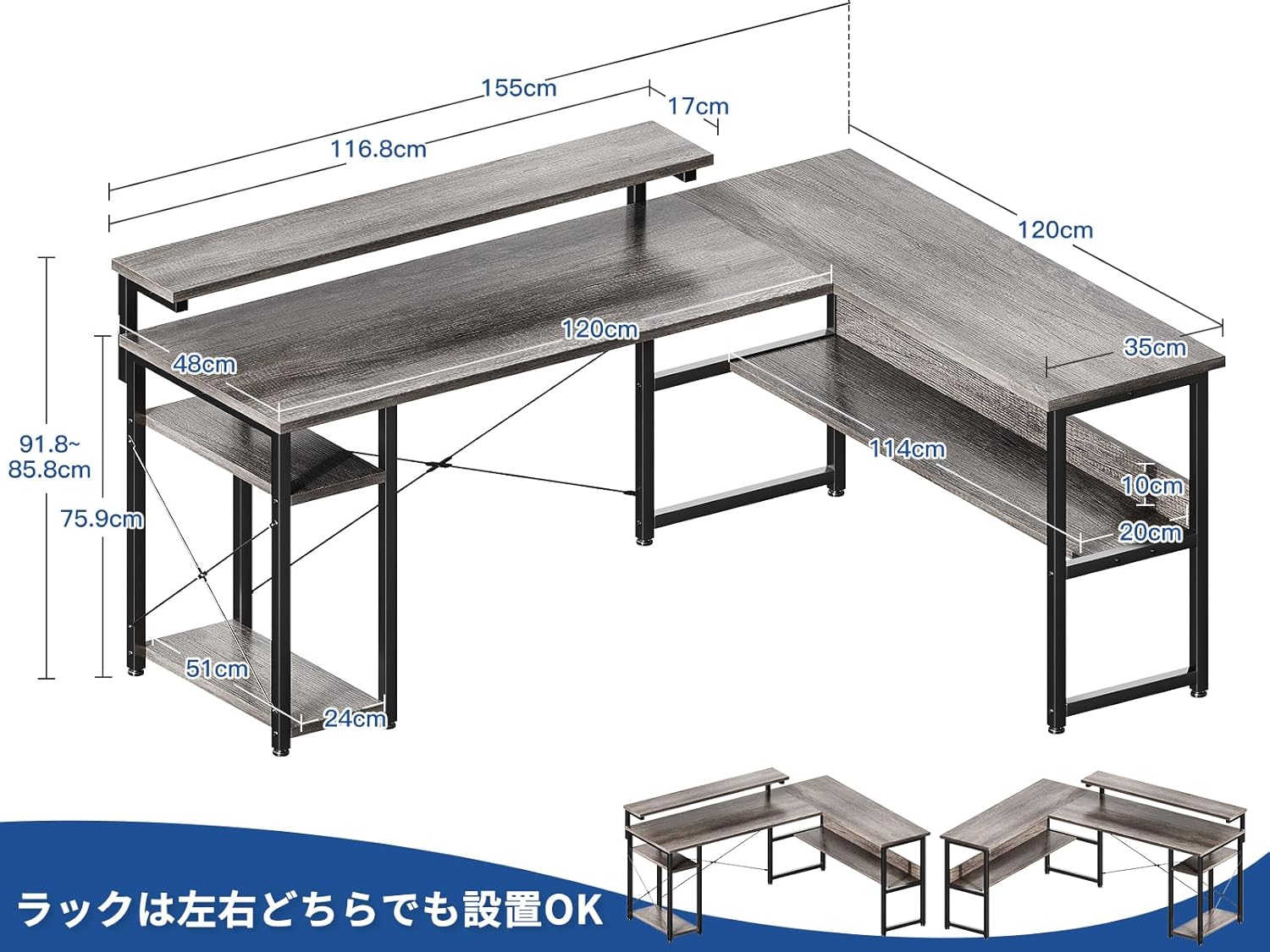
Figure 1: Desk dimensions and reversible rack options.
4.4. Monitor Stand and PC Stand Installation
Attach the monitor stand to the main tabletop. The PC stand is designed to fit within the lower shelf area.
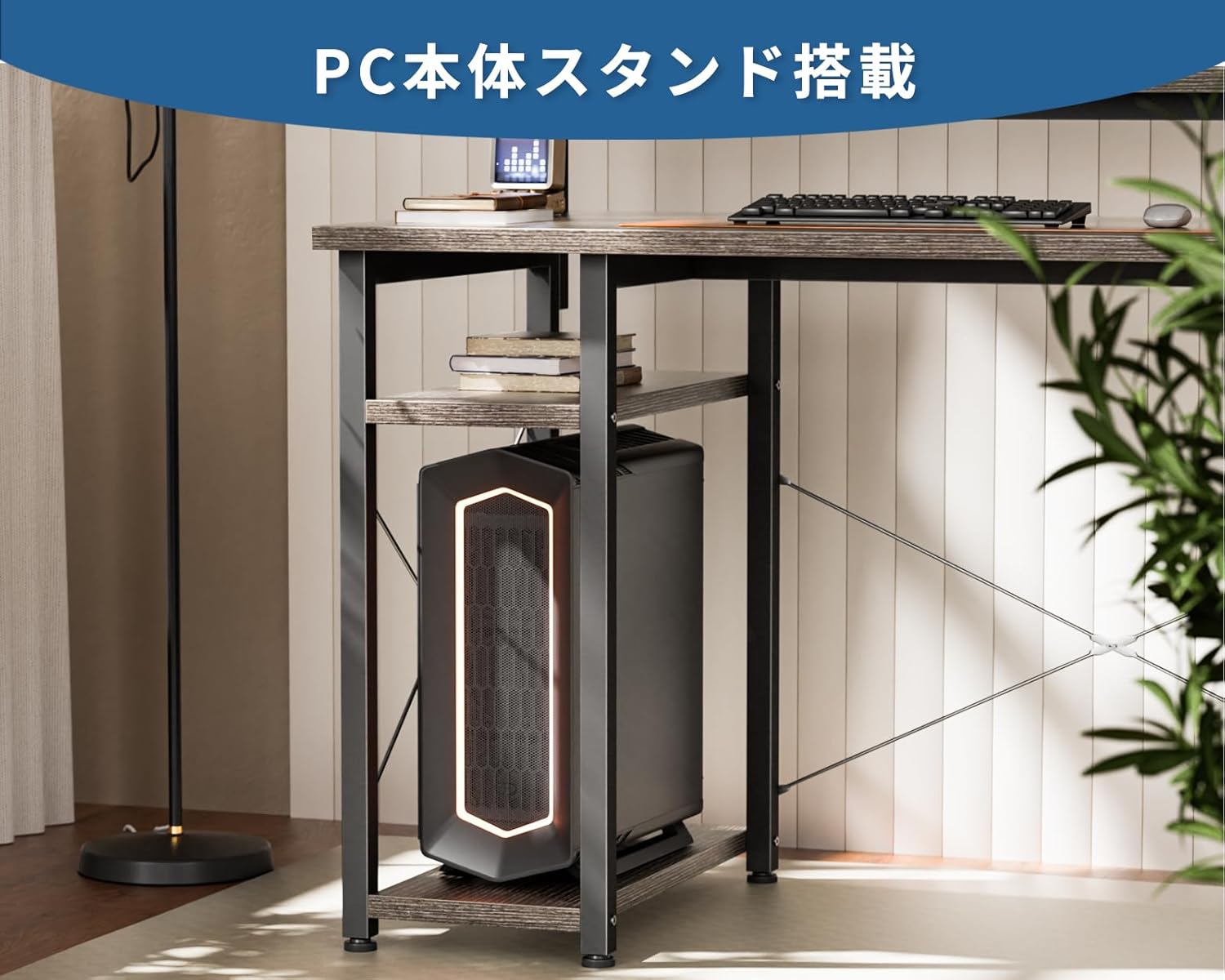
Figure 2: Integrated PC stand for convenient computer placement.
4.5. Final Tightening and Leveling
Once all components are in place, fully tighten all screws and bolts using the provided Allen wrench. Adjust the leveling feet at the bottom of the desk legs to ensure the desk is stable and does not wobble.
5. Operating Instructions
5.1. Adjusting the Monitor Stand Height
The monitor stand offers three adjustable height settings: 9 cm, 12 cm, and 15 cm. To adjust, remove the screws securing the monitor stand to its supports, reposition the stand to the desired height, and re-secure with the screws. This allows for ergonomic viewing tailored to your height and preference.

Figure 3: Monitor stand height adjustment options.
5.2. Utilizing Integrated Storage
The desk features integrated shelves for convenient storage of books, documents, and other items. The L-shaped design maximizes corner space, providing ample room for your work or gaming essentials.

Figure 4: Integrated storage shelves for organization.
6. Maintenance
- Cleaning: Wipe the desk surfaces with a soft, damp cloth. Avoid harsh chemicals or abrasive cleaners that may damage the finish.
- Inspection: Periodically check all screws and connections to ensure they remain tight. Re-tighten as necessary.
- Protection: Use coasters for drinks and pads under hot items to protect the desk surface.
7. Troubleshooting
- Desk is wobbly: Ensure all screws are fully tightened. Adjust the leveling feet on each leg until the desk is stable on the floor.
- Parts missing: Double-check the package contents against the list. If parts are genuinely missing, contact ODK customer support.
- Difficulty with assembly: Refer to the assembly diagrams carefully. If issues persist, consider seeking assistance from another person.
8. Specifications
| Feature | Detail |
|---|---|
| Brand | ODK |
| Model Number | B02XS020601005JP |
| Shape | L-shaped |
| Dimensions (W x D x H) | 155 cm x 120 cm x 76 cm (61 x 47.2 x 29.9 inches) |
| Weight | Approx. 22 kg (48.5 lbs) |
| Color | Grey |
| Top Material | Melamine Faced Board |
| Base Material | Metal (Steel) |
| Finish Type | Powder Coated |
| Special Features | Adjustable Height Monitor Stand (9, 12, 15 cm), Reversible Rack, Integrated Storage, PC Stand, Adjustable Feet |
| Tabletop Load Capacity | 50 kg (110 lbs) |
| Assembly Required | Yes |
| Tools Included | Yes |
9. Warranty and Support
ODK stands behind the quality of its products. If you encounter any issues or defects with your desk, please contact ODK customer support for assistance. Provide your purchase details and model number (B02XS020601005JP) when contacting support.
10. Product Overview Video
Watch this video for a visual overview of the ODK L-Shaped Gaming Desk's features and assembly process.
Video: ODK L-Shaped Gaming Desk features and assembly demonstration.


