
HAOVM M10PLUS
HAOVM 10-inch Android Tablet M10PLUS User Manual
Model: M10PLUS
Introduction
Thank you for choosing the HAOVM 10-inch Android Tablet M10PLUS. This manual provides essential information to help you set up, operate, and maintain your new device. Please read this manual thoroughly before using the tablet to ensure optimal performance and longevity.

Image: Overview of the HAOVM M10PLUS tablet, highlighting its 10.1-inch FHD display, MTK 8-core CPU, Android OS, and 64GB + 1TB expandable storage.
What's in the Box
Please check the package contents to ensure all items are present:
- 1 x HAOVM Android Tablet
- 1 x Power Adapter (5V2A)
- 1 x USB 2.0 Cable
- 1 x Quick Start Guide

Image: Diagram showing the HAOVM M10PLUS tablet and its included accessories: quick guide manual, charging cable, power adapter, and ejection pin.
Setup
1. Charging the Tablet
Before first use, fully charge your tablet. Connect the provided USB cable to the tablet's Type-C port and the power adapter, then plug the adapter into a wall outlet.
2. Powering On/Off
- To Power On: Press and hold the Power On/Off button located on the side of the tablet until the HAOVM logo appears.
- To Power Off: Press and hold the Power On/Off button, then select 'Power off' from the options that appear on the screen.
3. Initial Setup Wizard
Upon first power-on, the tablet will guide you through an initial setup process. This includes selecting your language, connecting to a Wi-Fi network, setting up your Google account, and configuring basic settings.
4. Inserting a TF Card (Optional)
The tablet supports storage expansion up to 1TB via a TF (microSD) card. Locate the TF card slot on the side of the tablet. Gently insert the TF card into the slot until it clicks into place. Ensure the tablet is powered off before inserting or removing the card.
Operating the Tablet
Display and Visual Experience
The HAOVM M10PLUS features a 10.1-inch 1920x1200 IPS Full HD display for vibrant colors and clear details. It includes a Read Mode for comfortable reading and an Eye Comfort function to reduce eye strain during night use.

Image: Comparison showing the clarity of the 1080p Full HD display versus a 720p HD display, highlighting the 1920x1200 resolution and 224 pixels per inch.

Image: Illustrates the Dark Theme for reduced eyestrain, Eye Comfort Mode to filter blue light, and Read Mode for a newspaper-like reading experience.
Performance and Storage
Equipped with a MediaTek 2.0 GHz octa-core processor and 4GB RAM, the tablet ensures smooth performance for apps, streaming, and multitasking. It comes with 64GB of internal storage, expandable up to 1TB with a TF card.

Image: Depicts the tablet's high-performance octa-core processor, highlighting 2.0GHz frequency, ARM Mali-G72 GPU, 64-bit processor, and 2.4G + 5G WiFi capabilities, shown with a gaming scene.

Image: Illustrates the 1TB expansion capability for entertainment, showing icons for 4GB RAM, 64GB ROM, and 1TB expandable storage, with various streaming service interfaces on the tablet screen.
Connectivity and Navigation
The tablet supports dual-band Wi-Fi (2.4G/5G) for fast internet access and includes GPS for navigation. Face ID unlock provides convenient and secure access.

Image: Shows the tablet displaying a navigation map in a car, indicating support for GPS, GLONASS, and Galileo satellite systems.
Camera Features
Capture moments with the 8MP rear camera and use the front camera for video calls and Face ID unlock.
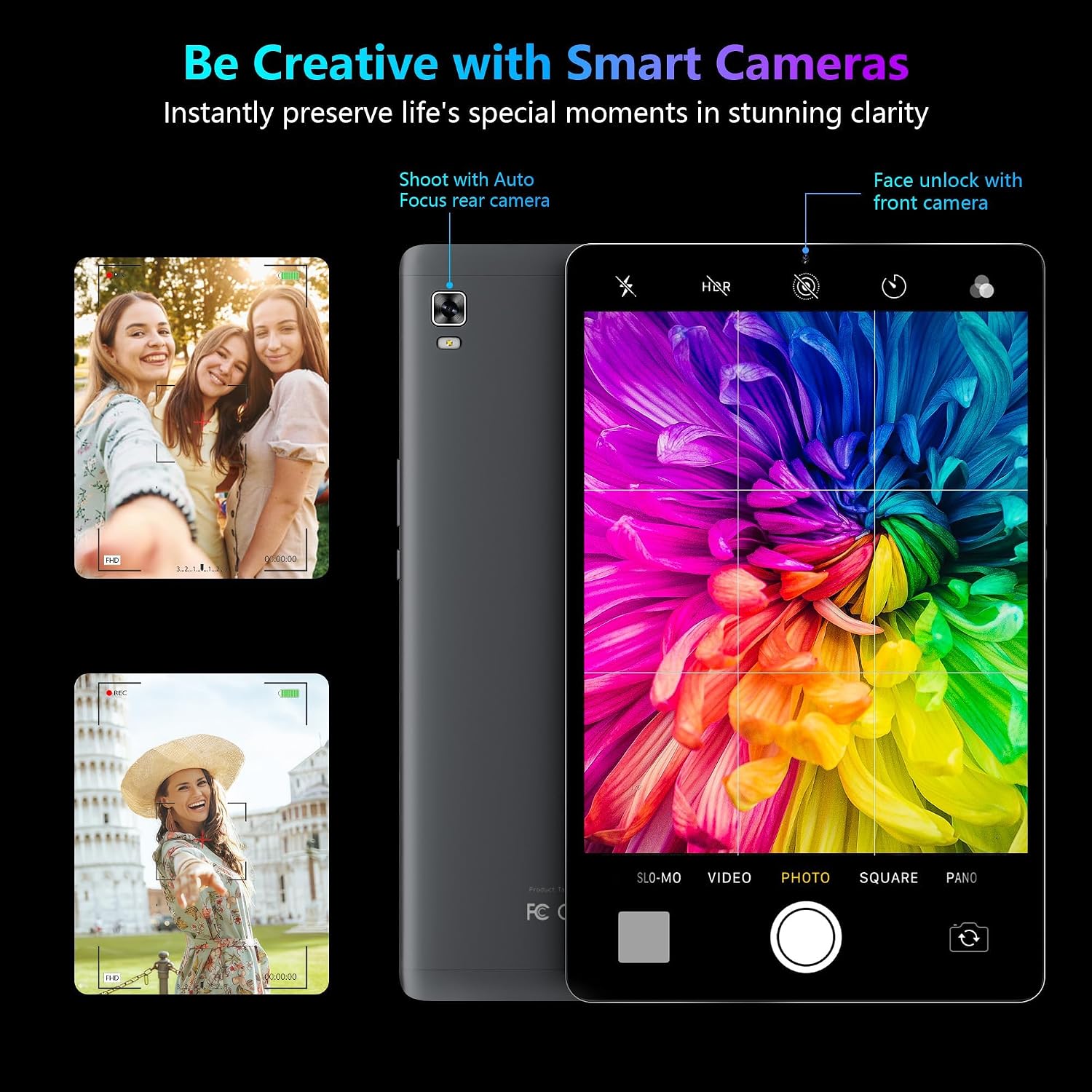
Image: Demonstrates the tablet's camera capabilities, including shooting with auto-focus rear camera and face unlock with the front camera, showing example photos and the camera interface.
Multimedia and Entertainment
Enjoy movies, music, and games with the tablet's full HD display and dual stereo speakers. You can also cast content to a larger screen using the wireless casting feature.
Video: A short promotional video showcasing the features of the HAOVM 10-inch Android tablet, including its display, performance, and connectivity.

Image: Illustrates the screen casting feature, allowing users to cast the tablet's screen to a TV or other device for larger viewing.
Maintenance
To ensure the longevity and optimal performance of your HAOVM tablet, follow these maintenance guidelines:
- Cleaning: Use a soft, lint-free cloth to clean the screen and body. Avoid abrasive cleaners or solvents.
- Battery Care: Avoid extreme temperatures. Do not let the battery fully drain frequently. Charge the tablet regularly.
- Software Updates: Keep your tablet's operating system and applications updated to ensure security and performance.
- Storage Management: Regularly clear unnecessary files and apps to free up storage space and maintain smooth operation.
- Protection: Consider using a protective case and screen protector to prevent physical damage.
Troubleshooting
Here are solutions to common issues you might encounter:
| Problem | Solution |
|---|---|
| Tablet won't turn on | Ensure the tablet is charged. Press and hold the power button for 10-15 seconds to force a restart. |
| Apps are slow or crashing | Close background apps. Clear app cache. Restart the tablet. Ensure sufficient storage space. |
| Wi-Fi connection issues | Restart your Wi-Fi router. Forget the network on the tablet and reconnect. Ensure correct password. |
| Battery drains quickly | Reduce screen brightness. Close unused apps. Turn off Wi-Fi/Bluetooth when not in use. Check for rogue apps. |
| Screen is unresponsive | Force restart the tablet. If issue persists, contact customer support. |
Specifications
| Feature | Detail |
|---|---|
| Model | M10PLUS |
| Operating System | Android 12 |
| Screen Size | 10.1 Inches |
| Screen Resolution | 1920 x 1200 pixels (Full HD IPS) |
| Processor | MediaTek Octa-Core (2.0 GHz) |
| RAM | 4 GB |
| Internal Storage | 64 GB |
| Expandable Storage | Up to 1 TB (via TF card, sold separately) |
| Rear Camera | 8 MP |
| Wireless Connectivity | 802.11ac (2.4G/5G WiFi) |
| Navigation | GPS, GLONASS, Galileo |
| Battery Capacity | 6000mAh (Approx. 10 hours mixed use) |
| Dimensions (LxWxH) | 9.5 x 6 x 0.3 inches |
| Item Weight | 1.11 pounds |
| Color | Gray |
Warranty and Support
HAOVM offers comprehensive support for your tablet:
- Warranty: The product comes with a 365-day worry-free warranty.
- Money Back Guarantee: Enjoy a 30-day money-back guarantee.
- Customer Service: Expect a quick reply within 24 hours for any inquiries.
For further assistance, please refer to the contact information provided in your Quick Start Guide or visit the official HAOVM website.
Image: Icons representing 24-hour quick reply, 30-day money-back guarantee, and 365-day worry-free warranty for HAOVM products.
Related documentsM10PLUS

Ask a question about this manual
Ask about setup, troubleshooting, compatibility, parts, safety, or missing instructions. Manuals+ will review the question and use this page’s manual context to help answer it.