
1. Introduction
This manual provides essential information for the safe and effective use of your DCH BP-265 2600mAh Li-ion battery replacement. Please read this manual thoroughly before using the battery to ensure proper operation, maximize battery life, and prevent potential hazards.
2. Safety Information
WARNING: Failure to follow these safety instructions may result in fire, electric shock, injury, or damage to the battery or device.
- DO NOT attempt to disassemble, open, or service the battery pack.
- Replace only with the battery pack designated for this product (BP-265 or BP-265LI).
- DO NOT crush, puncture, short external contacts, or dispose of in fire or water.
- DO NOT store above 60°C (140°F).
- Keep the battery away from children.
- If the battery leaks, avoid contact with the fluid. If contact occurs, rinse thoroughly with water and seek medical attention.
- Dispose of used batteries according to local regulations. Do not dispose of with household waste.

Image: Detailed view of the DCH BP-265 battery label, showing safety warnings and specifications. This label provides critical information regarding battery handling and usage precautions.
3. Compatibility
The DCH BP-265 battery replacement is designed for use with the following Icom two-way radio models and is compatible with the specified original battery part numbers:
Compatible Icom Radio Models:
- IC-S70
- IC-F4101D
- IC-3101
- IC-F4108D
Compatible Battery Part Numbers:
- BP-265
- BP-265LI
4. Setup (Installation)
Follow these general steps to install the DCH BP-265 battery into your compatible Icom two-way radio. Refer to your radio's specific user manual for detailed instructions if needed.
- Power Off Radio: Ensure your two-way radio is powered off before attempting to remove or install the battery.
- Remove Old Battery: Locate the battery release latch or button on your radio. Press or slide it to unlock the existing battery, then carefully slide or pull the old battery away from the radio.
- Align New Battery: Align the DCH BP-265 battery with the battery compartment of your radio. Ensure the contacts on the battery match the contacts on the radio.
- Install Battery: Gently slide or push the new battery into the compartment until it clicks securely into place. Verify that the battery is firmly attached and does not wobble.
- Attach Belt Clip (Optional): If your radio or battery uses a belt clip, ensure it is properly attached to the battery or radio body as intended.

Image: Side view of the DCH BP-265 battery, showing the integrated belt clip. This illustrates how the battery appears when ready for attachment to a radio or belt.

Image: Angled view of the DCH BP-265 battery, highlighting the belt clip mechanism. This perspective helps in understanding the attachment points for installation.
5. Operating (Charging)
For optimal performance and longevity, it is crucial to properly charge your DCH BP-265 battery.
- Initial Charge: A new battery pack must be fully charged before its first use. This helps to calibrate the battery and ensure maximum capacity.
- Use Correct Charger: Always use a charger specifically designed for Icom BP-265 type batteries or the charger supplied with your Icom two-way radio. Using an incompatible charger may damage the battery or radio.
- Charging Process: Connect the radio with the installed battery to the charger. Ensure the charging indicator on the radio or charger illuminates, indicating that charging has begun.
- Full Charge Indication: The charging indicator will typically change color or turn off when the battery is fully charged. Refer to your radio's or charger's manual for specific indications.
- Avoid Overcharging: While modern Li-ion batteries have protection circuits, it is generally good practice to remove the battery from the charger once fully charged, especially if not using a smart charger.
6. Maintenance
Proper maintenance can extend the life and performance of your DCH BP-265 battery.
- Clean Contacts: Periodically clean the battery contacts and the radio's contacts with a clean, dry cloth to ensure good electrical connection.
- Storage: If storing the battery for an extended period, charge it to approximately 50% capacity and store it in a cool, dry place, away from direct sunlight and extreme temperatures. Avoid storing fully charged or fully depleted batteries for long periods.
- Avoid Physical Damage: Protect the battery from drops, impacts, and crushing, as this can damage internal components and lead to safety hazards.
7. Troubleshooting
If you encounter issues with your DCH BP-265 battery, consider the following common troubleshooting steps:
- Battery Not Charging:
- Ensure the battery is correctly seated in the radio and charger.
- Check that the charger is properly plugged into a working power outlet.
- Clean the battery and charger contacts.
- Try a different compatible charger if available.
- Short Operating Time:
- Ensure the battery is fully charged before use.
- Battery capacity naturally degrades over time and with usage cycles. If the battery is old, it may be nearing the end of its lifespan.
- Operating in extreme temperatures can affect battery performance.
- Radio Not Powering On:
- Verify the battery is fully charged and correctly installed.
- Ensure the radio's power button is functioning correctly.
- Test with another known-good battery if possible.
If problems persist, contact customer support for further assistance.
8. Specifications
Key technical specifications for the DCH BP-265 2600mAh Li-ion battery:
| Feature | Specification |
|---|---|
| Battery Part Number | BP-265, BP-265LI |
| Model Number (Internal) | CS-ICM410TW |
| Category | Two-Way Radio Battery |
| Capacity | 2600mAh |
| Watt-Hours (Wh) | 19.24Wh |
| Type | Li-ion (Lithium-Ion) |
| Voltage | 7.4V |
| Dimensions (L x W x H) | 104.9 x 58.7 x 21.4mm (4.13 x 2.31 x 0.84 inches) |
| Weight | 273.0g (9.6 ounces) |
| Manufacturer | DCH (Manufactured by Shenzhen HENZENS Technology Co., Limited) |
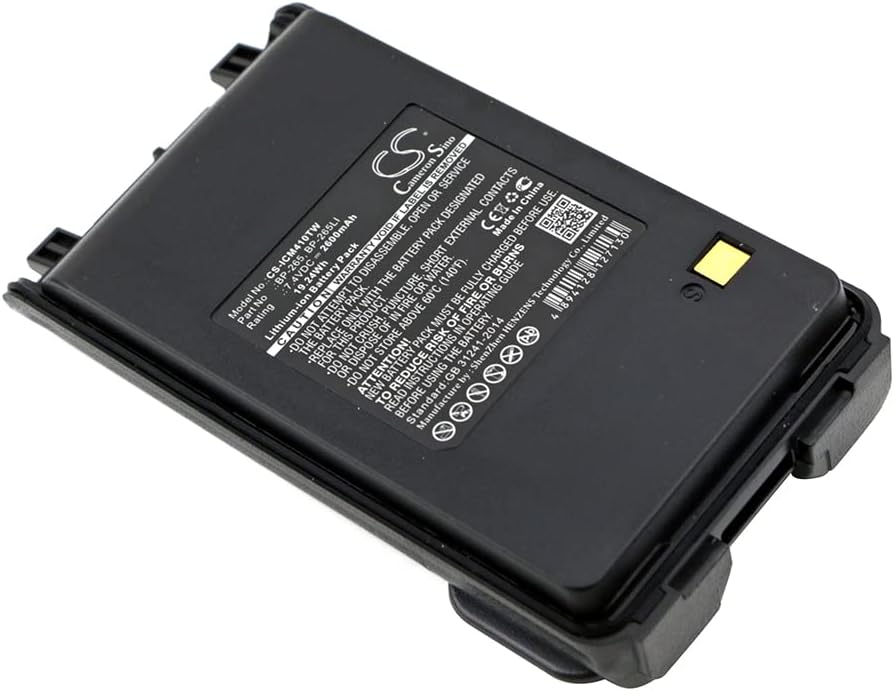
Image: Top-down view of the DCH BP-265 battery, displaying the product label with model number, part number, and key specifications.
9. Warranty and Support
For warranty information, technical support, or any questions regarding your DCH BP-265 battery, please contact the seller or manufacturer directly.
- Manufacturer: DCH (Shenzhen HENZENS Technology Co., Limited)
- Website: For additional product information or support, you may visit www.cameronsino.com.
- Customer Service: Refer to your purchase documentation or the seller's contact information for direct support.