
1. Introduction
Thank you for purchasing the ANJANK 4-in-1 Wireless Charging Station with Alarm Clock. This device is designed to simplify your charging experience by combining a wireless charger for your smartphone, AirPods, and Apple Watch with a functional digital alarm clock. Please read this manual carefully before use to ensure proper operation and to maximize the lifespan of your product.

Figure 1.1: ANJANK 4-in-1 Wireless Charging Station
Package Contents:
- ANJANK 4-in-1 Wireless Charging Station with Alarm Clock
- 18W Power Adapter
- Type-C Cable
- User Manual
2. Safety Information
To ensure safe operation and prevent damage, please observe the following precautions:
- Use only the provided 18W power adapter and Type-C cable. Using incompatible power sources may damage the device or connected electronics.
- Do not disassemble, modify, or repair the device yourself. Contact customer support for assistance.
- Keep the device away from water, moisture, and high temperatures.
- Avoid placing metal objects, magnetic attachments, or credit cards between the charging surface and your device, as this can interfere with charging or damage the device.
- Ensure proper ventilation. The charging station features cooling holes on its back and bottom for efficient heat dissipation. Do not block these vents.
- Important Note: This charging station is NOT compatible with Samsung Watch models. It supports Apple Watch Series 2-9, SE, and Ultra.
3. Product Features and Components
The ANJANK 4-in-1 Wireless Charging Station integrates multiple functionalities into a compact design:
- 4-in-1 Functionality: Simultaneously charges compatible smartphones, AirPods, and Apple Watch, while also serving as a digital alarm clock.
- Wide Compatibility: Supports a broad range of wireless charging-enabled smartphones (iPhone 8 and newer, Samsung Galaxy S21/S22, etc.), AirPods 1/2/3/Pro, and Apple Watch Series 2-9/SE/Ultra.
- Alarm Clock with Adjustable Brightness & Volume: Features a clear LED display with adjustable brightness levels and volume control for the alarm. Supports 12/24-hour time modes and a 9-minute snooze function.
- Case-Friendly Charging: Charges through most phone cases up to 3mm (0.12 inch) thick, excluding cases with magnetic or metal attachments.
- Advanced Safety Features: Built-in intelligent chipset provides multiple protections including over-current, over-voltage, and over-charging protection. Enhanced heat dissipation design ensures cooler and safer charging.
- Anti-slip Design: Silicone pads prevent devices from sliding off the charging surfaces.

Figure 3.1: 4-in-1 Wireless Charging Station Overview
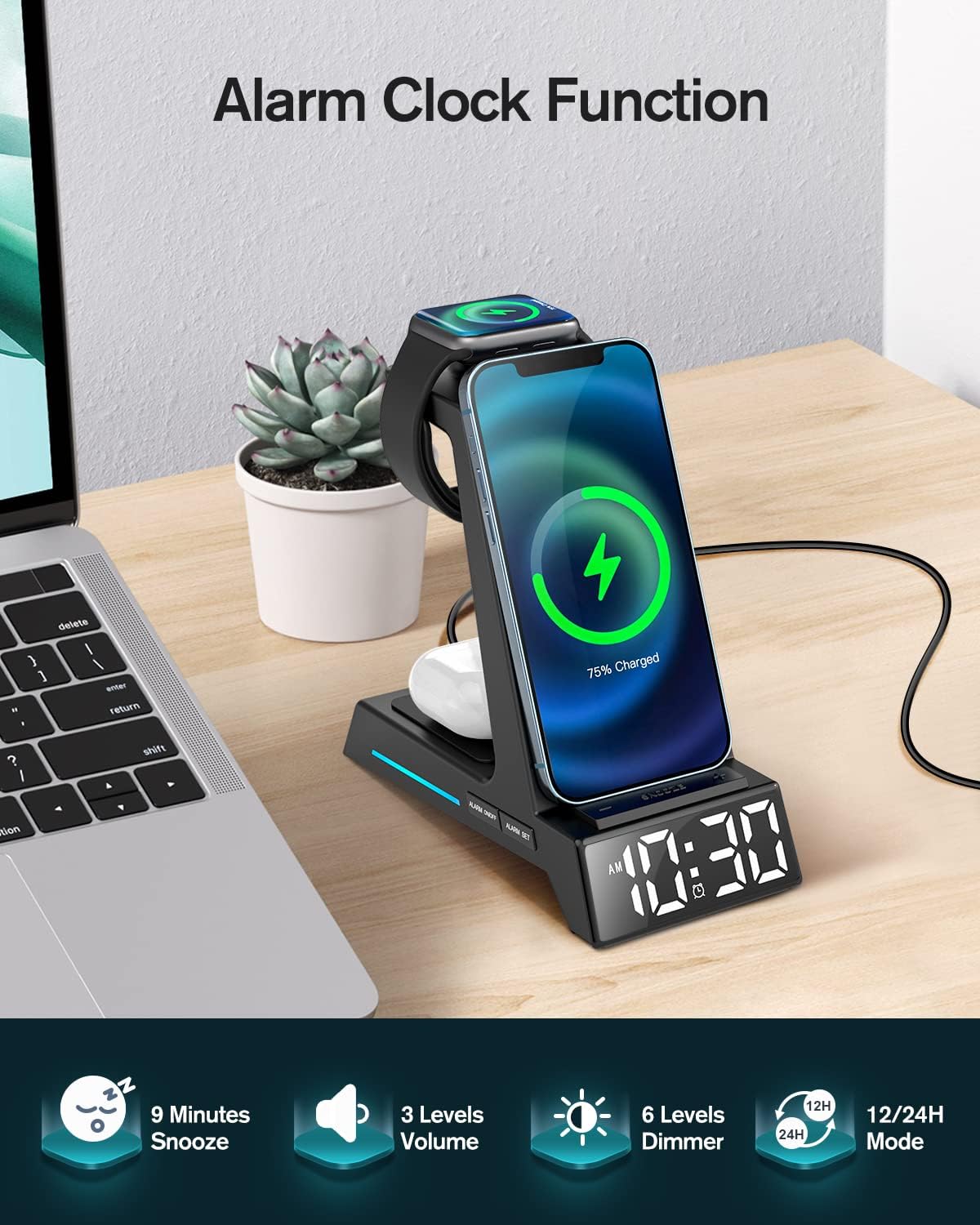
Figure 3.2: Alarm Clock Functionality
4. Setup Guide
- Connect Power: Insert the Type-C cable into the charging port on the back of the ANJANK charging station. Connect the other end of the cable to the provided 18W power adapter, then plug the adapter into a wall outlet.
- Power On: The digital display will light up, indicating the device is powered on and ready for use.
- Initial Placement: Place the charging station on a stable, flat surface, such as a nightstand or desk.
5. Operating Instructions
5.1 Wireless Charging
This station provides dedicated wireless charging areas for your smartphone, AirPods, and Apple Watch.
- Smartphone Charging: Place your wireless charging-enabled smartphone vertically or horizontally on the main charging stand. Ensure the phone is centered on the charging pad for optimal connection. A charging indicator light may illuminate on the base.
- AirPods Charging: Place your AirPods case (with wireless charging capability) on the flat charging pad located at the base of the unit.
- Apple Watch Charging: Mount your Apple Watch onto the magnetic charging module on the side of the stand. The watch will snap into place magnetically.
Note on Phone Cases: The charger supports most phone cases up to 3mm (0.12 inches) thick. Cases with magnetic attachments, metal rings, or credit cards stored in them should be removed before charging to ensure proper function and prevent damage.

Figure 5.1: Supports Vertical and Horizontal Phone Charging

Figure 5.2: Case-Friendly Charging Guidelines
5.2 Alarm Clock Functionality
The integrated digital alarm clock offers customizable settings.
- Setting Time:
- Press and hold the "TIME" button (usually indicated by a clock icon) to enter time setting mode.
- Use the "+" and "-" buttons to adjust the hour. Press "TIME" again to confirm and move to minutes.
- Use "+" and "-" to adjust the minutes. Press "TIME" again to confirm.
- 12/24 Hour Mode: Press the "12/24H" button to toggle between 12-hour (with AM/PM indicator) and 24-hour formats.
- Setting Alarm:
- Press and hold the "ALARM" button (usually indicated by an alarm icon) to enter alarm setting mode.
- Use "+" and "-" to adjust the alarm hour. Press "ALARM" again to confirm and move to minutes.
- Use "+" and "-" to adjust the alarm minutes. Press "ALARM" again to confirm.
- To activate/deactivate the alarm, short press the "ALARM" button. An alarm icon will appear/disappear on the display.
- Snooze Function: When the alarm sounds, press the "SNOOZE" button (often the largest button on top or front) to silence the alarm for 9 minutes. The alarm will sound again after 9 minutes.
- Adjusting Display Brightness: Press the "DIMMER" button (usually indicated by a sun icon) to cycle through different brightness levels for the digital display.
- Adjusting Alarm Volume: Press the "VOLUME" button (usually indicated by a speaker icon) to cycle through different alarm volume levels.
6. Maintenance
Proper maintenance ensures the longevity and optimal performance of your charging station.
- Cleaning: Disconnect the power adapter before cleaning. Use a soft, dry, lint-free cloth to wipe the surface of the device. Do not use abrasive cleaners, solvents, or chemical sprays.
- Storage: If not in use for an extended period, unplug the device and store it in a cool, dry place away from direct sunlight.
- Ventilation: Regularly check that the ventilation holes on the back and bottom of the unit are not obstructed by dust or debris.

Figure 6.1: Ventilation Holes for Heat Dissipation
7. Troubleshooting
If you encounter issues with your ANJANK charging station, refer to the following common problems and solutions:
| Problem | Possible Cause | Solution |
|---|---|---|
| Device not charging wirelessly. |
|
|
| Alarm clock display is dim or off. |
|
|
| Alarm is not sounding. |
|
|
| Device feels warm during charging. |
|
|
8. Specifications
| Feature | Detail |
|---|---|
| Model Number | Clock AC199-Black |
| Input Voltage | 5 Volts |
| Wattage | 18 Watts (Max) |
| Connectivity | Wireless Charger, USB Type C (for power input) |
| Compatible Devices |
|
| Dimensions | 6.5 x 6.1 x 3.31 inches |
| Item Weight | 14.9 ounces |
| Special Features | 3-in-1 Wireless Charging, Alarm Clock & Display Dimmer, Time Mode (12/24H), Alarm with Snooze, Adjustable Volume, Charging Indicator, Space-Saving, Easy Setup. |
9. Warranty and Customer Support
ANJANK is committed to providing high-quality products and excellent customer service. Your ANJANK 4-in-1 Wireless Charging Station comes with a standard manufacturer's warranty. Please refer to the warranty card included in your package for specific terms and conditions.
If you have any questions, concerns, or require technical assistance, please do not hesitate to contact our friendly customer service team. We are dedicated to offering you the best solution within 24 hours.
Contact Information:
- For support, please visit the official ANJANK store on Amazon: ANJANK Amazon Store
- Alternatively, use the contact method provided on your product packaging or purchase platform.


