
Redragon Juno G818 (GP15L)
Redragon Juno G818 Wireless Bluetooth Gaming Controller
Model: GP15L
Introduction
The Redragon Juno G818 is a versatile wireless Bluetooth gaming controller designed for an immersive gaming experience. It offers broad compatibility with various platforms, including PC (Dinput/Xinput), PlayStation 3, and PlayStation 4 (wired connection). Featuring a responsive touch panel, sensitive triggers, and dual vibration motors, the Juno G818 provides precise control and tactile feedback for a wide range of games. Its long-lasting battery ensures extended gameplay sessions.
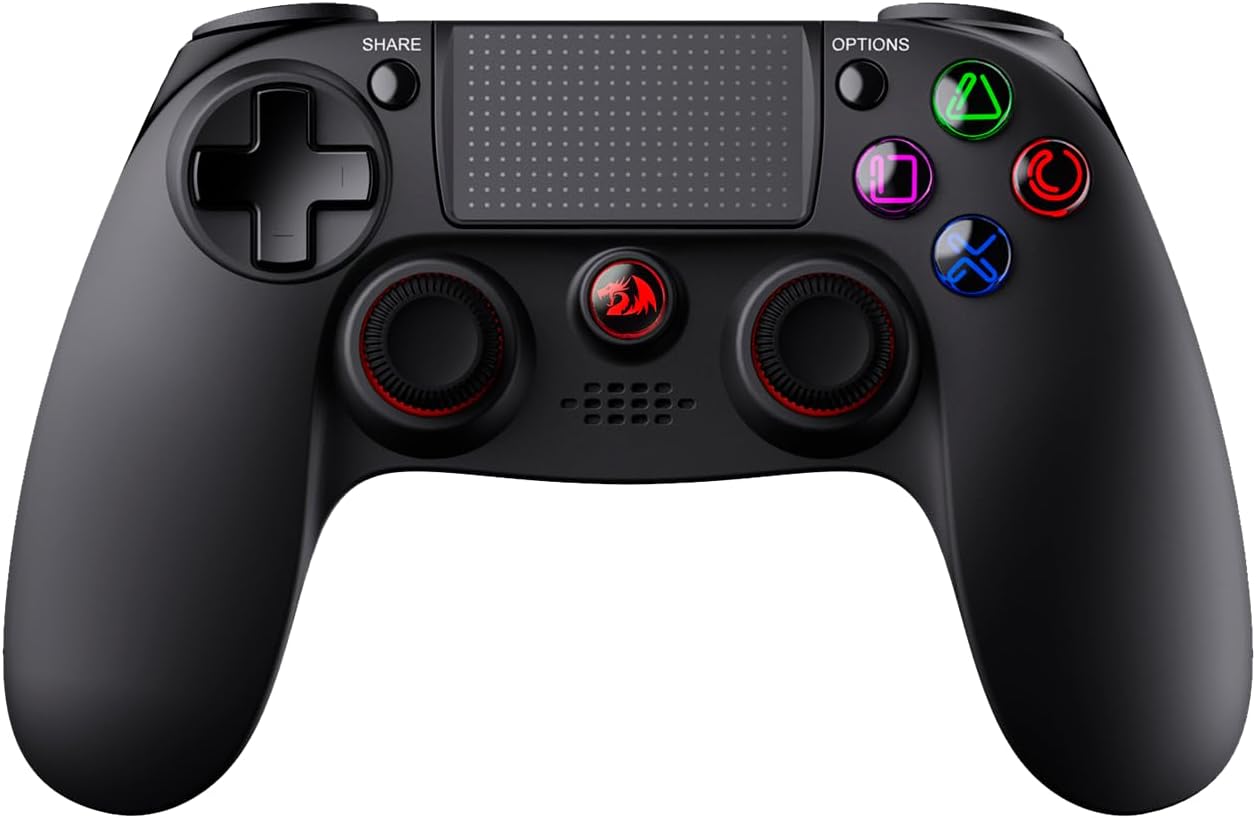
Image: Front view of the Redragon Juno G818 Wireless Bluetooth Gaming Controller, showcasing its ergonomic design, dual analog sticks, D-pad, action buttons, and central touch panel.
Setup Guide
1. Charging the Controller
Before first use, fully charge the controller. Connect the included micro USB cable to the controller's charging port and the other end to a USB power source (e.g., PC, USB wall adapter). The indicator light will show charging status and turn off when fully charged. A full charge provides up to 24 hours of continuous use.

Image: The Redragon Juno G818 controller highlighting its Li-Ion battery and 24-hour continuous battery life, along with the micro USB charging port.
2. Connecting to Devices
- Bluetooth Connection (PC/PS4):
For wireless connection, ensure your PC or PS4 has Bluetooth enabled. On the controller, press and hold the SHARE and PS buttons simultaneously until the light bar flashes rapidly. On your device, search for new Bluetooth devices and select "Redragon Juno G818" to pair. Once paired, the light bar will turn solid.
- Wired Connection (PC/PS3/PS4):
Connect the micro USB cable from the controller to a USB port on your PC, PS3, or PS4. The controller will automatically be recognized and ready for use. For PS3 and PS4, a wired connection is required for full functionality.

Image: The Redragon Juno G818 controller illustrating its full compatibility with PC (Dinput/Xinput), PS3, and PS4 (wired connection), and the 3.5mm audio connector.
Operating Instructions
Key Features and Functions
- Touch Panel: The central touch panel can be used for navigation and specific in-game interactions, depending on the game and platform.
- Sensitive Triggers (LT/RT): The rear triggers are designed to be highly sensitive and capacitive, allowing for a wide range of nuanced inputs, from light presses to full depressions for actions like acceleration or shooting.
- Dual Vibration Motors: Equipped with two internal force-feedback motors, the controller provides immersive haptic feedback, enhancing the gaming experience with realistic vibrations for impacts, explosions, and other in-game events.
- 3.5mm Audio Connector: Plug in your compatible headset to the 3.5mm audio jack for in-game audio and voice chat (functionality may vary by platform and game).

Image: Side view of the Redragon Juno G818 controller, emphasizing its sensitive triggers and the presence of two vibration motors for enhanced precision and comfort.

Image: The Redragon Juno G818 controller from an angled top-down view, illustrating the full vibration capability provided by its two internal force-feedback motors.
Maintenance
Proper maintenance ensures the longevity and optimal performance of your Redragon Juno G818 controller.
- Cleaning: Use a soft, dry cloth to wipe down the controller regularly. For stubborn dirt, slightly dampen the cloth with water or a mild cleaning solution. Avoid harsh chemicals or abrasive materials.
- Storage: Store the controller in a cool, dry place away from direct sunlight and extreme temperatures.
- Battery Care: To maximize battery life, avoid completely draining the battery frequently. Charge the controller when the battery low indicator appears. If storing for an extended period, charge the battery to about 50% every few months.
- Cable Management: When not in use, coil the micro USB cable neatly to prevent kinks and damage.
Troubleshooting
If you encounter issues with your Redragon Juno G818 controller, try the following solutions:
- Controller Not Connecting:
- Ensure the controller is charged.
- For Bluetooth, ensure your device's Bluetooth is on and the controller is in pairing mode. Try unpairing and re-pairing.
- For wired connection, try a different USB port or cable.
- Perform a reset: Locate the small reset hole on the back of the controller (near the micro USB port). Use a thin, pointed object (like a paperclip) to press the button inside for a few seconds.

Image: Rear view of the Redragon Juno G818 controller, highlighting the sensitive LT/RT triggers and the small reset button located on the back.
- Buttons/Sticks Unresponsive or Drifting:
- Reset the controller as described above.
- Ensure the controller's firmware is up to date (check Redragon's official website for PC software/drivers).
- Clean around the buttons and sticks to remove any debris.
- Audio Issues (3.5mm Jack):
- Ensure your headset is fully plugged in.
- Test the headset with another device to confirm it's working.
- Check audio settings on your console/PC to ensure output is directed to the controller.
Specifications
| Feature | Detail |
|---|---|
| Model Number | GP15L |
| Connectivity | Wireless Bluetooth, Wired (Micro USB) |
| Compatibility | PC (Dinput/Xinput), PS3 (Wired), PS4 (Wired) |
| Battery Type | 1 Lithium Ion |
| Battery Life | Up to 24 hours continuous use |
| Dimensions | 16 x 10.5 x 5.5 cm |
| Weight | 150 g |
| Audio Port | 3.5mm Jack |
| Feedback | Dual Force-Feedback Vibration Motors |
| Additional Features | Touch Panel, Sensitive Triggers |
Warranty and Support
For information regarding product warranty, returns, or technical support, please refer to the official Redragon website or the retailer's purchase policy where the product was acquired. Keep your proof of purchase for warranty claims.
For further assistance, you may contact Redragon customer support directly through their official channels.
Related documentsJuno G818 (GP15L)


Ask a question about this manual
Ask about setup, troubleshooting, compatibility, parts, safety, or missing instructions. Manuals+ will review the question and use this page’s manual context to help answer it.