
1. Overview
The Tilta Khronos Advanced Kit is a comprehensive mobile filmmaking solution designed specifically for the iPhone 15 Pro Max. This kit enhances your smartphone's capabilities for professional-grade video and photography by providing a secure mounting system, active cooling, precise focus control, and exposure management through ND filters. It is engineered to offer stability, power, and versatility for content creators.
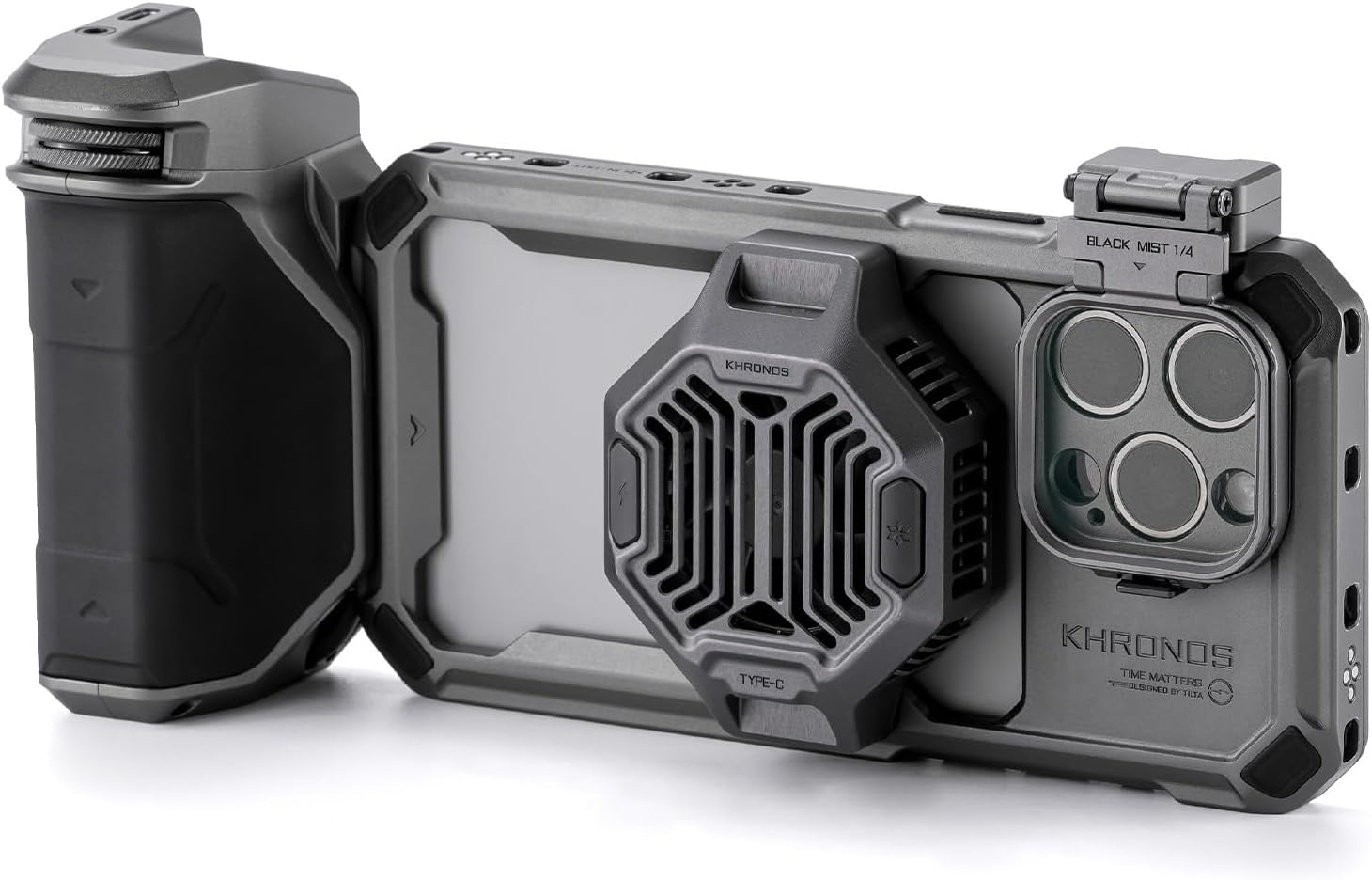
Figure 1.1: The Tilta Khronos Advanced Kit fully assembled with an iPhone 15 Pro Max, showcasing the case, cooling fan, and focus handle.
2. What's in the Box
The Tilta Khronos Advanced Kit for iPhone 15 Pro Max includes the following components:
- Tilta Khronos Case Compatible with iPhone 15 Pro Max (Space Gray)
- Khronos Cooling System for iPhone (Space Gray)
- Khronos Focus PD Handle for iPhone (Space Gray)
- Khronos Quick Release Filter Tray for iPhone (Space Gray)
- Khronos Magnetic FSND 0.6 Filter for iPhone
- Khronos Magnetic FSND 1.2 Filter for iPhone

Figure 2.1: All components included in the Tilta Khronos Advanced Kit, laid out for inspection.
3. Setup Guide
Follow these steps to assemble your Tilta Khronos Advanced Kit:
3.1. Installing the Khronos Case
- Carefully place your iPhone 15 Pro Max into the Khronos Case, ensuring it seats securely within the frame.
- Verify that all ports and buttons on your iPhone are accessible and aligned with the case cutouts.

Figure 3.1: Demonstrates the secure fit of the iPhone 15 Pro Max within the Khronos Case.
3.2. Attaching the Cooling System
- Locate the magnetic attachment point on the back of the Khronos Case.
- Align the Khronos Cooling System with this magnetic area and allow it to snap into place. Ensure a firm connection.
- Connect the cooling system to a power source (e.g., the Focus PD Handle or an external power bank) via its USB-C port.

Figure 3.2: The Khronos Cooling System magnetically attached to the back of the iPhone case.
3.3. Mounting the Focus PD Handle
- Identify the mounting points on the side of the Khronos Case.
- Slide the Khronos Focus PD Handle onto the desired mounting point until it locks securely.
- Ensure the handle is firmly attached before use.

Figure 3.3: The Focus PD Handle securely mounted on the side of the Khronos Case, providing an ergonomic grip.
3.4. Installing ND Filters
- Attach the Quick Release Filter Tray to the camera module area of the Khronos Case.
- Select the desired Magnetic FSND Filter (0.6 or 1.2).
- Align the magnetic filter with the filter tray and allow it to snap into place over the iPhone's camera lenses.

Figure 3.4: An exploded view illustrating the assembly of the Khronos Case, Cooling System, Focus PD Handle, Filter Tray, and ND Filters.
4. Operating Instructions
4.1. Using the Cooling System
The Khronos Cooling System helps prevent your iPhone 15 Pro Max from overheating during extended recording sessions. Once attached and powered, it will automatically begin to cool the device. Ensure it is connected to a stable power source for optimal performance.
4.2. Utilizing the Focus PD Handle
The Focus PD Handle provides enhanced control and power for your mobile filmmaking setup:
- Power Delivery: The integrated battery in the handle can power accessories connected to the kit.
- Focus Control: Use the control wheel on the handle for precise manual focus adjustments within compatible camera applications.
- Zoom Control: The handle may offer zoom functionality, allowing for smooth optical or digital zoom depending on your iPhone's capabilities and camera app.
- Run/Stop Function: A dedicated button on the handle allows for convenient start/stop recording control. Ensure your camera application supports external run/stop commands.
Note: Specific functionality of the Focus PD Handle (focus, zoom, run/stop) may depend on the camera application used on your iPhone 15 Pro Max. Refer to your camera app's documentation for external control compatibility.
4.3. Applying ND Filters
Neutral Density (ND) filters reduce the amount of light entering the camera lens without affecting color. This allows for greater control over exposure, enabling wider apertures for shallow depth of field or slower shutter speeds for motion blur, even in bright conditions.
- FSND 0.6 Filter: Reduces light by 2 stops.
- FSND 1.2 Filter: Reduces light by 4 stops.
To change filters, gently remove the currently installed magnetic filter from the tray and replace it with the desired one.
5. Maintenance
- Cleaning: Use a soft, dry cloth to clean the case and accessories. For stubborn dirt, a slightly damp cloth can be used, followed by immediate drying. Avoid harsh chemicals or abrasive materials.
- Filter Care: Clean ND filters with a lens cleaning solution and a microfiber cloth specifically designed for optics. Handle filters by their edges to avoid fingerprints.
- Storage: Store the kit components in a clean, dry environment, away from extreme temperatures and direct sunlight, when not in use.
- Battery Care (Focus PD Handle): To prolong battery life, avoid fully discharging the handle's battery frequently. Charge it regularly, even if not in constant use.
6. Troubleshooting
6.1. Cooling System Not Activating
- Ensure the cooling system is securely attached to the magnetic plate on the case.
- Verify that the USB-C cable is properly connected to a power source and the cooling system.
- Check the power source (e.g., Focus PD Handle battery level or external power bank) to ensure it is providing power.
6.2. Focus PD Handle Not Responding
- Confirm the handle is securely mounted to the Khronos Case.
- Ensure the handle's internal battery is charged. Connect it to a power source if necessary.
- Check your iPhone's camera application settings for external controller compatibility and ensure it is enabled.
- Restart your iPhone and the camera application.
6.3. Filters Not Staying in Place
- Ensure the Quick Release Filter Tray is correctly installed and locked onto the case.
- Verify that the magnetic ND filter is properly aligned with the tray's magnetic surface.
- Inspect the magnets on both the filter and the tray for any obstructions or damage.
7. Specifications
| Feature | Detail |
|---|---|
| Model Number | TK-IP15-PMC-SG |
| Compatible Devices | iPhone 15 Pro Max, Tilta Khronos Ecosystem Accessories |
| Color | Space Gray |
| Item Weight | 2 pounds (approx. 0.91 kg) |
| Package Dimensions | 11.5 x 9 x 4.5 inches (approx. 29.2 x 22.9 x 11.4 cm) |
| Manufacturer | Tilta |
8. Warranty and Support
Tilta products are covered by a manufacturer's warranty against defects in materials and workmanship. For specific warranty terms, duration, and to register your product, please visit the official Tilta website or contact their customer support.
For technical assistance, troubleshooting, or warranty claims, please contact Tilta Customer Support:
- Website: www.tilta.com (Note: This is a placeholder URL, please refer to your product packaging or official Tilta documentation for the correct support contact information.)
- Email: Refer to Tilta's official website for current contact email.
- Phone: Refer to Tilta's official website for current contact phone number.
Please retain your proof of purchase for warranty purposes.

