Introduction
The Tilta Khronos Basic Kit is designed to enhance the filmmaking capabilities of your iPhone 15 Pro Max. This manual provides comprehensive instructions for setting up, operating, and maintaining your kit, ensuring optimal performance and longevity.
Product Overview
The Khronos Basic Kit transforms your iPhone 15 Pro Max into a versatile mobile filmmaking rig, offering enhanced stability, lighting, and control. It includes a robust phone case, a mini LED panel for illumination, and a PD Focus Handle for precise focus and zoom control.
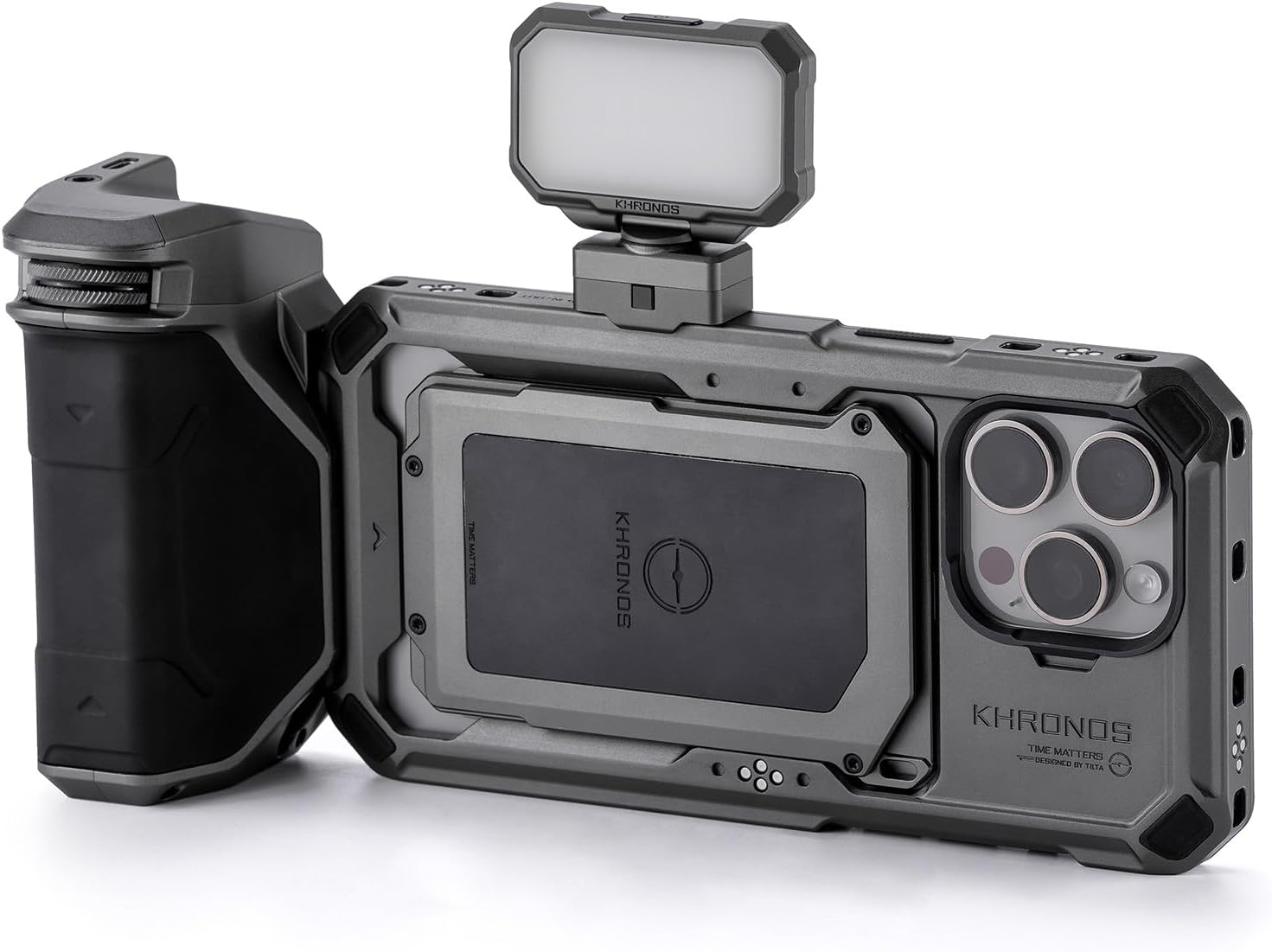
Figure 1: Tilta Khronos Basic Kit components assembled on an iPhone 15 Pro Max.
What's in the Box
- Tilta Khronos Case Compatible with iPhone 15 Pro Max (Space Gray)
- Khronos Mini LED Panel (Daylight) – Space Gray (Model: TK-MLP-DL-SG)
- Khronos Focus PD Handle for iPhone – Space Gray (Model: TK-IP-PH-SG)
Setup
Follow these steps to assemble your Tilta Khronos Basic Kit:
- Install the Khronos Case: Securely place your iPhone 15 Pro Max into the Khronos Case. Ensure all four screws in each corner are tightened for a snug fit.
- Attach the Focus PD Handle: Align the connection point of the Focus PD Handle with one of the side mounting points on the Khronos Case. Press the release button on the handle and slide it into place until it clicks securely. The handle features an integrated battery to power accessories and offers control for focus, zoom, and run/stop functions.
- Mount the Mini LED Panel: Attach the Mini LED Panel to any available electronic contact mounting point on the case. The panel provides three levels of brightness for shooting in low-light conditions.

Figure 2: Disassembled components of the Tilta Khronos Basic Kit.
Video 1: Tilta Khronos Ecosystem for iPhone Setup Guide & Overview. This video demonstrates the assembly process for various Khronos components, including the case, handles, and accessories.
Operating Instructions
Once assembled, your Tilta Khronos Basic Kit is ready for use. The integrated design allows for seamless operation with your iPhone 15 Pro Max.
- Powering Accessories: The Focus PD Handle's integrated battery powers connected accessories through the case's electronic contact points.
- Focus and Zoom Control: Use the controls on the Focus PD Handle for precise manual focus and zoom adjustments within compatible camera applications.
- Lighting Adjustment: The Mini LED Panel features a power button and brightness adjustment settings. Press to cycle through brightness levels.
- Mounting to Support Systems: The locking clamp design allows for secure attachment to tripods and other support systems, providing stable footage.
Video 2: Mobile Filmmaking with Khronos Ecosystem for iPhone 15 Pro. This video showcases the practical application of the Khronos ecosystem in mobile filmmaking scenarios.
Video 3: Tilta Khronos Ecosystem for iPhone 15 Pro / Pro Max. This video provides an overview of the Khronos ecosystem's features and compatibility with iPhone 15 Pro/Pro Max.
Features
- Custom Designed: Specifically engineered for iPhone 15 Pro Max smartphones.
- Mini LED Light: Offers 3 levels of brightness and an adjustable mount for shooting in low-light environments.
- Focus Handle: Features an integrated battery to power accessories and expands control for focus, zoom, and run/stop functions.
- Locking Clamp Design: Provides a secure way to connect accessories and mount the system to tripods and other support systems.
- Expandable Design: Compatible with a wide range of accessories including side handles, cooling modules, filters, and USB-C hubs (sold separately).
Maintenance
To ensure the longevity and optimal performance of your Tilta Khronos Basic Kit, follow these maintenance guidelines:
- Cleaning: Use a soft, dry cloth to clean the case and accessories. Avoid abrasive materials or harsh chemicals.
- Storage: Store the kit in a cool, dry place away from direct sunlight and extreme temperatures.
- Battery Care: For the Focus PD Handle, ensure regular charging to maintain battery health. Avoid fully discharging the battery for extended periods.
- Connection Points: Periodically inspect all mounting and connection points for any debris or wear. Keep them clean to ensure secure attachments.
Troubleshooting
| Problem | Possible Cause | Solution |
|---|---|---|
| Accessories not powering on. | Low battery in Focus PD Handle or loose connection. | Charge the Focus PD Handle. Ensure all connections are secure. |
| Focus/Zoom control is unresponsive. | App compatibility issue or Bluetooth connection problem. | Ensure your camera app supports external focus/zoom control. Re-pair the handle via Bluetooth if applicable. |
| Kit feels unstable on tripod. | Improperly secured locking clamp or tripod. | Verify the locking clamp is fully engaged. Ensure the tripod is stable and properly set up. |
Specifications
| Feature | Detail |
|---|---|
| Product Dimensions | 10 x 10 x 10 inches (Kit) | 4.5"D x 11.5"W x 4.5"H (Folded Size) |
| Item Weight | 3 pounds |
| Item Model Number | TK-IP15-PMB-SG |
| Manufacturer | Tilta |
| Color | Space Gray |
| Compatible Devices | iPhone 15 Pro Max, Tilta Khronos Ecosystem Accessories |
| UPC | 810153170549 |
Warranty and Support
For warranty information and technical support, please refer to the official Tilta website or contact their customer service directly. Keep your purchase receipt for warranty claims.
Visit: www.tilta.com


