
Caddytek CP-CO-DG
Caddytek CaddyLite Compact 3-Wheel Golf Push Cart User Manual
Model: CP-CO-DG
1. Introduction
The Caddytek CaddyLite Compact 3-Wheel Golf Push Cart is designed for golfers who prioritize convenience, portability, and performance. This lightweight folding golf trolley offers stability and smooth rolling across various terrains, making it an ideal companion for any walking golfer.
2. Key Features
- Effortless Folding for Travel: Patented one-click folding mechanism collapses to a compact 16" x 14" x 21" for easy transport and storage.
- Stable All-Terrain Performance: Features 11.5" rear and 10.5" front maintenance-free EVA wheels with a 32" wide wheelbase for smooth rolling and traction.
- Universal Fit for Golf Bags: Adjustable elastic straps securely hold most stand or cart bags.
- Fully Loaded Storage Features: Includes umbrella holder, mesh net, scorecard holder, phone/GPS mount, drink holder, and steel pad for magnetic attachments.
- Durable & Lightweight Aluminum Build: Weighs only 18 lbs, with an ergonomic adjustable handle and built-in hand brake for control on slopes.
3. Setup
The Caddytek CaddyLite Compact is designed for quick and easy setup. It comes largely pre-assembled, requiring minimal effort to get it ready for use.
3.1 Unfolding the Cart
The cart features a patented one-click folding mechanism for effortless unfolding. Press the designated button (usually a grey button near the handle) and gently lift the handle. The cart will automatically extend into its operational position. Secure the top portion by pulling the lever near the handle.
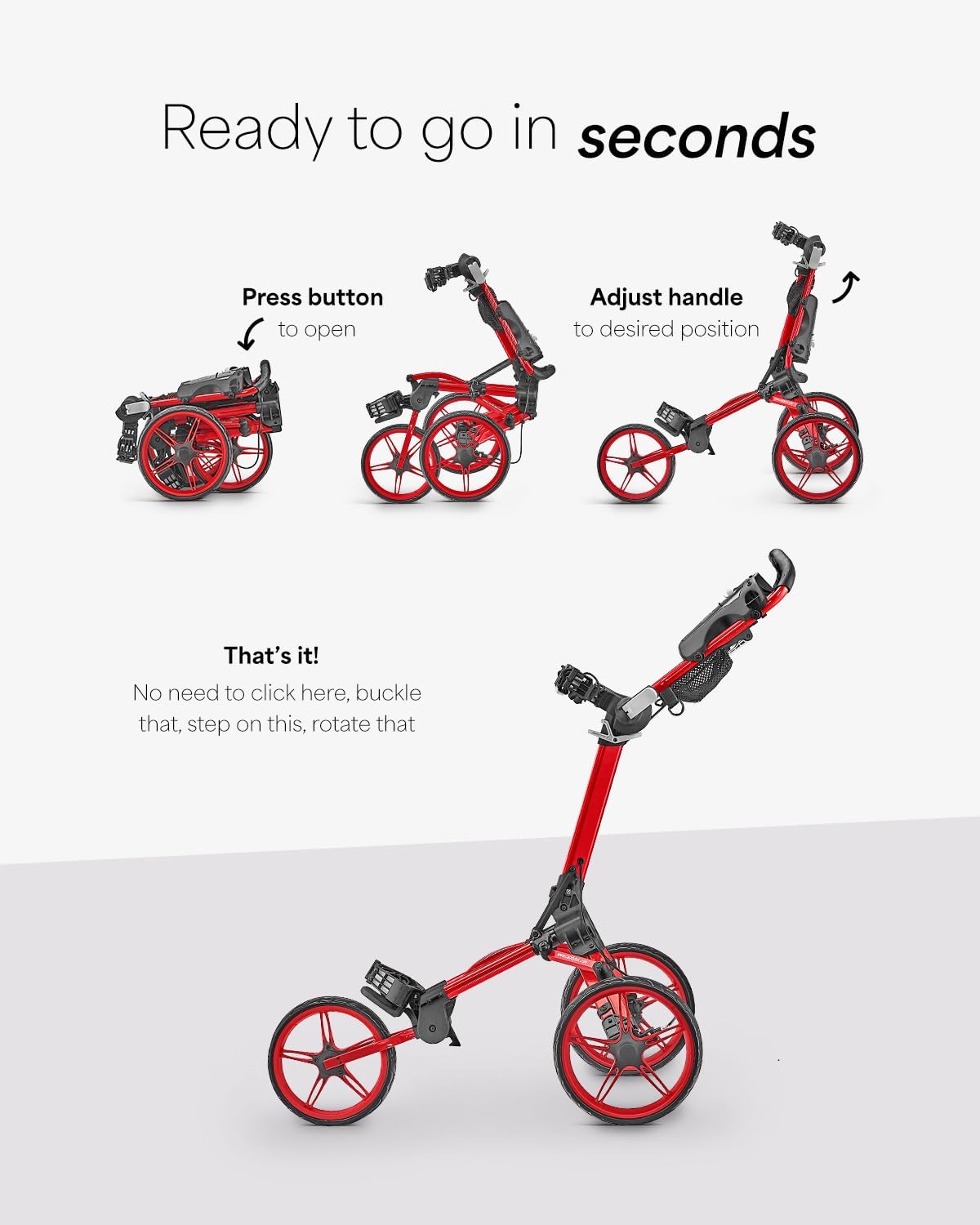
Image: Step-by-step guide to unfolding the Caddytek CaddyLite Compact.
Video: Detailed instructions on how to semi-automatically fold and unfold the Caddytek CaddyLite Compact golf push cart.
3.2 Attaching Accessories
Attach the cup holder and umbrella holder to their designated slots on the handle console. These are designed for easy snap-on installation.

Image: Detailed view of the accessory console, including cup and umbrella holders.
4. Operating Instructions
4.1 Securing Your Golf Bag
Place your golf bag onto the cart. Utilize the adjustable elastic straps to firmly secure the bag to the upper and lower bag supports. Ensure the bag is centered and stable to prevent movement during play. The patented stand bag slot accommodates stand bags securely.
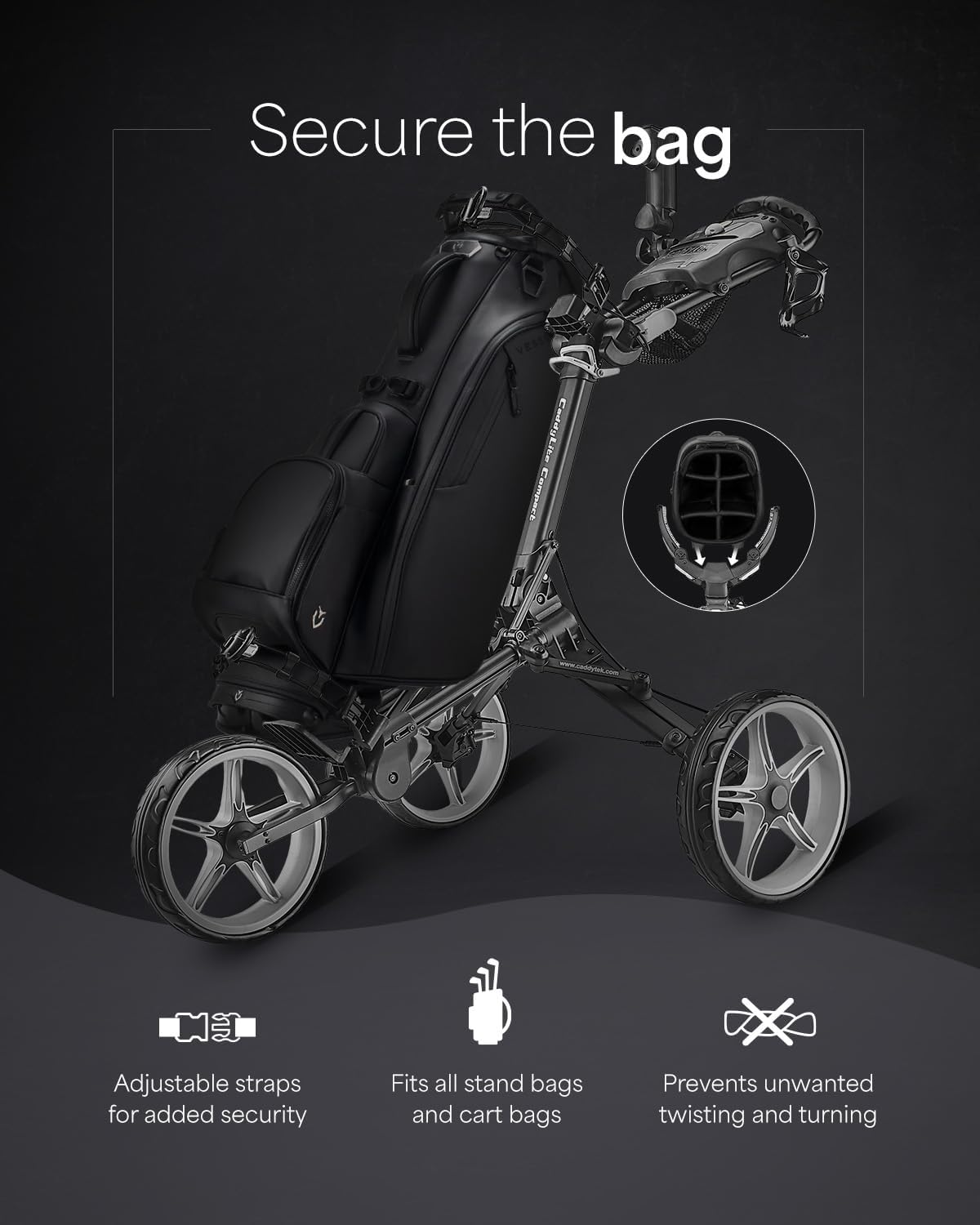
Image: Golf bag secured on the cart, showing adjustable straps.
4.2 Adjusting Handle Height
The ergonomic handle can be adjusted to multiple heights for comfortable pushing. Locate the adjustment mechanism near the handle and set it to your preferred height.
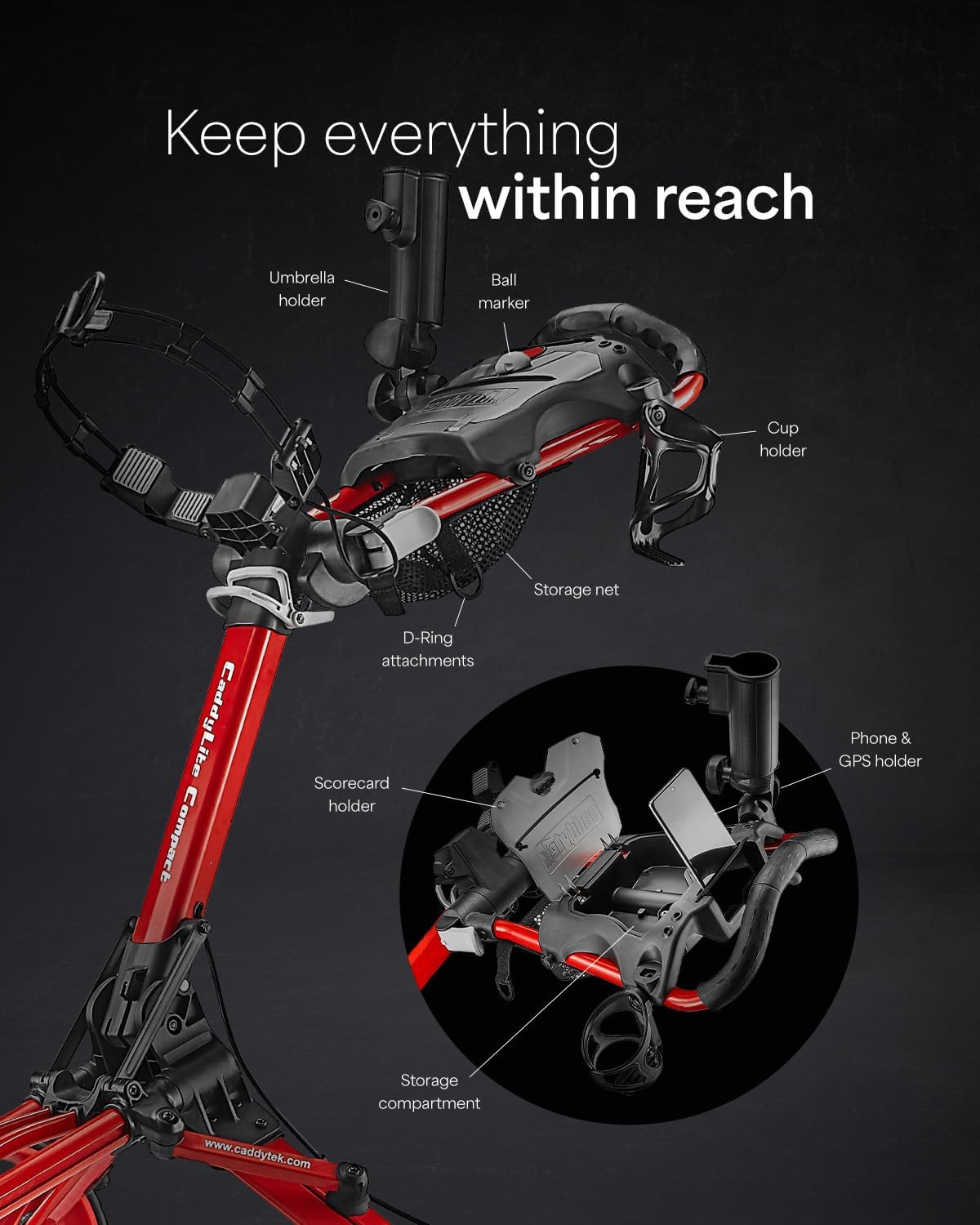
Image: Handle height adjustment options for ergonomic comfort.
4.3 Using the Hand Brake
The built-in hand brake is conveniently located on the handle. Engage the brake to secure the cart on slopes or when stationary. Disengage to allow free movement.
4.4 Folding the Cart for Storage
To fold the cart, pull the lever near the handle to release the top portion. Then, push the handle down towards the base until the cart collapses into its compact form. Ensure all parts are securely latched for transport.

Image: The Caddytek CaddyLite Compact in both unfolded and folded configurations.

Image: The compact folded cart fitting into a car trunk.
5. Maintenance
- Cleaning: Wipe down the cart with a damp cloth after each use to remove dirt and debris. Avoid harsh chemicals.
- Storage: Store the cart in a dry, cool place when not in use to prevent rust or material degradation.
- Wheel Inspection: Periodically check the wheels for any obstructions or damage. The EVA wheels are maintenance-free, but ensuring they are clean will prolong their lifespan.
- Strap Check: Inspect elastic straps for wear and tear. Replace if necessary to ensure secure bag attachment.
6. Troubleshooting
| Problem | Possible Cause | Solution |
|---|---|---|
| Cart does not unfold/fold smoothly. | Mechanism might be jammed or not fully disengaged. | Ensure the release button/lever is fully pressed. Check for any debris obstructing the folding joints. Refer to the unfolding video in Section 3.1. |
| Brake is not holding the cart. | Brake cable might be loose or worn. | Inspect the brake cable for tension. If loose, it may require adjustment or replacement by a qualified technician. |
| Golf bag is slipping or not secure. | Straps are not tightened sufficiently or are worn. | Ensure elastic straps are pulled taut and securely fastened. Replace worn straps. |
| Cart pulls to one side. | Front wheel alignment issue or uneven weight distribution. | Check that the front wheel is properly aligned. Redistribute the weight of your golf bag evenly on the cart. |
7. Specifications
- Model Name: CaddyLite Compact, Dark Grey
- Model Number: CP-CO-DG
- Brand: Caddytek
- Material: Aluminum
- Item Weight: 18.1 Pounds
- Item Dimensions (LxWxH): 47 x 32 x 40 inches (unfolded)
- Folded Dimensions: 16" x 14" x 21"
- Wheel Size: 11.5" rear, 10.5" front EVA wheels
- Wheelbase: 32" wide
- Included Components: Golf cart Frame with 3 wheels, Cup Holder, Umbrella Holder, User's Manual
8. Warranty & Support
The Caddytek CaddyLite Compact 3-Wheel Golf Push Cart comes with a 1-year manufacturer warranty. For warranty claims, technical support, or any inquiries regarding your product, please contact Caddytek customer service through their official website or the retailer where the product was purchased.
Visit the official Caddytek website for further assistance: Caddytek Store
Ask a question about this manual
Ask about setup, troubleshooting, compatibility, parts, safety, or missing instructions. Manuals+ will review the question and use this page’s manual context to help answer it.