
Introduction
This manual provides comprehensive instructions for the Black Shark Magnetic Cell Phone Cooler 4Pro. This device is engineered to provide efficient cooling for your mobile phone, tablet, or other compatible devices during intensive use, preventing overheating and maintaining optimal performance. Please read this manual thoroughly before using the product.
Package Contents
- Black Shark Magnetic Cell Phone Cooler 4Pro x1
- Type-C Cable x1
- User Manual x1
- Removable Grips x2
Product Features
The Black Shark Magnetic Cell Phone Cooler 4Pro incorporates advanced cooling technology and user-friendly features:
- 27W Power Upgrade: Features semiconductor variable frequency cooling technology capable of dropping temperatures to below zero in 30 seconds, achieving up to a 40°C drop and cooling down to -15°C.
- Smart Temperature Control: Equipped with dual NTC over-temperature protection, monitoring internal clip temperature in real-time. Automatic shutdown occurs if temperature exceeds 60°C or drops below -15°C to ensure safety and device longevity. The Shark Arsenal app allows for constant monitoring and manual or smart temperature adjustments to prevent condensation.
- Comfortable Gaming Experience: Utilizes a magnetic attachment design with top and bottom air outlets to direct hot air away from hands. Features a low-noise design for uninterrupted use. Customizable RGB lighting effects are available via the Shark Arsenal app.
- Wide Compatibility: Includes a detachable grip, supporting both magnetic and clip-on usage. Compatible with Android smartphones, iPhones (MagSafe series), Nintendo Switch, iPads, laptops, and more. An upgraded copper nut design allows mounting on gimbals and camera stands for various scenarios like live streaming and vlogging.

Image: Exploded view showing the copper cooling plate, extra-large TEC cooling chip, large-area heat sink, and 7-blade high-speed fan.

Image: Detailed diagram highlighting the custom super large cooling chip, 27W high-power cooling, NTC dual protection for overtemperature, custom 4210 large-sized fan, and first top and bottom venting magnetic absorption radiator.
Setup
Magnetic Attachment (for MagSafe compatible devices)
- Ensure your device is MagSafe compatible (e.g., iPhone 12 series and above) or has a magnetic sticker applied.
- Align the cooler with the magnetic area on the back of your device. The cooler will snap into place securely.
- Connect the provided Type-C cable to the cooler's port and to a power source (e.g., power bank, wall adapter).

Image: The Black Shark Magnetic Cell Phone Cooler 4Pro attached magnetically to the back of a smartphone, demonstrating the magnetic connection.
Clip-on Attachment (for non-MagSafe devices)
- Take out the provided detachable grips.
- Align the sides of the back clip with the buckle on the cooler.
- Insert the buckle into the side hole of the back clip. Apply force at a 45-degree angle with your right index finger. Align the force direction immediately with the buckle at an angle. Once you hear a "click" sound, the installation is complete.
- Adjust the grips to securely hold your device (compatible with devices 66-85mm wide).
- Connect the provided Type-C cable to the cooler's port and to a power source.

Image: Illustration of the cooler's compatibility, showing magnetic attachment for iPhone 12 and above series, and clip-type attachment for Android phones without magnetic suction (width 66-85mm).
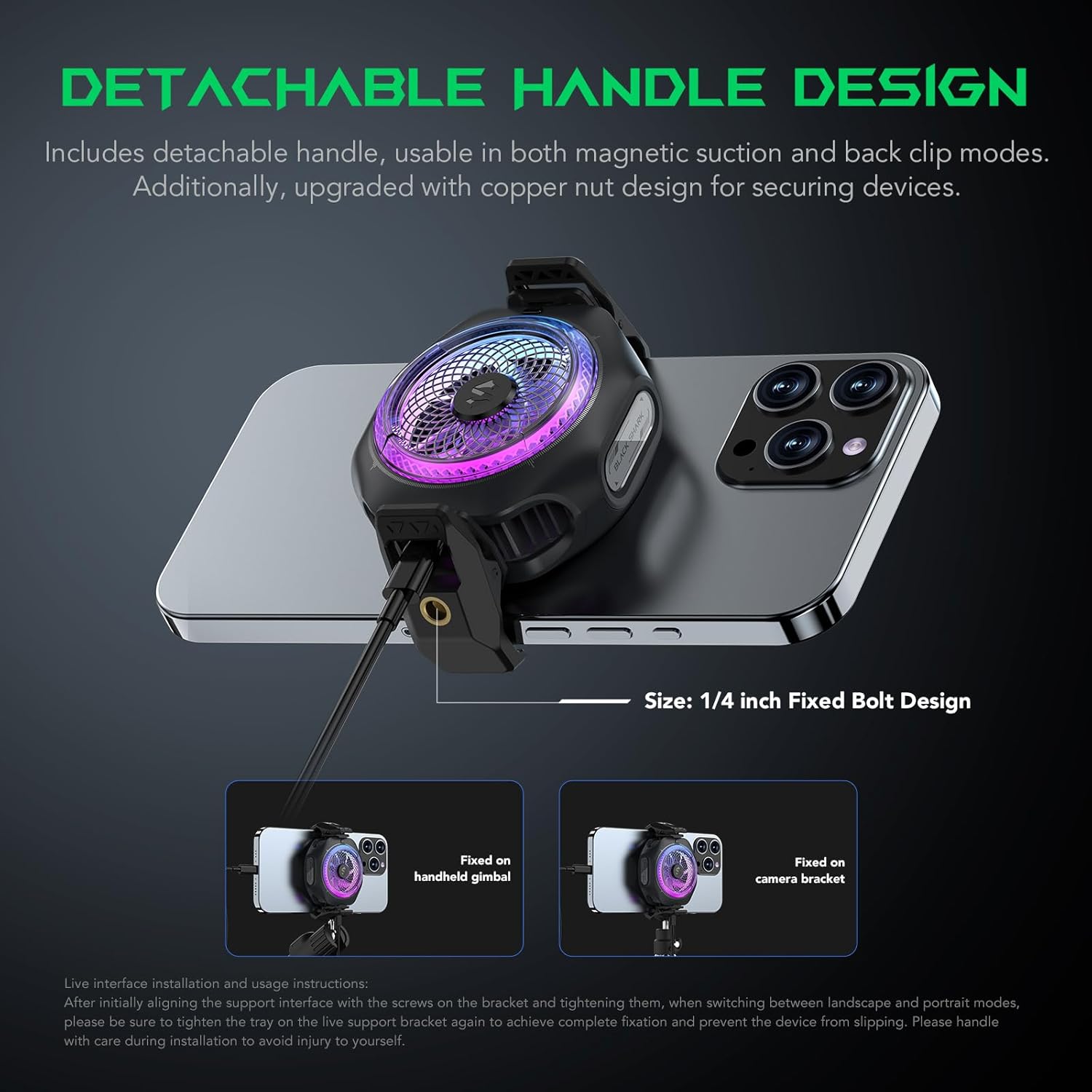
Image: Demonstrates the detachable handle design, usable in both magnetic suction and back clip modes. Also shows the upgraded copper nut design for securing devices, with examples of fixing on a handheld gimbal and a camera bracket.
Video: This video provides a tutorial on how to install the grabber (clip-on attachment) for the Magnetic Phone Cooler 4PRO.
Operating Instructions
Power On/Off
Once connected to a power source, the cooler will automatically power on. To power off, disconnect the Type-C cable from the cooler or the power source.
Temperature Control
The cooler features dual NTC over-temperature protection. It automatically shuts off if the internal temperature exceeds 60°C or drops below -15°C. For manual control and smart temperature adjustment, download and use the Shark Arsenal app.
RGB Lighting Customization
The RGB lighting effects can be customized through the Shark Arsenal app. Connect the cooler to your device via Bluetooth and use the app to select various lighting schemes and colors.

Image: The cooler shown with a smartphone displaying the Shark Arsenal app interface, illustrating options for RGB lighting effect switching and temperature control scheme switching.
Maintenance
- Keep the cooler clean by wiping it with a dry, soft cloth.
- Avoid exposing the device to water or excessive moisture.
- Store the cooler in a cool, dry place when not in use.
- Do not attempt to disassemble or repair the device yourself, as this will void the warranty.
Troubleshooting
- Cooler not turning on: Ensure the Type-C cable is securely connected to both the cooler and a functioning power source. Verify the power source is active.
- Insufficient cooling: Check that the cooler is properly attached to your device, ensuring good contact with the cooling plate. Remove any obstructions from the air inlets or outlets. Ensure the device is not in a high-temperature environment that exceeds the cooler's capacity.
- RGB lights not working or not changing: Confirm the cooler is powered on. Ensure the Shark Arsenal app is installed, and the cooler is connected via Bluetooth. Check app settings for lighting customization.
- Condensation on device: This can occur due to extreme cooling. Use the Shark Arsenal app's smart temperature adjustment feature to prevent excessive cooling and condensation.
Specifications
| Feature | Detail |
|---|---|
| Product Dimensions | 3.9"L x 7.13"W x 1.71"H |
| Brand | Black Shark |
| Power Connector Type | USB Type-C |
| Voltage | 5 Volts |
| Wattage | 27 watts |
| Cooling Method | Air |
| Compatible Devices | Laptop, Smartphone |
| Noise Level | 35 Decibels |
| Material | Plastic |
| Maximum Rotational Speed | 7200 RPM |
| Item Weight | 88 Grams |
Warranty and Support
This product comes with a 12-month warranty. Black Shark's after-sales service team provides 24-hour satisfaction solutions for any issues you may encounter. For support, please refer to the contact information provided in your product packaging or visit the official Black Shark website.


