
1. Important Safety Information
Please read all instructions carefully before using your ICECO VL60D portable freezer. Retain this manual for future reference.
- Ensure proper ventilation around the unit to prevent overheating.
- Do not block air vents.
- Avoid placing the unit in direct sunlight or near heat sources.
- Use only the provided power cables.
- Do not operate the unit if the power cable is damaged.
- Keep the unit away from water and moisture.
- Do not attempt to repair the unit yourself. Contact customer support for assistance.
- Always ensure the unit is securely fastened when used in a moving vehicle to prevent movement and potential damage.
2. Product Overview
The ICECO VL60D is a 63-quart (60L) dual-zone portable freezer/refrigerator designed for versatile use in cars, RVs, and indoors. It features independent temperature control for each zone, allowing for simultaneous freezing and refrigeration.
What's in the Box
- VL60D Refrigerator x1
- User Manual x1
- AC Power Cable x1
- DC Power Cable x1
- Cover x1
- Baskets x2
- Extension DC Cord x1
Key Features
- Dual Zone & Independent Control: Two compartments with separate temperature settings (0°F to 50°F).
- SECOP Compressor: Ensures stable and superior cooling performance with MAX and ECO modes.
- Versatile Power: Operates on 12/24V DC and 110-240V AC.
- Battery Protection: L/M/H 3-level battery protection to prevent vehicle battery drain.
- Durable Construction: Metal shell with impact-resistant caps and metal hardware.
- User-Friendly Design: Built-in LED light, elastic iron handles, and removable wired baskets.

Image: The ICECO VL60D Dual Zone Portable Freezer with its protective cover.

Image: Detailed view of ICECO VL60D features, including LED light, storage basket, anti-fingerprint surface, heat dissipation vents, impact-resistant corner caps, steel lock, and spring handle design.
3. Setup
Placement
Place the portable freezer on a flat, stable surface. Ensure there is adequate space (at least 6 inches) around all sides for proper ventilation. Avoid placing it near direct heat sources or in enclosed spaces without airflow.
Power Connection
The VL60D can be powered by either AC (110-240V) or DC (12/24V). Use the appropriate cable for your power source.
- AC Power: Connect the AC power cable to the AC input port on the unit and then to a standard wall outlet.
- DC Power: Connect the DC power cable to the DC input port on the unit and then to your vehicle's 12V/24V cigarette lighter socket or a portable power station.

Image: Close-up of the independent AC and DC input ports on the ICECO VL60D, showing the fuse and voltage indicators.
Video: This video provides a comprehensive overview of the ICECO VL60 Dual Zone 12 Volt Refrigerator, including its features, power options, and rugged construction, demonstrating how to set it up and use it in various environments.
Initial Cooling
For optimal performance, it is recommended to pre-cool the unit for several hours before loading it with items. This allows the interior to reach the desired temperature efficiently.
4. Operating Instructions
Control Panel
The control panel allows you to power the unit on/off, adjust temperatures, and select operating modes.
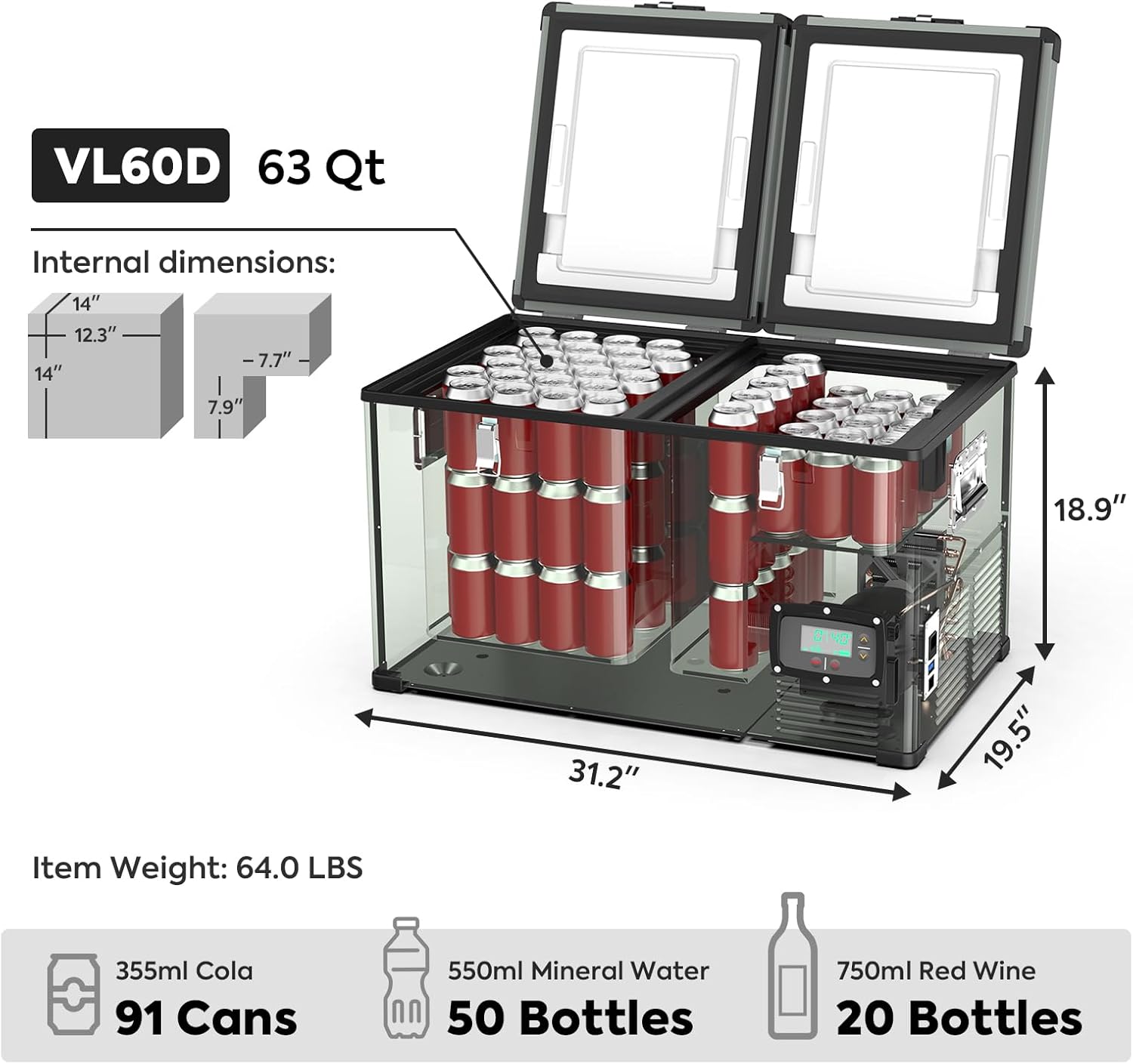
Image: Close-up of the ICECO VL60D control panel, showing the digital temperature display, power button, mode button, and temperature adjustment arrows.
Power On/Off
- Press the Power button to turn the unit on or off.
Temperature Adjustment
- Press the Mode button to switch between adjusting the left zone temperature, right zone temperature, MAX/ECO mode, and battery protection level.
- Use the Up and Down arrows to set the desired temperature for each zone.
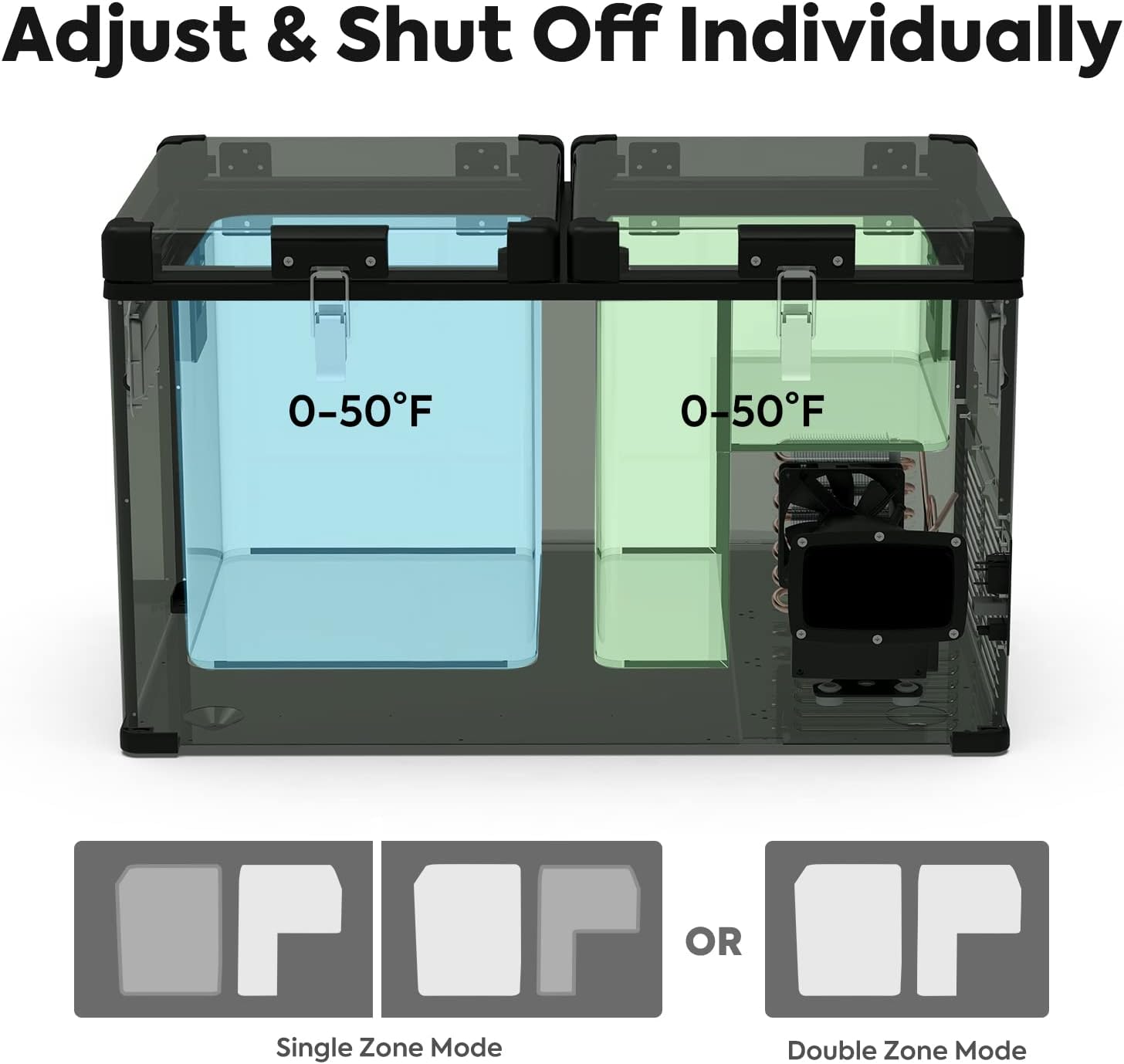
Image: Diagram illustrating the dual-zone functionality of the ICECO VL60D, showing how each compartment can be set to a temperature between 0-50°F, and options for single or double zone operation.
Operating Modes
- MAX Mode: Provides fast cooling for quick temperature reduction.
- ECO Mode: Optimizes energy consumption for extended battery life.
Battery Protection
The unit features three levels of battery protection to prevent draining your vehicle's battery:
- H (High): Highest protection, unit turns off at a higher voltage.
- M (Medium): Standard protection.
- L (Low): Lowest protection, unit turns off at a lower voltage.
It is recommended to use 'H' (High) setting when connected to your vehicle's starter battery to prevent it from draining completely.
5. Usage Tips
Pre-cooling for Efficiency
Pre-cooling the freezer at home using AC power before your trip can significantly reduce the power consumption from your vehicle's battery or portable power station during travel.
Optimal Loading
Utilize the removable wired baskets to organize items efficiently and allow for better air circulation, which improves cooling performance.

Image: The ICECO VL60D with its lids open, showcasing the removable wired baskets for organized storage and easy access to contents.
Insulation and Cover
The unit features 60mm thickened inner walls for excellent heat insulation. Using the included cover bag further enhances insulation and protects the unit from scratches and external temperatures, improving cooling efficiency.

Image: Cross-section view highlighting the ICECO VL60D's excellent heat insulation with a metal shell and 60mm thickened inner wall.
Video: This video demonstrates the quiet and efficient operation of the ICECO VL60D over a 48-hour period, highlighting its low power consumption and effective cooling capabilities in various settings.
6. Maintenance
Cleaning
- Always unplug the unit before cleaning.
- Wipe the interior and exterior with a damp cloth and mild detergent.
- Do not use abrasive cleaners or sharp objects that could damage the surfaces.
- Ensure all vents are clear of dust and debris for optimal performance.
Defrosting
- If a thick layer of ice builds up inside, unplug the unit and allow the ice to melt naturally.
- Wipe away melted water with a clean cloth. Do not use sharp tools to remove ice.
Storage
- When storing the unit for an extended period, ensure it is clean and dry.
- Leave the lids slightly ajar to prevent odors and mold growth.
- Store in a cool, dry place.
7. Troubleshooting
If you encounter issues with your ICECO VL60D, refer to the following common troubleshooting steps:
- Unit not powering on: Check power connections (AC/DC), ensure the power outlet is functional, and verify the fuse (15A) is not blown.
- Not cooling effectively: Ensure vents are not blocked, the ambient temperature is not excessively high, and the lids are properly sealed. Check if the unit is in ECO mode and switch to MAX mode if faster cooling is needed.
- Error codes on display: Consult the detailed troubleshooting section in the full user manual for specific error code meanings and solutions.
- Battery drain: Adjust the battery protection level to 'H' (High) to prevent excessive discharge of your vehicle's battery.
For persistent issues or further assistance, please contact ICECO customer support.
8. Specifications
| Feature | Specification |
|---|---|
| Model | VL60D |
| Capacity | 63 Quarts (60 Liters) |
| Product Dimensions (D x W x H) | 19.5" x 31.2" x 18.9" |
| Item Weight | 62.5 Pounds |
| Temperature Range | 0°F to 50°F (-18°C to 10°C) |
| Voltage | 12V/24V DC, 110-240V AC |
| Cooling Method | Compressor (SECOP) |
| Annual Energy Consumption | 199 Kilowatt Hours Per Year |
| Color | Dark Green |
| Material | Stainless Steel (Door Material Type) |
| Special Features | Dual Zone, Independent Control, Low Noise, Battery Protection, Anti-Shake, Portable, Compact, Convenient Plugs (AC+DC), SECOP Compressor, MAX&ECO Mode |
9. Warranty and Support
Warranty Information
- Compressor: 5-Year Warranty
- All Other Parts: 1-Year Warranty
Please retain your proof of purchase for warranty claims.
Customer Support
ICECO offers professional technical support and after-sales service. For any inquiries, troubleshooting, or warranty claims, please contact ICECO customer service. Messages will be answered within 24 hours, including weekends.
Visit the official ICECO website or refer to the contact information provided in your purchase documentation for the most up-to-date support details.


