
Introduction
The Tonton 60CM 20AWG DC Power Adapter Y Splitter Cable (Model 2L-1/4) is designed to efficiently distribute power from a single source to multiple devices. This package includes two 60CM Y splitter cables, each featuring a 1 female to 4 male configuration with right-angle 90-degree connectors. It is suitable for various applications, including CCTV security cameras, surveillance routers, DVRs, and LED strip lights.
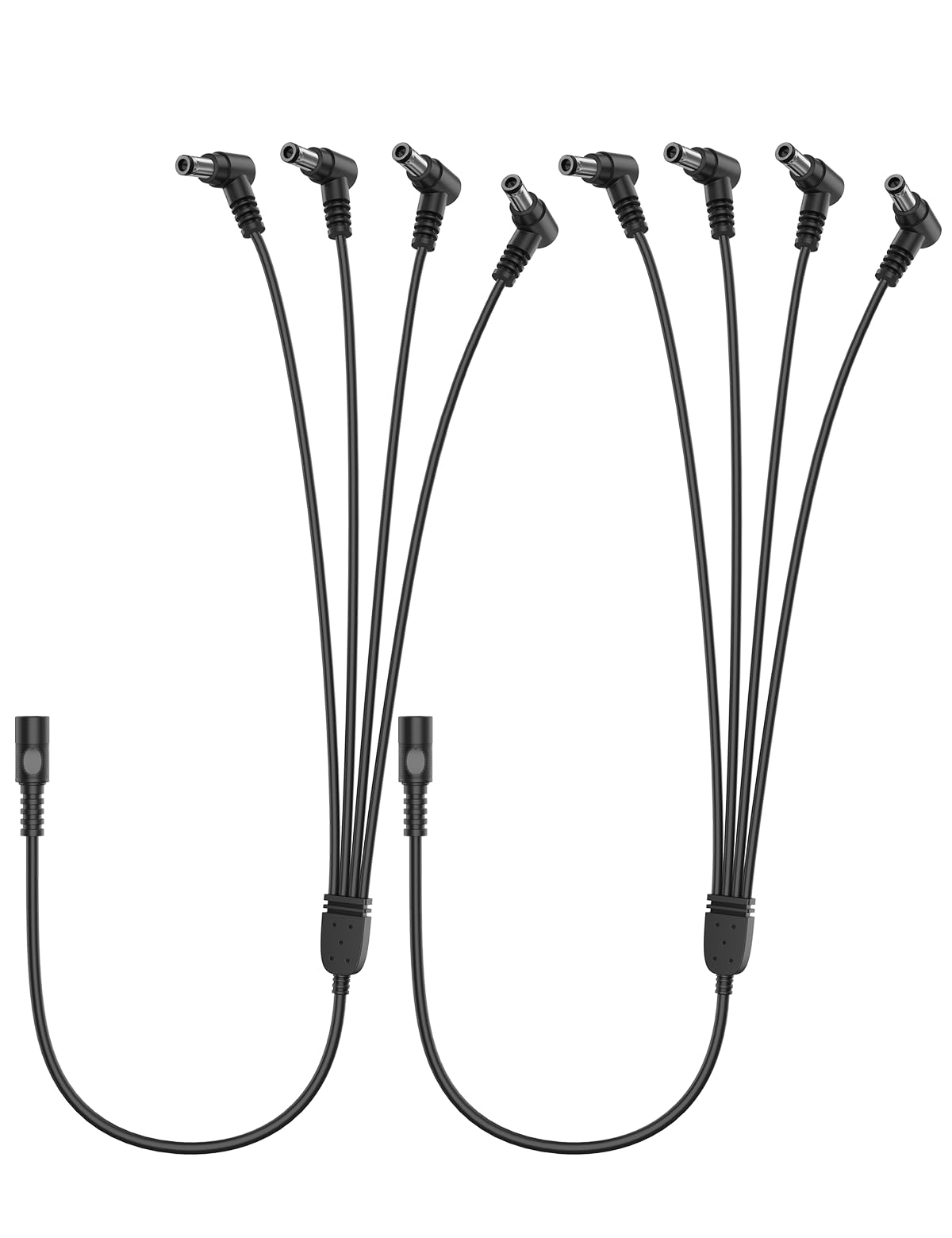
Image: Tonton 60CM 20AWG DC Power Adapter Y Splitter Cable with 1 female to 4 male connectors.
What's in the Box
- 2 x Tonton 60CM 20AWG DC Power Adapter Y Splitter Cables (1 Female to 4 Male, Right Angle 90 Degree)
Pre-Purchase Check
Before connecting, verify that your devices require a 5.5mm outer diameter and 2.1mm inner diameter DC power connector. This cable is specifically designed for this size.

Image: Close-up view of the 5.5mm x 2.1mm DC connectors and cable dimensions.
Setup and Installation
- Connect the Power Source: Plug the female end of the Tonton Y Splitter Cable into your existing DC power adapter. Ensure the power adapter meets the voltage and current requirements of all connected devices.
- Connect Devices: Plug the four male right-angle connectors into the DC power input ports of your compatible devices. The right-angle design allows for neat and organized connections, especially in confined spaces.
- Verify Connections: Ensure all connections are secure and fully inserted.
- Power On: Once all devices are connected, power on your main DC power adapter.

Image: Easy connection diagram for powering multiple devices.

Image: Right-angle design for tight spaces.
Video: Demonstration of connecting the Tonton 4-way DC power adapter Y splitter cable to power multiple security cameras from a single source.
Operating Instructions
The Tonton Y Splitter Cable operates passively by distributing power from one source to up to four compatible devices. No additional configuration is required. Ensure the total power draw of all connected devices does not exceed the capacity of your power adapter.

Image: Wide range of applications for the splitter cable.

Image: Compatibility with wired cameras, NVR/DVR, WiFi IP cameras, and monitors.

Image: Compatibility with routers, LED strips, printers, and IR illuminators.
Maintenance
- Keep the cable clean and free from dust.
- Avoid excessive bending or sharp turns, especially near the connectors, to maintain cable integrity.
- Store in a dry environment when not in use.
- The cable is designed for both indoor and outdoor use and is weatherproof.

Image: Cable durability and weatherproof design.

Image: Suitable for indoor and outdoor use.

Image: High-quality wire material for stable transmission.

Image: 10000+ bend lifespan for enhanced durability.
Troubleshooting
- No Power to Devices:
- Verify that the main DC power adapter is functioning correctly and plugged into a live outlet.
- Check all connections to ensure they are secure and fully inserted.
- Confirm that the power adapter's output voltage and current capacity are sufficient for all connected devices. Insufficient power can lead to devices not functioning or intermittent operation.
- Ensure the DC connector size (5.5mm x 2.1mm) matches your devices.
- Intermittent Power:
- Inspect the cable for any visible damage or frayed wires.
- Ensure connections are tight.
- Reduce the number of connected devices if the power adapter is overloaded.
Specifications
| Brand | Tonton |
| Model | 2L-1/4 |
| Cable Type | DC Power Adapter Y Splitter Cable |
| Connector Type | 5.5mm x 2.1mm DC Barrel (1 Female to 4 Male) |
| Connector Gender | Male-to-Female |
| Cable Length | 60CM (approximately 23.6 inches) |
| Wire Gauge | 20AWG |
| Maximum Voltage | 12 Volts (DC) |
| Special Feature | Right-Angle 90-Degree Connectors, Weatherproof |
| Compatibility | Devices requiring 5.5mm x 2.1mm DC power, such as CCTV cameras, surveillance routers, DVRs, LED strip lights, guitar pedals. |
| Item Weight | 50 Grams (per cable) |
| Included | 2PCS 1 to 4 60CM DC 5521 Power Y Splitter Cable |
Warranty and Support
For product support or warranty inquiries, please visit the official Tonton support page: Tonton Store on Amazon. You may also scan the QR code provided in the product images for direct support access.

Image: Scan for Tonton support.