
tectake 405025
tectake Sunna Garden Umbrella 2.5x2.5m with Solar LED Lights - User Manual
Model: 405025
1. Introduction
Thank you for choosing the tectake Sunna Garden Umbrella. This manual provides essential information for the safe and efficient assembly, operation, and maintenance of your new umbrella. Please read these instructions carefully before use and retain them for future reference.
The tectake Sunna Garden Umbrella is designed to provide shade and comfort for your outdoor spaces. It features a convenient crank mechanism for easy opening and closing, an adjustable tilt function, and integrated solar-powered LED lights for evening ambiance. Its robust construction ensures stability and durability.

Image 1.1: The tectake Sunna Garden Umbrella providing shade in an outdoor setting.
2. Included Components
Before assembly, please ensure all the following components are present in your package:
- Umbrella canopy and frame assembly
- Protective cover
- 2 Wind protection straps
- Solar panel unit
- Assembly material (screws, bolts, tools if included)
- Assembly instructions (separate document, if applicable)

Image 2.1: Exploded view of the umbrella components and dimensions.
3. Setup and Assembly
Follow the detailed assembly instructions provided in your package. General steps include:
- Unpack Components: Carefully remove all parts from the packaging and verify against the included components list.
- Assemble Base: Connect the base components as per the instructions. Ensure the base is placed on a flat, stable surface.
- Secure Base: For optimal stability, especially in windy conditions, it is highly recommended to secure the base with appropriate weights (e.g., concrete slabs, sandbags) or by anchoring it to the ground if suitable. Base weights are typically not included.
- Attach Main Pole: Insert the main pole into the assembled base and secure it firmly.
- Mount Umbrella Frame: Attach the umbrella frame to the main pole, ensuring all connections are tight and secure.
- Install Solar Panel: Secure the solar panel unit to the designated area on the umbrella frame. Ensure it is positioned to receive maximum sunlight.
- Connect Wind Straps: Attach the two wind protection straps to the umbrella canopy and frame as indicated in the instructions to enhance stability.
Important Safety Note:
- Always ensure the umbrella is securely anchored or weighted to prevent tipping, especially in windy conditions.
- Do not use the umbrella in strong winds or storms. Close and secure it immediately.
4. Operating Instructions
4.1. Opening and Closing the Umbrella
The umbrella features a smooth crank mechanism for easy operation:
- To Open: Turn the crank handle clockwise until the canopy is fully extended.
- To Close: Turn the crank handle counter-clockwise until the canopy is fully retracted.

Image 4.1: Operating the crank mechanism.
4.2. Adjusting the Tilt Angle
The umbrella's tilt can be adjusted using the locking lever:
- To Adjust: Locate the locking lever on the main pole. Release the lever, adjust the canopy to your desired tilt angle (between 90° and 135°), and then firmly re-engage the lever to secure the position.
4.3. Using the Solar LED Lights
The umbrella is equipped with 24 LED lights powered by a solar panel:
- Charging: Ensure the solar panel is exposed to direct sunlight during the day for optimal charging.
- Activation: Locate the ON/OFF switch, usually near the solar panel or on the main pole. Flip the switch to 'ON' to activate the lights in low-light conditions. Flip to 'OFF' when not needed to conserve battery.
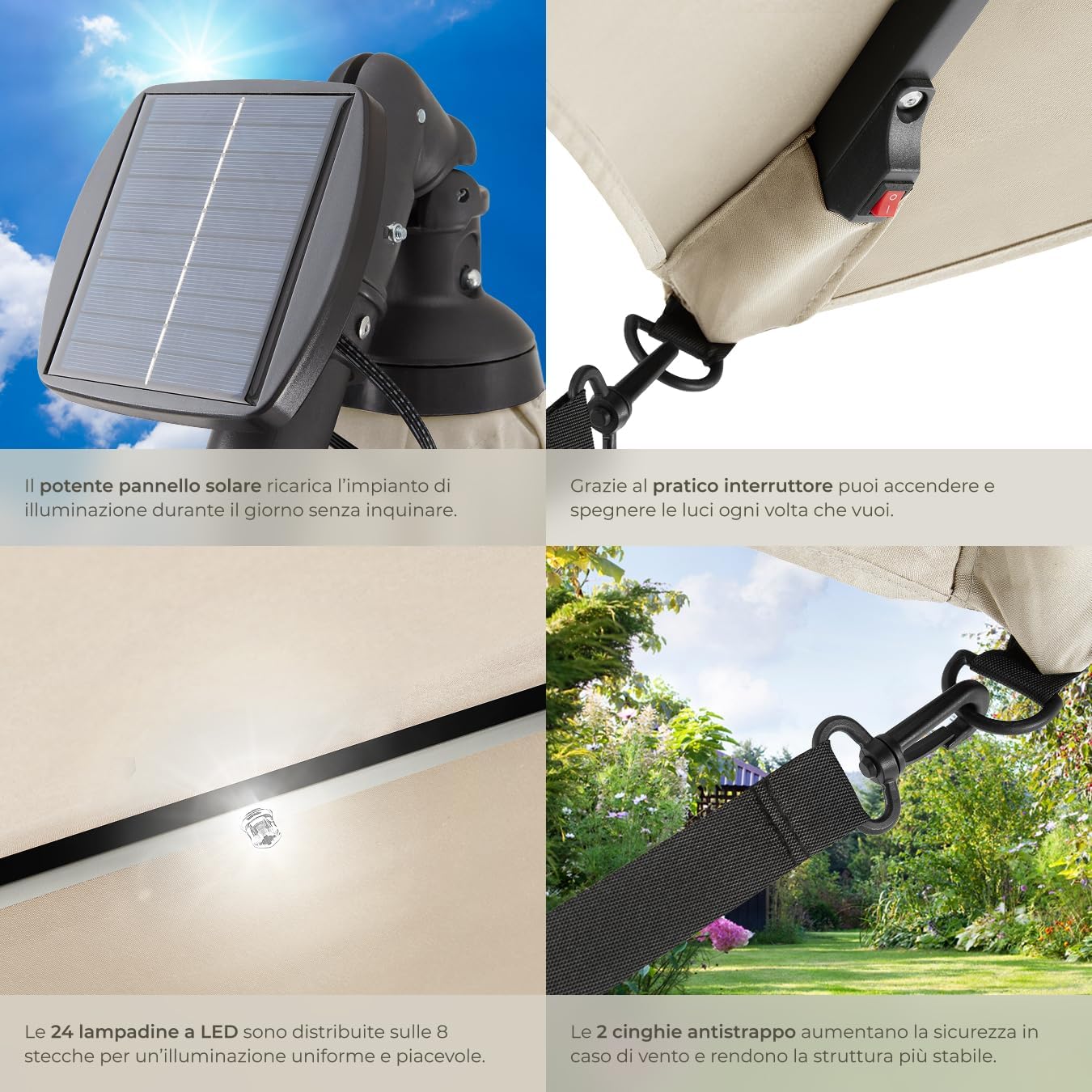
Image 4.2: Solar panel and LED light switch details.
5. Maintenance and Care
- Cleaning: Clean the umbrella canopy and frame with a damp cloth. For stubborn dirt, use a mild soap solution and rinse thoroughly. Allow to air dry completely before closing or storing.
- Storage: When not in use for extended periods or during adverse weather, close the umbrella and cover it with the provided protective cover. This will prolong its lifespan and maintain its appearance.
- Inspection: Regularly inspect all screws, bolts, and connections to ensure they are tight. Tighten any loose fasteners.
- Solar Panel: Keep the solar panel clean from dust and debris to ensure efficient charging of the LED lights.

Image 5.1: Umbrella stored with its protective cover.
6. Troubleshooting
| Problem | Possible Cause | Solution |
|---|---|---|
| Umbrella is unstable or tips over easily. | Insufficient base weight; loose connections. | Ensure the base is adequately weighted (e.g., with sandbags or concrete slabs). Check and tighten all assembly connections. Do not use in strong winds. |
| LED lights are not turning on. | Solar panel not charged; switch is off; faulty connection. | Ensure the solar panel receives sufficient direct sunlight for charging. Check that the ON/OFF switch is in the 'ON' position. Verify all wiring connections to the solar panel and lights. |
| Crank mechanism is stiff or difficult to operate. | Dirt or debris in the mechanism; lack of lubrication. | Clean the crank mechanism area. Apply a silicone-based lubricant to moving parts if necessary. |
7. Specifications
| Feature | Detail |
|---|---|
| Model Number | 405025 |
| Open Dimensions (W x D x H) | Approx. 250 x 300 x 255 cm (2.5 x 3.0 x 2.55 meters) |
| Closed Dimensions (W x D x H) | Approx. 100 x 100 x 253 cm (1.0 x 1.0 x 2.53 meters) |
| Canopy Diameter | Approx. 250 cm |
| Passage Height | Approx. 187 cm |
| Tilt Angle | 90° - 135° |
| Fabric Grammage | 180 g/m² |
| UV Protection (UPF) | 50+ |
| Lower Tube Diameter | Approx. 54 mm |
| Upper Tube Diameter | Approx. 48 mm |
| Umbrella Weight | Approx. 14.3 kg |
| Materials | Powder-coated steel (frame), 100% polyester (canopy), polypropylene |
| Special Features | Solar-powered LED lights (24 lights) |
| Opening Mechanism | Crank mechanism |
| Tilt Mechanism | Manual tilt |
| Recommended Use | Outdoor use (gardens, terraces, balconies), day and night |
8. Warranty and Support
This product is subject to the retailer's standard return policy, typically allowing returns within 30 days of receipt for change of mind. For defective or damaged products, or for specific marketplace purchase information, please refer to the retailer's return and warranty policies or contact customer support directly.
For any questions, missing parts, or technical assistance, please contact tectake customer support or the retailer from whom you purchased the product. Please have your model number (405025) and purchase details ready when contacting support.
Related documents405025


Ask a question about this manual
Ask about setup, troubleshooting, compatibility, parts, safety, or missing instructions. Manuals+ will review the question and use this page’s manual context to help answer it.