
NICEHCK NX7 MK4
NICEHCK NX7 MK4 In-Ear Monitor User Manual
Model: NX7 MK4
1. Product Overview
The NICEHCK NX7 MK4 is a high-fidelity in-ear monitor designed for musicians, audiophiles, and gamers, offering a rich and detailed audio experience. It features a sophisticated driver configuration and customizable sound profiles.

Image: The NICEHCK NX7 MK4 In-Ear Monitors, showcasing their design and form factor.
Key features include:
- Classic Seven Driver Units: Equipped with new beryllium-plated dual dynamic drivers and 4 Balanced Armature (BA) drivers for rich low-mid frequencies and exquisite treble, complemented by a 7-layer Piezoelectric (PZT) driver for gorgeous Ultra High Frequencies (UHF).
- Premium Materials: Constructed from stabilized wood, resin, aluminum alloy, and PC, providing a warm and rich sound while ensuring durability and an elegant appearance.
- Ergonomic Design: Lightweight and ergonomically shaped for comfortable, extended wear. The soft, tangle-free cable enhances daily usability.
- Wide Compatibility: Features interchangeable cables with 3.5mm single-ended or 4.4mm balanced options, making them versatile for various audio setups.
- Customizable Sound: Includes replaceable tuning filters (gold, red, black) to adjust the sound profile to balanced, mid/treble-focused, or bass-heavy preferences.

Image: Diagram illustrating the four different materials used in the construction of the NX7 MK4: stabilized wood, environmental resin, aluminum alloy, and environmental PC.

Image: Comparison chart highlighting improvements of the 4th Generation NX7 MK4 over the 3rd Generation NX7 MK3, including mixed materials, easier drive, and higher sound quality.
2. Package Contents
Please check the package carefully to ensure all items are present and in good condition.
- NICEHCK NX7 MK4 In-Ear Monitors (1 pair)
- High-fidelity OCC and silver-plated mixed cable (1 unit)
- Replaceable Tuning Filters (Gold, Red, Black - 1 set each)
- Silicone Ear Tips (various sizes)
- Storage Case (1 unit)

Image: The NX7 MK4 In-Ear Monitors displayed with their packaging and the included interchangeable tuning filters.

Image: Close-up of the upscale OCC and silver-plated mixed cable that comes standard with the NX7 MK4, highlighting its braided design.
3. Setup
3.1 Connecting the Cable
- Identify the left (L) and right (R) earpieces. The cable connectors are typically marked.
- Align the 2-pin connector on the cable with the corresponding receptacle on the earpiece. Ensure the pins are correctly oriented.
- Gently push the connector into the earpiece until it clicks securely into place. Do not force it.
- Repeat for the other earpiece.
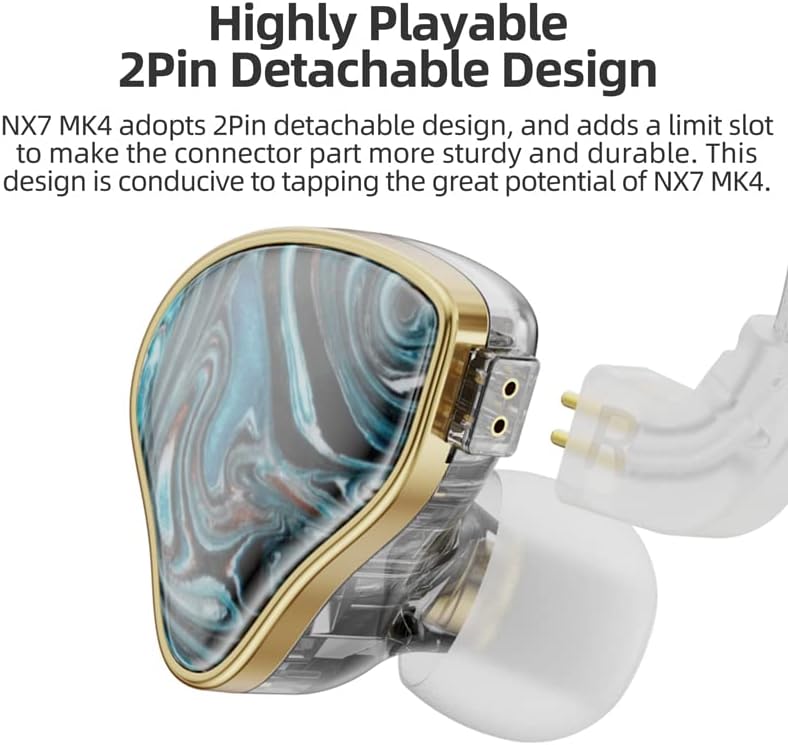
Image: Detailed view of the NX7 MK4's 2-pin detachable design, showing how the cable connects to the earpiece for secure and durable attachment.
3.2 Choosing Ear Tips
Selecting the correct ear tip size is crucial for optimal sound quality and comfort. Experiment with the included silicone ear tips to find the best fit. A good seal ensures proper bass response and passive noise isolation.
3.3 Inserting the In-Ear Monitors
- Gently insert the earpiece into your ear canal.
- Adjust the earpiece until it feels secure and comfortable, forming a good seal.
- Route the cable over your ear for a more secure fit and to reduce microphonics (cable noise).
4. Operating Instructions
4.1 Basic Usage
Once the cable is connected and the ear tips are properly seated, plug the 3.5mm or 4.4mm connector into your audio source (e.g., smartphone, digital audio player, computer, gaming console). Adjust the volume on your audio source to a comfortable listening level before placing the IEMs in your ears.

Image: The NX7 MK4 In-Ear Monitors connected to a portable music player, demonstrating typical usage.
4.2 Compatibility
The NX7 MK4 is compatible with a wide range of devices that feature a 3.5mm or 4.4mm audio jack. This includes:
- Mobile Phones
- Tablets
- Desktop Computers
- Laptops
- Gaming Consoles
- Televisions
- Smart Speakers
- Digital Audio Players (DAPs)
5. Tuning Filters
The NICEHCK NX7 MK4 comes with three sets of replaceable tuning filters, allowing you to customize the sound signature to your preference. Each filter subtly alters the frequency response:
- Gold Filter: Provides a balanced sound profile, offering a neutral and natural listening experience. Sensitivity: 112dB/mW.
- Red Filter: Enhances mid and high frequencies, providing a brighter and more detailed sound. Sensitivity: 113dB/mW.
- Black Filter: Boosts bass frequencies, delivering a more impactful and warm sound. Sensitivity: 110dB/mW.
5.1 Changing Filters
- Gently unscrew the currently installed filter from the nozzle of the earpiece.
- Select your desired filter (gold, red, or black).
- Carefully screw the new filter onto the nozzle until it is finger-tight. Do not overtighten.
- Ensure the filter is securely attached before use.
Image: The NX7 MK4 In-Ear Monitors displayed with their packaging and the included interchangeable tuning filters (gold, red, black).
6. Maintenance
6.1 Cleaning the Ear Tips and Nozzles
- Regularly remove the ear tips and clean them with a soft, damp cloth. Allow them to dry completely before reattaching.
- Use a small, soft brush or a cotton swab to gently clean any earwax or debris from the earpiece nozzles. Ensure no moisture enters the earpiece.
6.2 Cable Care
- Avoid sharp bends or kinks in the cable, as this can damage the internal wires.
- When storing, coil the cable loosely.
- Do not pull the cable directly to disconnect; always grasp the plug.
6.3 Storage
When not in use, store your NX7 MK4 IEMs in the provided storage case to protect them from dust, moisture, and physical damage.
7. Troubleshooting
| Problem | Possible Cause | Solution |
|---|---|---|
| No sound or sound from only one side. |
|
|
| Poor sound quality (lack of bass, tinny sound). |
|
|
| Uncomfortable fit. |
|
|
8. Specifications

Image: Exploded view diagram of the NX7 MK4's classic seven-driver unit configuration, detailing the 4BA, Beryllium-plated Dual Dynamic, and 7-layer PZT drivers.
| Feature | Detail |
|---|---|
| Product Name | NICEHCK NX7 MK4 In-Ear Monitors |
| Model | NX7 MK4 |
| Driver Configuration | 4 Balanced Armature (BA) + 2 Beryllium-plated Dynamic + 1 Seven-layer Piezoelectric (PZT) |
| Impedance | 39Ω |
| Sensitivity (Gold Filter) | 112dB/mW |
| Sensitivity (Red Filter) | 113dB/mW |
| Sensitivity (Black Filter) | 110dB/mW |
| Frequency Response | 20-28kHz |
| Plug Options | 3.5mm or 4.4mm |
| Cable Length | 1.2m ± 5cm |
| Cable Material | High-purity silver-plated copper wire and monocrystalline copper wire mixed cable |
| Noise Control | Passive Noise Cancellation |
| Weight | 318 g (product) |
| Dimensions (packaging) | 17.02 x 12.7 x 5.59 cm |
9. Warranty and Support
9.1 Warranty Information
NICEHCK products are typically covered by a manufacturer's warranty against defects in materials and workmanship. Please refer to your purchase documentation or the seller's policy for specific warranty terms and duration. Extended warranty options may be available through third-party providers.
- Standard Return Policy: 30 days for refund/replacement.
- Extended Warranty Options: Available for 12 or 24 months against failures and defects.
9.2 Customer Support
For technical assistance, troubleshooting, or warranty claims, please contact NICEHCK customer support. You can reach them via email:
Email: support@nicehck.com
Additional support and information can be found on the official NICEHCK website or through their social media channels.

Image: Information on NICEHCK's global support and service, including the support email address and social media icons.
Related documentsNX7 MK4

Ask a question about this manual
Ask about setup, troubleshooting, compatibility, parts, safety, or missing instructions. Manuals+ will review the question and use this page’s manual context to help answer it.