
1. Introduction
Thank you for choosing the UUQ 1.2-6X24 Rifle Scope. This manual provides essential information for the proper setup, operation, and maintenance of your new optical device. Please read this manual thoroughly before use to ensure optimal performance and safety.

Figure 1: UUQ 1.2-6X24 Rifle Scope
2. Setup
2.1 Unboxing and Initial Inspection
Upon receiving your UUQ 1.2-6X24 Rifle Scope, carefully open the packaging and inspect all components. The package should include the rifle scope, lens caps, a cleaning cloth, an Allen wrench, and this instruction manual. Ensure no items are missing or damaged.
Video 1: Unboxing and overview of the scope's features, including lens caps, magnification, diopter, and windage/elevation adjustments.
2.2 Mounting the Scope
The included ring mounts are designed to fit 20mm Picatinny/Weaver rails. These mounts are compatible with both Picatinny (MIL-STD-1913) and Weaver rails, ensuring a secure and stable attachment for your scope. They are not compatible with 11mm dovetail rails.
- Attach the scope rings to your 20mm Picatinny/Weaver rail using the provided Allen wrench. Ensure they are securely tightened.
- Place the rifle scope into the lower halves of the rings.
- Attach the upper halves of the rings and tighten the screws evenly, ensuring the scope is level and the reticle is aligned.

Figure 2: Illustration of 20mm Picatinny/Weaver rail compatibility for mounting.
Video 2: Demonstration of how to install the scope mounts using the provided Allen key.
2.3 Battery Installation
The scope requires one CR2032 battery for reticle illumination, which is included. To install, unscrew the illumination control cap, insert the battery with the positive (+) side facing up, and then replace the cap.
2.4 Diopter Adjustment
To achieve a clear reticle image, adjust the diopter ring located at the eyepiece. Look through the scope at a plain, bright background (like the sky) and rotate the diopter ring until the reticle appears sharp and in focus. This adjustment is personal and should be set for your individual eyesight.
3. Operating Instructions
3.1 Magnification Adjustment
The scope features a magnification range of 1.2x to 6x. Rotate the magnification ring, located near the eyepiece, to adjust the desired level of zoom. The second focal plane reticle maintains its size across all magnifications.

Figure 3: Field of view comparison at 1.2x and 6x magnification.
3.2 Reticle Illumination
The MOA reticle offers red/green illumination with 5 brightness levels for each color. Rotate the illumination control knob, located on the side turret, to select between red or green and adjust the brightness. There are 'off' positions between each brightness level for convenience.
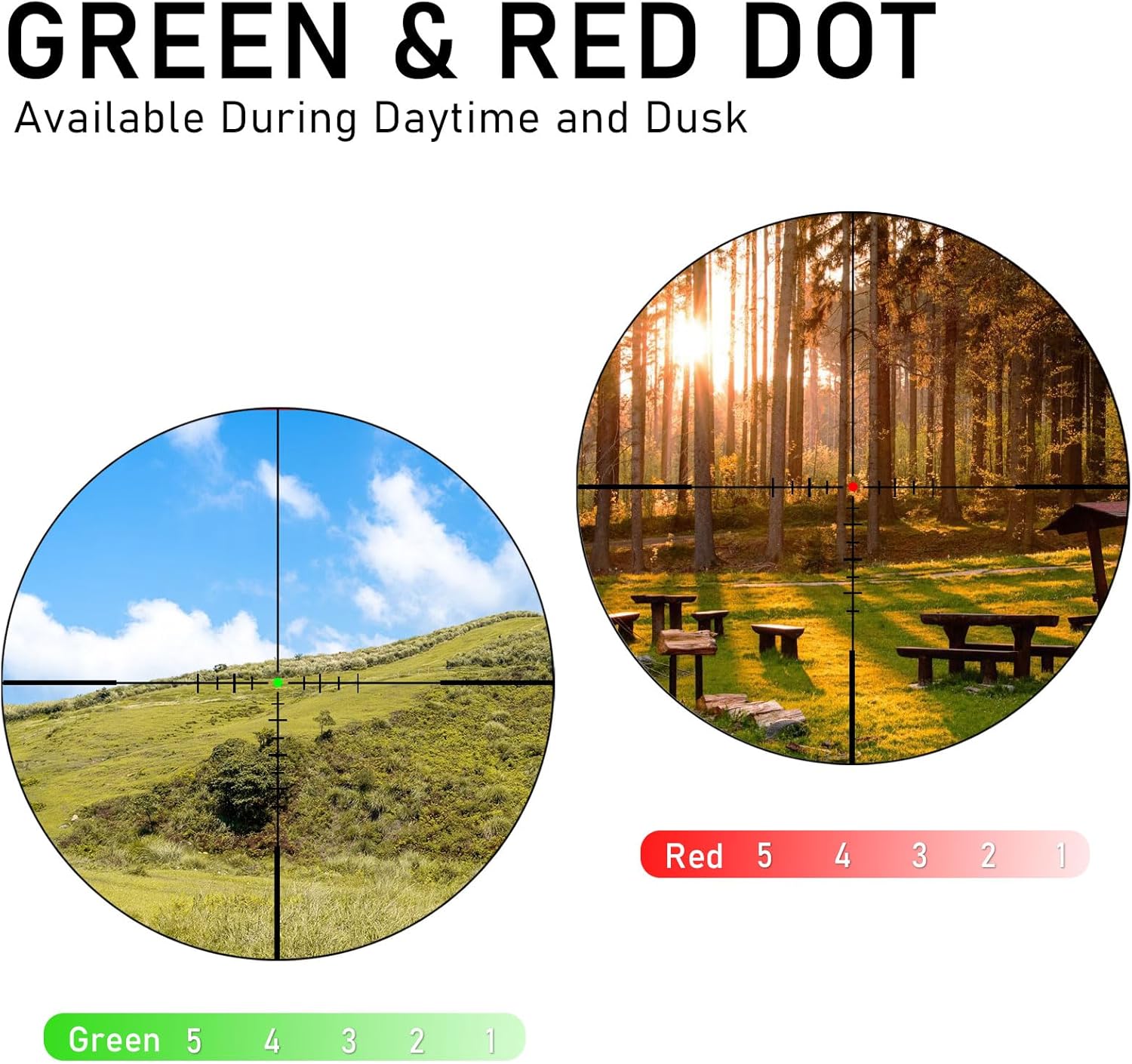
Figure 4: Green and Red Dot illumination settings for various lighting conditions.
Video 3: Demonstration of the reticle illumination system, showing green and red settings with varying brightness levels.
3.3 Windage and Elevation Adjustments
The scope features 1/2 MOA adjustments for both windage and elevation. The turrets provide crisp, audible clicks for precise adjustments. The downward-locking turret design prevents accidental changes to your settings. To adjust, pull up the turret cap, make your adjustments, and then push the cap back down to lock it in place.

Figure 5: MOA Reticle diagram illustrating adjustment points and measurements.
3.4 Eye Relief
The scope is designed with a long eye relief of approximately 3.5 to 4 inches, which allows for comfortable dual-eye aiming and reduces eye fatigue. Maintain the suggested eye relief distance for a full and clear field of view. If the eye is too close, the image may have dark edges. If too far, the image will be blurry.

Figure 6: Recommended eye relief distance for optimal viewing.
4. Maintenance
4.1 Cleaning
Use the provided microfiber cleaning cloth to gently wipe the lenses. For stubborn smudges, a small amount of lens cleaning solution designed for optics can be applied to the cloth, not directly to the lens. Avoid using abrasive materials or harsh chemicals.
4.2 Durability and Storage
The scope features 1000G shock resistance and IPX4 waterproofing, with nitrogen-filled construction to prevent fogging. While durable, avoid unnecessary impacts. Store the scope in a dry, cool place, ideally in its original packaging or a protective case, with lens caps in place.

Figure 7: Durability features: Dust-Proof, Shock Proof, Water Proof, and Fog Proof.
5. Troubleshooting
If you encounter any issues with your scope, please refer to the following common troubleshooting steps:
- Blurred Image: Adjust the diopter ring for eyepiece focus. Ensure the magnification ring is set correctly.
- Reticle Not Illuminating: Check the CR2032 battery. Ensure it is correctly installed and not depleted. Rotate the illumination control knob to an active brightness setting.
- Inconsistent Zero: Verify that the scope mounts are securely tightened to the rail and the scope rings. Ensure the turret lock is engaged after making adjustments.
- Fogging: The scope is nitrogen-filled to prevent internal fogging. If external fogging occurs, wipe the lenses with a dry, clean cloth.
For persistent issues, please contact customer support.
6. Specifications
| Feature | Detail |
|---|---|
| Brand | UUQ |
| Model | 1.2-6X24 Rifle Scope |
| Magnification | 1.2x - 6x |
| Objective Lens Diameter | 24 mm |
| Reticle | MOA |
| Illumination Settings | 5 Level Green/Red Brightness |
| Adjustment Increments | 1/2 MOA |
| Total Elevation Travel | 60 MOA |
| Total Windage Travel | 60 MOA |
| Focal Plane | Second Focal Plane (SFP) |
| Material | Aluminum |
| Color | Black |
| Waterproofing | IPX4 |
| Shock Resistance | 1000G |
| Batteries | 1 CR2032 (included) |
| Overall Length | 220 mm (8.7 inches) |
| Item Weight | 450 g (15.9 oz) |
| Mounting Type | Turret Reset Lock Mount (20mm Picatinny/Weaver) |
| Included Components | Rifle scope, wrench, lens caps, cleaning cloth, manual |

Figure 8: Key specifications of the UUQ 1.2-6X24 Rifle Scope.
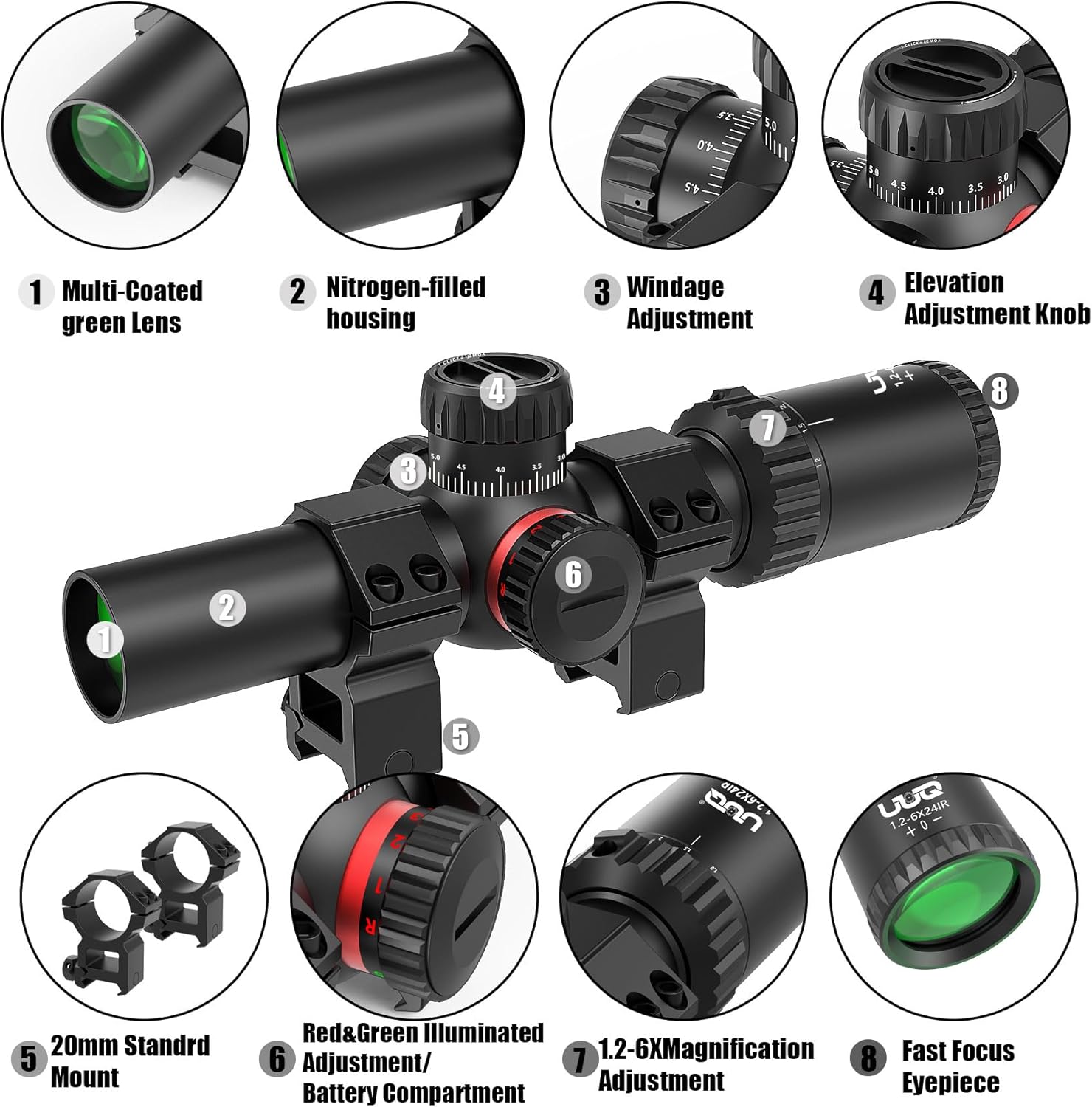
Figure 9: Labeled diagram highlighting key components of the scope.
7. Warranty and Support
7.1 Quality Assurance
UUQ offers 365 days of quality assurance for this product. We recommend registering your service plan card to ensure easy access to related services.
7.2 Customer Support
If you encounter any quality issues with your product, please contact our customer service team via email. Our team is available to provide support and solutions.