
1. Introduction
The SYNLETT Wireless Caregiver Pager System is designed to provide reliable and easy-to-use assistance for caregivers, patients, the elderly, and individuals with reduced mobility. This system ensures that help can be summoned quickly and efficiently, enhancing safety and peace of mind in various settings such as homes, clinics, and nursing facilities.
This manual will guide you through the setup, operation, and maintenance of your pager system, ensuring optimal performance and longevity.
2. Product Components
Your SYNLETT Wireless Caregiver Pager System includes the following items:
- Portable Pagers (Receivers): 2 units, designed to be carried or placed on a table.
- Call Buttons (Transmitters): 2 units, with wall mounts and safety lanyards.
- Batteries: 4 AA batteries included for the pagers, and CR2032 batteries pre-installed in call buttons.
- Accessories: Belt clips, wall mounting hardware, and user manual.

Image: All components included in the SYNLETT Wireless Caregiver Pager System, showing two pagers, two call buttons, batteries, and mounting accessories.
3. Setup Instructions
3.1. Installing Batteries
The pagers require 4 AA batteries (included). The call buttons come with pre-installed CR2032 batteries. If replacement is needed for the call buttons, please follow the video instructions below.
Video: This video demonstrates how to install or replace the battery in the call button transmitter. It shows opening the casing with a small screwdriver, inserting the CR2032 battery, and reassembling the unit.
3.2. Mounting Options for Call Buttons
Call buttons can be mounted in several ways:
- Wall Mount: Use the provided screws or adhesive patches to fix the button to a wall near a bed, in a bathroom, or any critical area.
- Pendant: Attach the safety lanyard to wear the button around the neck for constant accessibility.
- Portable: The pager can be carried using its belt clip or placed on a table.
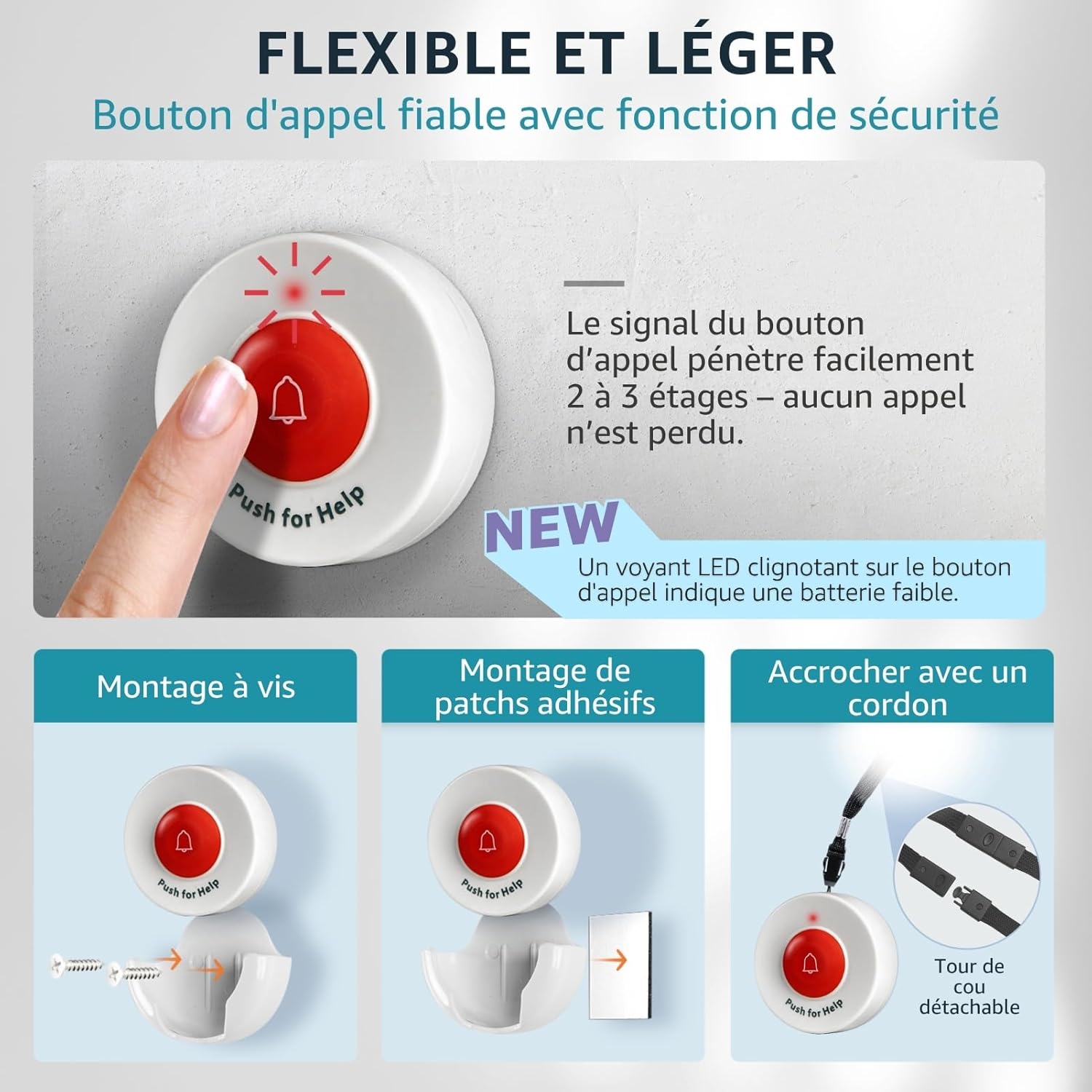
Image: Illustration showing various ways to mount or carry the call button, including screw mounting, adhesive mounting, and wearing it as a pendant.
4. Operating Instructions
4.1. Pairing Call Buttons with Receivers
To ensure your system works correctly, you need to pair the call buttons with the receivers. Follow these steps:
- Plug in the receiver to a power outlet.
- Press and hold the volume button on the receiver for 5 seconds until you hear a 'Ding' sound and the indicator light flashes. This puts the receiver into pairing mode.
- Quickly press the call button you wish to pair. The receiver will emit the selected melody, and its indicator light will flash, confirming successful pairing.
- Repeat for any additional call buttons.
Video: This video illustrates the process of pairing a call button with a receiver, including entering pairing mode and confirming successful connection.
Video: A detailed guide on how to pair a transmitter (call button) with a receiver, demonstrating the button presses and confirmation signals.
4.2. Changing Ringtones and Volume
The receiver offers multiple melodies and adjustable volume levels:
- Change Melody: Press the melody selection button on the receiver to cycle through available tunes.
- Adjust Volume: Use the volume buttons to select between low, medium, and high volume settings.
- Alert Modes: Choose between 'DingDong' for a gentle alert or 'Alarm' for a continuous siren until intervention.

Image: The receiver displaying different alert tones and volume settings, highlighting the portability and 3-color indicator for calls.
4.3. Using the SOS Call Function
When assistance is needed, simply press the SOS call button. The signal will be sent to the paired receiver(s), triggering the selected alert. The system has a wireless range of up to 150 meters in open areas, ensuring broad coverage within a home or facility.

Image: A caregiver in a kitchen wearing a pager, while an elderly person presses a call button, illustrating the system's ease of use.

Image: An illustration demonstrating the wireless range of up to 150 meters, showing a call button in a room and a pager carried by a caregiver.
5. Multiple Use Cases
The SYNLETT Wireless Caregiver Pager System is versatile and can be used in various scenarios:
- Home Care: Ideal for elderly individuals, patients, or those with limited mobility who may need immediate assistance.
- Clinics & Nursing Homes: Provides a simple and effective way for residents to call for staff.
- Fall Prevention: Strategically placed buttons can help prevent serious injuries by allowing quick calls for help after a fall.
- Emergency Situations: A reliable tool for summoning help in any urgent situation.

Image: A collage showing different scenarios where the pager system can be used, such as by an elderly person in bed, a patient in a wheelchair, or in a bathroom.
6. Maintenance
6.1. Cleaning
Wipe the devices with a soft, dry cloth. Do not use abrasive cleaners or solvents, as these may damage the surface.
6.2. Battery Life
The call buttons have a low battery indicator (flashing LED). Replace batteries promptly to ensure continuous operation. The pagers use standard AA batteries and should be replaced when the alert sound becomes weak or the device stops functioning.
7. Troubleshooting
- No Alert from Receiver:
- Ensure the receiver is plugged in and powered on.
- Check if the call button battery needs replacement.
- Verify that the call button and receiver are properly paired (refer to Section 4.1).
- Ensure the devices are within the effective wireless range. Thick walls or electronic interference can reduce range.
- Weak or Intermittent Signal:
- Replace call button batteries.
- Relocate the receiver or call button to minimize obstructions or interference from other electronic devices.
- Receiver Not Responding to Pairing:
- Ensure you are holding the volume button for the correct duration (5 seconds) to enter pairing mode.
- Try resetting the receiver by unplugging it for a few minutes and then re-attempting the pairing process.
8. Specifications
| Feature | Detail |
|---|---|
| Brand | SYNLETT |
| Model Number | D091G4 |
| Control Method | Tactile |
| Sound Level | 90 Decibels |
| Mounting Type | Wall Mount |
| Maximum Range | 150 Meters (open field) |
| Sensor Technology | Contact Sensor |
| Product Dimensions (L x W x H) | 23 x 10.3 x 6 cm |
| Weight | 370 grams |
| Batteries (Pagers) | 4 AA (included) |
| Batteries (Call Buttons) | CR2032 (pre-installed) |
| Battery Type | Alkaline |
| Power Source | Battery Powered |
9. Warranty & Support
This product comes with a 1-year manufacturer's warranty from the date of sale. For any questions, technical support, or warranty claims, please contact SYNLETT customer service through your retailer or the official SYNLETT website.


