
1. Introduction
This manual provides detailed instructions for the assembly, operation, and maintenance of your Tilta Khronos Basic Kit for iPhone 15 Pro Max. Please read this manual thoroughly before using the product to ensure proper functionality and longevity.
1.1 What's in the Box
- 1 x Tilta Khronos Case Compatible with iPhone 15 Pro Max (Titanium White)
- 1 x Khronos Mini LED Panel (Daylight) (Titanium White)
- 1 x Khronos Focus PD Handle for iPhone (Titanium White)
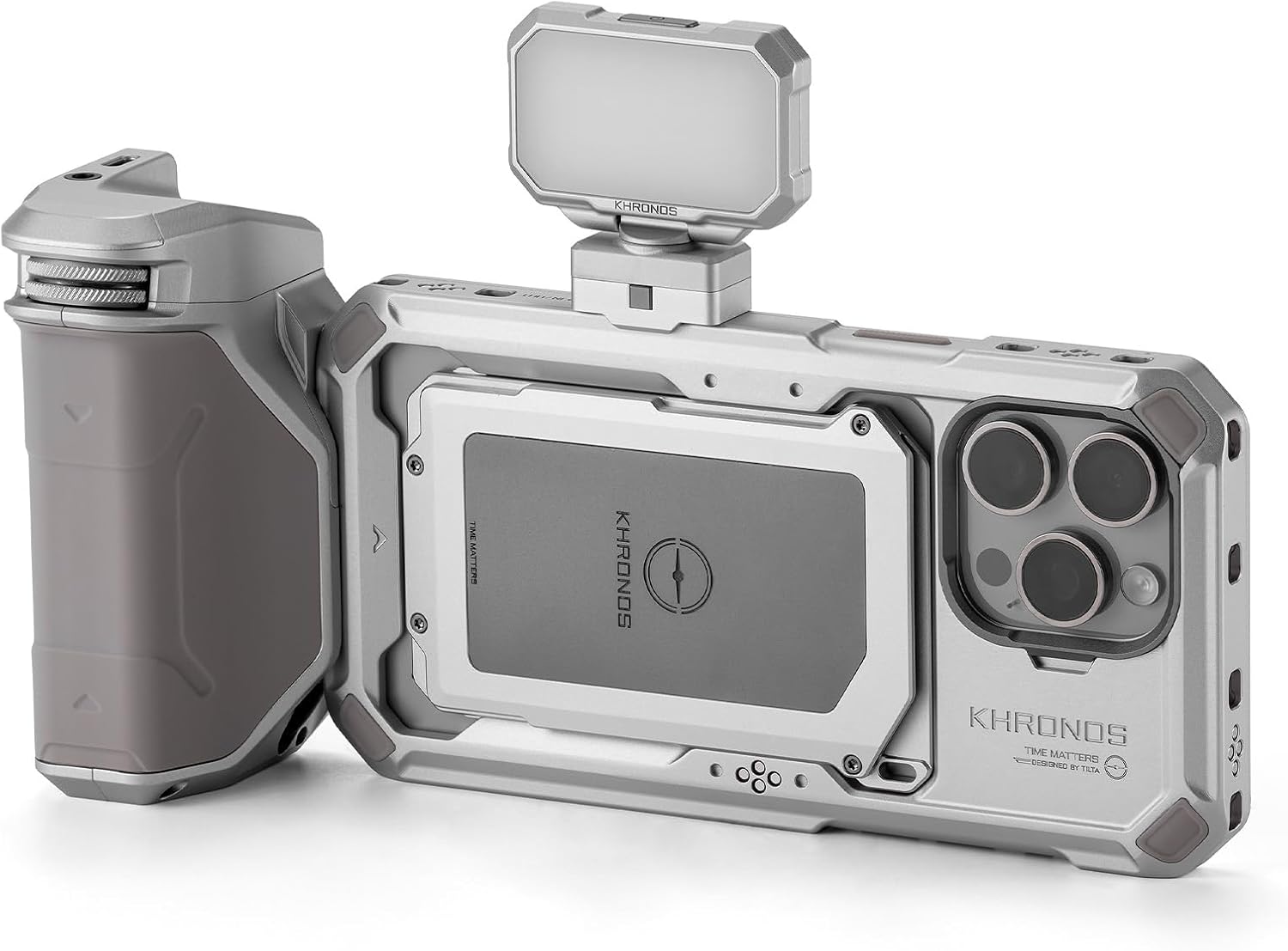
Figure 1.1: Tilta Khronos Basic Kit components assembled.

Figure 1.2: Exploded view of the Khronos Basic Kit components.
2. Setup
2.1 Assembling the Khronos Case
- Carefully insert your iPhone 15 Pro Max into the Khronos Case. Ensure all ports and buttons align correctly with the case cutouts.
- Verify that the phone is securely seated within the case.

Figure 2.1: iPhone 15 Pro Max securely in the Khronos Case.
2.2 Attaching the Mini LED Panel
- Locate the mounting point on the top of the Khronos Case.
- Slide the Mini LED Panel onto the mounting point until it clicks securely into place.

Figure 2.2: Mini LED Panel attachment.
2.3 Connecting the Focus PD Handle
- Align the Focus PD Handle with the designated attachment point on the side of the Khronos Case.
- Slide the handle into position and ensure the locking mechanism engages for a secure connection.

Figure 2.3: Focus PD Handle attachment.
3. Operation
3.1 Using the Khronos Case
The Khronos Case provides a protective and modular platform for your iPhone 15 Pro Max. It features proprietary attachment points for various accessories, allowing for a customized mobile camera rig. The locking clamp design ensures secure attachment of accessories and allows mounting to tripods or other support systems.
3.2 Operating the Mini LED Panel
The Mini LED Panel offers supplementary lighting for your recordings. It features three levels of brightness. To adjust brightness, press the power/mode button located on the panel. Cycle through the brightness levels to select the desired intensity.
3.3 Utilizing the Focus PD Handle
The Focus PD Handle enhances control over your iPhone's camera functions. It includes an integrated battery to power accessories and provides expanded control for focus, zoom, and run/stop functions. Connect the handle to your iPhone via Bluetooth or a compatible cable (if applicable) to enable these controls. Refer to your iPhone's camera app settings for specific compatibility and control mapping.
4. Maintenance
To ensure the longevity and optimal performance of your Tilta Khronos Basic Kit, follow these maintenance guidelines:
- Cleaning: Use a soft, dry cloth to wipe down the case and accessories. For stubborn dirt, a slightly damp cloth with mild soap can be used, followed by immediate drying. Avoid abrasive cleaners or solvents.
- Storage: Store the kit in a cool, dry place away from direct sunlight and extreme temperatures.
- Battery Care (Focus PD Handle): If the handle is not used for extended periods, charge it periodically to maintain battery health.
5. Troubleshooting
If you encounter issues with your Tilta Khronos Basic Kit, please refer to the following common solutions:
| Problem | Possible Cause | Solution |
|---|---|---|
| Focus PD Handle not charging or disconnecting. | Loose connection, faulty cable, or internal damage. | Ensure the handle is firmly connected to the case. Try a different USB-C cable and power source. If the issue persists, contact customer support. |
| Zoom function on handle is unreliable. | Bluetooth connectivity issue, software incompatibility, or hardware malfunction. | Ensure the handle is properly paired via Bluetooth. Check for firmware updates for the handle or software updates for your iPhone's camera app. Restart both devices. |
| Mini LED Panel not turning on. | Low battery, loose connection, or panel malfunction. | Ensure the LED panel is fully charged or has sufficient power. Verify it is securely attached to the case. |
If these solutions do not resolve your issue, please contact Tilta customer support for further assistance.
6. Specifications
| Feature | Detail |
|---|---|
| Product Dimensions | 10 x 10 x 10 inches (assembled, approximate) |
| Item Weight | 3.5 pounds |
| Model Number | TK-IP15-PMB-TW |
| Compatible Devices | iPhone 15 Pro Max, Tilta Khronos Ecosystem Accessories |
| Mini LED Light | 3 Levels of Brightness |
| Focus Handle | Integrated Battery, Focus/Zoom/Run Stop Control |
| UPC | 810153170556 |
7. Warranty and Support
Tilta products are designed and manufactured to high-quality standards. For warranty information, please refer to the warranty card included with your purchase or visit the official Tilta website. If you require technical support or have questions regarding your product, please contact Tilta customer service through their official channels.
Online Support: www.tilta.com/support