
1. Introduction
Thank you for choosing the Woputne HL-8010B-7 Dual Head LED Desk Lamp. This manual provides essential information for the safe and efficient use of your new desk lamp. Please read it thoroughly before installation and operation, and retain it for future reference.
Package Contents:
- 1 x Woputne Dual Head LED Desk Lamp
- 1 x USB Type-C Cable
- 1 x 5V 2A Adapter
- 1 x Instruction Manual (this document)
Safety Warnings:
- Power Adapter: Using a fast-charging adapter with excessive current may damage the internal MOS protection circuit, leading to controller failure and significantly shortening the lamp's lifespan. Always use the provided 5V 2A adapter or a compatible adapter with appropriate voltage and current.
- Placement: Ensure the lamp is securely clamped to a stable surface to prevent tipping.
- Indoor Use Only: This product is designed for indoor use. Do not expose to water or high humidity.
- Cleaning: Disconnect power before cleaning. Use a soft, dry cloth. Do not use abrasive cleaners.
2. Product Overview
The Woputne HL-8010B-7 is a versatile LED desk lamp designed for various tasks, offering adjustable lighting and flexible positioning. It features dual heads for wide coverage, multiple light modes, and brightness levels.

Main product image of the Woputne Dual Head LED Desk Lamp.
Key Features:
- Adjustable Dual Head and Flexible Neck: Features a 13.6-inch solid neck and a 12-inch adjustable neck, allowing precise light direction. The dual heads provide wide coverage, ideal for multiple monitors or large workspaces.
- 5 Light Modes & 10 Dimmable Brightness Levels: Choose from 5 color temperatures (2700K, 3500K, 4500K, 5000K, 6500K) and 10 brightness levels (10%-100%) for optimal illumination.
- Space-Saving Clamp Design: The clamp opens up to 2.36 inches (6cm), allowing secure attachment to desks without occupying valuable surface area.
- Memory and Timing Function: The lamp remembers your last brightness and color settings. Includes a 1-minute auto-off timer and a 30-minute auto-shutoff timer.
- Eye Protection: Designed to be flicker-free, providing soft, even light to reduce eye strain during extended use.
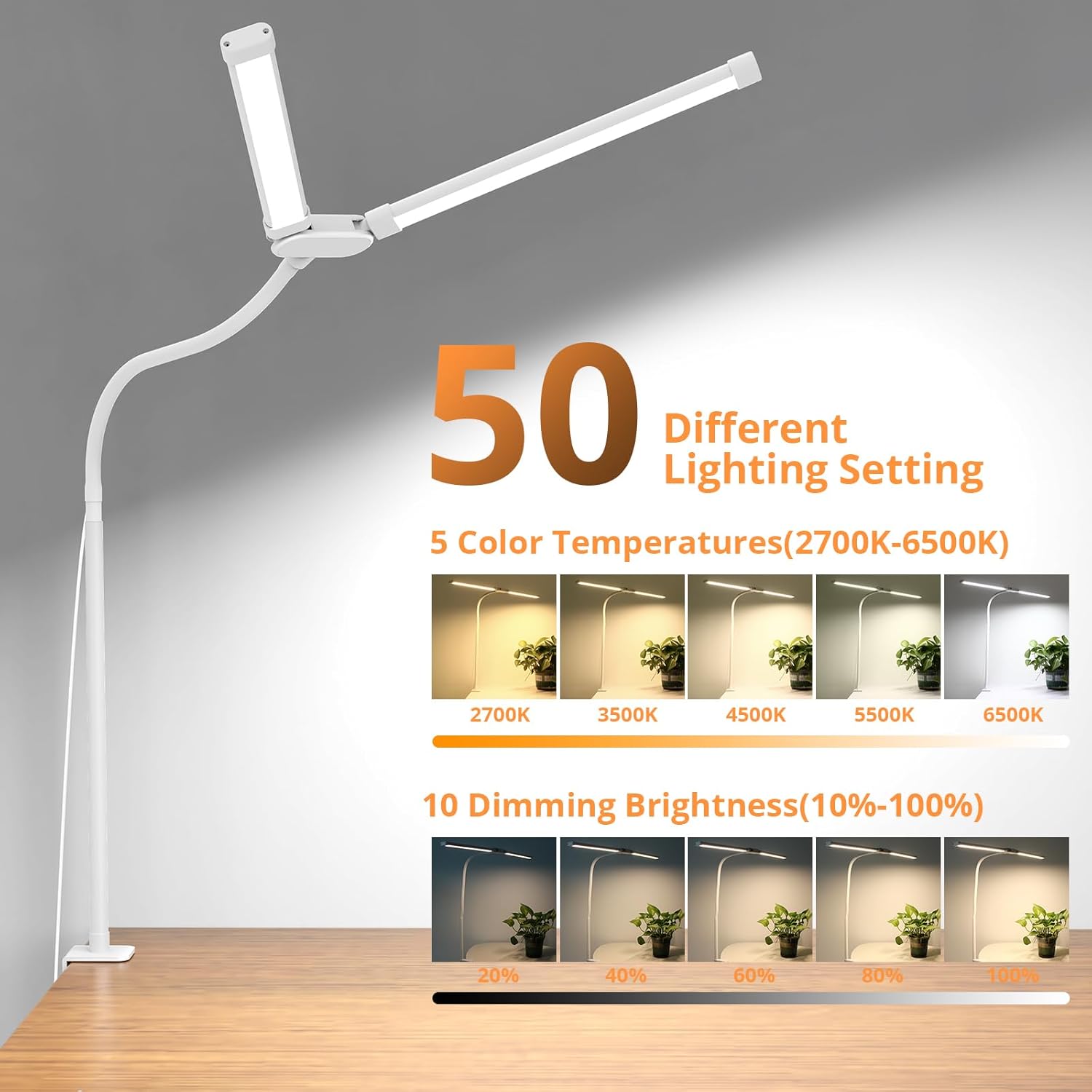
Illustration of the 5 color temperatures (2700K-6500K) and 10 dimming brightness levels (10%-100%).
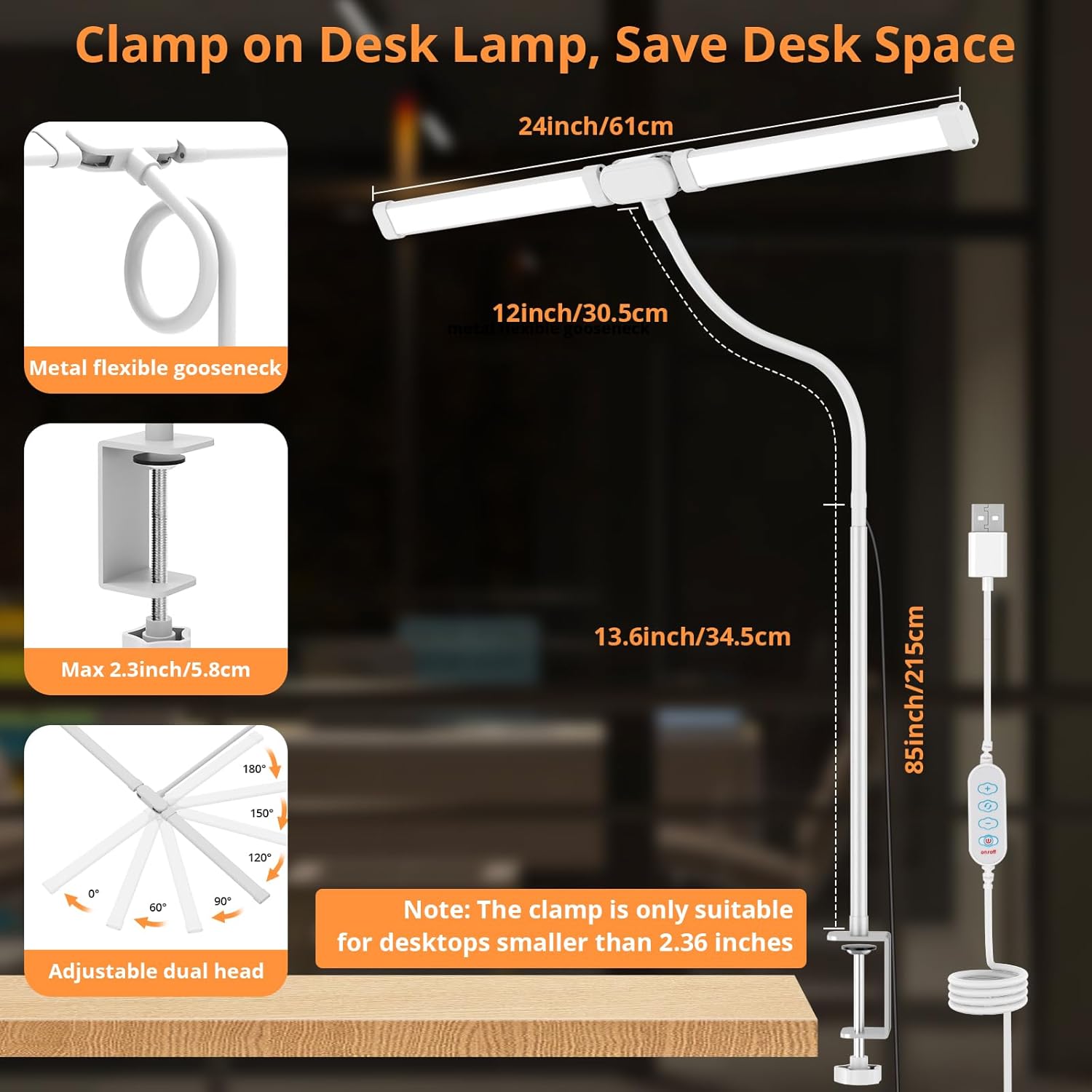
Diagram showing the clamp mechanism, flexible gooseneck, and adjustable dual heads. Note: The clamp is suitable for desktops smaller than 2.36 inches (6cm).
3. Setup
Follow these steps to set up your Woputne Dual Head LED Desk Lamp:
- Unpack: Carefully remove all components from the packaging. Ensure all items listed in the "Package Contents" section are present.
- Attach Clamp: Identify a suitable desktop edge for the clamp. The clamp can open up to 2.36 inches (6cm). Turn the screw on the clamp to secure it firmly to the desk.
- Insert Lamp: Slide the base of the lamp into the opening of the clamped bracket. Ensure it is seated securely.
- Connect Power: Connect the USB Type-C cable to the lamp and then to the provided 5V 2A adapter. Plug the adapter into a standard wall outlet.
- Adjust Position: Adjust the flexible neck and dual heads to your desired lighting angle and height. The lamp features a 360° flexible neck and 180° adjustable dual heads.
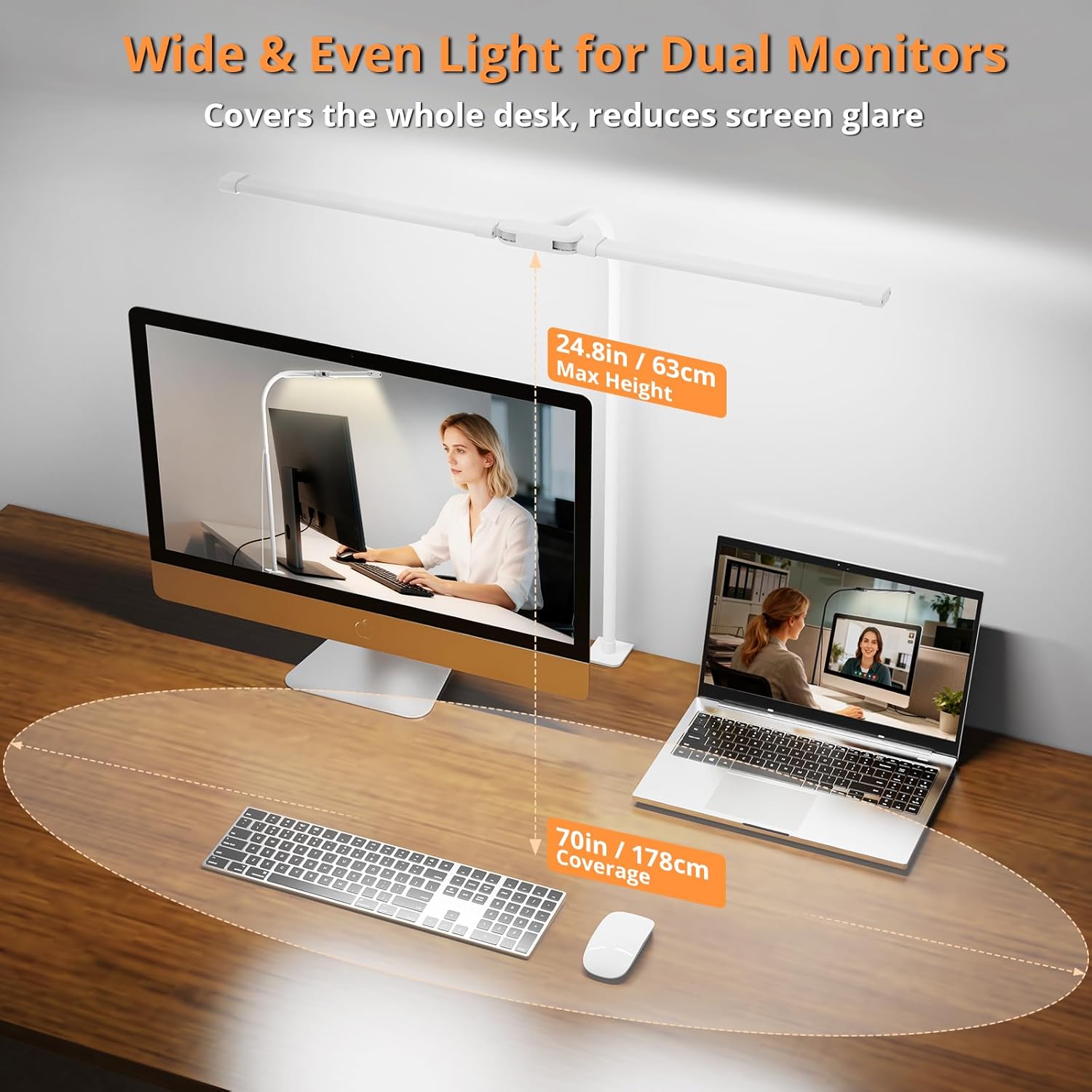
The lamp positioned to provide wide and even light across a desk with dual monitors, illustrating its coverage and height.
Video demonstrating the Woputne LED desk lamp for home office use, highlighting its features and setup.
4. Operation
The Woputne Desk Lamp is controlled via an inline controller on the power cable.
Controller Functions:
- Power Button: Press once to turn the lamp ON/OFF.
- Brightness Adjustment (+/-): Use the '+' and '-' buttons to cycle through 10 brightness levels (10%-100%).
- Color Temperature (M Button): Press the 'M' button to switch between 5 color temperatures: 2700K (Ultra Warm), 3500K (Soft Warm), 4500K (Warm White), 5000K (Natural White), and 6500K (Cool White).
- 1-Minute Timing Function: Press the power button for 2 seconds. The blue light will flash, and the lamp will automatically turn off after 1 minute.
- 30-Minute Timing Function: Double-click the power button. The red indicator light will illuminate, and the lamp will automatically turn off after 30 minutes.
- Memory Function: The lamp will remember your last used brightness and color temperature settings when turned off and on again.

Visual representation of the lamp's auto timer and memory functions, suitable for various activities like working, studying, crafting, and home working.
Video showcasing the Woputne LED desk lamp with clamp, demonstrating its flexibility and various lighting modes for home office use.
5. Maintenance
Proper maintenance ensures the longevity and optimal performance of your desk lamp.
- Cleaning: Before cleaning, always unplug the lamp from the power source. Use a soft, dry, lint-free cloth to wipe down the lamp. Avoid using liquid cleaners, aerosols, or abrasive materials, as these can damage the finish or electrical components.
- Storage: If storing the lamp for an extended period, ensure it is clean and dry. Store it in a cool, dry place away from direct sunlight and extreme temperatures.
- Cable Care: Do not bend, twist, or pinch the power cable excessively. Avoid placing heavy objects on the cable. Regularly inspect the cable for any signs of damage.
- LEDs: The LED light source is integrated and not user-replaceable. Do not attempt to disassemble the lamp head.
6. Troubleshooting
If you encounter any issues with your Woputne Desk Lamp, please refer to the following common problems and solutions:
| Problem | Possible Cause | Solution |
|---|---|---|
| Lamp does not turn on. | No power supply. Faulty adapter/cable. | Ensure the power adapter is securely plugged into a working outlet and the USB cable is firmly connected to the lamp. Try a different USB port or adapter if available. |
| Light flickers or is unstable. | Incompatible power adapter. Loose connection. | Ensure you are using the provided 5V 2A adapter. Check all cable connections. If the issue persists, discontinue use and contact support. |
| Cannot change brightness or color mode. | Controller malfunction. | Ensure the controller buttons are pressed firmly. Disconnect and reconnect the power to reset the lamp. |
| Clamp is not holding securely. | Desk thickness exceeds limit. Clamp not tightened enough. | Ensure your desk thickness is within the 2.36 inch (6cm) limit. Tighten the clamp screw until it is firm and stable. |
If the problem persists after trying these solutions, please contact Woputne customer support.
7. Specifications
| Feature | Detail |
|---|---|
| Model Number | HL-8010B-7 |
| Brand | Woputne |
| Lamp Type | LED Desk Lamp |
| Power Source | Corded Electric (USB) |
| Wattage | 12 watts |
| Voltage | 10 Volts |
| Adapter Input | 5V 2A (Included) |
| Light Source Type | LED (160 LEDs) |
| Color Temperatures | 5 Modes (2700K, 3500K, 4500K, 5000K, 6500K) |
| Brightness Levels | 10 Levels (10%-100%) |
| Control Method | Touch (Inline Controller) |
| Additional Features | Adjustable Arm, Adjustable Color Temperature, Flexible, Adjustable Height, Dimmable, Portable, Energy Efficient, Memory Function, Timer |
| Product Dimensions | 14.59"D x 3.14"W x 3.5"H (Base) / 65cm tall (approx. max height) |
| Item Weight | 558 Grams |
| Material Type | Metal, Plastic |
| Mounting Type | Tabletop (Clamp) |
| Max Clamp Opening | 2.36 inches (6cm) |
| Indoor/Outdoor Usage | Indoor |
8. Warranty and Support
Manufacturer Warranty:
The Woputne HL-8010B-7 Dual Head LED Desk Lamp comes with a 1-year manufacturer's warranty from the date of purchase. This warranty covers defects in materials and workmanship under normal use. It does not cover damage caused by misuse, accident, unauthorized modification, or use with incompatible power adapters.
Customer Support:
For warranty claims, technical assistance, or any questions regarding your product, please contact Woputne customer support through the retailer where you purchased the item or visit the official Woputne store online.
Woputne Store: Visit the Woputne Store on Amazon
Please have your model number (HL-8010B-7) and proof of purchase ready when contacting support.
