1. Introduction
This manual provides essential information for the safe and efficient operation of your Anker Flat Plug Power Strip (Model A91F4). Please read these instructions thoroughly before using the product and retain them for future reference.

Figure 1: Anker Flat Plug Power Strip (Model A91F4) with 8 AC outlets, 2 USB-C, and 2 USB-A ports, featuring a flat plug and cable.
2. Product Overview
The Anker Flat Plug Power Strip is designed to provide multiple power and charging options in a compact form factor. It includes a variety of ports and safety features to protect your devices.
2.1 Key Features
- 12-in-1 Ports: Equipped with 8 AC outlets, 2 USB-C ports, and 2 USB-A ports for comprehensive device charging.
- Speedy 35W Max Charging: The USB-C1 port delivers up to 35W for fast charging compatible devices.
- Slim Design: A compact and sleek profile suitable for various environments.
- Flat Cable and Plug: Designed to fit in tight spaces and reduce clutter.
- 900J Surge Protection: Integrated surge protection to safeguard connected equipment.
- 8-Point Safety System: Includes over-temperature control, overcurrent protection, overvoltage protection, surge protection, overload protection, short-circuit protection, grounded protection, and fire-resistance.

Figure 2: Port configuration showing 8 AC outlets, 2 USB-C, and 2 USB-A ports.
3. Safety Instructions
To ensure safe operation, please observe the following precautions:
- Do not exceed the maximum current rating of 15 Amps.
- Do not expose the power strip to moisture or extreme temperatures.
- Avoid disassembling or modifying the device.
- Ensure the power strip is properly grounded.
- Keep out of reach of children.
- Do not use in wet environments.
- Unplug the power strip from the wall outlet when not in use for extended periods.
4. Setup
4.1 Connecting the Power Strip
- Locate a standard 3-prong grounded wall outlet.
- Plug the flat plug of the Anker Power Strip into the wall outlet. The flat design allows for placement behind furniture.
- The power indicator light on the strip will illuminate, confirming it is receiving power.
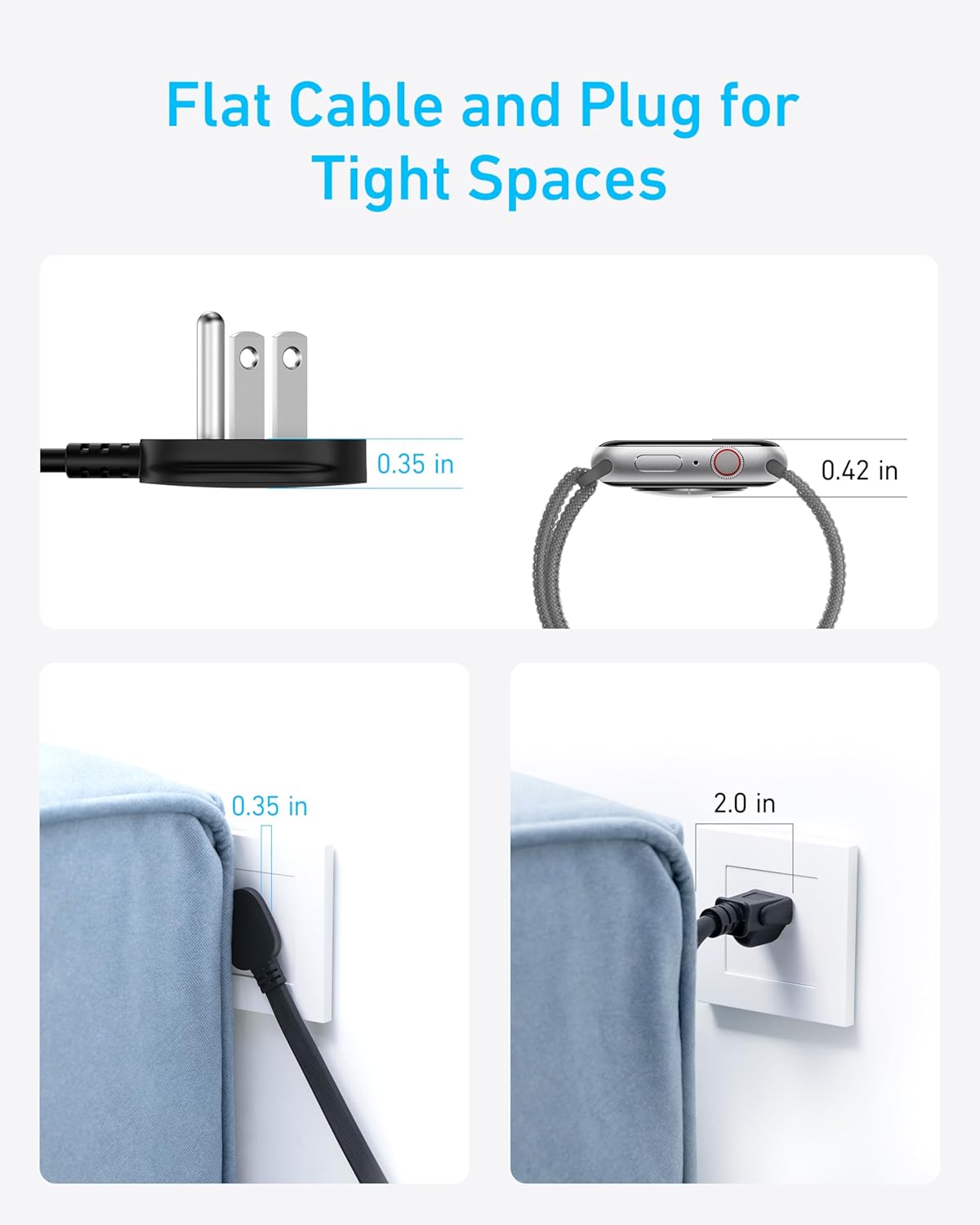
Figure 3: Flat plug and cable design for optimal space utilization.
4.2 Mounting (Optional)
The power strip features keyhole slots on the back for wall mounting. Use appropriate screws (not included) for your wall type to secure the unit. Ensure the mounting surface is stable and can support the weight of the power strip and connected devices.
5. Operating Instructions
5.1 Using AC Outlets
- Plug your devices directly into any of the 8 AC outlets.
- Ensure the total power consumption of all connected devices does not exceed the maximum rating of the power strip.
5.2 Using USB Ports
- Connect your USB-C compatible devices to the 2 USB-C ports. The USB-C1 port supports up to 35W fast charging.
- Connect your USB-A compatible devices to the 2 USB-A ports.
- The power strip intelligently detects and delivers optimal charging speed for connected devices.

Figure 4: Demonstrating 35W Max USB-C charging.
5.3 Power Button
Press the circular power button on the top surface to turn the power strip on or off. The indicator light around the button will show the power status.
6. Maintenance
- Ensure the power strip is unplugged before cleaning.
- Wipe the surface with a soft, dry cloth. Do not use liquid cleaners or abrasive materials.
- Regularly check the power strip and connected cables for any signs of damage.
7. Troubleshooting
7.1 No Power to Devices
- Check if the power strip is securely plugged into a working wall outlet.
- Verify that the power button on the strip is pressed and the indicator light is on.
- Ensure the connected devices are properly plugged into the power strip.
- Check if the total power consumption exceeds the maximum rating. Unplug some devices if necessary.
7.2 Slow Charging
- Ensure you are using the correct USB-C port (USB-C1 for 35W max charging).
- Verify that your device and charging cable support fast charging.
- If multiple devices are connected, the charging speed may be distributed.
8. Specifications
| Feature | Detail |
|---|---|
| Model Number | A91F4 |
| AC Outlets | 8 |
| USB-C Ports | 2 (USB-C1: 35W Max, USB-C2: 15W Max) |
| USB-A Ports | 2 (12W Max Shared) |
| Total Power Output | 35W Max (USB) |
| Surge Protection | 900 Joules |
| Voltage | 125V |
| Maximum Current | 15A |
| Product Dimensions | 7.87 x 3.13 x 0.1 inches |
| Item Weight | 1.19 pounds |
| Cord Length | 5 feet |

Figure 5: Anker's 8-Point Safety System for comprehensive device protection.
9. Warranty and Support
Your Anker Flat Plug Power Strip (Model A91F4) comes with an 18-month warranty. Additionally, it includes a $200,000 connected equipment guarantee for the product's full service life.
For technical support, warranty claims, or general inquiries, please contact Anker customer service. Refer to the welcome guide included with your product for specific contact details or visit the official Anker website: www.anker.com.


