
Rolosar Q76
Rolosar Bluetooth Sport Earbuds Q76
User Manual
1. Product Overview
The Rolosar Q76 Bluetooth Sport Earbuds are designed for an active lifestyle, offering advanced features for superior audio and communication. They incorporate Bluetooth 5.3 technology for stable connectivity, 13mm professional speakers for HiFi stereo sound, and ENC noise reduction for crystal-clear calls.
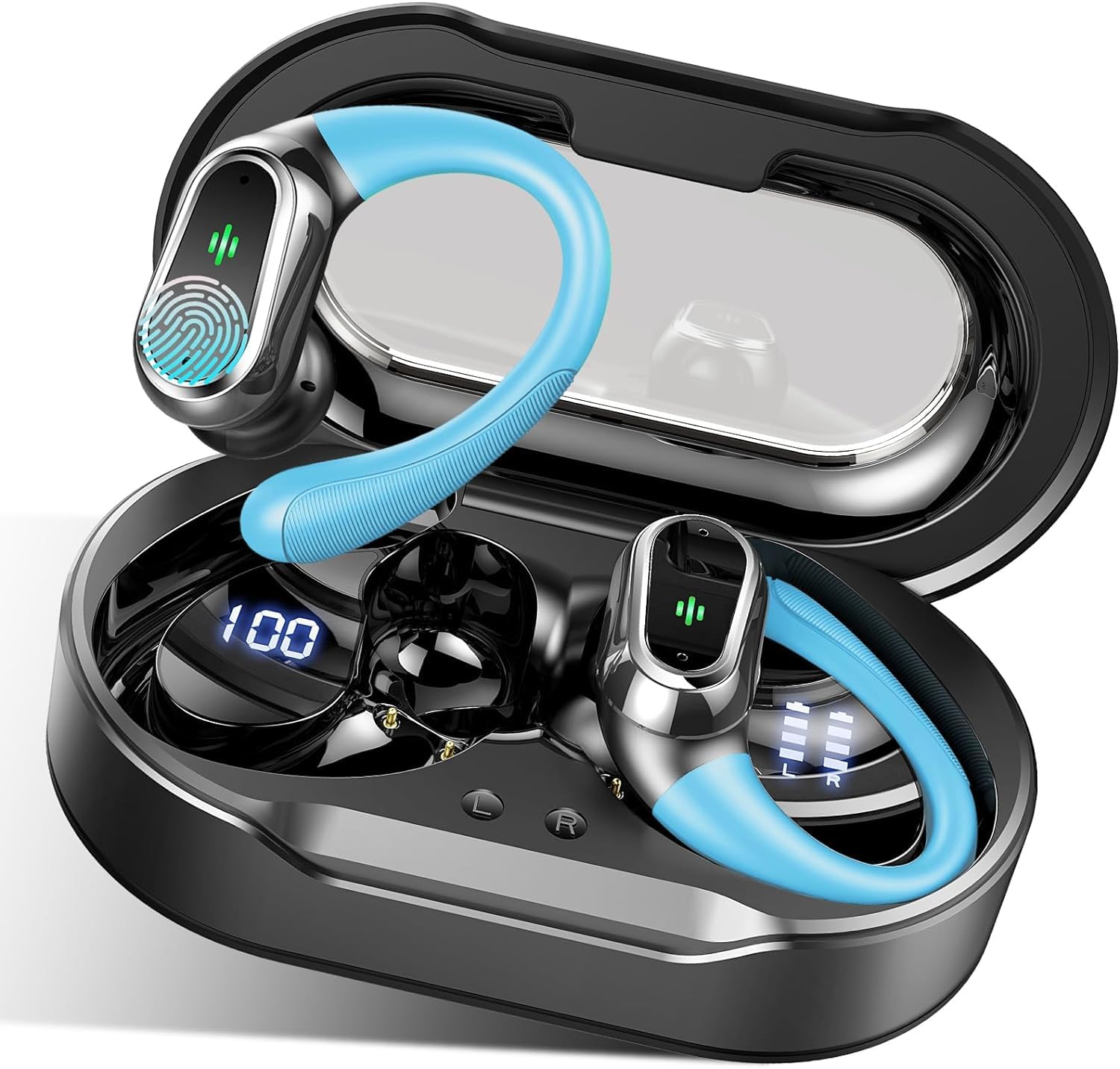
Image: Rolosar Q76 Bluetooth Sport Earbuds in their charging case, showcasing the design and LED display.
Key Features:
- Advanced Bluetooth 5.3: Ensures faster transmission speed, more stable connection, and wider compatibility with iOS and Android smartphones.
- Extended Playtime: Up to 10 hours on a single charge, extended to 50 hours with the charging case. Features a dual LED digital display for battery levels.
- HiFi Stereo Sound & ENC Clear Calls: Equipped with 13mm professional speakers for rich Hi-Fi audio and ENC noise cancellation for clear voice calls, reducing environmental noise.
- IP7 Waterproof & Ergonomic Design: Innovative elastic rubber ear hooks provide maximum comfort and stability, ideal for sports. IP7 waterproof rating protects against sweat and rain. Includes 3 sizes of silicone ear tips (S/M/L).
- Touch Control & Automatic Pairing: Sensitive touch panel for easy control of music and calls. Earbuds automatically power on and reconnect to the last paired device when removed from the case.
2. Setup Guide
Package Contents:
- 2 x Bluetooth Earbuds
- 1 x Charging Case
- 1 x USB-C Cable
- 4 x Silicone Ear Tips (L/S sizes)
- 1 x User Manual
Initial Setup:
- Charge the Case and Earbuds: Before first use, fully charge the charging case and earbuds. Connect the USB-C cable to the charging port on the case and a power source. The LED display on the case will indicate the charging status.
- Select Ear Tips: Choose the silicone ear tips (S, M, or L) that provide the most comfortable and secure fit for your ears. A good seal is crucial for optimal sound quality and noise isolation.
- Insert Earbuds: Gently insert each earbud into your ear canal, adjusting the ear hook over your ear for a stable fit.
3. Operating Instructions
Bluetooth Pairing:
- First-Time Pairing: Open the charging case. The earbuds will automatically power on and enter pairing mode.
- Enable Bluetooth: On your device (smartphone, tablet, etc.), go to Bluetooth settings and turn on Bluetooth.
- Connect: Search for "Q76" in the list of available devices and select it to connect. You will hear a confirmation tone once paired successfully.
- Automatic Reconnection: After the initial pairing, the earbuds will automatically reconnect to the last paired device when removed from the charging case.
Touch Controls:
The Rolosar Q76 earbuds feature sensitive touch controls on each earbud. The specific functions are:
- Play/Pause: Single tap on either earbud.
- Next Track: Double tap on the right earbud.
- Previous Track: Double tap on the left earbud.
- Answer/End Call: Single tap on either earbud during an incoming call.
- Reject Call: Press and hold either earbud for 2 seconds during an incoming call.
- Activate Voice Assistant: Triple tap on either earbud.
- Volume Up: Press and hold the right earbud.
- Volume Down: Press and hold the left earbud.
Charging the Earbuds and Case:
- Earbuds Charging: Place the earbuds back into the charging case. They will automatically begin charging. The LED display on the case shows the charge level of the case, and individual indicators for each earbud.
- Case Charging: Connect the USB-C cable to the charging case and a power adapter (not included). The digital display on the case indicates its battery percentage.

Image: Users enjoying the Rolosar Q76 earbuds during a workout, highlighting their secure fit and suitability for active use.
4. Maintenance
Cleaning:
- Regularly clean the ear tips and the mesh covers of the earbuds with a soft, dry, lint-free cloth.
- If necessary, use a cotton swab lightly dampened with rubbing alcohol to clean the charging contacts on both the earbuds and the case. Ensure they are completely dry before placing the earbuds back in the case.
- Do not use abrasive cleaners or immerse the earbuds or case in water.
Storage:
- When not in use, store the earbuds in their charging case to protect them and keep them charged.
- Store the device in a cool, dry place, away from extreme temperatures and direct sunlight.
Battery Care:
- To prolong battery life, avoid fully discharging the earbuds and charging case frequently.
- Charge the device regularly, even if not in frequent use, to prevent deep discharge.
5. Troubleshooting
Common Issues and Solutions:
| Problem | Possible Cause | Solution |
|---|---|---|
| Earbuds do not pair with device. | Bluetooth is off, earbuds not in pairing mode, or previously paired device interfering. | Ensure Bluetooth is on. Place earbuds back in case, then remove to re-enter pairing mode. Forget "Q76" from your device's Bluetooth list and re-pair. |
| No sound or low volume. | Volume too low, earbud placement, or connection issue. | Increase volume on both earbuds and your device. Adjust earbud position. Reconnect earbuds to your device. |
| Earbuds disconnect frequently. | Out of range, interference, or low battery. | Stay within 15 meters of your device. Avoid strong electromagnetic interference. Ensure earbuds are fully charged. |
| One earbud has no sound. | Individual earbud connection issue. | Place both earbuds back in the charging case, close the lid, wait a few seconds, then take them out again. This often resets the connection. |
| Charging case LED display not working. | Case battery depleted or charging cable issue. | Connect the charging case to a power source using the USB-C cable. Ensure the cable and adapter are working correctly. |
6. Technical Specifications
| Feature | Specification |
|---|---|
| Brand | Rolosar |
| Model Name | Q76 |
| Connectivity Technology | Wireless (Bluetooth 5.3) |
| Ear Placement | In-Ear |
| Form Factor | In-Ear |
| Water Resistance Level | IP7 Waterproof |
| Frequency Response | 20 Hz - 20,000 Hz |
| Control Type | Touch Control, Voice Control |
| Battery Life (with case) | Up to 50 hours |
| Battery Type | Lithium Polymer (included) |
| Product Dimensions | 8 x 5 x 3 cm |
| Item Weight | 160 grams |
| Additional Features | Microphone included, Sweatproof, Fast charging, Volume control |
| Compatible Devices | Mobile Phones |
7. Warranty and Support
Warranty Information:
The Rolosar Q76 Bluetooth Sport Earbuds come with a standard manufacturer's warranty. Please refer to the warranty card included in your package or contact the seller for specific details regarding warranty coverage and duration.
Customer Support:
For any questions, technical assistance, or support needs regarding your Rolosar Q76 earbuds, please contact the seller directly through the platform where you purchased the product. Provide your order number and a detailed description of the issue for prompt assistance.
Ask a question about this manual
Ask about setup, troubleshooting, compatibility, parts, safety, or missing instructions. Manuals+ will review the question and use this page’s manual context to help answer it.