
1. Introduction
Thank you for choosing the ODK Gaming Desk. This manual provides essential information for the safe assembly, operation, and maintenance of your new gaming desk. Please read these instructions carefully before beginning assembly and retain them for future reference.
This gaming desk features integrated LED lighting and a built-in power outlet, designed to enhance your gaming experience and provide convenient power access.
2. Safety Information
- Ensure all components are present and undamaged before assembly. Do not use if any parts are missing or broken.
- Assemble the desk on a soft, clean surface to prevent scratches.
- Do not overtighten screws during assembly to avoid damaging the material.
- Keep small parts away from children to prevent choking hazards.
- Do not exceed the maximum weight capacity of the desk.
- Ensure the power outlet is connected to a properly grounded electrical source. Do not overload the power outlet.
- Keep liquids away from electrical components to prevent electric shock.
3. Package Contents
Please verify that all the following components are included in your package. If any parts are missing, please contact customer support.
- Desk Top (Split Board Structure)
- Z-shaped Leg Frames (2)
- Support Beams
- Built-in Power Outlet Unit (with LED strip)
- LED Remote Control
- Hardware Pack (screws, bolts, washers, etc.)
- Assembly Tools (Allen wrench, screwdriver)
- User Manual
4. Setup and Assembly
Assembly is designed to be straightforward and can typically be completed by one person. All necessary tools are included.
- Unpack Components: Carefully remove all parts from the packaging and lay them out on a soft, clean surface to prevent damage.
- Assemble Leg Frames: Attach the Z-shaped leg frames to the support beams using the provided hardware. Ensure all connections are secure but do not fully tighten yet.
- Attach Desk Top: Place the desk top sections onto the assembled leg frame. The split board design allows for monitor arm installation. Align the pre-drilled holes.
- Secure Desk Top: Fasten the desk top to the leg frame using the appropriate screws. Once all screws are in place, fully tighten all hardware connections on the legs and desk top.
- Install Power Outlet Unit: Mount the built-in power outlet unit into its designated slot on the desk top. Connect any internal wiring as indicated in the detailed assembly diagram (refer to the included diagram for specific steps).
- Connect LED Lighting: Ensure the LED strip is properly seated. Connect the LED power cable to the power outlet unit.
- Final Check: Verify that all screws are tightened and the desk is stable.
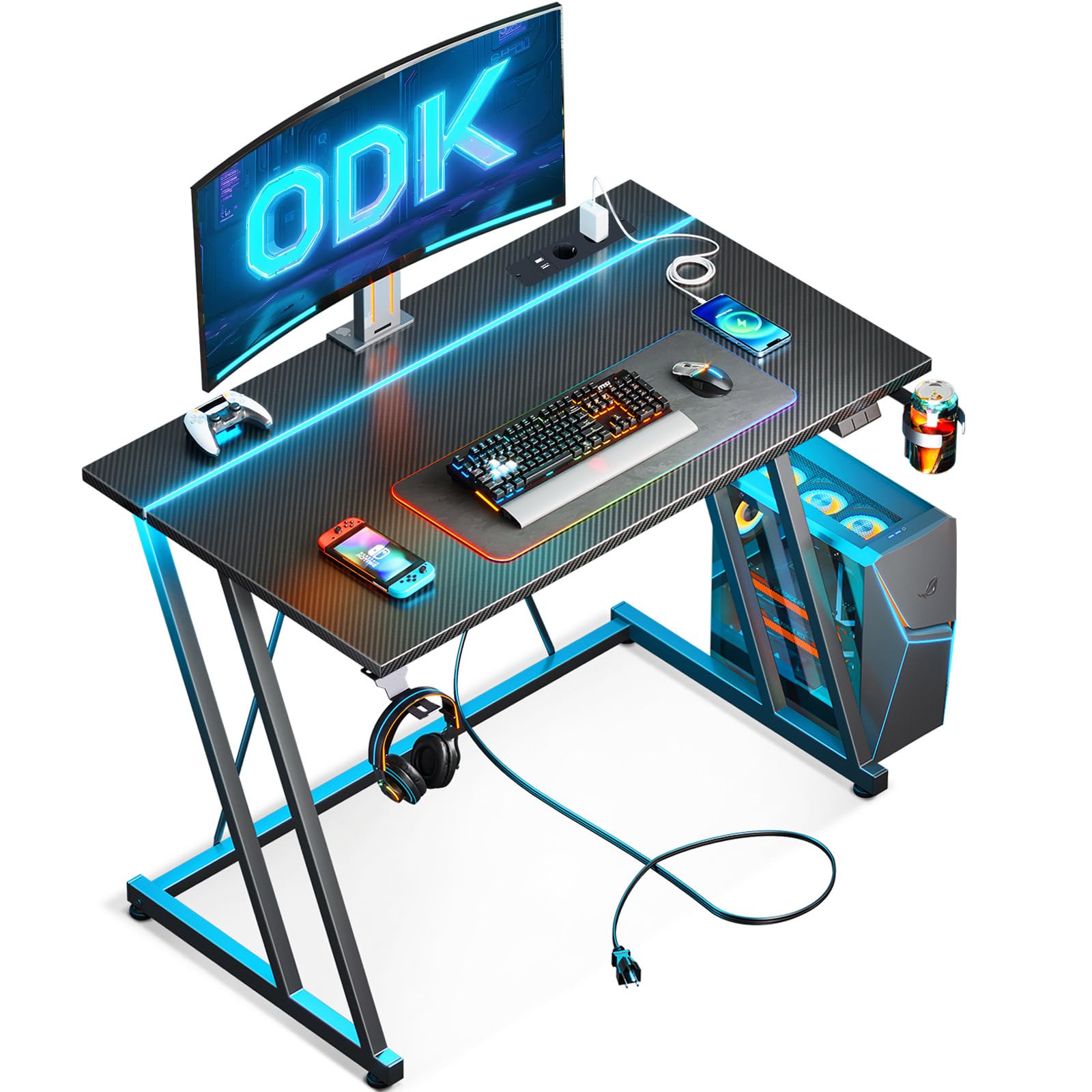
Image 1: Assembled ODK Gaming Desk, showcasing the LED lighting and overall structure.
5. Operating Instructions
5.1. LED Lighting
The integrated LED lighting system offers 10 colors and 20 modes to create an immersive gaming environment. Use the provided remote control to manage the lighting effects.
- Power On/Off: Press the power button on the remote to turn the LEDs on or off.
- Color Selection: Use the color buttons to select from 10 static colors.
- Mode Selection: Use the mode buttons to cycle through 20 dynamic lighting effects (e.g., flash, strobe, fade, smooth).
- Brightness Adjustment: Use the brightness up/down buttons to adjust the intensity of the lights.
- Speed Adjustment: For dynamic modes, use the speed up/down buttons to control the effect speed.
5.2. Built-in Power Outlet
The desk includes a built-in power strip with two standard AC outlets and two USB charging ports for convenient access to power for your devices.
- Connecting to Power: Plug the desk's main power cord into a wall outlet.
- Using AC Outlets: Plug your devices (monitors, PC, lamps) into the two AC outlets.
- Using USB Ports: Connect your smartphones, tablets, or other USB-powered devices to the two USB ports for charging.
- Caution: Do not exceed the maximum power rating of the built-in outlet. Refer to the specifications section for details.
6. Maintenance
To ensure the longevity and appearance of your ODK Gaming Desk, follow these simple maintenance guidelines:
- Cleaning: Wipe the desk surfaces with a soft, damp cloth. For stubborn marks, a mild cleaning solution can be used, followed by wiping with a dry cloth. Avoid abrasive cleaners or harsh chemicals.
- Dusting: Regularly dust the desk with a dry, soft cloth to prevent buildup.
- Liquid Spills: Immediately wipe up any liquid spills to prevent damage to the desk surface and electrical components.
- Hardware Check: Periodically check all screws and bolts to ensure they remain tight. Retighten if necessary.
- Electrical Components: Keep the power outlet and LED components free from dust and moisture. Do not attempt to repair electrical components yourself.
7. Troubleshooting
If you encounter any issues with your ODK Gaming Desk, please refer to the following common problems and solutions:
| Problem | Possible Cause | Solution |
|---|---|---|
| Desk is wobbly | Loose screws or uneven floor. | Tighten all assembly screws. Adjust leveling feet if present, or place shims under legs on an uneven floor. |
| LED lights not working | Power connection issue, remote battery dead, or LED strip damage. | Ensure the desk's main power cord is plugged in. Check the connection between the LED strip and the power unit. Replace the remote control battery. If issues persist, contact support. |
| Power outlets not functioning | Desk not plugged in, wall outlet issue, or overloaded circuit. | Verify the desk's main power cord is securely plugged into a working wall outlet. Test the wall outlet with another device. Reduce the number of devices plugged into the desk's outlets. |
| Remote control not responding | Battery issue or obstruction. | Replace the battery in the remote control. Ensure there are no obstructions between the remote and the LED receiver. |
If you are unable to resolve an issue using the troubleshooting guide, please contact ODK customer support for assistance.
8. Specifications
| Brand | ODK |
| Model Number | B04011801001 |
| Product Type | Gaming Desk / Computer Desk |
| Dimensions (D x W x H) | 50 cm x 80 cm x 75 cm |
| Color | Black |
| Style | Modern |
| Primary Material | Carbon Fiber |
| Top Material Type | Wood |
| Furniture Leg Material | Metal |
| Finish Type | Lacquered |
| Special Features | Built-in power socket (2 AC outlets, 2 USB ports), Integrated LED lighting (10 colors, 20 modes, remote control) |
| Item Weight | 7.8 kg |
| Assembly Required | Yes |
| Recommended Persons for Assembly | 1 |
| Included Assembly Tools | Yes |
| Care Instructions | Wipe with damp/dry cloth |
| Customizable | No |
9. Warranty
This ODK Gaming Desk comes with a limited warranty. Please refer to the warranty card included in your package or contact ODK customer support for specific terms and conditions regarding coverage and duration.
10. Support
For any questions, concerns, or assistance with your ODK Gaming Desk, please contact our customer support team. Our team is available to help ensure smooth assembly and maximum satisfaction.
- Online Support: Visit the official ODK website for FAQs and support resources.
- Email Support: [Insert Customer Support Email Address Here]
- Phone Support: [Insert Customer Support Phone Number Here]
Please have your model number (B04011801001) and purchase information ready when contacting support.


