
1. Introduction
This manual provides essential instructions for the safe installation, operation, and maintenance of your Quality Heating 200 Watt Underfloor Heating Mat Set, which includes the PRF-79 Programmable WiFi Thermostat. This system is designed to provide efficient heating for tiled floors and can also be adapted for various other floor finishes. Please read this manual thoroughly before installation and use to ensure optimal performance and safety.
2. Safety Information
- Installation must be performed by a qualified electrician in accordance with local electrical codes and regulations.
- Do not cut or shorten the heating cables. Doing so will damage the mat and void the warranty.
- Ensure the subfloor is clean, dry, and structurally sound before installation.
- Avoid placing heavy objects with sharp edges directly on the heating mat during or after installation.
- Always disconnect power before performing any maintenance or inspection.
- The heating mat is designed for indoor use only.
3. Package Contents
Verify that all components listed below are present in your Quality Heating Underfloor Heating Mat Set:
- Quality Heating Electric Underfloor Heating Mat (200 Watt)
- PRF-79 Programmable WiFi Thermostat
- Floor Sensor
- Conduit for Floor Sensor
- Adhesive/Primer (FastHeat)
- Roller for adhesive application
- Detailed Instruction Manual (this document)
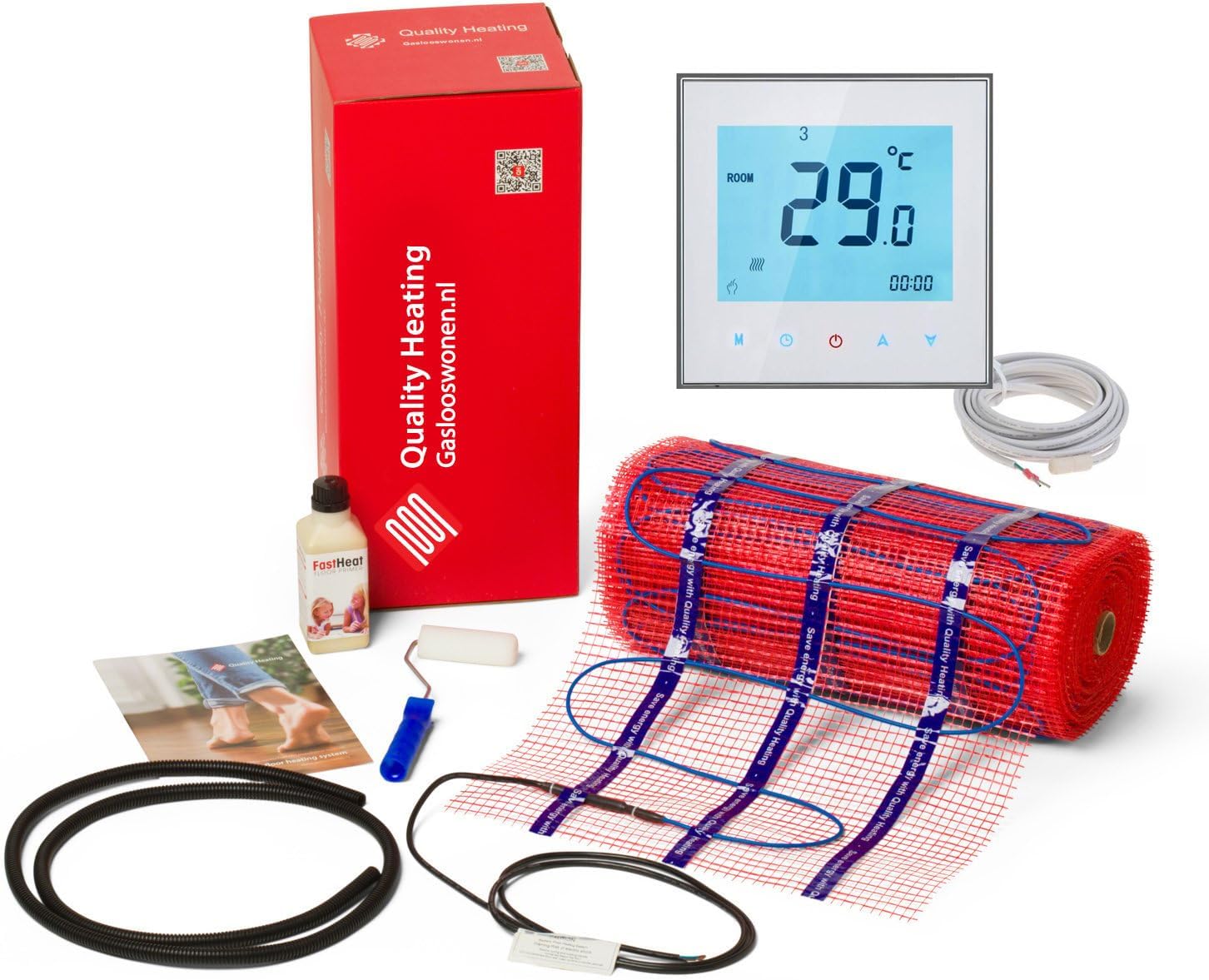
Image 3.1: Overview of the Quality Heating 200 Watt Underfloor Heating Mat Set, showing the heating mat, PRF-79 thermostat, floor sensor, adhesive, and other accessories included in the package.
4. Setup and Installation
4.1 Planning and Preparation
- Determine the area to be heated. It is recommended to choose an electric underfloor heating set that covers approximately 90% of your floor space.
- Measure the room accurately. It is better to order a few centimeters too little than to estimate too much, as the cables cannot be cut or shortened.
- Ensure the electrical supply is adequate for the total wattage of the heating mat.
- Prepare the subfloor: ensure it is clean, level, and free of debris. Apply the provided FastHeat adhesive/primer as per its instructions.
4.2 Heating Mat Installation
- Unroll the heating mat onto the prepared subfloor, ensuring even spacing and avoiding overlapping cables.
- The mat is self-adhesive for ease of placement. Press firmly to secure it.
- Route the cold lead (non-heating cable) to the thermostat location.
- Install the floor sensor within the conduit provided, placing it centrally between two heating cables, ensuring it does not cross or touch the heating cables. The sensor should be flush with the floor surface.
- Once the mat and sensor are in place, cover with a suitable floor leveling compound or tile adhesive according to the flooring manufacturer's instructions.
4.3 Thermostat Installation (PRF-79)
The PRF-79 thermostat controls the underfloor heating system. It should be installed in a standard electrical wall box.

Image 4.1: The PRF-79 Programmable WiFi Thermostat, showing its digital display and control buttons, along with the white floor sensor cable.
- Ensure power is OFF at the main circuit breaker before wiring.
- Connect the heating mat's cold lead, the floor sensor cable, and the main power supply wires to the appropriate terminals on the PRF-79 thermostat. Refer to the wiring diagram provided with the thermostat for specific connections.
- Mount the thermostat securely into the wall box.
- Restore power and proceed to initial setup.
5. Operating Instructions
5.1 Basic Operation
The PRF-79 thermostat features a clear digital display with backlight and touch controls.
- Power On/Off: Press the power button (usually indicated by a circle with a vertical line) to turn the thermostat on or off.
- Temperature Adjustment: Use the up and down arrow buttons to set your desired floor temperature.
- Mode Selection: The 'M' button typically cycles through different operating modes (e.g., manual, programmed, economy).
- Backlight: The display features a backlight for improved visibility, especially in low light conditions.
5.2 Programmable Features
The PRF-79 is a programmable thermostat, allowing you to set heating schedules for different times of the day and week. Consult the dedicated PRF-79 thermostat manual for detailed instructions on setting up schedules.
5.3 WiFi Connectivity
The WiFi functionality allows remote control and monitoring of your underfloor heating system via a smartphone application. Follow the instructions in the PRF-79 thermostat manual to connect the device to your home WiFi network and pair it with the companion app.
6. Maintenance
- The Quality Heating underfloor heating system requires minimal maintenance.
- Keep the thermostat clean by wiping it with a soft, dry cloth. Avoid abrasive cleaners.
- Ensure no heavy furniture or appliances are placed directly over the heated floor area without proper heat dissipation considerations.
- Regularly check for any signs of damage to the floor covering that might affect the heating system.
7. Troubleshooting
- No Heat: Check the circuit breaker for the heating system. Ensure the thermostat is powered on and set to a temperature above the current room temperature. Verify thermostat wiring.
- Thermostat Display Off: Check power supply to the thermostat. Ensure it is securely mounted and wired correctly.
- Inaccurate Temperature Reading: Ensure the floor sensor is correctly installed and not damaged.
- WiFi Connection Issues: Refer to the PRF-79 thermostat's specific manual for WiFi troubleshooting steps, including network compatibility and pairing procedures.
- For persistent issues, contact Quality Heating technical support.
8. Specifications
| Feature | Specification |
|---|---|
| Brand | Quality Heating |
| Model Number (Set) | 222790030 |
| Heating Mat Power | 200 Watt |
| Thermostat Model | PRF-79 |
| Thermostat Type | Programmable WiFi |
| Thermostat Color | White |
| Thermostat Backlight | Yes |
| Cable Thickness | 3mm (Ultra-thin Teflon cable) |
9. Warranty and Support
9.1 Warranty Information
Every Quality Heating underfloor heating mat comes with a lifetime warranty. Please note that this lifetime warranty applies exclusively to Quality Heating branded products. For components or products from other brands included in the set, the warranty conditions of their respective manufacturers apply.
9.2 Technical Support
Should you have any questions before, during, or after the installation of your Quality Heating products, our technical support team is available to provide appropriate assistance for every situation. Please refer to the contact information provided with your purchase documentation for support details.


