
Introduction
The HAMPBACK ACE-510 Electric Drum Set is an advanced-tier 8-piece electronic drum kit designed for drummers seeking authentic feel and versatile sound options. This manual provides essential information for setting up, operating, and maintaining your drum set to ensure optimal performance and longevity.
Included Components
Please verify that all components listed below are present in your package:
- Sound Module X1
- Cymbal X3 (12'' choke-able crash cymbals, 14'' three-zone ride cymbal)
- Pad X4 (10'' dual-zone mesh drum pads)
- Bass Drum X1 (8'' super durable kick drum)
- Rack X1
- Cable X1
- Drum Sticks X1
- User Manual X1
- Installation Instruction X 1
- Accessories Bag X1
Setup & Assembly
The HAMPBACK ACE-510 features a quick-release structure for straightforward assembly. Follow these steps to set up your electric drum set:
- Assemble the Drum Rack: Connect the various rack components as illustrated in the included Installation Instruction manual. Ensure all clamps are securely tightened.
- Attach Drum Pads: Mount the 10'' dual-zone mesh drum pads to the designated positions on the rack. Adjust their height and angle for comfortable playing.
- Install Cymbals: Secure the 12'' choke-able crash cymbals and the 14'' three-zone ride cymbal to their respective stands on the rack.
- Position Bass Drum: Place the 8'' super durable kick drum in front of the rack, ensuring it is stable for consistent play.
- Mount Sound Module: Attach the sound module to the dedicated mount on the drum rack.
- Connect Cabling: Use the provided cables to connect each drum pad, cymbal, and the bass drum to the sound module. Refer to the sound module's diagram for correct port assignments.
- Power On: Connect the power adapter to the sound module and a power outlet. Press the power button to turn on the drum set.

Figure 1: Fully assembled HAMPBACK ACE-510 Electric Drum Set.
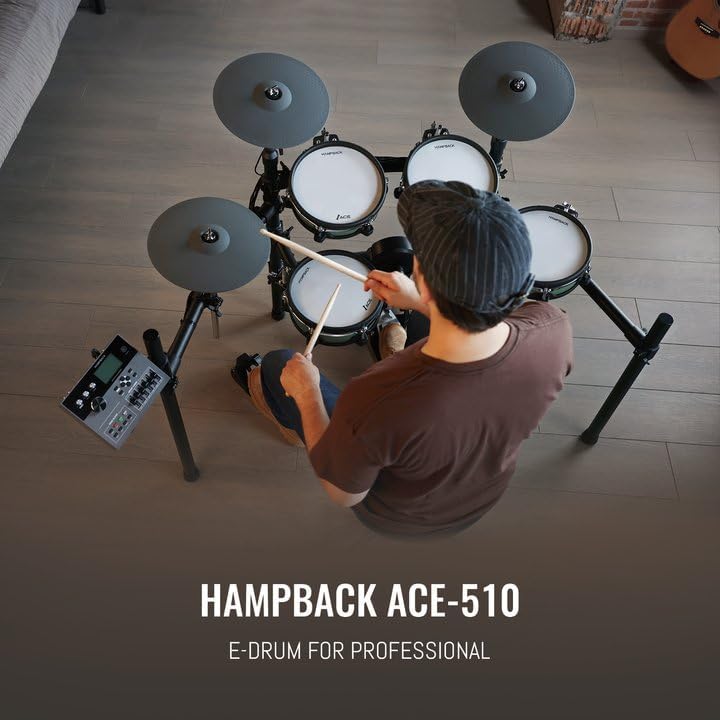
Figure 2: Detail of a 10'' dual-zone mesh drum pad, highlighting the double-layer mesh heads for optimal percussion feedback.

Figure 3: The 8'' super durable kick drum, engineered for longevity and reduced noise.
Video 1: An official HAMPBACK video demonstrating the ACE-510 Electric Drum Set in use, showcasing its professional features and sound.
Operating Instructions
The ACE-510 sound module provides extensive control over your drumming experience. Familiarize yourself with its functions for optimal use.
- Sound Module: The 128*64 LCD display and fader volume controls allow for effortless adjustment of settings. Explore the vast selection of 948 sounds and 52+20 drum kits.
- Drum Kits & Songs: Choose from a variety of preset drum kits or create your own with 20 customizable sound kits. Practice along with 15 built-in songs.
- Bluetooth Connectivity: Connect external devices via Bluetooth for audio playback or MIDI control.
- Drum Pads: The 10'' dual-zone mesh drum pads offer excellent percussive feedback. They are equipped with two sensors to produce both edge and surface sounds. The three-point trigger system ensures balanced sound output.
- Cymbals: The 12'' crash cymbals are choke-able, allowing you to mute the sound by grabbing the edge. The 14'' ride cymbal is three-zone, providing distinct sounds for the bell, bow, and edge.
- Bass Drum: The 8'' bass drum is designed for durability and reduced noise, providing a consistent and powerful kick sound.
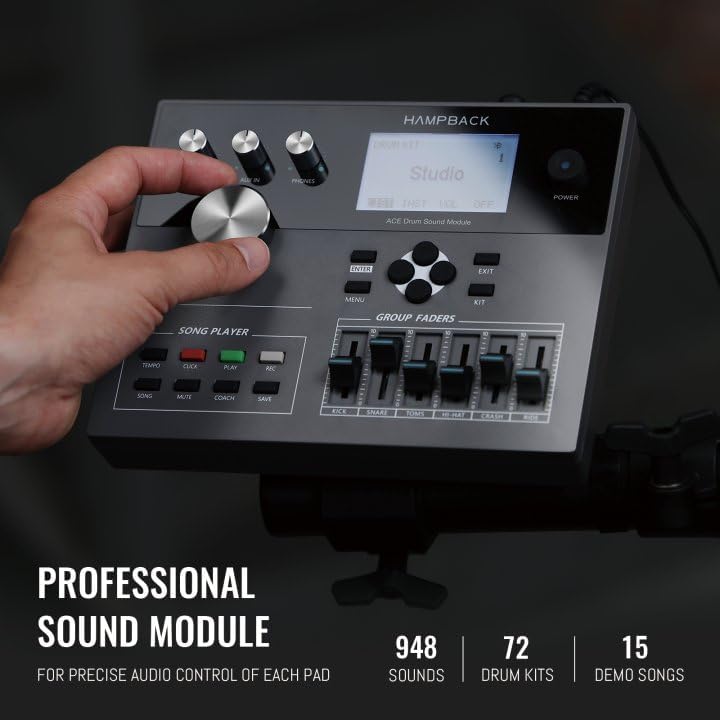
Figure 4: The professional sound module with 948 sounds, 72 drum kits, and 15 demo songs for precise audio control.
Maintenance
To ensure the longevity and optimal performance of your HAMPBACK ACE-510 Electric Drum Set, follow these maintenance guidelines:
- Cleaning: Regularly wipe down drum pads, cymbals, and the sound module with a soft, dry cloth. Avoid using abrasive cleaners or solvents.
- Cable Management: Keep all cables neatly organized and secured to prevent tangling or damage. Avoid sharp bends or excessive tension on the cables.
- Storage: When not in use, store the drum set in a dry, temperature-controlled environment. If disassembling for storage, ensure all components are packed securely in the accessories bag.
- Pad Care: Avoid striking the mesh drum pads with excessive force or sharp objects, as this can damage the mesh heads.
Troubleshooting
If you encounter any issues with your drum set, refer to the following common troubleshooting tips:
- No Sound: Ensure the power adapter is securely connected and the drum module is turned on. Check all audio cables connecting pads/cymbals to the module, and the main audio output to your headphones or amplifier. Verify volume levels on the module and external audio devices.
- Inconsistent Triggering: Check that all cables are firmly connected. Adjust the sensitivity settings for individual pads/cymbals in the sound module's menu. Ensure drum pads are securely mounted and not loose.
- Bluetooth Connection Issues: Make sure the drum module's Bluetooth is enabled and visible. Ensure your external device's Bluetooth is on and within range. Try restarting both devices.
- Pad/Cymbal Damage: If a pad or cymbal is physically damaged or not responding, inspect the connection cable first. If the issue persists, contact customer support for assistance.
Specifications
| Feature | Detail |
|---|---|
| Model Name | ACE-510 |
| Brand | HAMPBACK |
| Drum Pads | 10'' Dual-Zone Mesh Drum Pads |
| Cymbals | 12'' Full Silicone Cymbals with Choke, 14'' Three-Zone Ride Cymbal |
| Kick Drum | 8'' Super Durable Kick Drum |
| Sound Module | 948 Sounds, 52+20 Drum Kits, 15 Songs, 20 Customizable Kits, 128*64 LCD Display, Fader Volume Control |
| Connectivity | Bluetooth, USB |
| Material | Durable Material, Mesh, Silicone, Bass Wood |
| Color | Green |
Warranty & Support
The HAMPBACK ACE-510 Electric Drum Set comes with a Two-year warranty. For any warranty claims, technical support, or product inquiries, please contact HAMPBACK customer service through the retailer where the product was purchased or visit the official HAMPBACK website.