
Introduction
The Vertiv Liebert EXS V-Model (EXSV-20KXRTN) is a compact monolithic uninterruptible power system (UPS) designed to provide continuous, conditioned, and regulated power. This UPS employs true on-line, double-conversion technology, ensuring a clean sine wave output for sensitive equipment. It is suitable for powering IT devices in small data rooms, IT closets, VoIP, ISDN, storage, and security systems. The system offers efficient and reliable three-phase power for critical loads up to 20kVA, featuring flexible power distribution and battery arrangements, an integrated maintenance bypass cabinet, unity power factor, and high power-density in a standalone unit. Its design prioritizes ease of installation and operation.
Safety Information
Before installing, operating, or performing maintenance on the Vertiv Liebert EXS V-Model UPS, read and understand all safety instructions provided in the complete product documentation. This UPS operates with high voltages and stores significant energy in its batteries. Only qualified personnel should perform installation and service procedures. Always disconnect power before servicing and follow local electrical codes and regulations.
Product Overview
The Vertiv Liebert EXS V-Model UPS is a tower-form factor unit designed for robust power protection. Key components and features include:
- True On-Line, Double-Conversion Technology: Provides continuous power conditioning and regulation.
- Integrated Maintenance Bypass Cabinet: Allows for service without interrupting critical loads.
- Front Access Design: Facilitates easy serviceability and eliminates the need for rear clearance.
- Liebert Intellislot Card (is-Unity-DP): Enables advanced monitoring and management capabilities.
- High Operating Efficiency: Achieves >93% in double conversion mode and 99% in eco mode.
- Unity Power Factor (1.0): Delivers more usable power to connected loads.
- Advanced Battery Monitoring: Monitors capacity, temperature, humidity, access, and leaks.

Figure 1: Front view of the Vertiv Liebert EXS V-Model UPS. This image shows the full height of the tower unit with its front grille and control panel.
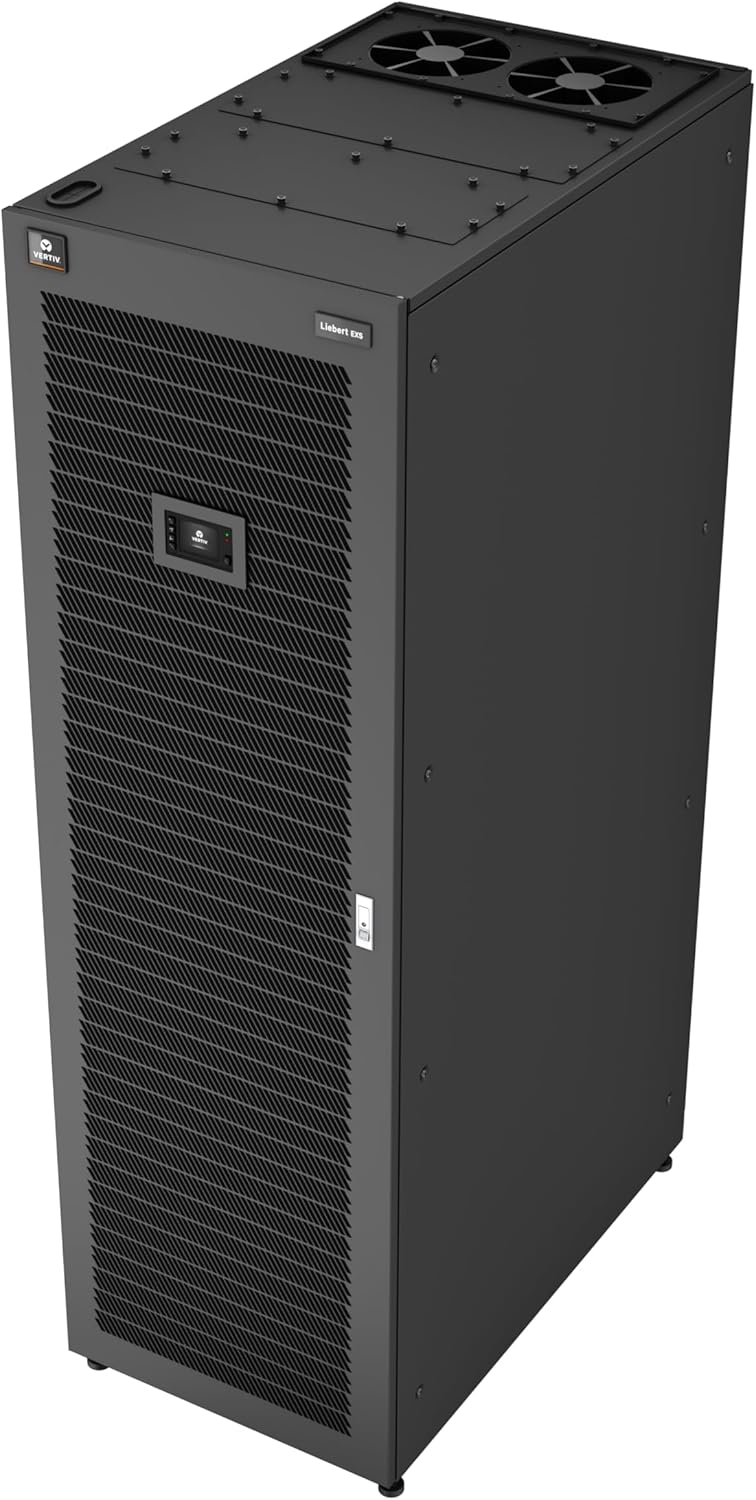
Figure 2: Side view of the Vertiv Liebert EXS V-Model UPS. This image highlights the depth and side panel design of the unit.

Figure 3: Rear view of the Vertiv Liebert EXS V-Model UPS, showing power connections and cooling vents.
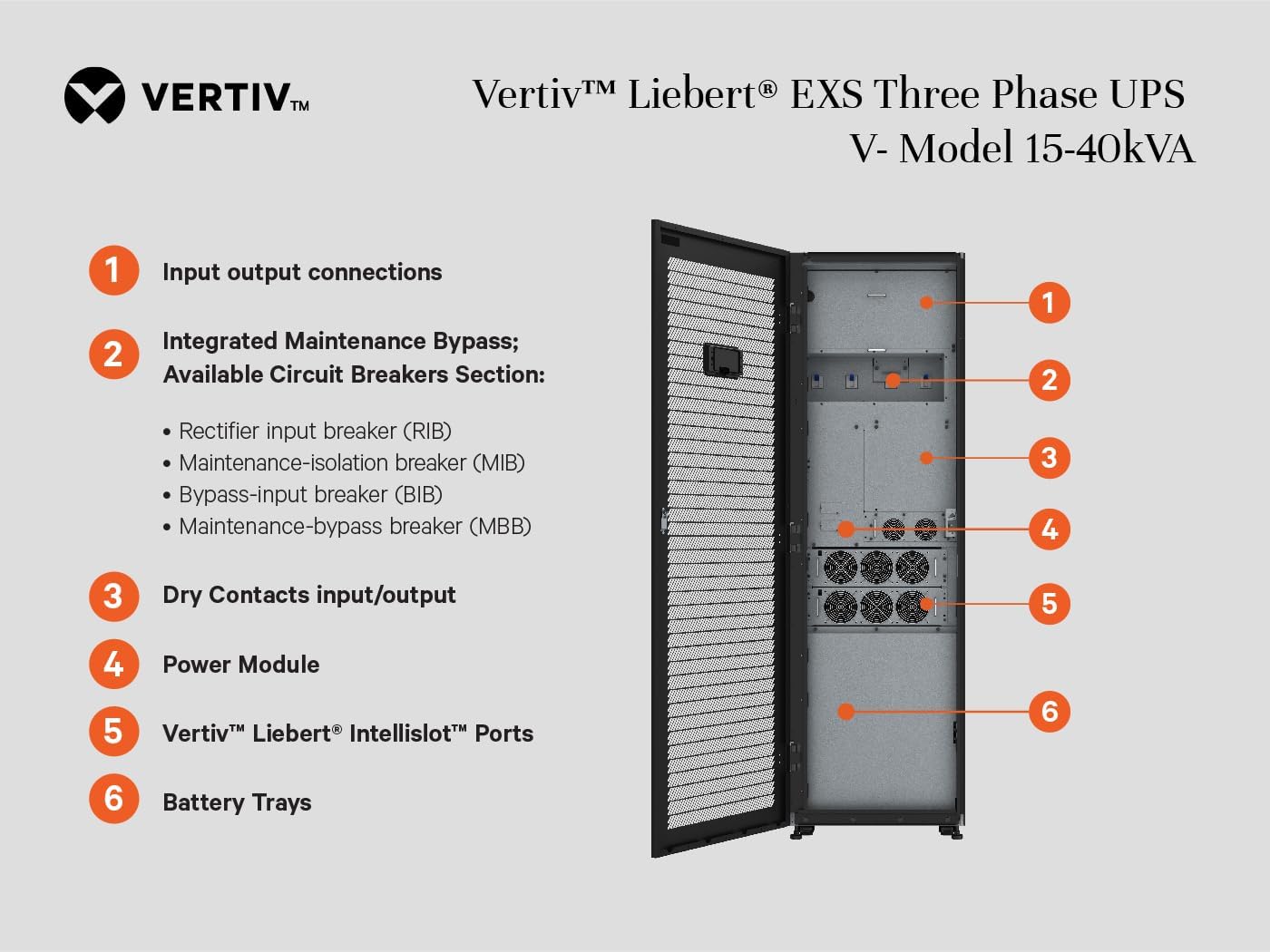
Figure 4: Internal view of the Vertiv Liebert EXS V-Model UPS, detailing key components. These include (1) Input/Output connections, (2) Integrated Maintenance Bypass with Rectifier input breaker (RIB), Maintenance-isolation breaker (MIB), Bypass-input breaker (BIB), and Maintenance-bypass breaker (MBB), (3) Dry Contacts input/output, (4) Power Module, (5) Vertiv Liebert Intellislot Ports, and (6) Battery Trays.
Setup and Installation
The Vertiv Liebert EXS V-Model UPS is designed for straightforward installation. Due to its weight and electrical requirements, professional installation is recommended.
Unpacking and Placement
- Carefully unpack the UPS and inspect for any shipping damage. Report any damage to the carrier immediately.
- Place the UPS in a clean, temperature-controlled environment, away from direct sunlight, excessive dust, and moisture.
- Ensure adequate clearance around the unit for proper ventilation. The front access design minimizes rear clearance requirements, allowing for in-row or against-the-wall configurations.
- The unit's dimensions are approximately 78.74 x 23.6 x 39.37 inches (H x W x D) and it weighs 1521 pounds. Ensure the floor can support this weight.
Electrical Connections
All electrical connections must be performed by a qualified electrician in accordance with local and national electrical codes.
- Connect the UPS to a 208/120VAC (or 220/127VAC) 3-Phase 4-Wire input power source.
- Connect the critical load equipment to the UPS output.
- Refer to Figure 4 for the location of input/output connections and integrated maintenance bypass components.
- Ensure all circuit breakers (Rectifier input breaker (RIB), Maintenance-isolation breaker (MIB), Bypass-input breaker (BIB), Maintenance-bypass breaker (MBB)) are in the correct position during installation and startup.
Battery Installation and Connection
The UPS uses Lead Acid batteries. Ensure batteries are properly connected and charged before initial operation. Refer to Figure 4 for battery tray locations.
Network and Monitoring Setup
The Liebert Intellislot Card (is-Unity-DP) allows for remote monitoring and management. Connect the card to your network and configure it according to the separate Intellislot card manual for advanced battery monitoring and system status updates.
Operating Instructions
Once installed and connected, the Vertiv Liebert EXS V-Model UPS provides continuous power protection.
Initial Startup
- Verify all electrical connections are secure and correct.
- Ensure the integrated maintenance bypass is in the appropriate operating position (typically bypass mode for initial power-up, then transferred to UPS mode).
- Apply input power to the UPS.
- Follow the on-screen prompts on the UPS control panel for initial configuration and startup.
- Once the UPS is operating in normal mode, verify that the connected loads are receiving conditioned power.
Normal Operation
In normal operation, the UPS continuously conditions and regulates the output voltage using its true on-line, double-conversion technology. It maintains a high operating efficiency (>93% in double conversion mode, 99% in eco mode) and a 1.0 output power factor, ensuring optimal power delivery to your critical equipment.
Battery Operation
In the event of a power outage, the UPS will seamlessly transfer to battery power, providing approximately 13 minutes of runtime at full load (20kW). The advanced battery monitoring system will track battery capacity, temperature, and other parameters to ensure optimal performance and longevity.
Shutdown Procedure
To safely shut down the UPS, follow these steps:
- Gracefully shut down all connected critical loads.
- Initiate the UPS shutdown sequence via the control panel or remote management interface.
- Once the UPS has shut down and the output is off, disconnect the input power.
- If performing maintenance, ensure the integrated maintenance bypass is engaged to isolate the UPS from the load.
Maintenance
Regular maintenance ensures the longevity and reliable operation of your Vertiv Liebert EXS V-Model UPS. All maintenance should be performed by qualified service personnel.
Routine Checks
- Periodically check the UPS control panel for any alarms or status indicators.
- Ensure adequate airflow around the unit and keep ventilation openings clear of obstructions.
- Monitor battery status through the Liebert Intellislot Card for any anomalies.
Battery Maintenance
The UPS utilizes Lead Acid batteries. While the advanced battery monitoring system provides insights, periodic physical inspection and testing by a qualified technician are recommended to ensure optimal battery health and replacement as needed.
Integrated Maintenance Bypass
The integrated maintenance bypass cabinet allows for the UPS to be isolated for service without interrupting power to critical loads. This feature is crucial for performing maintenance safely and efficiently. Always follow proper procedures when engaging or disengaging the bypass.
Troubleshooting
This section provides general guidance for common issues. For detailed troubleshooting steps and error code explanations, refer to the comprehensive Vertiv Liebert EXS V-Model UPS technical manual or contact Vertiv customer support.
- No Power Output: Check input power connections, circuit breakers (RIB, BIB), and ensure the UPS is not in a fault state. Verify the UPS is in normal operating mode, not bypass or off.
- UPS Alarms: Consult the control panel display for specific alarm codes. These codes will direct you to the nature of the problem (e.g., battery fault, overload, input power issue).
- Short Battery Runtime: This may indicate aging batteries or an excessive load. Check battery health via the monitoring system and ensure the load does not exceed the UPS capacity.
- Communication Issues (Intellislot Card): Verify network cable connections, IP settings, and ensure the Intellislot card firmware is up to date.
Warning: Do not attempt to repair the UPS yourself. Refer all servicing to qualified Vertiv service personnel.
Specifications
| Model Number | EXSV-20KXRTN |
| Brand | Vertiv |
| Form Factor | Tower |
| Power Capacity | 20kVA / 20kW |
| Input/Output Voltage | 208/120VAC (220/127VAC) |
| Phase | 3-Phase, 4-Wire |
| Battery Cell Composition | Lead Acid |
| Typical Runtime (Full Load) | 13 minutes |
| Product Dimensions (H x W x D) | 78.74 x 23.6 x 39.37 inches |
| Item Weight | 1521 pounds |
| Operating Efficiency | >93% (double conversion), 99% (eco mode) |
| Output Power Factor | 1.0 |
Warranty Information
Specific warranty terms and conditions for the Vertiv Liebert EXS V-Model UPS are provided with the product documentation at the time of purchase. Please refer to the official Vertiv warranty statement for details regarding coverage, duration, and claims procedures. Typically, Vertiv products come with a standard manufacturer's warranty covering defects in materials and workmanship.
Customer Support
For technical assistance, service requests, or further information regarding your Vertiv Liebert EXS V-Model UPS, please contact Vertiv customer support. You can find contact details, including phone numbers and online support portals, on the official Vertiv website. When contacting support, please have your model number (EXSV-20KXRTN) and serial number ready.
Vertiv Official Website: www.vertiv.com


