
Introduction
Thank you for choosing the Vortex POWERHUB20 20000mAh Portable Power Bank. This robust and high-performance external battery is designed to meet all your on-the-go charging needs. With an impressive 20000mAh capacity, it can recharge your devices multiple times. Equipped with LED battery percentage indicators and an ON/OFF button, you have full control over your device's power. This power bank allows you to charge up to 3 devices simultaneously via its USB and Type-C ports. Compact and portable, the POWERHUB20 is the perfect accessory to stay powered while traveling.
Product Features
- High Capacity 20000 mAh: Recharges smartphones or tablets up to 5 times.
- Simultaneous Charging: Features 2 USB ports and 1 Type-C port (input/output) for charging up to 3 devices concurrently.
- Fast Recharge: Supports charging via Type-C & Micro-USB ports. A USB-Type C cable is included.
- Integrated LED Display: Monitors battery level with clear LED indicators. Includes an ON/OFF button for power control.
- Robust Design: Compact ABS casing (14.8 × 7 × 2.8 cm), making it easy to transport.
Package Contents
- Vortex POWERHUB20 20000mAh Portable Power Bank
- USB-Type C Charging Cable
- User Manual (this document)
Product Overview
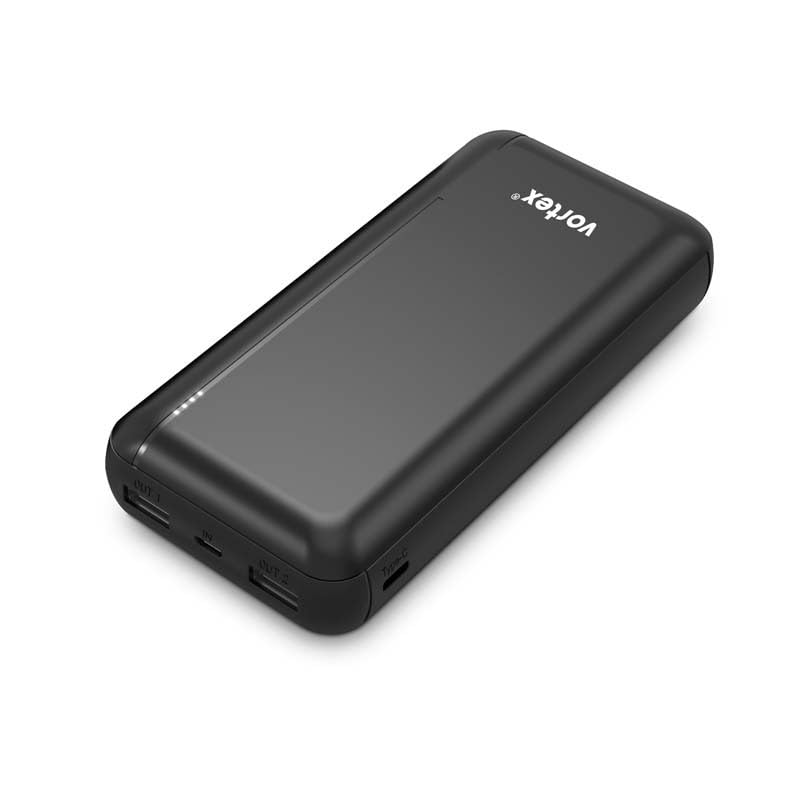
Image 1: Front view of the Vortex POWERHUB20 power bank, highlighting its 20000mAh capacity and showing various devices it can charge.
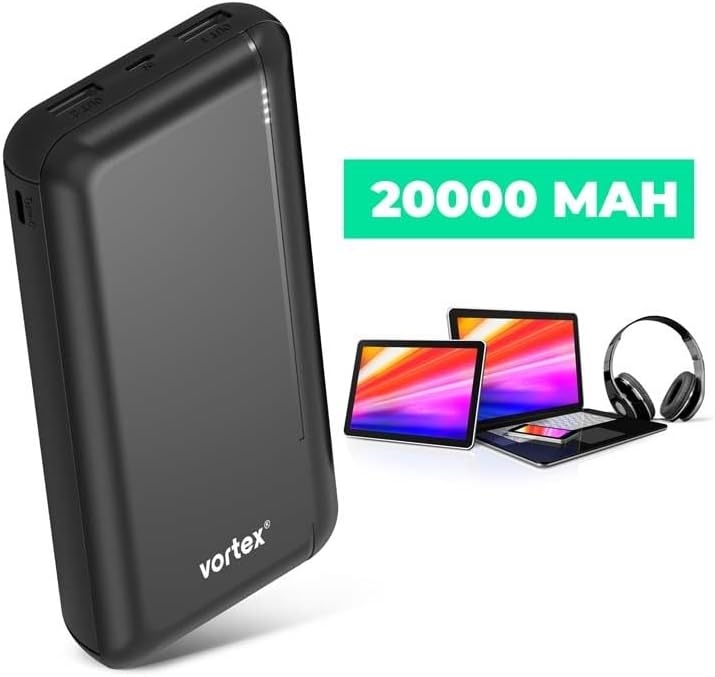
Image 2: Angled view of the Vortex POWERHUB20 power bank, illustrating the various input and output ports and the LED battery level indicators.
The POWERHUB20 features a sleek black design with multiple ports for versatile charging. On one side, you will find two USB-A output ports, a Micro-USB input port, and a USB-C port that functions as both input and output. A series of LED lights indicate the remaining battery charge.
- OUT1/OUT2: USB-A Output Ports (DC 5V 2A)
- IN: Micro-USB Input Port (DC 5V 2A)
- IN/OUT: Type-C Input/Output Port (DC 5V 2A)
- LED Indicators: Display battery charge level
- ON/OFF Button: Activates/deactivates the power bank
Setup
- Initial Charge: Before first use, fully charge the POWERHUB20 power bank. Connect the included USB-Type C cable to the power bank's Type-C input/output port or a Micro-USB cable (not included) to the Micro-USB input port. Connect the other end to a USB wall adapter (not included) or a computer's USB port.
- Monitor Charge: The LED indicators will light up to show the charging progress. All LEDs will be solid when fully charged.
Operating Instructions
Charging the Power Bank
- Connect the power bank to a power source using either the Micro-USB input port or the Type-C input/output port.
- The LED indicators will flash to show the charging status. When all LEDs are solid, the power bank is fully charged.
Charging External Devices
- Connect your device's charging cable to one of the power bank's USB-A output ports (OUT1/OUT2) or the Type-C input/output port.
- Connect the other end of the cable to your device.
- Press the ON/OFF button on the power bank to begin charging. The LED indicators will illuminate to show the remaining power.
- You can charge up to three devices simultaneously.
- Once your device is fully charged, disconnect it from the power bank. The power bank will automatically turn off after a period of inactivity.
LED Indicator Guide
- 4 LEDs Solid: 75-100% charge remaining
- 3 LEDs Solid: 50-75% charge remaining
- 2 LEDs Solid: 25-50% charge remaining
- 1 LED Solid: 0-25% charge remaining (recharge soon)
- Flashing LEDs: Indicates the power bank is currently charging.
Maintenance
- Cleaning: Use a soft, dry cloth to clean the power bank. Do not use harsh chemicals or abrasive materials.
- Storage: Store the power bank in a cool, dry place away from direct sunlight and extreme temperatures.
- Battery Life: To prolong battery life, fully charge the power bank at least once every three months if not in regular use.
Troubleshooting
| Problem | Possible Cause | Solution |
|---|---|---|
| Power bank not charging | Cable not connected properly; faulty cable/adapter; power bank fully discharged. | Ensure cables are securely connected. Try a different cable or wall adapter. Allow a few minutes for the power bank to respond if completely drained. |
| Device not charging from power bank | Power bank is off; power bank is out of charge; faulty cable; device incompatibility. | Press the ON/OFF button. Check LED indicators for remaining charge. Try a different charging cable. Ensure your device is compatible with 5V 2A charging. |
| Slow charging | Using a low-power adapter/cable; device drawing high current; multiple devices charging. | Use a 5V 2A (or higher) wall adapter for faster charging of the power bank. Ensure your device's cable is not damaged. Charging multiple devices simultaneously may reduce individual charging speed. |
Specifications
| Model: | POWERHUB20 |
| Battery Capacity: | 20000 mAh (Milliampere-hour) |
| Battery Type: | Lithium-Polymer |
| Housing Material: | ABS |
| Micro-USB Input: | DC 5V 2A |
| Type-C Input/Output: | DC 5V 2A |
| USB-A Output (x2): | DC 5V 2A |
| Dimensions: | 14.8 × 7 × 2.8 cm (approximate) |
| Recommended Use: | Smartphones, Tablets, other USB-powered devices |
| Origin: | China |
Safety Information
- Do not expose the power bank to extreme temperatures (above 45°C or below 0°C), direct sunlight, or fire.
- Do not expose to water or high humidity.
- Do not disassemble, crush, puncture, or short-circuit the power bank.
- Keep out of reach of children.
- Use only original or certified cables for charging the power bank and your devices.
- If the power bank swells, emits an odor, or becomes excessively hot, discontinue use immediately.
- Dispose of the product responsibly according to local regulations. Do not dispose of with household waste.
Warranty and Support
Vortex products are designed and manufactured to the highest quality standards. For warranty information and customer support, please refer to the documentation provided at the time of purchase or visit the official Vortex website.

