
1. Introduction
This manual provides detailed instructions for the installation, operation, and maintenance of your NALsa Android 12 Car Stereo system, model M150CP. This system is designed to enhance your driving experience with advanced multimedia, navigation, and connectivity features. Please read this manual thoroughly before installation and use to ensure proper functionality and safety.
2. Compatibility
This car stereo system is specifically designed for Peugeot 3008 (2009-2016) models. Before purchasing or installing, verify that your vehicle's original center console matches the design shown in the product images. If you are uncertain about compatibility, it is recommended to consult with a professional installer or contact customer support with a picture of your vehicle's dashboard.
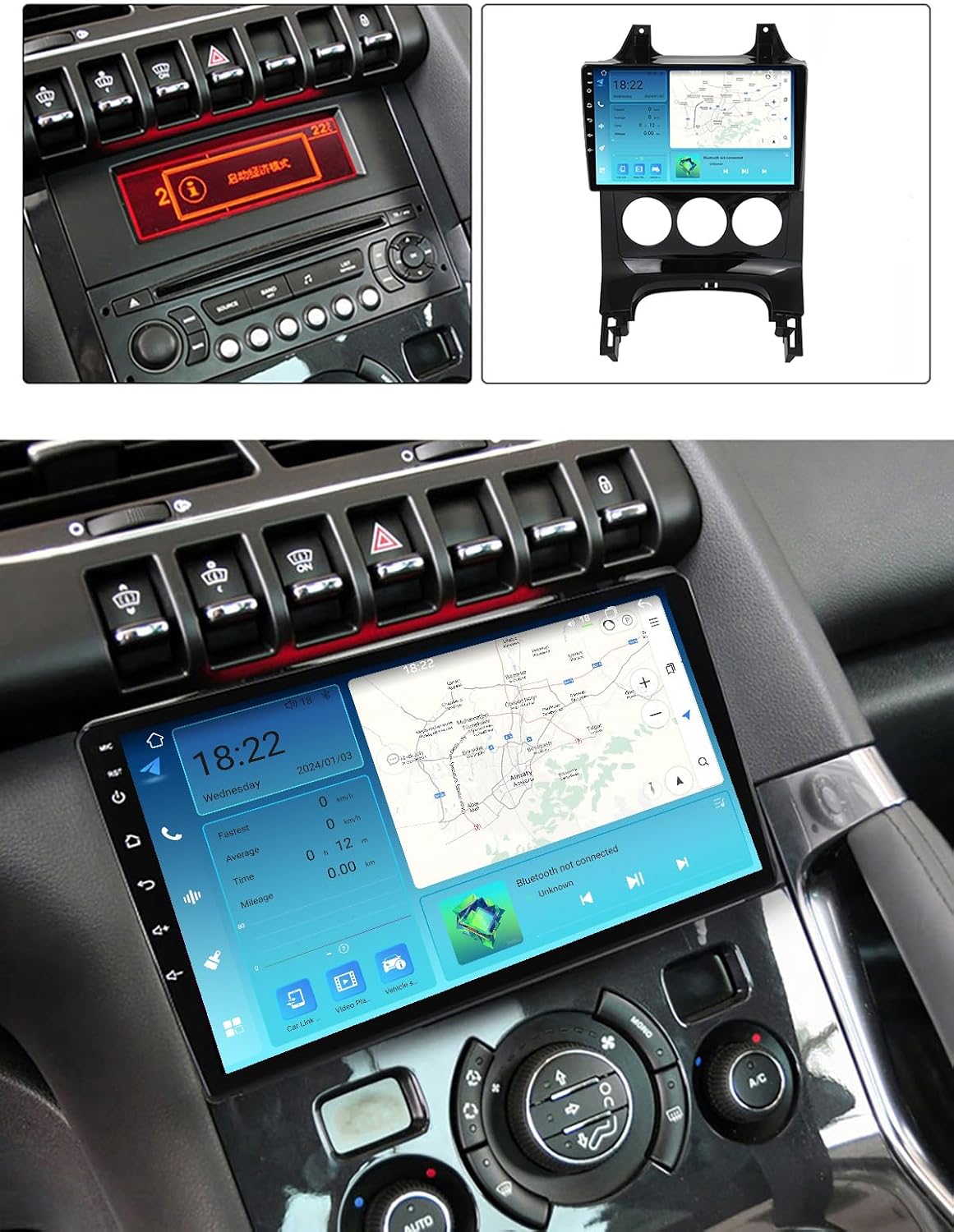
Figure 2.1: Comparison of original car console and NALsa stereo installation in a Peugeot 3008.
3. Key Features
- Operating System: Android 12.0 API29
- Processor: 4-core CPU
- Memory: 2GB RAM, 32GB ROM
- Display: 9-inch 2.5D IPS High-resolution capacitive multi-touch screen (1024*600 resolution)
- Connectivity: Built-in WiFi, Bluetooth 4.0, FM Radio, GPS Navigation
- Multimedia: MP3/MP4/MP5/WMA/JPEG support, 1080P video playback
- Special Features: Support Steering Wheel Control (SWC), Rearview Camera input, Picture-in-picture split screen
- Audio: Amplifier IC TDA7388
4. Setup and Installation
Installation of this Android car stereo requires specialized skills and knowledge of car electronics. It is highly recommended to have the unit installed by a professional automotive technician to ensure correct wiring and functionality, and to prevent damage to the unit or your vehicle. Our customer service technology team can provide ongoing technical support for installation queries.
4.1 Wiring Diagram (M150CP)
Refer to the following diagram for the correct connection of the main harness and peripheral devices. Ensure all connections are secure before powering on the unit.

Figure 4.1: Back of the host device (M150CP) wiring diagram.
4.2 Package Contents
Verify that all components listed below are present in your package:
- Android Host (Screen)
- All necessary cable adapters
- AHD720P Reversing Camera (complimentary gift)
- RCA Cable
- USB Cable
- Microphone
- GPS Antenna

Figure 4.2: Package contents for M100CP/M150CP models.
5. Operating Instructions
5.1 Basic Operation
The unit features a responsive touch screen for all operations. Power on the device by starting your vehicle. The main interface provides access to various applications such as Radio, Music, Navigation, and Settings.

Figure 5.1: NALsa Android Car Stereo main interface.
5.2 Steering Wheel Control (SWC)
The system supports steering wheel controls, allowing you to manage audio and calls without diverting attention from the road. This unit works with a digital SWC. If your vehicle does not have steering wheel buttons, external BT steering wheel buttons may be purchased separately.

Figure 5.2: Steering Wheel Control functionality.
5.3 GPS Navigation
The integrated GPS module supports both online and offline navigation maps. The system provides real-time traffic conditions and accurate positioning. Ensure the GPS antenna is properly installed for optimal signal reception.
Figure 5.3: GPS Navigation interface.
5.4 Connectivity
- Bluetooth 4.0: Connect your smartphone for hands-free calling and audio streaming.
- Wi-Fi: Connect to a Wi-Fi hotspot for internet access. The unit supports 5GHz Wi-Fi (802.11 b/g/n) for faster and more stable connections.
- 4G LTE: This feature is not available on the M150CP model. It is supported on M200S-M800S models.
- CarPlay & Android Auto: These features are not available on the M150CP model. They are supported on 8-core models (M200S-M800S).
5.5 Multimedia Playback
The system supports various digital media formats including MP3, MP4, MP5, WMA, and JPEG. You can play music and videos via USB or internal storage. The display supports 1080P video playback.
5.6 Rearview Camera
The unit supports AHD720P rearview camera input. When reverse gear is engaged, the display will automatically switch to the camera view, aiding in safe parking and maneuvering.
5.7 Split Screen Functionality
The picture-in-picture split screen feature allows you to run two applications simultaneously, such as navigation and music playback, enhancing multitasking capabilities.
6. Maintenance
To ensure the longevity and optimal performance of your car stereo, follow these maintenance guidelines:
- Screen Cleaning: Use a soft, lint-free cloth to gently wipe the screen. For stubborn smudges, slightly dampen the cloth with water or a screen-safe cleaner. Avoid abrasive materials or harsh chemicals.
- Temperature: Avoid exposing the unit to extreme temperatures. While designed for automotive use, prolonged exposure to direct sunlight in a parked car can affect performance.
- Software Updates: Periodically check for available software updates to ensure the system runs efficiently and has the latest features and security patches.
7. Troubleshooting
If you encounter issues with your NALsa car stereo, refer to the following common troubleshooting tips:
- No Power: Check all power connections and fuses. Ensure the vehicle's ignition is on.
- No Sound: Verify speaker connections. Check volume levels and audio settings. Ensure the mute function is not activated.
- GPS Signal Loss: Ensure the GPS antenna is securely connected and has a clear view of the sky. Move the vehicle to an open area if signal is weak.
- Touch Screen Unresponsive: Try restarting the unit. If the issue persists, a factory reset might be necessary (note: this will erase user data).
- Bluetooth Connection Issues: Ensure Bluetooth is enabled on both the stereo and your device. Delete previous pairings and attempt to re-pair.
For persistent problems or issues not covered here, please contact NALsa customer support for assistance.
8. Specifications
Below are the detailed specifications for the NALsa M150CP Android Car Stereo. For a comparison with other models, please refer to the parameter table.

Figure 8.1: Car Multimedia Player Parameter Comparison.
| Feature | Specification |
|---|---|
| Model | M150CP |
| Operating System | Android 12.0 API29 |
| CPU | 4-core |
| RAM | 2GB |
| ROM | 32GB |
| Resolution | 1024*600 |
| Screen Type | 2.5D IPS Capacitive Multi-touch |
| Bluetooth | 4.0 |
| Wi-Fi | Built-in (5GHz support) |
| GPS | Built-in GPS module |
| Amplifier IC | TDA7388 |
| Voltage | 12 Volts |
| Item Weight | 5.5 pounds |
| Special Features | Touchscreen, Steering Wheel Control, Rearview Camera Input |
8.1 Cooling System
The M150CP model does not include a dedicated cooling fan. For models M200S-M800S, a powerful cooling fan is integrated to manage operating temperatures, especially during prolonged use or in hot climates.

Figure 8.2: Cooling fan comparison and IPS screen benefits.
9. Support and Warranty
NALsa provides online technical service and professional installation technical support. If you have any questions regarding installation, operation, or troubleshooting, please contact our customer service team. For warranty information, please refer to the terms and conditions provided at the time of purchase or contact NALsa support directly.
Contact information for support can typically be found on the NALsa official website or through your purchase platform.