
Yamnweo XF8
Yamnweo XF8 Professional Audio Mixer User Manual
Model: XF8
Brand: Yamnweo
Introduction
This manual provides detailed instructions for the setup, operation, and maintenance of your Yamnweo XF8 Professional Audio Mixer. Please read this manual thoroughly before using the device to ensure proper functionality and to maximize its performance. The XF8 is an 8-channel digital audio mixer designed for various applications including music production, live broadcasting, stage performance, and recording.

Figure 1: Yamnweo XF8 Professional Audio Mixer
Product Panel Introduction
Familiarize yourself with the various controls and connections on the XF8 mixer. Understanding each component is crucial for effective operation.

Figure 2: Front and Rear Panel Layout of the XF8 Mixer with Labeled Controls and Ports
Key components include:
- Input Channels: Microphone/Line inputs (XLR/TRS combo jacks) with Gain, EQ (Treble, Midrange, Bass), FX Send, Pan, and Volume Faders.
- Main Output: Left and Right main outputs (TRS/XLR).
- Auxiliary Outputs: AUX1 and AUX2 for monitor mixes or external effects.
- Headphone Output: For monitoring the main mix.
- MP3/USB Section: Controls for USB playback/recording and Bluetooth connectivity.
- Digital Effects Processor: Knob and display for selecting and adjusting 99 built-in reverb effects.
- Phantom Power: +48V switch for condenser microphones.
- Level Indicators: LED meters to monitor audio levels.
Setup Guide
Powering On the Mixer
The XF8 mixer offers flexible power options:
- Power Adapter: Connect the included power adapter to a standard 110V AC outlet.
- Power Bank: For portable use, connect a compatible power bank (not included).
- Computer USB: The mixer can be powered via a computer's USB port.
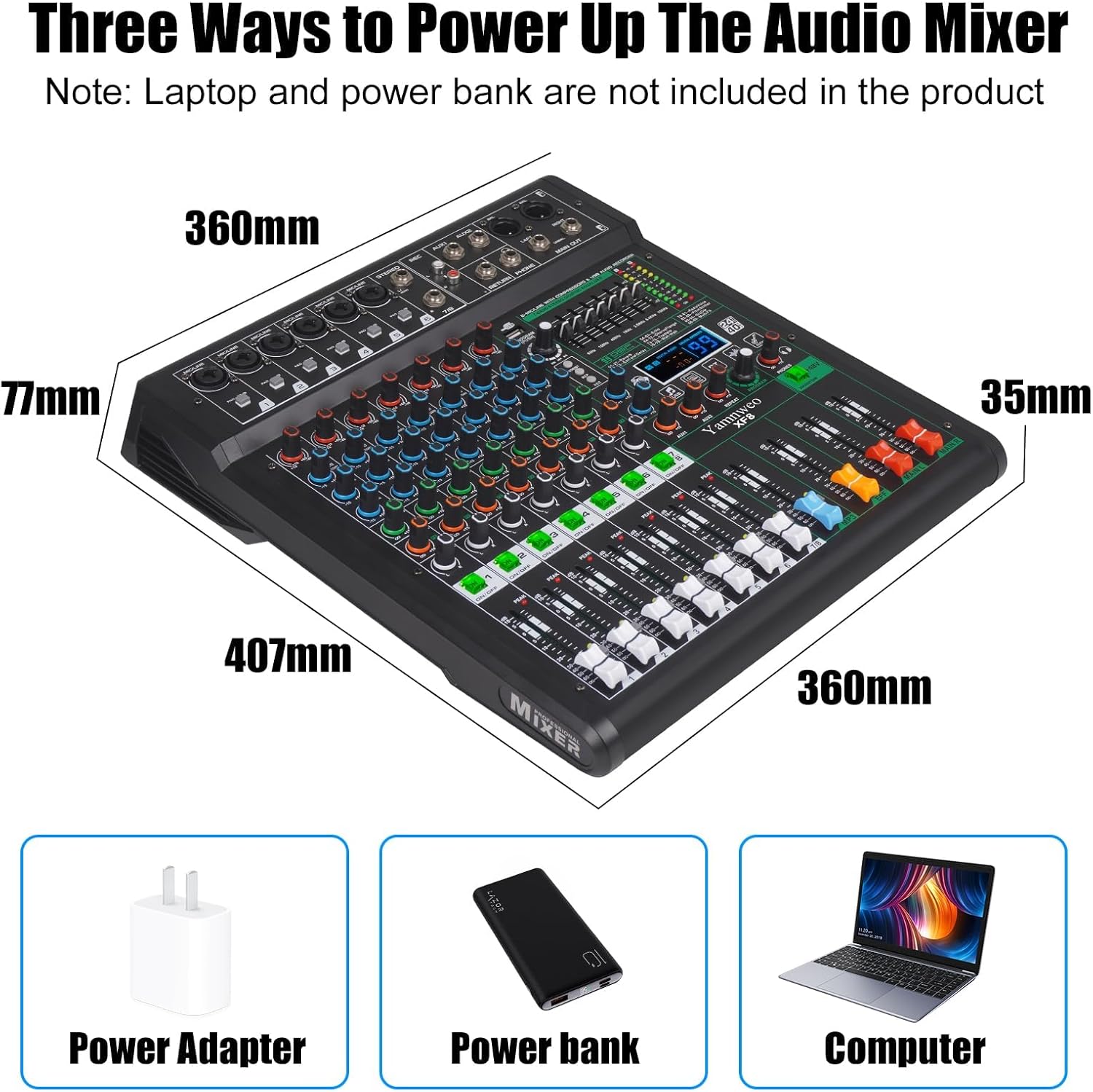
Figure 3: Powering Options for the XF8 Mixer
Connecting Devices
The XF8 supports a wide range of audio devices. Note that the output is compatible only with wired connected active speakers, not Bluetooth speakers or headphones.

Figure 4: Compatible Devices and Connection Methods
- Microphones: Connect condenser or dynamic microphones to the XLR/TRS combo jacks. For condenser microphones, activate +48V Phantom Power.
- Musical Instruments: Connect guitars, keyboards, or other instruments to the appropriate input channels.
- Computers/Laptops: Use the USB port for audio input/output.
- Powered Speakers/Active Sound Systems: Connect to the Left and Right main outputs.
- Headphones: Connect to the dedicated headphone output for monitoring.
- USB Stick: Insert a USB flash drive for MP3 playback or recording.
- Bluetooth Devices: Pair mobile phones or iPads for wireless audio playback.

Figure 5: Input and Output Connection Types
Operating Instructions
Channel Control
- Gain Adjustment: Use the GAIN knob to set the input level for each channel.
- Equalization (EQ): Adjust the TREBLE, MIDRANGE, and BASS knobs to shape the tone of each input.
- Mute Switch: Each channel features an independent ON/OFF mute button for quick muting.
- Volume Fader: Use the channel faders to control the individual volume of each input.
Video 1: Overview of XF8 Mixer Controls, including faders, gain, EQ, and mute switches.
Digital Effects (DSP)
The XF8 features 99 built-in digital effects to enhance your audio. These include various reverbs, delays, chorus, flanger, tremolo, wah-wah, radio voice, pitch shifter, and multi-FX.
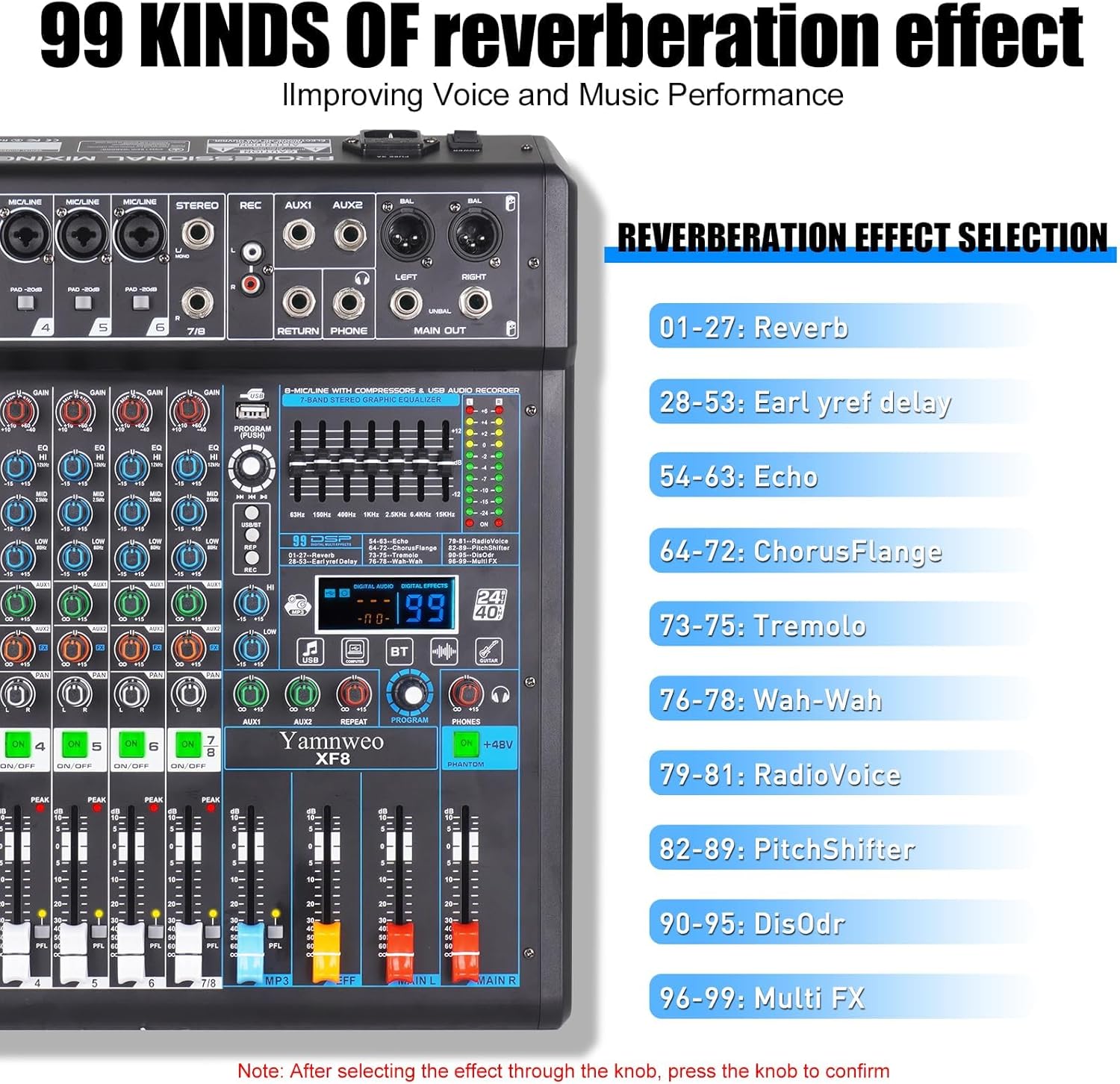
Figure 6: 99 Kinds of Reverberation Effects
- Effect Selector Knob: Rotate the knob to browse through the 99 preset effects.
- Confirm Selection: Press the knob to confirm your effect selection.
- Effect Level: Adjust the FX effect volume control to blend the effect into your mix.

Figure 7: DSP Effects and Equalization Controls
USB Playback and Recording
The XF8 allows for direct USB playback and recording, as well as computer and mobile phone recording functions.

Figure 8: USB and Bluetooth Connectivity
- USB Playback: Insert a USB flash drive into the USB port. Use the operating knob to switch USB songs. Function mode buttons allow for single song loop, sequential play, or random play.
- USB Recording: Record your mix directly to a USB stick.
- Computer/Mobile Phone Recording: Connect the mixer directly to your computer or mobile phone (with compatible adapter) to use it as a sound card for recording, live broadcasting, or voice chat.

Figure 9: Computer and Mobile Phone Recording Function

Figure 10: USB Jack for Recording, Live Streaming, and Music Playback
Bluetooth Connectivity
Wirelessly stream music from your mobile phone or iPad to the mixer via Bluetooth 5.0. Ensure your device is paired correctly with the XF8.
48V Phantom Power
The XF8 provides +48V phantom power, essential for operating condenser microphones. This feature ensures high-performance sound reduction and ultra-low noise, suitable for both beginners and professionals.

Figure 11: 48V Phantom Power Switch
Applications
The Yamnweo XF8 mixer is versatile and can be used in various audio environments:
- Music Production
- Live Broadcast
- Stage Performance
- Music Recording
- Family KTV
- DJ Shows

Figure 12: Common Applications of the XF8 Mixer

Figure 13: Diverse Use Cases for the XF8 Mixer
Maintenance
To ensure the longevity and optimal performance of your XF8 mixer, follow these general maintenance guidelines:
- Keep the mixer clean and free from dust. Use a soft, dry cloth for cleaning.
- Avoid exposing the mixer to extreme temperatures, humidity, or direct sunlight.
- Do not place liquids near the mixer to prevent spills and electrical damage.
- When not in use for extended periods, disconnect the power supply.
- Handle all knobs, faders, and switches gently to prevent mechanical wear.
Troubleshooting
If you encounter issues with your XF8 mixer, refer to the following common troubleshooting steps:
| Problem | Possible Cause | Solution |
|---|---|---|
| No power | Power cable not connected; Power outlet faulty | Ensure power cable is securely connected; Try a different power outlet. |
| No sound output | Volume faders down; Mute buttons engaged; Incorrect cable connections; Speakers off/faulty | Check all volume faders (channel, main, headphone); Ensure mute buttons are disengaged; Verify all audio cables are correctly connected; Check speaker power and functionality. |
| Microphone not working | Incorrect input selected; +48V Phantom Power off (for condenser mics); Faulty microphone/cable | Ensure mic is connected to correct input; Activate +48V Phantom Power if using a condenser mic; Test with a different microphone or cable. |
| Bluetooth connection issues | Device not in pairing mode; Interference; Mixer already paired with another device | Ensure Bluetooth device is in pairing mode; Move closer to the mixer; Disconnect from other Bluetooth devices. |
| USB playback/recording not working | USB drive format incompatible; USB drive faulty; Incorrect mode selected | Ensure USB drive is formatted correctly (FAT32 recommended); Try a different USB drive; Verify the mixer is in the correct USB playback/recording mode. |
Specifications
| Feature | Detail |
|---|---|
| Model | XF8 |
| Number of Channels | 8 |
| Item Weight | 9.28 pounds |
| Product Dimensions | 15.74 x 14.17 x 2.75 inches (407mm x 360mm x 77mm) |
| Voltage | 110 Volts |
| Phantom Power | +48V |
| Digital Effects | 99 DSP presets (Reverb, Delay, Echo, Chorus, Flange, Tremolo, Wah-Wah, RadioVoice, PitchShifter, DisOdr, Multi FX) |
| Connectivity | USB (Playback/Recording), Bluetooth 5.0 |
| Country of Origin | China |
| UPC | 762730095557 |
Figure 14: XF8 Product Dimensions and Panel Overview
Warranty and Support
For warranty information and technical support, please refer to the documentation included with your purchase or contact Yamnweo customer service through the retailer where the product was purchased. Keep your purchase receipt as proof of purchase for any warranty claims.
Yamnweo is committed to providing high-quality audio equipment and customer satisfaction. If you have any questions or require assistance, please do not hesitate to reach out.
Related documentsXF8

Ask a question about this manual
Ask about setup, troubleshooting, compatibility, parts, safety, or missing instructions. Manuals+ will review the question and use this page’s manual context to help answer it.