
1. Introduction
Thank you for choosing the Vortex Powerhub30 Black 30000 mAh External Battery. This device is designed to provide reliable portable power for your electronic devices. Please read this manual carefully before use to ensure proper operation and to maximize the lifespan of your power bank.
2. Safety Information
- Do not expose the power bank to extreme temperatures (above 60°C / 140°F or below 0°C / 32°F), direct sunlight, or fire.
- Avoid dropping, disassembling, or attempting to repair the device yourself. This may cause damage and void the warranty.
- Keep the power bank away from water, moisture, and corrosive materials.
- Do not use the power bank if it is visibly damaged, swollen, or leaking.
- Keep out of reach of children.
- Use only certified charging cables and adapters.
- Dispose of the power bank responsibly according to local regulations.
3. Package Contents
- Vortex Powerhub30 Black 30000 mAh External Battery
- USB Charging Cable (Micro-USB/Type-C compatible)
- User Manual
4. Product Overview
The Vortex Powerhub30 is equipped with multiple ports and an LED display for convenient charging and monitoring.

Image 1: Front view of the Vortex Powerhub30 Black external battery, showing its compact design and the Vortex logo. The image also highlights its 30000 mAh capacity and illustrates its use with various devices like smartphones, tablets, and headphones.
Components:
- USB-A Output Ports (x2): For charging external devices.
- USB Type-C Port: Bidirectional, used for both charging the power bank and charging external devices.
- Micro-USB Input Port: For charging the power bank.
- LED Display: Shows the remaining battery percentage.
- Power Button: Activates the LED display and initiates charging.
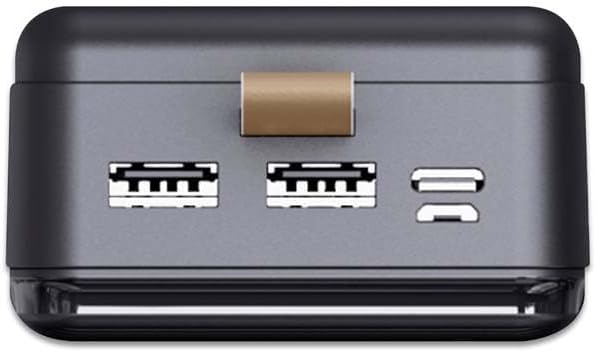
Image 2: Top view of the Vortex Powerhub30, clearly displaying the two USB-A output ports and the single bidirectional USB Type-C port. This view illustrates the multiple connectivity options available.

Image 3: Close-up top view of the Vortex Powerhub30, highlighting the integrated LED indicator which displays the current battery charge level. The power button is also visible next to the indicator.
5. Setup
Initial Charging of the Power Bank:
- Before first use, fully charge your Powerhub30.
- Connect the provided USB charging cable to either the Micro-USB input port or the USB Type-C port on the power bank.
- Connect the other end of the cable to a USB wall charger (not included) or a computer's USB port.
- The LED display will show the charging progress. Once 100% is displayed, the power bank is fully charged.
6. Operating Instructions
Charging External Devices:
- Connect your device's charging cable to one of the USB-A output ports or the USB Type-C port on the Powerhub30.
- Connect the other end of the cable to your smartphone, tablet, or other compatible device.
- Press the power button on the Powerhub30 to initiate charging. The LED display will show the power bank's remaining charge.
- The Powerhub30 can charge up to three devices simultaneously.
- Once your device is fully charged, disconnect it from the power bank. The power bank will automatically turn off after a period of inactivity.
7. Maintenance
- Clean the power bank with a soft, dry cloth. Do not use harsh chemicals or abrasive cleaners.
- Store the power bank in a cool, dry place when not in use.
- To maintain battery health, fully charge the power bank at least once every three months, even if not in regular use.
- Avoid overcharging or completely draining the battery frequently.
8. Troubleshooting
Power bank not charging:
- Ensure the charging cable is securely connected to both the power bank and the power source.
- Try a different charging cable or wall adapter.
- Verify the power source is active.
Device not charging from power bank:
- Ensure the power bank has sufficient charge (check the LED display).
- Press the power button on the power bank to activate output.
- Try a different charging cable for your device.
- Ensure your device is compatible with the power bank's output specifications.
Slow charging:
- Ensure you are using a high-quality charging cable.
- Some devices may charge slower if multiple devices are connected simultaneously.
- Check if your device supports fast charging and if the cable/port used supports it.
9. Specifications
| Model | Powerhub30 |
| Battery Capacity | 30000 mAh |
| Input Ports | Micro USB, USB Type-C |
| Output Ports | 2x USB-A, 1x USB Type-C (bidirectional) |
| Special Feature | Compact design, LED battery display |
| Recommended Use | Smartphones, Tablets, other USB-powered devices |
| Dimensions | 14.8 × 7 × 2.8 cm (approx.) |
| Material | ABS Casing |
10. Warranty and Support
For warranty information and customer support, please refer to the official Vortex website or contact your retailer. You can also visit the Vortex Brand Store for more details.