
1. Introduction
This manual provides detailed instructions for the safe and efficient operation, maintenance, and troubleshooting of your Hisense 50 Pint 3-Speed Dehumidifier with Built-in Pump, Model HT5021KP. This appliance is designed to remove excess moisture from the air in spaces up to 4,500 sq.ft, helping to create a more comfortable and healthy indoor environment.
2. Safety Information
IMPORTANT SAFETY INSTRUCTIONS: Read all instructions before using this appliance.
- Always plug the dehumidifier into a grounded 3-prong outlet. Do not remove the grounding prong.
- Do not use an adapter.
- Do not use an extension cord.
- Unplug the dehumidifier before cleaning or performing any maintenance.
- Do not operate the dehumidifier if the power cord is damaged.
- Keep the dehumidifier away from heat sources and direct sunlight.
- Ensure the dehumidifier is placed on a level, stable surface to prevent tipping.
- Do not block the air intake or exhaust vents.
- This appliance is for residential use only.
3. Product Overview
3.1. Components
The Hisense HT5021KP dehumidifier features a compact design with a front air intake and top air exhaust. Key components include the control panel, removable water bucket, and connections for continuous drainage.

Figure 3.1: Front view of the Hisense 50 Pint Dehumidifier.
3.2. Control Panel
The intuitive LED digital control panel allows for easy adjustment of settings and monitoring of the dehumidifier's status. It includes buttons for Power, Mode, Fan Speed, Timer, and indicators for Clean Filter and Empty Bucket.
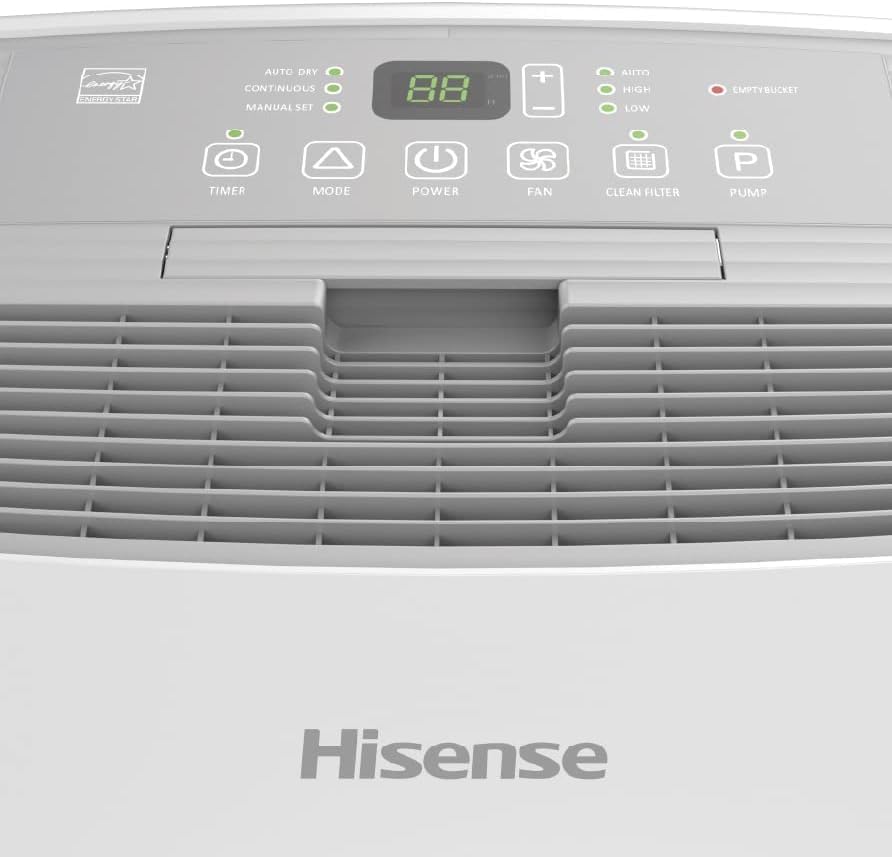
Figure 3.2: Close-up of the dehumidifier's control panel.
3.3. Rear View and Drainage Port
The rear of the unit houses the air filter access and the continuous drainage port, which allows for direct water discharge via a hose, bypassing the internal bucket.

Figure 3.3: Rear view showing the air filter and drainage port.
4. Setup
4.1. Placement
Place the dehumidifier in a location where the humidity is highest and air circulation is good. Ensure there is at least 8 inches of space around the unit for proper airflow. Avoid placing it near heat-generating appliances or in direct sunlight.
4.2. Continuous Drainage Setup
For continuous operation without needing to empty the bucket, connect a standard garden hose (not included) to the continuous drainage port located on the side/rear of the unit. The built-in pump allows the water to be discharged to a sink or drain, even if it's at a higher elevation.
To set up continuous drainage:
- Locate the drainage port on the side of the dehumidifier.
- Attach a standard garden hose to the port, ensuring a secure connection to prevent leaks.
- Direct the other end of the hose to a suitable drain, such as a floor drain, utility sink, or basement window. Ensure the hose is sloped downwards to allow for gravity drainage, or if using the pump, ensure the hose is not kinked.
- Verify that the hose is not obstructed and water can flow freely.

Figure 4.1: Side view illustrating the drainage connection point.
5. Operating Instructions
5.1. Power On/Off
Press the POWER button on the control panel to turn the unit on or off.
5.2. Operating Modes
Press the MODE button to cycle through the available operating modes:
- Auto Dry Mode: The unit automatically adjusts the dehumidification level based on the current room conditions to maintain optimal humidity.
- Continuous Mode: The unit runs continuously, regardless of the humidity level, to maintain a consistent dry environment. This is ideal for very damp conditions or when using continuous drainage.
- Manual Set Mode: Allows you to manually set your desired humidity level. The unit will operate until the set humidity is reached, then cycle on and off to maintain it.
5.3. Fan Speeds
Press the FAN button to select the desired fan speed:
- High: Provides maximum moisture removal and rapid dehumidification.
- Low: Offers quieter, energy-efficient operation and gentle air circulation.
- Auto: Automatically adjusts fan speed based on the current humidity level and room conditions for efficient operation.
5.4. Setting Humidity Level (Manual Set Mode)
In Manual Set Mode, use the + and - buttons to adjust the desired relative humidity (RH) percentage. The display will show the set humidity level.
5.5. Timer Function
Press the TIMER button to set a programmable 24-hour on/off timer. Follow the on-screen prompts to set the desired duration for the unit to turn on or off automatically.
6. Maintenance
6.1. Emptying the Water Bucket
When the water collection bucket is full, the
Ask a question about this manual
Ask about setup, troubleshooting, compatibility, parts, safety, or missing instructions. Manuals+ will review the question and use this page’s manual context to help answer it.